
Virtualization in Xen 3.0
Editor's Note: This article has been updated since its original posting.
Virtualization has existed for over 40 years. Back in the 1960s, IBM developed virtualization support on a mainframe. Since then, many virtualization projects have become available for UNIX/Linux and other operating systems, including VMware, FreeBSD Jail, coLinux, Microsoft's Virtual PC and Solaris's Containers and Zones.
The problem with these virtualization solutions is low performance. The Xen Project, however, offers impressive performance results--close to native--and this is one of its key advantages. Another impressive feature is live migration, which I discussed in a previous article. After much anticipation, Version 3.0 of Xen recently was released, and it is the focus of this article.
The main goal of Xen is achieving better utilization of computer resources and server consolidation by way of paravairtualization and virtual devices. Here, we discuss how Xen 3.0 implements these ideas. We also investigate the new VT-x/VT-i processors from Intel, which have built-in support for virtualization, and their integration into Xen.
The idea behind Xen is to run guest operating systems not in ring 0, but in a higher and less privileged ring. Running guest OSes in a ring higher than 0 is called "ring deprivileging". The default Xen installation on x86 runs guest OSes in ring 1, termed Current Privilege Level 1 (or CPL 1) of the processor. It runs a virtual machine monitor (VMM), the "hypervisor", in CPL 0. The applications run in ring 4 without any modification.

About 250 instructions are contained in the IA-32 instruction set, of which 17 are problematic in terms of running them in ring 1. These instructions can be problematic in two senses. First, running the instruction in ring 1 can cause a general protection exception (GPE), which also may be called a general protection fault (GPF). For example, running HLT immediately causes a GPF. Some instructions, such as CLI and STI, may can cause a GPF if a certain condition is met. That is, a GPF occurs if the CPL is greater than the IOPL of the current program or procedure and, as a result, has less privilege.
The second problem occurs with instructions that do not cause a GPF but still fail. Many Xen articles use the term "fail silently" to describe thess cases. For example, the POPF at the restored EFLAGS has a different interrupt flag (IF) value than the current EFLAGS.
How does Xen handles these problematic instructions? In some cases, such as the HLT instruction, the instruction in ring 1--where the guest OSes run--is replaced by a hypercall. For example, consider sparse/arch/xen/i386/kernel/process.c in the cpu_idle() method. Instead of calling the HLT instruction, as is done eventually in the Linux kernel, we call the xen_idle() method. It performs a hypercall instead, namely, the HYPERVISOR_sched_op(SCHEDOP_block, 0) hypercall.
A hypercall is Xen's analog to a Linux system call. A system call is an interrupt (0x80) called in order to move from user space (CPL3) to kernel space (CPL0). A hypercall also is an interrupt (0x82). It passes control from ring 1, where the guest domains run, to ring 0, where Xen runs. The implementation of a system call and a hypercall is quite similar. Both pass the number of the syscall/hypercall in the eax register. Passing other parameters is done in the same way. In addition, both the system call table and the hypercall table are defined in the same file, entry.S.
You can batch some hypercalls into one multicall by building an array of hypercalls. You can do this by using a multicall_entry_t struct. You then can use one hypercall, HYPERVISOR_multicall. This way, the number of entries to and exits from the hypervisor is reduced. Of course, reducing such interprivilege transitions when possible results in better performance. The netback virtual drivers, for example, uses this multicall mechanism.
Here's another example: the CLTS instruction clears the task switch (TS) flag in CR0. This instruction causes a GPF, however, when issued in ring 1, as is the case with HLT. But the CLTS instruction itself is not replaced by some hypercall. Instead, it is delegated to ring 0 in the following way. When it is issued in ring 1, we get a GPF. But this GPF is handled by do_general_protection(), located in xen/arch/x86/traps.c. Note, though, that do_general_protection() is the hypervisor handler, which runs in ring 0. From there, do_general_protection() calls do_fpu_taskswitch(). Under certain circumstances, this handler scans the opcode of the instructions received in the CPU. In the case of CLTS, where the opcode is 0x06, it calls do_fpu_taskswitch(0). Eventually, do_fpu_taskswitch(0) calls the CLTS instruction, but this time it is called from ring 0. Note: be sure _VCPUF_fpu_dirtied is set to enable this.
Those who are curious about further details can look at the emulate_privileged_op() method in that same file, xen/arch/x86/traps.c. The instructions that may "fail silently" usually are replaced by others.
The idea behind split devices is safe hardware isolation. Domain 0 is the only one that has direct access to the hardware devices, and it uses the original Linux drivers. But domain 0 has another layer, the backend, that contains netback and blockback virtual drivers. (On a side note, support for usbback will be added in the future, and work on the USB layer is being done by Harry Butterworth.)
Similarly, the unprivileged domains have access to a frontend layer, which consists of netfront and blockfront virtual drivers. The unprivileged domains issue I/O requests to the frontend in the same way that I/O requests are sent to an ordinary Linux kernel. However, because the frontend is only a virtual interface with no access to real hardware, these requests are delegated to the backend. From there they are sent to the real devices.
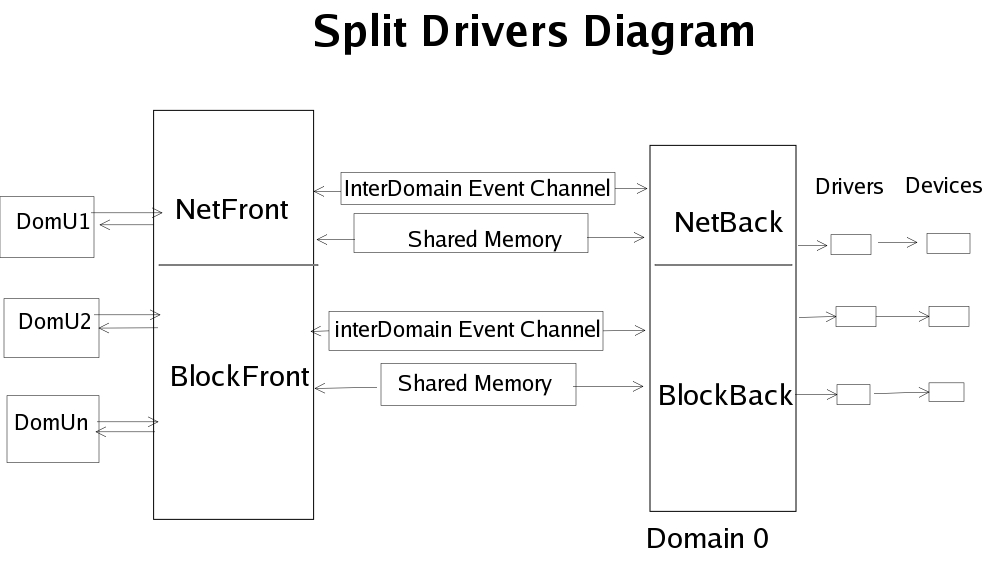
When an unprivileged domain is created, it creates an interdomain event channel between itself and domain 0. This is done with the HYPERVISOR_event_channel_op hypercall, where the command is EVTCHNOP_bind_interdomain. In the case of the network virtual drivers, the event channel is created by netif_map() in sparse/drivers/xen/netback/interface.c. The event channel is a lightweight channel for passing notifications, such as saying when an I/O operation has completed.
A shared memory area exists between each guest domain and domain 0. This shared memory is used to pass requests and data. The shared memory is created and handled using the grant tables API.
When an interrupt is asserted by the controller, the APIC, we arrive at the do_IRQ() method, which also can be found in the Linux kernel (arch/x86/irq.c). The hypervisor handles only timer and serial interrupts. Other interrupts are passed to the domains by calling __do_IRQ_guest(). In fact, the IRQ_GUEST flag is set for all interrupts except for timer and serial interrupts.
__do_IRQ_guest() sends the interrupt by calling send_guest_pirq() for all guests registered on this IRQ. The send_guest_pirq() creates an event channel--an instance of evtchn--and sets the pending flag of this event channel by calling evtchn_set_pending(). Then, asynchronously, Xen notifies this domain of the interrupt, and it is handled appropriately.
Intel currently is developing the VT-x and VT-i technologies for x86 and Itanium processors, respectively, which will provide virtualization extensions. Support for the VT-x/VT-i extensions is part of the Xen 3.0 official code; it can be found in xen/arch/x86/vmx*.c., xen/include/asm-x86/vmx*.h and xen/arch/x86/x86_32/entry.S.
The most important structure in Xen's implementation of VT-x/VT-i is the VMCS (vmcs_struct in the code), which represents the VMCS region. The VMCS region contains six logical regions; most relevant to our discussion are the Guest-state area and Host-state area. The other four regions are VM-execution control fields, VM-exit control fields, VM-entry control fields and VM-exit information fields.
Intel added 10 new opcodes in VT-x/VT-i to support Intel Virtualization Technology. Let's take a look at the new opcodes and their wrappers in the code:
VMCALL: (VMCALL_OPCODE in vmx.h) This simply calls the VM monitor, causing the VM to exit.
VMCLEAR: (VMCLEAR_OPCODE in vmx.h) copies VMCS data to memory in case it is written there. wrapper: _vmpclear (u64 addr) in vmx.h.
VMLAUNCH: (VMLAUNCH_OPCODE in vmx.h) launches a virtual machine, and changes the launch state of the VMCS to be launched, if it is clear.
VMPTRLD: (VMPTRLD_OPCODE in vmx.h) loads a pointer to the VMCS. wrapper: _vmptrld (u64 addr) in vmx.h
VMPTRST: (VMPTRST_OPCODE in vmx.h) stores a pointer to the VMCS. wrapper: _vmptrst (u64 addr) in vmx.h.
VMREAD: (VMREAD_OPCODE in vmx.h) read specified field from VMCS. wrapper: _vmread(x, ptr) in vmx.h
VMRESUME: (VMRESUME_OPCODE in vmx.h) resumes a virtual machine. In order it to resume the VM, the launch state of the VMCS should be "clear".
VMWRITE: (VMWRITE_OPCODE in vmx.h) write specified field in VMCS. wrapper _vmwrite (field, value).
VMXOFF: (VMXOFF_OPCODE in vmx.h) terminates VMX operation. wrapper: _vmxoff (void) in vmx.h.
VMXON: (VMXON_OPCODE in vmx.h) starts VMX operation. wrapper: _vmxon (u64 addr) in vmx.h.
When using this technology, Xen runs in VMX root operation mode. The guest domains, which are unmodified OSes, run in VMX non-root operation mode. Because the guest domains run in non-root operation mode, they are more restricted, meaning that certain actions cause a VM exit to occur.
Xen enters the VMX operation in start_vmx() method, xen/arch/x86/vmx.c. This method is called from init_intel() method in xen/arch/x86/cpu/intel.c.; CONFIG_VMX should be defined.
First, we check the X86_FEATURE_VMXE bit in the ecx register to see if the cpuid shows support for VMX in the processor. For IA-32, Intel added a part to the CR4 control register that specifies whether we want to enable VMX. Therefore, we must set this bit to enable VMX on the processor by calling set_in_cr4(X86_CR4_VMXE). It is bit 13 in CR4 (VMXE).
We then call _vmxon to start the VMX operation. If we try to start the VMX operation with _vmxon when the VMXE bit in CR4 is not set, we get an #UD exception, telling us we have an undefined opcode.
Some instructions can cause VM to exit unconditionally, and some can cause VM to exit certain VM-execution control fields. (See the discussion about the VMX region above.) The following instructions cause VM to exit unconditionally: CPUID, INVD, MOV from CR3, RDMSR, WRMSR and all the new VT-x instructions listed above. Other instructions, such as HLT, INVPLG (invalidate TLB entry instruction), MWAIT and others, cause a VM exit if a corresponding VM-execution control was set.
Apart from VM-execution control fields, two bitmaps are used for determining whether to perform a VM exit. The first is the exception bitmap (see EXCEPTION_BITMAP in vmcs_field enum in xen/include/asm-x86/vmx_vmcs.h), which is a 32-bit field. When a bit is set in this bitmap, it causes a VM exit if a corresponding exception occurs. By default, the entries set are EXCEPTION_BITMAP_PG, for page fault, and EXCEPTION_BITMAP_GP, for general protection (see MONITOR_DEFAULT_EXCEPTION_BITMAP in vmx.h).
The second bitmap is the I/O bitmap. In truth, there are two 4KB I/O bitmaps, A and B, which control I/O instructions on various ports. I/O bitmap A contains the ports in the range of 0000-7FFF, and I/O bitmap B contains the ports in the range of 8000-FFFF. (See IO_BITMAP_A and IO_BITMAP_B in vmcs_field enum.)
When a VM exit occurs, we are sent to the vmx_vmexit_handler() in vmx.c. We handle the VM exit according to the exit reason provided, which we can see in the VMCS region. There are 43 basic exit reasons; you can find some of them in vmx.h. The fields start with EXIT_REASON_, such as EXIT_REASON_EXCEPTION_NMI (which is exit reason 0) and so on.
When working with VT-x/VT-i, guest operating systems cannot work in real mode. This is the reason why we load the guests with a special loader, the vmxloader. The vmxloader loads ROMBIOS at 0xF0000, VGABIOS at 0xC0000 and then VMXAssist at D000:0000. VMXAssist is an emulator for real mode that uses the virtual-8086 mode of IA32. After setting virtual-8086 mode, the vmxloader executes in a 16-bit environment.
Certain instructions are not recognized in virtual-8086 mode, however, such as LIRT (load interrupt register table) and LGDT (load global descriptor table). When trying to run these instructions in protected mode, they produce #GP(0) errors. VMXAssist checks the opcode of the instructions being executed and handles them so that they do not cause GPFs.
VT-x/VT-i and AMD's SVM architectures have much in common, which was the motivation for developing their common interface layer, the Hardware Virtual Machine (HVM). The code for the HVM layer was written by Leendert van Doorn from the Watson Research Center at IBM, and it resides in a separate branch in the Xen repository.
An example of a common interface for VT-x/VT-i and AMD SVM is the domain builder, xc_hvm_build(), located in xc_hvm_build.c. Because the loader now is common to both architectures, the vmxloader now is called the hvmloader. The hvmloader identifies the processor simply by calling its CPUID; see tools/firmware/hvmloader/hvmloader.c.
The AMD SVM has a paged real mode, which virtualizes a real mode inside of a protected mode. So in the case of AMD SVM, we should set operations to real mode only, SVM_VMMCALL_RESET_TO_REALMODE. In the case of VT-x/VT-i, we should use VMXAssist, as explained above.
HVM defines a table called hvm_function_table, which is a structure containing functions that are common to both VT-x/VT-i and AMD SVM. These methods, including initialize_guest_resources() and store_cpu_guest_regs(), are implemented differently in VT-x/VT-i and AMD SVM.
Xen 3.0 also includes support for the AMD SVM processor. One of SVM's benefits is a tagged TLB: guests are mapped to address spaces different from what the VMM sets. The TLB is tagged with address space identifiers (ASIDs), so a TLB flush does not occur when there is a context switch.
One of the fascinating features of Xen is live migration, which can be used as a solution for load balancing and maintenance. The downtime when using live migration is quite low--tens of milliseconds. Live migration implementation in Xen is managed by domain 0.
There are two stages to live migration. The first stage is "pre-copying", in which the physical memory is copied to the target by way of TCP while the migrating domain continues to run. After some iterations, during which only the pages that were dirtied from the last iteration are copied, the migrating domain stops running. Then, in the second stage, the remaining pages are copied, and the domain resumes its work on the target machine.
In addition, Jacob Gorm Hansen, from the University of Copenhagen, Denmark, is doing some interesting work on "self migration". In self migration, the unprivileged domain being migrated handles the migration itself. Although there are some benefits to having this ability, such as security, self migration is more complex than live migration. For instance, the memory pages containing the code that manages the migration are dirtied during the transfer.
In the future, it appears as though all of Intel's new 64-bit processors will have virtualization extension support, and Xen seems to adopt mainly CPUs with virtualization support. Currently, Xen has support for VT-x and VT-i in the official tree, and a branch in the repository has AMD SVM support.
Overall, Xen is an interesting virtualization project with many features and benefits. And, there's a chance that Xen will be integrated into the official Linux kernel tree sometime in the future, as happened with UML and LVS.
Rami Rosen is a computer science graduate of Technion, the Israel Institute of Technology, located in Haifa. He works as a Linux kernel programmer for a networking start-up, and he can be reached at ramirose@gmail.com. In his spare time, he likes running, solving cryptic puzzles and helping everyone he knows to move to this wonderful operating system, Linux.
