
Get Your Game On - Playing PlayStation Games in Linux
This article focuses on Sony PlayStation games and the PCSX PlayStation Emulator. I chose this particular system because you can find PlayStation games both on-line and in game stores, primarily in the Used section.
To get PCSX, point a browser to the Web site (see the on-line Resources), scroll down to the Linux port section, and download the latest build. Once you have the file, change to your download directory. Next, uncompress and then unpackage the file. For example, on the command line inside your download directory, you might type tar xzvf Lpcsx-1.5.tgz.
This action creates a directory called Pcsx in your current location (for example, ~/Downloads/Pcsx). Now that you have the main tool unpacked, it's time to download and add plugins.
PCSX is just a program shell. Plugins provide the functionality you need in order to play your games. To find a good selection, go to the Next-Gen Emulation site (see Resources) and click PlayStation. Along the left-hand side of the PLUGINS section of links, click Linux Plugins to find your options.
The plugins I selected were Pete's XGL2 Linux GPU (video), P.E.O.P.s Linux OSS SPU (sound), CDR Mooby Linux (to use ISO files of my games instead of the CDs) and padJoy. If you want to learn more about any of the plugins, click the home icon next to the entry in the listing. Otherwise, click the disk next to it in order to download the file. Either save them directly into the Plugin subdirectory (for example, ~/Downloads/Pcsx/Plugin), or copy them there once you have them downloaded.
In addition to plugins, you need a PlayStation BIOS. “Need” is a strong word—PCSX comes with a rudimentary BIOS, but many recommend downloading a real PlayStation version for the best game compatibility. It's legally questionable to offer the BIOS content so I won't give you a link. However, reading TheGing's Guide to PlayStation BIOS Images (see Resources) will not only educate you more about PlayStation BIOSes, it will give you a list of versions to try. Enter the name of the version you want to use in a search engine, and you'll find the files soon enough. Save the file into the Bios subdirectory (for example, ~/Downloads/Pcsx/Bios), or move it there once you have it.
Some parts are simple to install, and some parts are more difficult. Let's start with the easy ones, beginning with the BIOS. It probably came in a file ending in .zip, so use either your graphical file manager to uncompress it, or type unzip filename to do it by hand (for example, unzip scph1001.zip). That's it. It's installed.
Next, we install Pete's XGL2 Linux GPU plugin. As you might guess from the name, if you know much about sound in Linux, this plugin uses the Open Sound System (OSS). If your system doesn't use OSS, you need to install and set it up before your sound will work. Your distribution already may have it in place; see the documentation for details or search your package management system.
The tarball you downloaded for this plugin is in a file similar to gpupetexgl208.tar.gz. Using your preferred method, unpack the file. There is no configuration directory by default, so create Pcsx/cfg (for example, ~/Downloads/Pcsx/cfg). Now, copy the files gpuPeteXGL2.cfg and cfgPeteXGL2 into the cfg directory.
Getting the P.E.O.P.s Linux OSS SPU plugin, whose filename is similar to spupeopsoss108.tar.gz, is a nearly identical process. Unpackage it in Plugin, and then copy spuPeopsOSS.cfg and cfgPeopsOSS into the cfg directory.
This plugin can be a bit tougher. The installation can appear to go well and then not work, but there's a quick fix available, so don't worry. CDR Mooby comes in a file similar to cdrmooby2.8.tgz. Unpack this tarball in the Plugin directory. This should be all you need to do. However, if you find later when you start PCSX, you see the error (the program will start anyway, look on the command line):
libbz2.so.1.0: cannot open shared object file: No such file or directory
then PCSX is looking in the wrong place for this library. Type one of the following two commands (try locate first, and if it doesn't work, try find):
locate libbz2.so.1.0
or:
find / -name libbz2.so.1.0* 2> /dev/null
As an example, your result might include:
/usr/lib/libbz2.so.1.0.2
If so, notice the difference in the filenames. To make a symbolic link so PCSX can find the library, using the example above, type (as root):
ln -s /usr/lib/libbz2.so.1.0.2 /usr/lib/libbz2.so.1.0
I've saved the “worst” for last. You don't have to use a game controller to use PCSX (the keyboard works too), but you may want to use a game controller to get a genuine PlayStation experience.
I say this is the worst because there's more to padJoy than simply installing the plugin. You also have to get your game controller working, but one thing at a time. First, make sure you installed the tools necessary to compile C programming code (such as GCC). You also need the GNOME development tools. In addition, make sure that you have gtk-devel—though it may be called something like gtk+-devel in your package management system.
Once you have everything you need in place, compile the padJoy plugin. The padJoy file you downloaded looks similar to padJoy082.tgz. Unpackage it in the Plugin folder, and it creates its own subdirectory called, not surprisingly, padJoy (for example, ~/Downloads/Pcsx/Plugin/padJoy). Enter padJoy/src (so, for example, ~/Downloads/Pcsx/Plugin/padJoy/src), and type make. This command should compile the plugin. If the compilation fails, you may be missing a dependency—hopefully, there are hints available in the output displayed.
You now find the files cfgPadJoy and libpadJoy-0.8.so in the src directory. Copy cfgPadJoy into Pcsx/cfg (so, ~/Downloads/Pcsx/cfg) and libpadJoy-0.8.so into Pcsx/Plugin (so, ~/Downloads/Pcsx/Plugin).
Before you proceed, consider the game controller you intend to use with padJoy. Do you already own one? Is it digital or analog? Does it have a connector that can attach to your computer, such as USB? Does it require a game port, and do you have one? (Check your sound card if you aren't sure.) Does it have its own funky connector? If you own an Xbox controller already (not the Xbox 360, which uses USB, but the original Xbox), you can go to Dan Gray's site (see Resources) and read how to use a bit of soldering to convert the controller's connector to use USB—use these instructions at your own risk, of course. If you own another type of controller with a proprietary connector, you can usually purchase a third-party converter on-line.
I tried two different controllers with PCSX. First, I dug around and found a joystick that connects to a computer's game port. Then I discovered that my SoundBlaster Live! card has a game port. The first thing I noticed is that the joystick devices didn't exist by default on my system (look for /dev/js0 and/or /dev/input/js0, these are often symlinked together); however, that's because my distribution uses devfs and creates only the devices it needs at the time. All I had to do was become the root user and type the following two commands:
modprobe analog
modprobe joydev
Then, when I typed ls /dev/j* /dev/input/j*, I found that the device /dev/input/js0 had been created, showing that the system found my joystick. If you think that you have everything set up properly and are just missing the device file, type mknod /dev/input/js0 c 13 0 to create it. To test your joystick (or gamepad, or whatever you're using), you need the joystick tools installed if they aren't already. Then, type jstest /dev/input/js0 (adjusting the path for your driver file). You should see output such as:
Joystick (Analog 3-axis 4-button joystick) has 3 axes and 4 buttons.
Driver version is 2.1.0.
Testing ... (interrupt to exit)
Axes:  0:     0  1:     0  2:-22892 Buttons:  0:off  1:off  2:off  3:off
If you see this, it's a good sign. Move the joystick controller around and press some buttons. The numbers should change and the button positions should change. If this happens, you're ready to move on. Press Ctrl-C to get out of the tool. If you see an error message or nothing, the joystick isn't being recognized. You can find a list of all supported input hardware on SourceForge (see Resources). It is often possible to get third-party converters that allow you to hook up game console controllers such as PlayStation 2 gamepads. Typically, if you can attach a gamepad through USB, you can use it.
If you have an original Xbox controller, you can modify it to connect to regular USB (again, see Dan Gray's site for details); however, it will no longer be usable with your Xbox after that. Xbox 360 controllers, on the other hand, have USB connectors. Gentoo users can turn to the Gentoo Wiki (see Resources) for more information on using the Xbox 360 controller. Users of other distributions can as well, but will have to adjust their instructions for their versions of Linux. For example, they will have to learn how to build a kernel from scratch if their kernel's xpad driver isn't as new as the one linked to from the Gentoo site (the driver for Fedora Core 4's kernel 2.6.14-1.1656_FC4-i686 was far older at version .5 compared to the 1.6 of the version that supports the 360 controller, so you likely will need to update). Those using Xbox controllers will need the xpad driver. Because they are USB controllers, your system will load the driver for you when you plug in the gamepad—if the pad is properly recognized. The same jstest program works here as well.
Once you're (relatively) sure you have your hardware working and all of your plugins properly installed, you can finally move on to configuring your emulation software.
PCSX is just a core program. It requires plugins to do anything, and you already have these installed. To configure the plugins, change to the directory you created when you unpacked the files—for example, ~/Downloads/Pcsx. From there, run the program from the command line by typing ./pcsx.
A Pcsx Msg dialog appears, telling you to configure the program. Click OK to open the PCSX Configuration dialog (Figure 1). Many of these dialog boxes don't need you to do anything unless you have a specialty in sound or graphics and like to tweak things, so I will skip to those that are essential.

Figure 1. The Main PCSX Configuration Dialog
The main dialog box to configure is the Pad section, so click Configure under Pad 1 (Figure 2).

Figure 2. The PAD Config Dialog
Next to Emulation, click the PCSX radio button. If your controller is analog, check the analog check box as well. From here, you can click the various buttons to change what they map to. With a joystick, for example, you might click the up arrow in the left cluster of four and then press the joystick handle forward. You can set some of these buttons to map to your keyboard as well, but your keyboard options are limited, so try to keep most on the controller. If you're into creating macros, use the M buttons on the bottom.
Click OK when you are finished mapping the keys. If you have two controllers, click the Configure button under Pad 2 and repeat the process for the second one—make sure to change its device listing; you can use jstest to confirm for yourself which pad is js0 and which pad is js1. After setting up the controllers, you need to tell PCSX which BIOS to use. Otherwise, under the BIOS section, select the BIOS that you downloaded. To do so, find the Bios section and use the drop-down list box to choose the BIOS in the listing.
Your configuration is now complete. Click OK, if all went well, and PCSX starts (Figure 3).

Figure 3. The Main PCSX Window
PCSX can't read a PlayStation CD-ROM directly unless you use a different plugin than the one I chose. Don't despair. I chose the different plugin for a reason. It is, in fact, much faster for game play if you create an image of the game CD-ROM(s) and store them on your hard drive. You can't use most standard tools to do this, however, because there are many little issues in the way (see the Mega Games site if you're interested). Instead, use cdrdao to build an ISO file from the CD's raw content. For many, the command will look like this:
cdrdao read-cd --read-raw --datafile frogger.bin --device ATAPI:0,0,0 --driver generic-mmc-raw frogger.toc
where frogger.bin is the data file to create (the CD you will select when it comes time to play), and frogger.toc is the table of contents file to create. Both of these files are named after the game, so I easily can tell which one I want to choose. The ATAPI:0,0,0 entry will work for most CD-ROM drives.
Yes, it's been a long haul, but you finally can attempt to play a game. I'll warn you right now that not all games will work. Frogger worked immediately, but I'm still fussing with Final Fantasy VII, which is, of course, a more complex game.
Start PCSX just as you did earlier: enter the Pcsx directory and type ./pcsx. This time, only the PCSX dialog appears. If you need to, use the Configuration menu to adjust your settings. When you're ready to play, select File-->Run CD and then navigate to where you stored your .bin and .toc files. Select the .bin file for the game, and click OK (Figure 4). It might take a bit of practice to figure out your control setup, but it gets easier.
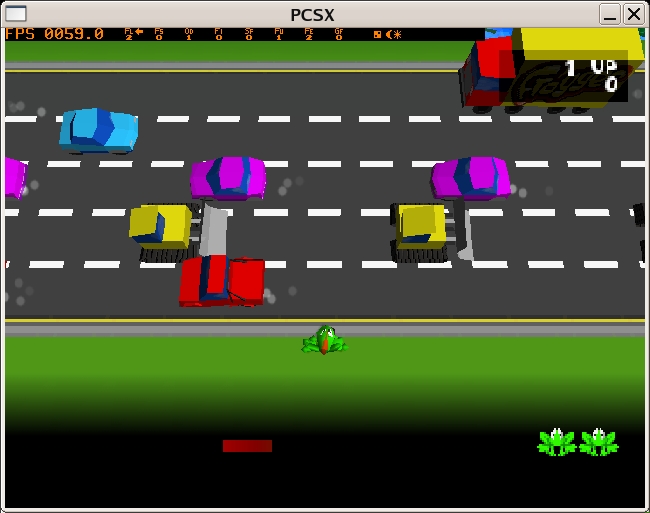
Figure 4. Frogger for the Original PlayStation Running in PCSX
Make sure you're not running something that hogs processor time or RAM in the background. You can watch for this by opening a terminal window and typing top to open the process monitor. You may find that trying to make the game window larger doesn't work and, in fact, even crashes your machine. If you want to run a game through the specified BIOS, choose File-->Run CD Through BIOS. This action might convince some touchy games to play.
Resources for this article: /article/8888.
Dee-Ann LeBlanc (dee-ann.blog-city.com) is an award-winning technical writer and journalist specializing in Linux and miniature huskies. She welcomes comments sent to dee@renaissoft.com.

