
CrossOver Office 5.0
CodeWeavers' CrossOver Office 5.0 is a commercial application based on Wine that allows you to run many popular Microsoft Windows-based office and productivity applications under Linux, as well as a few multimedia and Internet applications. For those who are tied to Microsoft Office in particular, it can provide a means to migrate to Linux.
Supported applications include:
Acrobat Reader 5
FrameMaker 7.1
Photoshop 6 and 7
DreamWeaver MX
Endnote 8
Flash MX
iTunes
Lotus Notes 5 and 6.5.1
Internet Explorer 6 Service Pack1
MS Office 97/2000/XP/2003
MS Project
MS Visio
QuickBooks
Quicken
QuickTime
Various MS Office document viewers
For people researching CrossOver Office with a mind to deploying the product in their workplace or as a single-user home installation, the CodeWeavers' Web site is an excellent resource (www.codeweavers.com). Clear and well-written information is grouped in a logical manner. Case studies illustrate how effectively the product copes in real-world situations, and questions about Microsoft licensing are addressed.
CodeWeavers offers a time-limited demonstration version of its products. For 30 days, you can try the full capabilities of the product without being limited in functionality. This is an excellent way to let customers test the compatibility and performance of the product for themselves before committing to purchasing a license.
CodeWeavers' CrossOver Office comes in three main flavours. The Standard Edition, which we tested here, is a standalone application licensed for a single user with limited support and upgrade period. If any other users on the machine want to use CodeWeavers' CrossOver Office, they need to purchase their own copy. The Standard Edition is available only as an 11MB download.
CrossOver Office Professional is also standalone, with support for multiple local users. It can be purchased on CD as well as downloaded, and it includes 12 months of a higher level of support. Bulk and educational discounts are available.
CrossOver Office Server Edition provides a centrally managed way of distributing Windows productivity applications to Linux thin clients, with a premium level of support designed for large-scale deployments.
CrossOver Office is distributed as a large bourne shell script. On invoking the script, a graphical installer is launched that takes you through the install and configuration process. We found the installer to be simple to use. Once the installer was complete, CrossOver Office then offered us a dialog through which to install various Microsoft Windows software. The installation process automatically created entries in our KDE and GNOME menus, a CrossOver submenu with access to various CrossOver Office tools and a Windows Applications menu for our Windows application launchers once installed.
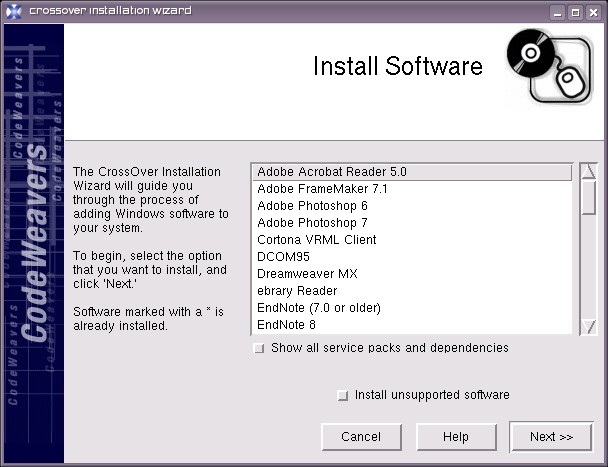
Figure 1. CrossOver Office Install Software Dialog
The installation process was quick, painless and easy to follow. We give CrossOver Office a thumbs up for installation.
One installed, we immediately tested installing an application from the Internet by selecting the Internet Explorer browser. CrossOver Office gave us excellent feedback, letting us know what it was doing at each stage of the process. The familiar Windows installer dialog for Internet Explorer was launched, and after clicking through the wizard, we were returned to CrossOver Office while it simulated a Windows reboot. Once this was complete, an Internet Explorer launcher could be found in the KDE menu under Windows Applications, making finding and executing the newly installed program a breeze.
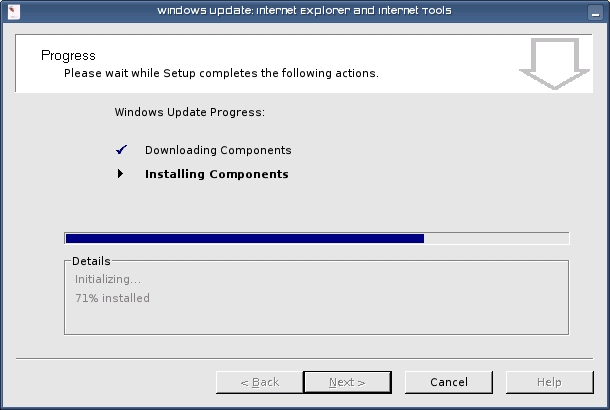
Figure 2. Installing Internet Explorer
We tested installing software from CD using Microsoft Office 2000. The application installer managed to detect the correct CD-ROM drive and install from it.
The user guide for CrossOver Office is distributed as HTML files on disk suitable for off-line reading. The documentation is clear and easy to read, with helpful screenshots. It covers an exhaustive range of issues from installing CrossOver Office and Windows applications, to more advanced topics, such as the configuration of Windows emulation options.
The troubleshooting section was a little confusing, with a long cluttered list of frequently asked questions. The FAQ does cover a wide range of questions, and we recommend reading it for handy tips. We give CrossOver Office a thumbs up for documentation.
CrossOver Office installed and ran without a hitch on SUSE, Ubuntu and Slackware Linux. The list of supported distributions currently includes:
Red Hat 9
Fedora Core 4
Red Hat Enterprise Linux Workstation 3 and 4
SUSE 10.0
Novell Linux Desktop
Mandriva 10.x
Debian Stable
Ubuntu 5.04
Ubuntu 5.10
Given the reasonable range of modern distributions supported and that CrossOver Office worked very well even on unsupported distributions we tried, we give CrossOver Office a thumbs up for compatibility.
Support for the standalone editions is available in two levels. CrossOver Office Standard includes six months of Level 3 support. This level of support includes fixes for installation issues and only the most grievous problems with supported applications on tested distributions: “...you should not expect a rapid or complete response to any but the most serious problems.”
CrossOver Office Professional includes 12 months of Level 2 support. This level of support promises problem resolution for any problem found within any supported application. Any Level 2 problem will be triaged and logged. Problems encountered on non-tested distributions will be considered.
The archives of the support ticketing system used by all levels of support can be found on the CodeWeavers' Web site and can be accessed by unregistered users, allowing all users of the software to search the database to find solutions to their problems. For lesser support levels, CodeWeavers provides a medium-volume mailing list and an IRC channel.
We went to the IRC channel to find support for various minor problems we encountered. The person who helped us was courteous and friendly and very well informed. We give CrossOver Office a thumbs up for support.
How We Tested
We tested by installing CrossOver Office on three machines. Waste is a Pentium 4 1.7GHz with 512MB memory running Ubuntu, and Holly is a Pentium III 700MHz with 256MB of memory running SUSE. To check how CrossOver Office installs on unsupported distributions, we also tried running various applications on Hal, a 2.4GHz with 1,024MB of memory and Slackware Linux.
We installed Internet Explorer, Apple's iTunes music player, Adobe Photoshop 7.0 and Microsoft Office 2000 on both machines. To test the stability of these applications, we performed a range of fairly standard tasks with them—playing MP3s from disk and streamed from music shares on a Macintosh with iTunes, touching up photographs with Adobe Photoshop, using Internet Explorer for Webmail and on-line banking and opening and editing various Word and Excel files with MS Office.
Microsoft Office, Photoshop and IE performed well on Waste and tolerably on Holly. Given Waste's modest specifications, as compared to even the cheapest of new machines today, we think this is pretty reasonable. Even running natively under Windows, Photoshop 7 isn't terribly fast on a Pentium III. The applications were not completely stable and crashed a few times during testing. All applications suffered from occasional rendering glitches.
iTunes and QuickTime required considerably more CPU power, and Holly's 700MHz was simply not up to the task. Audio crackled and was jerky, and video completely refused to play. Even on Waste, iTunes was unbearably slow to use and respond to user interaction. No amount of coaxing could convince it to play music smoothly. We tried various suggestions from support without success.
Due to some issues with stability and drastic problems with multimedia over multiple distributions, we give CrossOver Office a flat hand for capability.
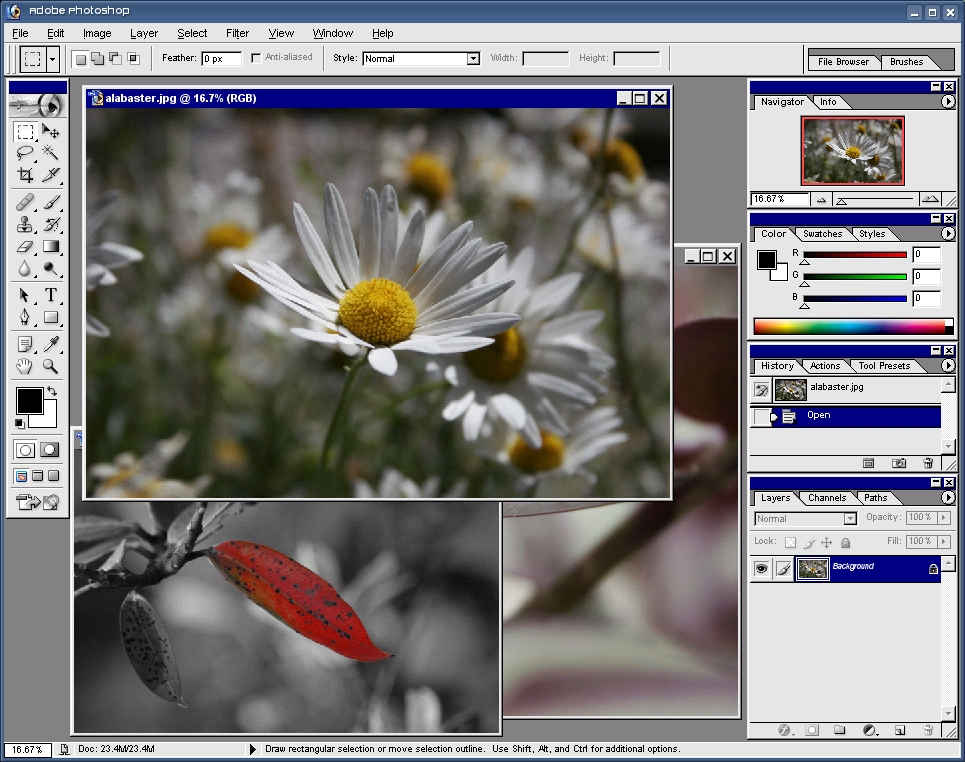
Figure 3. Adobe Photoshop Running under CrossOver Office
At $39.95 US, CrossOver Standard is relatively inexpensive—certainly cheaper that purchasing a licensed copy of Windows. Most professional users would consider $69.95 US to be a reasonable price to pay for the higher level of support. We give CrossOver Office a thumbs up for price.
In summary, CodeWeavers CrossOver Office is a promising product, and we give it a final score of very good. We recommend strongly that you run CrossOver Office on a decent machine with some good processing power and lots of RAM. On anything less, CrossOver Office would score satisfactory at best. With the right hardware though, it easily could have earned a score of excellent if it weren't for the fact that it has minor stability problems and difficulty getting multimedia applications working properly. This brings down the overall score of a product that has excellent documentation, support and an easy-to-use interface. Hopefully, future versions of CrossOver Office will address these points, making it a more viable professional product for hardware that is less than the latest and greatest.
Summary
Installation: Thumbs up
Ease of Use: Thumbs up
Documentation: Thumbs up
Compatibility: Thumbs up
Capability: Flat hand
Price: Thumbs up
Final Score: Very Good
CrossOver Office 5.0 is a great solution for those who must run some popular legacy Windows applications under Linux. It has some glitches, and you need good hardware to get the best out of the product, but it does the job it is designed to do quite well.
Jes Hall is a KDE developer from New Zealand who is passionate about helping open-source software bring life-changing information and tools to those who would otherwise not have them. She welcomes comments sent to jhall@kde.org.

