
NetDVD: Building a Network-Attached Peripheral with Linux
I work in the Molecular Imaging group of Siemens Medical Solutions, where my colleagues and I develop and maintain software used to run Positron Emission Tomography (PET) medical scanners. These machines generate large amounts of patient data that our customers must archive for later retrieval and review, so our software allows customers to archive data to tape or Magneto-Optical (MO) disk. Using tape is very slow, so archiving to MO disk is generally preferred. Unfortunately, during the past few years, we've had a lot of problems with the MO hardware sporadically corrupting the MO disks, leading to expensive and tedious data recovery efforts and several replaced MO drives.
For many years, our customers have been asking for the ability to archive their data to DVD. DVD media is much cheaper than either tape or MO, and it can be read by any PC with a DVD drive. This would be useful to many of our customers, because there are free software tools they can use to read our data files on a PC. Because the MO drive vendor appeared unable to resolve our hardware problems, we decided the time was right to implement DVD archiving.
Unfortunately, we immediately hit a snag. The control consoles for our scanners are Sun UltraSPARC workstations running Solaris 2.6, Solaris 7 or Solaris 8. Customer hardware ranges from an Ultra 2 to a Sun Blade 2500. With so many different machines to support, we clearly needed an external SCSI DVD burner. But, we couldn't find a stable source for such a device, and Solaris 2.6 and Solaris 7 have little or no support for DVD burner hardware.
Because DVD burners are easy to get for x86 hardware and have been well supported by Linux for years, we decided the best solution would be to use a small Linux box with a high-quality DVD burner to do the work of reading and writing the DVDs. This would solve our hardware and OS-compatibility problems and make it easier to add support for new media types in the future. The Solaris workstations would communicate with the DVD reader/writer machine over the network, so we named our creation the NetDVD.
Because our business is building large medical scanners—not computers—the first thing we needed was a company to put the devices together for us and help select the hardware. I did Web searches to find appropriate companies and sent out several query letters. Few of the companies I contacted were interested in our project, and most required a guaranteed minimum number of units to work with us. We have about 700 scanners in the field, and it's likely we'll sell NetDVD devices to a few hundred of those, but I didn't have the authority to make any kind of commitment.
Thankfully, MBX Systems was very helpful. Their representative, Ed Jamison, quickly suggested some possible hardware solutions, including one using a mini-ITX motherboard in the C134 case from Casetronic, shown in Figure 1. This case is actually a bit smaller than the external MO drives we've been using, so it looked like the perfect choice. We eagerly ordered one with a 1GHz processor, 256MB of RAM, a 40GB hard drive and a laptop-size DVD burner.
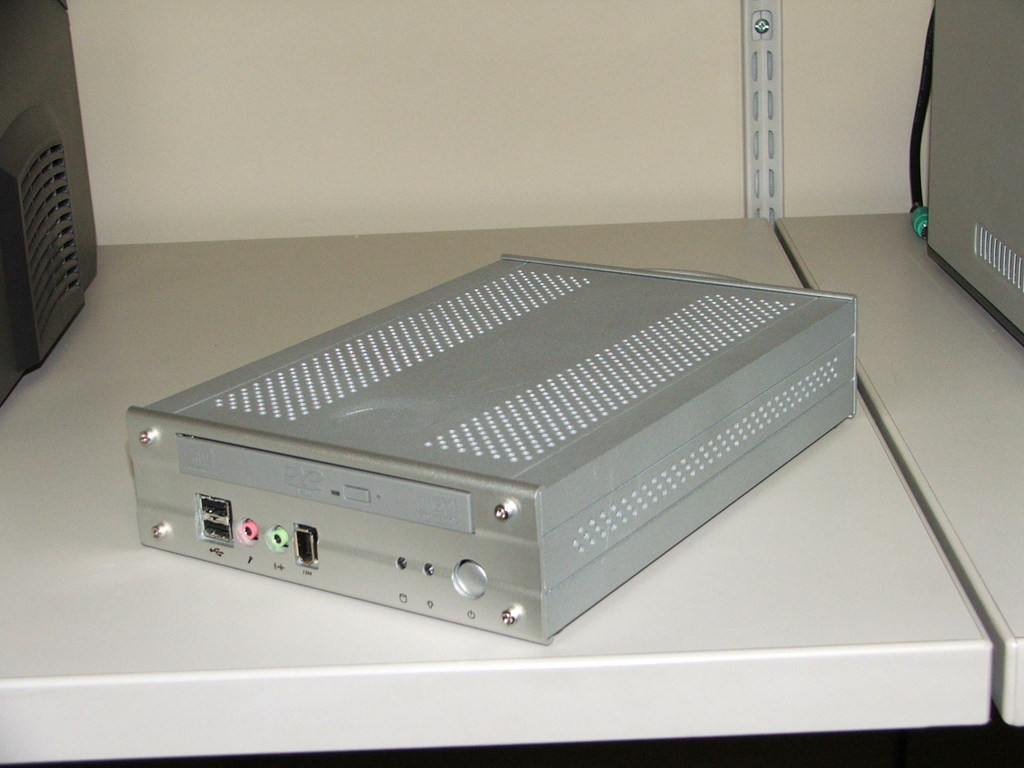
Figure 1. Prototype NetDVD in Casetronic C134 Case
Once we had the prototype, we had to decide what Linux distribution we would put on it. My fellow developer and Linux enthusiast, Dan Duckworth, had just been reading about how great this new Ubuntu distribution was, so we decided to give it a try. We downloaded the Ubuntu 4.10 Warty Warthog CD image, and it installed beautifully. Ubuntu is based on Debian, which I've been using for several years, so I found configuring it very easy to do. It worked so well for us that we never even tried another distribution.
While we were picking out a vendor, hardware and a Linux distribution, I was putting a lot of thought into how client machines would talk to the NetDVD. The client computer must be able to read a DVD, write to a DVD and create a copy of a DVD to provide redundant archive backups. To manage this, I decided to combine a custom TCP/IP protocol with Network File System (NFS).
To use a NetDVD, the client machine connects to it using our custom NetDVD TCP/IP protocol. If the device is already busy serving another client, it will respond with a BUSY error message and drop the connection. This ensures that only one client can control the device at a time. If the device is not busy, it will send a brief message stating the highest version of the NetDVD protocol it understands. At the time of this writing, the only version of the NetDVD protocol is 0, but we may create new versions of the protocol later to add new features.
If the client connects successfully, it immediately sends an initialization command to the NetDVD. This command tells the device both the version of the NetDVD protocol the client will use to communicate with it and what the client believes the current time to be in Universal Coordinated Time. The NetDVD sets its clock to match the client, so the machines will be in agreement on filesystem timestamps.
Also during the initialization command, the NetDVD uses NFS to export an empty directory on its hard drive with read/write permission strictly to the client's IP address. This is a working directory for the client to fill with files it wants to write to DVD. It is on a large disk partition separate from the operating system, so filling it up will not cause the device to misbehave.
To read a DVD in the NetDVD's drive, the client sends a mount command. This causes the device to mount the media in its drive and export it via NFS strictly to the client's IP address. When the client is finished reading, it can simply unmount it or unmount and eject it using an appropriate command.
To write files to a DVD, the client first mounts the NetDVD's working directory via NFS and fills it with the files and directories it wants to write to the DVD. Once finished, it sends a burn working directory command to the device and specifies whether this is supposed to be a new DVD or data appended to a DVD written previously. The ability to append data was crucial to our use of the device to archive data incrementally.
To copy a DVD in the NetDVD device's drive, the client sends a special copy command. The device then copies the directory structure on the media to a special directory on the same partition with the working directory. Once the copy is done, the client may send a burn copy command to the device one or more times to write the copied directory tree to as many DVDs as it likes. This method will not make viewable copies of video DVDs, because the data on those disks must be written in a very specific order that we don't preserve.
Although we usually had a monitor and keyboard hooked up to the NetDVD device during development, it is meant to appear to the customer as if it were a network-based peripheral, like a network printer. Because the user cannot type shutdown -h now to tell the NetDVD to shut down, it must do a clean shutdown when the user presses the power button.
Conveniently, modern motherboards supply the Advanced Configuration and Power Interface (ACPI). When the user presses the power button, the motherboard sends a signal to the processor. Then the processor is responsible for actually shutting the computer off. Linux has good support for this interface, so all we had to do was install the acpid Ubuntu package. This package comes already configured to do a clean shutdown when the power button is pressed.
But, a clean shutdown takes several seconds to complete. If the device doesn't appear to respond immediately to the power button press, a user is likely to press it repeatedly, maybe even hold it down for several seconds. This is both frustrating for the user and potentially harmful to the device, because holding down the power button forces the machine to power off immediately before the shutdown is complete.
So, we needed a way to tell the user, “I got your message. I'm turning off now. Give me a minute.” As the NetDVD has no display, the natural choice was to beep using its PC speaker. For this we used the beep program written by Johnathan Nightingale. The beep package isn't part of the base Ubuntu installation, but it's still available from Ubuntu's Universe archives. Using this program, I wrote some init scripts that would make the machine start beeping once per second during boot up or shutdown and finish with an upward or downward arpeggio of beeps, respectively. This had the added benefit of informing the user when the device was ready for client connections. Unfortunately, it wasn't quite enough.
Several seconds still would pass between the user pressing the power button and the first beep. To make the NetDVD start beeping immediately, I edited the shell script responsible for responding to the power button press, /etc/acpi/powerbtn.sh, so it invokes my beep-start init script immediately before running the shutdown command. With this change, the NetDVD starts beeping immediately in response to the power button press.
Because the NetDVD device must communicate over a TCP/IP network, the user must have some way to tell it what IP address, network mask and default router to use. This is a tricky problem, because you can't easily communicate with a machine that doesn't have its network parameters set properly. Thankfully, all machines on the same subnet can receive UDP broadcast packets even if they aren't configured properly for that subnet. So, I designed a simple protocol allowing a client machine to locate and configure NetDVD devices on its subnet using UDP broadcast.
To locate NetDVD devices on its subnet, the client program broadcasts a packet asking all NetDVD devices to respond. When a NetDVD device sees this packet, it responds by broadcasting its Ethernet MAC address and other network parameters to the UDP port specified in the request. The client program receives this information and displays it to the user. Users will know which NetDVD device they want to configure, because every NetDVD device has a label displaying its Ethernet MAC address.
To reconfigure a NetDVD device on its subnet, the client program broadcasts a packet containing the target device's Ethernet MAC address and the network parameters it should use. The target NetDVD will reconfigure its network parameters and broadcast a response back to the client's UDP port. All other NetDVD devices ignore the request.
In order to make this scheme work, I had to disable the spoofprotect Linux kernel feature by changing spoofprotect=yes to spoofprotect=no in /etc/network/options on the NetDVD device. The spoofprotect feature causes the kernel to ignore packets that come from the local subnet but appear to come from an invalid IP address for that subnet. If we left this feature enabled, a NetDVD with incorrect network parameters would ignore the UDP packets intended to correct them.
Once we got things working and started really exercising our prototype, we began having problems with burn failures. After discussing the issue with Ed Jamison at MBX, we decided the problem was the laptop-size DVD burner. Due to their small size, these burners have more reliability problems than the full-size drives. He recommended switching to a Plextor PX-716A 16x Double Layer DVD+RW/-RW drive. Plextor has a reputation for making extremely reliable DVD burners, and this drive is also capable of faster burn speeds than the laptop drive we were using, which our customers will appreciate.
Sadly, this meant we couldn't use the little Casetronic C134 case we loved so much. But, moving to a larger case meant we could move to hardware that was less expensive and more stable overall. As a result, we got a faster processor, a faster and larger hard drive and a Gigabit Ethernet interface. Just as important, we reduced the problems we'll have in the future due to obsoleted hardware, because desktop hardware generally stays on the market much longer than laptop hardware. Because we still were trying to minimize the size of the device, Ed recommended the Aria case from Antec shown in Figure 2.
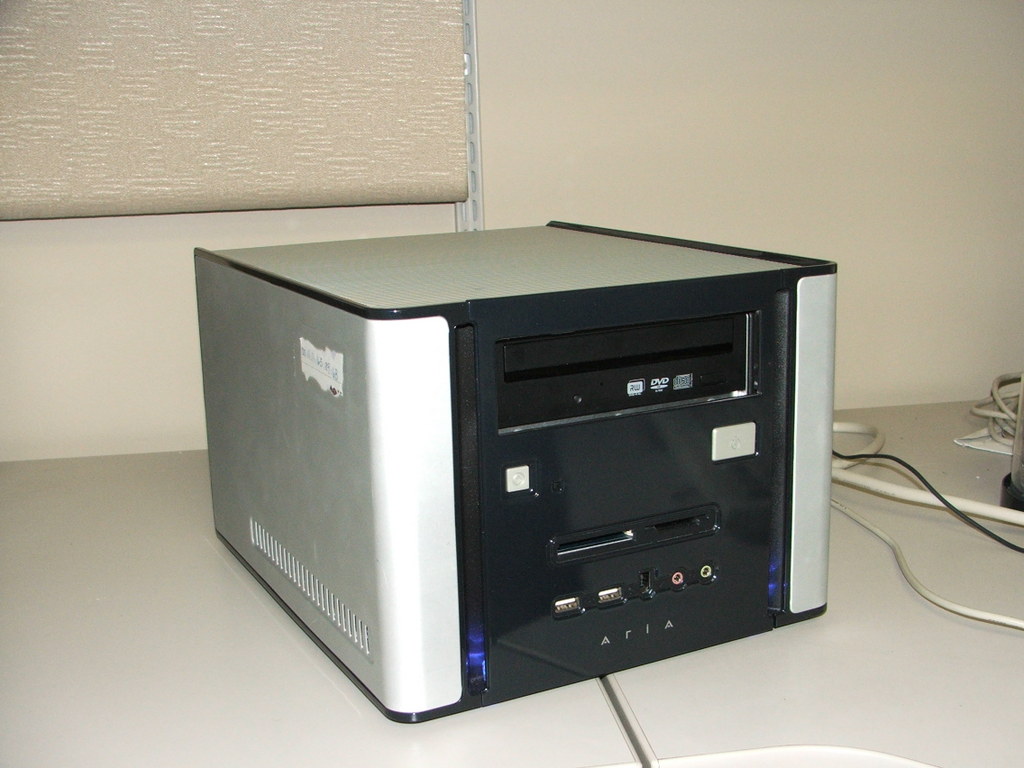
Figure 2. Second prototype NetDVD in Antec Aria Case
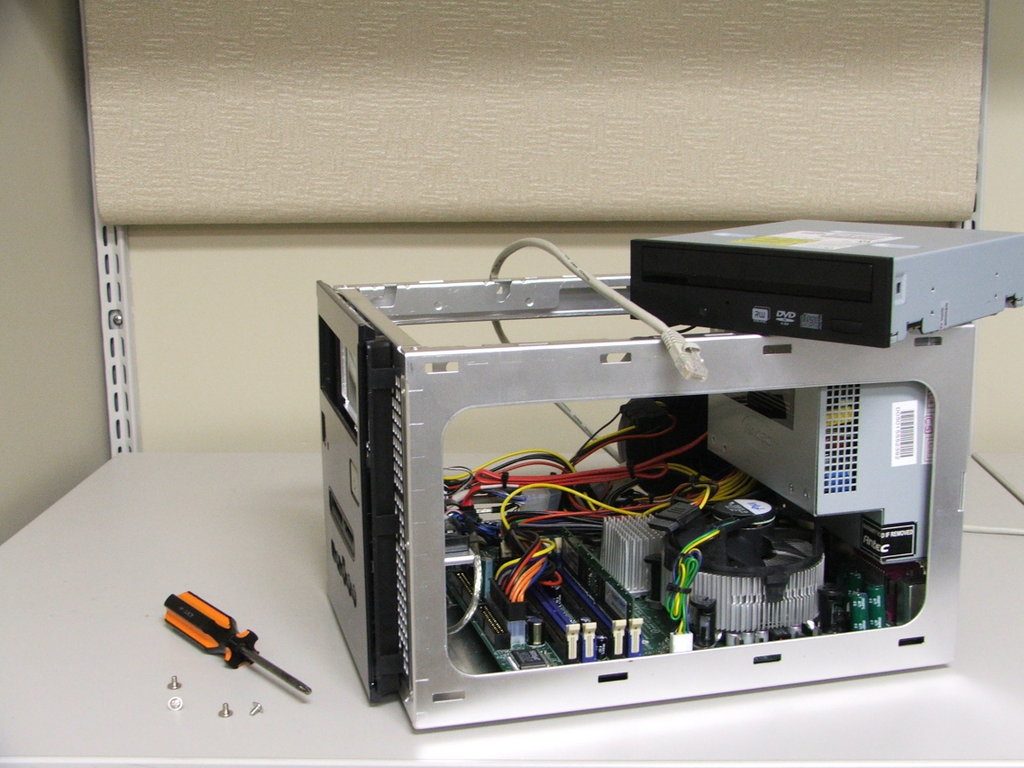
Figure 3. Inside of Case
By this time, we were using Ubuntu 5.04 Hoary Hedgehog, but when I tried to install it on the new machine, it hung while detecting network devices. After a little research, we discovered that the SysKonnect SK-98xx Gigabit Ethernet interface on the Intel D915GUXLK motherboard we were using wasn't supported properly by the Linux 2.6.10 kernel provided with Ubuntu 5.04. Luckily, a kernel patch was available from the manufacturer, so I downloaded the kernel source code, applied the patch and rebuilt the kernel.
That fixed the problem with the Ethernet controller, but the kernel also had trouble with the motherboard's ACPI. This caused a lot of boot error messages and prevented the machine from handling a power button press correctly. To fix this problem, I had to upgrade to Linux 2.6.12.2 and apply the Gigabit Ethernet driver patch to that. This was difficult to get right, because Ubuntu didn't have a package for that version of the kernel. I had to do a lot of experimentation with kernel parameters before I was sure I had all of the kernel features that Ubuntu relied upon.
Once the kernel problems were settled and we had the machine functioning as a NetDVD, we discovered another problem. The DVD burns actually were taking longer than they had with the original hardware, and the DVD activity light showed that the drive was frequently idle during the burn. The Ubuntu installation had not enabled Direct Memory Access (DMA) for the drive, so the drive wasn't getting data fast enough. Once we corrected this, the burns came up to the speed we had expected. It's really a tribute to the quality of the Plextor DVD drive that it successfully burned several DVDs even when it was starved for data.
When Ubuntu 5.10 Breezy Badger came out, I was pleased to find it corrected all of the problems that required a custom kernel build, but it introduced another problem I had no idea how to correct. In Ubuntu 5.10, exportfs fails sporadically, though it always exits with a 0 status. This isn't much of a problem for static exports, but as all of our exports are dynamic, it's a serious problem for us. So, we had to go back to Ubuntu 5.04.
In our testing, we've seen only one failure in hundreds of burns since moving to the new hardware, so we're confident that the NetDVD will be the stable archiving solution we need. As I write this, we are on the brink of installing NetDVD devices at two very enthusiastic beta sites. They've seen how it works already, and based on their reactions, I think we'll have a lot of NetDVD orders once it's officially released.
It has taken us about 15 months to reach this point, but most of that time was spent working on software that goes on our Solaris workstations and other things not related to the NetDVD. I'm extremely grateful to Ariel King and Dan Duckworth for their excellent work developing the new DVD archiving software for our workstations. That software was actually much harder to get right. I don't think we spent more than three developer-months working on the NetDVD device itself. Using Linux and other open-source software made that the easy part.
Resources for this article: /article/9071.
Bradford C. Smith is a software developer in the Molecular Imaging division of Siemens Medical Solutions USA, Inc. He has been working with Linux and loving it since 1996, and he has been known to use the ed editor just for the fun of roughing it. He welcomes your comments at bradford.smith@usermail.com.
