At the Sounding Edge: Music Notation Software for Linux, Part 3
In this month's stop on our tour of Linux music notation programs, we
look at the MusiXTeX music typesetting software. MusiXTeX was created by
Daniel Taupin, Ross Mitchell and Andreas Egler. MusiXTeX currently is
maintained by Christian Mondrup and other volunteers.
MusiXTeX is a set of macros and fonts that provide extensions for music
publication with the TeX typesetting software. TeX is a powerful text
processing system for UNIX/Linux, originally designed for high-quality
typesetting of scientific and engineering articles and books. It puts special
emphasis on representing the symbols and graphics found in algebraic
equations and other mathematics formulae. This special graphics capability
made TeX a natural choice for a high-quality typesetting system for music.
A Few Words About Installing TeX
The TeX system is non-trivial to install, and I recommend using
the package installation system for your distribution to automate
the process. Details of installing TeX are available on the primary
TeX-related Web sites (see this article's Resources). I refer
the reader to those sites for complete instructions on building and
configuring the TeX system. This stage is non-optional: you must have
a working TeX installation before you can set up and use your MusiXTeX
extensions.
Note: Linux users are more likely to acquire and install TeX in its
incarnation as LaTeX, which is functionally identical to TeX. Throughout
this profile I simply refer to TeX, with the understanding that LaTeX
also is referenced.
Installing And Configuring MusiXTeX
Go to the main MusiXTeX Web site, download and unpack the
musixtex-Txxx.tar.gz tarball in your home directory and then enter your
new MusiXTeX source directory. The MusiXTeX package is made up mostly
of TeX-compatible macro files, so there is no build procedure. The
entire process is described on the MusiXTeX Web site, but I will point
out that it is wisest to follow the instructions for setting up what
is called a "private" installation in the /usr/local file
hierarchy. Become the root user and then copy the distribution files into
the recommended directories as follows:
/usr/local/share/texmf 	;;; Create this directory first
/usr/local/share/texmf/tex/musixtex/ ;;; Copy all files from the tex subdirectory of your MusiXTeX distribution
/usr/local/share/texmf/doc/musixtex/ ;;; Copy all files from the doc subdirectory
/usr/local/share/texmf/fonts/source/musixtex/ ;;; Copy all files from the mf subdirectory
/usr/local/share/texmf/fonts/tfm/musixtex/ ;;; Copy all files from the tfm subdirectory
Create the required directories if they do not already exist. After
placing the macros and fonts in their proper directories, run the
following commands (as root) to update your TeX environment:
mktexlsr
mktexlsr /usr/local/share/texmf
If your TeX installation does not include the mktexlsr command, try
replacing it with texhash. If neither command exists, then your
TeX installation is incomplete and must be upgraded before you can
successfully install MusiXTeX.
Now you need to build and install musixflx, a required tool that must be
compiled from the musixflx.c file found in the system/c-source directory
of your MusiXTeX distribution. Fortunately, compiling the utility is
easy. Enter the system/c-sources directory and issue the following
command:
gcc musixflx.c -o musixflx
Copy the musixflx binary to /usr/local/bin. Now your MusiXTeX system
is installed completely and is ready for use. By the way, the version of
MusiXTeX profiled in this article is the stable version T112. A beta
version T113 also is available at the time of this writing, but it was
not tested for this review.
MusiXTeX Documentation
To view the extensive MusiXTeX manual, enter
/usr/local/share/texmf/doc/musixtex and issue the following command:
xdvi musixdoc.dvi
For a printable PostScript file, run this command:
dvips musixdoc.dvi -o musixdoc.ps
Using MusiXTeX
Preparing a MusiXTeX score source file is similar to the process of
preparing a Web page using a mark-up language such as HTML. The following
example demonstrates some basic features of a properly written MusiXTeX
source file:
    			% This is a comment.
\input musixtex		% You must include this line

\parindent10mm		% Staff and meter configuration
\instrumentnumber{1}
\setname1{Piano}
\setstaffs1{2}
\generalmeter{\meterfrac44}

\startextract		% Set up notes, barlines, beaming, etc.
\Notes\ibu0f0\qb0{cge}\tbu0\qb0g|\hl j\en
\Notes\ibu0f0\qb0{cge}\tbu0\qb0g|\ql l\sk\ql n\en
\bar
\Notes\ibu0f0\qb0{dgf}|\qlp i\en
\Notes\tbu0\qb0g|\ibbl1j3\qb1j\tbl1\qb1k\en
\Notes\ibu0f0\qb0{cge}\tbu0\qb0g|\hl j\en
\endextract

\end
Unfortunately, a MusiXTeX source file is only partially readable by
musicians. In particular, the Note statements are rather complex.
These explanations from the MusiXTeX manual, however, should help clarify the
actions of the typesetting commands in the example above:
\ibu0f0 begins an upper beam, aligned on the f, reference number 0, slope 0
\tbu0 terminates this beam before writing the second g (\qb0g)
\qb.. indicates a note belonging to a beam
\sk sets a space between the two quarter notes in the right hand, so that
	the second quarter note is aligned with the third eighth-note in the left hand
\qlp indicates a dotted quarter note (p = point)
\ibbl1j3 starts a double beam aligned on the C (j) with a slope of 15%
Although the semantics and syntax still are somewhat difficult, you can
see how MusiXTeX represents musical symbols and syntax. Consult the
MusiXTeX manual for a complete description of the language details.
After all of the required preparations are finished, actually using MusiXTeX to create a
printable score is rather anticlimactic. Enter the example code fragment
in your favorite text editor, and save it as fragment.tex. then, run the
following command:
tex fragment.tex
This command will create a DVI file named fragment.dvi that can be
viewed directly with the xdvi utility or converted to a PostScript file
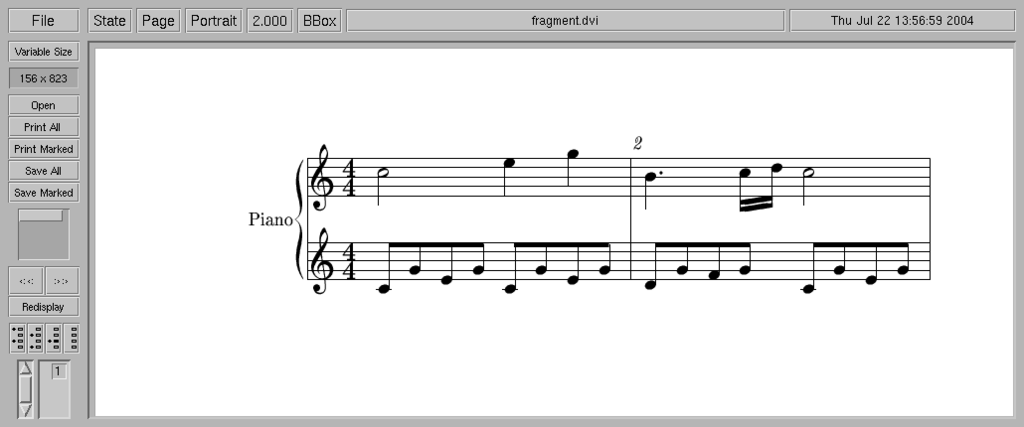
with the dvips program. Figure 1 shows the resulting PostScript view.
Figure 1. A Simple MusiXTeX Example
As Figure 1 demonstrates, MusiXTeX produces excellent output in the
PostScript format. It also is capable of excellent PDF output, but to
do so requires fonts and utilities not described in this profile. See
the MusiXTeX Web site for details regarding the preparation of MusiXTeX
files for eventual realization as PDF output.
By now it should be clear that MusiXTeX is not a composer's assistant. It
has been designed for quality of output, and its input language is
sometimes difficult to understand. Nevertheless, MusiXTeX does achieve its
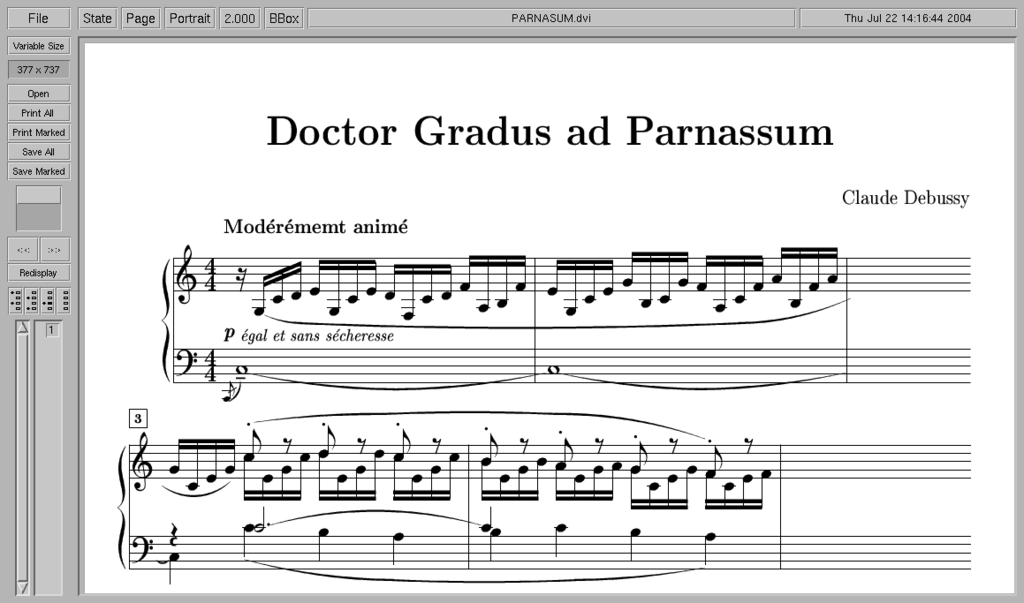
goal of high-quality printable music scores, as you can see in Figure 2.
Figure 2. A More Complex MusiXTeX Example
The source code for the score seen in Figure 2 can be found in a set of
MusiXTeX examples prepared by Daniel Taupin, available from the MusiXTeX
Web site.
MusiXTeX's Family and Friends
A variety of helper applications have evolved to alleviate MusiXTeX's
rather complex usage. Therefore, before leaving this profile, let's briefly view
the PMX MusiXTeX preprocessor and the Mux2D GUI for MusiXTeX source
creation.
PMX
Don Simons' PMX is a type of programming utility called a preprocessor.
It is
designed to make the entry of MusiXTeX source code faster and easier
by presenting MusiXTeX's features in a more easily comprehended
form. Download and installation details are available from the MusiXTeX
Web site, so here I present only a basic example for PMX.
The following source code presents a simple PMX file:
% nv noinst mtrnuml mtrdenl mtrnump mtrdenp xmtrnum0 isig npages nsyst musicsize fracindent
  2  2      4       4       4       4       0        0    1      1     20        0.07


bt
./
e23   c   | g43 a f g | e43 d e f | g43 a f g /
c44 d e f | g44 a b c | c24   e   | g44 a b c /
%---------------------------------------------------------%
The first two uncommented lines include a variety of setup parameters,
defined as follows:
nv       number of staves
noinst   number of instruments
mtrnuml/mtrdenl  logical time signature numerator and denominator
mtrnump/mtrdenp  printed time signature numerator and denominator (if 0 set to logical values)
xmtrnum0  number of beats in partial first measure, i.e. pickup notes
isig     number of sharps or flats in key signature (positive integer equals sharps, negative equals flats)
npages   number of pages
nsyst    number of systems
musicsize  height of staff in points (20 or 16)
fracindent left indentation of the first system (decimal fraction of total line width)
The syntax is critically sensitive. If you remove one of the empty lines
before the bt directive, the PMX compiler will halt with a fatal error.
After the two empty lines we have clef ordering, starting with the lowest
staff, and an indicator for the target directory:
bt   bass, then treble clef
./   directory path for resulting TeX file (in this instance, the current directory)
After this setup block, we finally get to the note data. Here we can see that
PMX is considerably more transparent than MusiXTeX's native language
elements, defining the basic note element as follows:
note name, duration, octave
If no values follow the note name the, note takes its duration and octave
from the preceding element. Simple bar lines are indicated with the |
symbol, the end bar by the / character (forward slash).
To create a TeX output file, copy the above code as ex1.pmx and process
it in these stages:
pmx ex1.pmx
tex ex1.tex
xdvi ex1.dvi
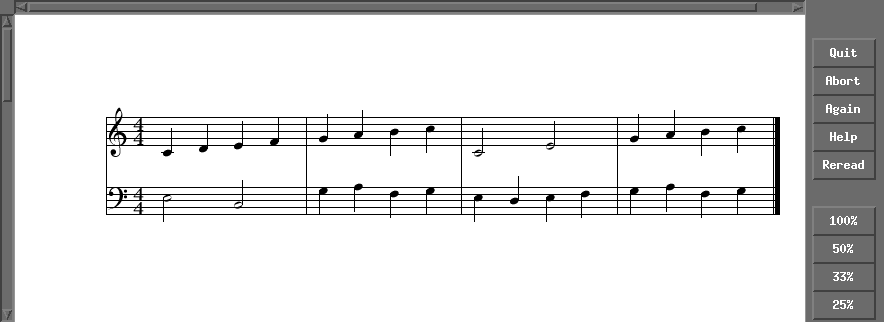
Figure 3 displays the results as seen in the xdvi viewer.
Figure 3. Simple Output from PMX
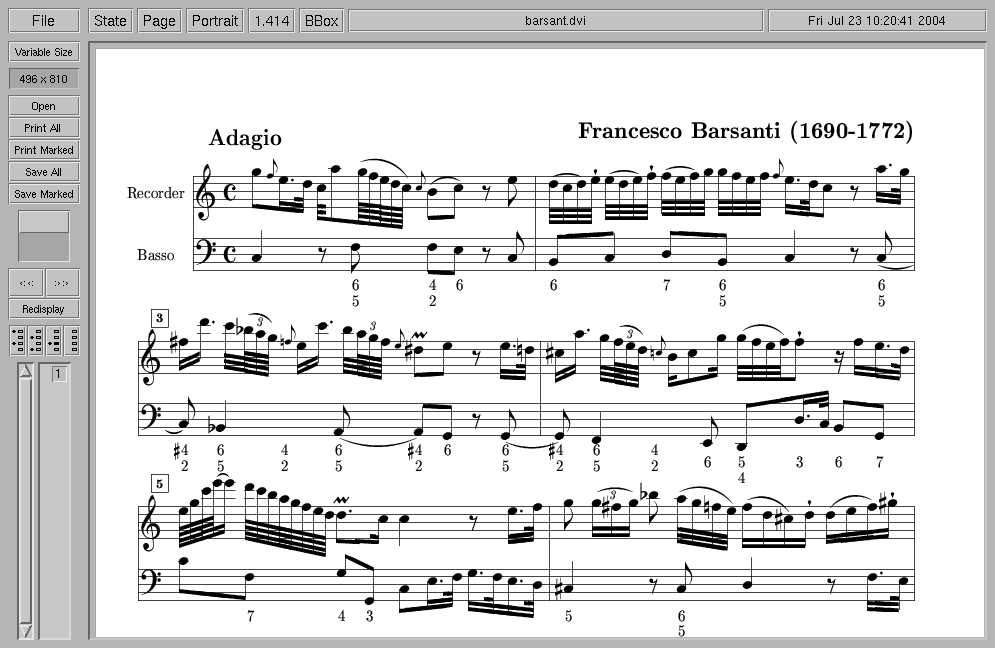
Figure 4 shows off a more advanced example from the PMX source
package. The author thoughtfully has included a number of helpful example
files with the PMX sources. I suggest that interested readers study
these examples carefully to get the best results from the system. In
addition to the examples, excellent documentation of the PMX system
exists as a full manual and a as reference card, both in PDF format.
Figure 4. A More Complex PMX Example
PMX also can prepare a MIDI file of your score for "proofing by
audition",
so you can hear your score before committing it to print.
Mux2D
Lukas Gratzmacher's Mux2D provides a convenient graphic interface for
the creation of MusiXTeX source files. It is similar to the Denemo
utility for LilyPond, designed as a helper application and not as
a full-featured notation editor. Nevertheless, Mux2D can be a great
help to those of us for whom MusiXTeX is simply too difficult to use
directly. Complete instructions regarding installation and configuration
details are available from the Mux2D Web site, so we take only a
glimpse of Mux2D in action here.
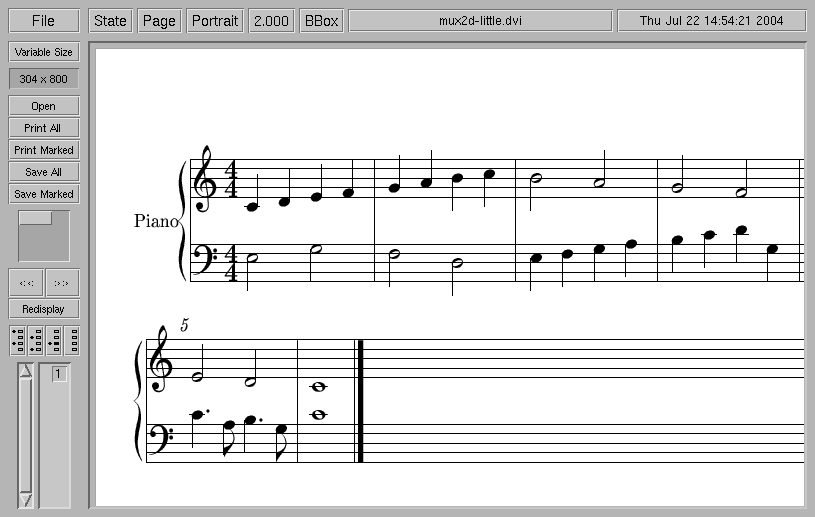
Figure 5 shows Mux2D at work. Notes and other score elements are entered
and modified from the computer keyboard and menu dialogs. The interface
is easy to learn, with the definition for each key indicated in the
lower left corner of the display.
Figure 5. Mux2D, a GUI for MusiXTeX
Files created with Mux2D can be loaded and saved in the program's native
MXD format. You also can export your work in TeX format for processing
with MusiXTeX. The following TeX code was created by the example seen
in Figure 5:
%%% TeX file with MusiXTeX code
%%% generated by MuX2d

\input musixtex
\input musixext

\instrumentnumber{1}
\def\freqbarno{5}

\setstaffs1{2}

\setsign{1}{0}
\setclef{1}{60}
\setname1{Piano}
\setmeter1{{\meterfrac{4}{4}}{\meterfrac{4}{4}}}\relax

\parindent25pt

\startpiece
\Notes\hl{L}|\qu{c}\en
\Notes|\qu{d}\en
\Notes\hl{N}|\qu{e}\en
\Notes|\qu{f}\en
\barre
\Notes\hl{M}|\qu{g}\en
\Notes|\qu{h}\en
\Notes\hl{K}|\ql{i}\en
\Notes|\ql{j}\en
\barre
\Notes\ql{L}|\hl{i}\en
\Notes\ql{M}|\en
\Notes\ql{N}|\hu{h}\en
\Notes\ql{a}|\en
\barre
\Notes\ql{b}|\hu{g}\en
\Notes\ql{c}|\en
\Notes\ql{d}|\hu{f}\en
\Notes\ql{N}|\en
\barre
\Notes\qlp{c}|\hu{e}\en
\notes\cl{a}|\en
\Notes\qlp{b}|\hu{d}\en
\notes\cl{N}|\en
\barre
\Notes\wh{c}|\wh{c}\en
\setdoubleBAR\stoppiece
\bye
Figure 6 illustrates the results after processing this code in TeX
and converting the resulting DVI file to PostScript. As you can see,
the rather simple graphics seen in Figure 5 have been replaced by the
excellent MusiXTeX symbols.
Figure 6. A Mux2D File Converted to TeX and PostScript
Closing Comments
MusiXTeX is free and open-source software licensed under the GPL. It
is being maintained and users continue to contribute scores and code.
An active mailing list provides a forum for questions and suggestions
regarding MusiXTeX, PMX, Mux2D and other members of the MusiXTeX
family. If you're looking for publication-quality output for your work,
and you're ready to tackle TeX--or already know how to use it--you
should look into MusiXTeX.
Next month I'll present another TeX-based music typesetting program,
the awesome LilyPond. See you then!
Resources
MusiXTeX and PMX
The TeX Users Group (a good starting point for TeX newbies)
Music Notation at linux-sound.org
Dave Phillips is a musician, teacher and writer living in Findlay, Ohio.
He has been an active member of the Linux audio community since his
first contact with Linux in 1995. He is the author of The Book of Linux
Music & Sound, as well as numerous articles in
Linux Journal. He can be reached at
dlphilp@linux-sound.org.