
User-Mode Linux: A Book Excerpt
Editor's Note: This content is excerpted from Chapter 11 of Linux Debugging and Performance Tuning: Tips and Techniques, authored by Steve Best, ISBN 0-13-149247-0. Copyright 2006 Pearson Education, Inc. To learn more about this book, including purchasing options, please visit this page.
One of the largest efforts involved with software engineering is testing the software to make sure that it works as designed. Testing can require several different types of system configurations and could require multiple instances of Linux. One way to create this type of environment is to use a virtual machine.
User-Mode Linux (UML) is a fully functional Linux kernel. It runs its own scheduler and virtual memory (VM) system, relying on the host kernel for hardware support. It includes virtual block, network, and serial devices to provide an environment that is almost as full-featured as a hardware-based machine. UML cannot destroy the host machine. Furthermore, the UML block devices, also called disks, can be files on the native Linux file system, so you cannot affect the native block devices. This is very useful when you're testing and debugging block operations.
Each UML instance is a complete virtual machine that's all but indistinguishable from a real computer. All of them run as a normal user on the host. They give you root-level access, the ability to start daemons, the ability to run text and graphical applications, full networking, and almost all of the other capabilities of a Linux system. The only exception is that you can't directly address hardware inside UML, so the UML environment provides virtual network adapters, virtual X Window displays, and virtual drives.
The virtual machine can be configured through the command line, which allows memory and devices to be configured. The kernel, and hence any programs running under UML, runs as a software process of the real/host Linux system rather than directly under the hardware. UML can give you complete root access, and the same programs can be run that would normally be run on a Linux server. UML is a good way to experiment with new Linux kernels and distributions and to learn the internals of Linux without risking the system's main setup.
UML has been used in the following ways:
As a system administration tool
As an inexpensive dedicated hosting environment
For server consolidation
As a secure, isolated environment
To test applications
In college classes
For kernel development and debugging
This chapter covers the advantages that UML can provide in the area of kernel development and debugging. UML offers the advantage of source-level kernel debugging using gdb. Using gdb, you can view kernel data structures. kdb is another kernel debugger that can't directly show the kernel data structures. For additional information about kdb, see Chapter 13, "Kernel-Level Debuggers (kgdb and kdb)."
UML is not the right environment to use in some cases:
Developing and testing disk device drivers
Developing and testing network device drivers
Developing and testing other hardware devices
Currently UML is supported only on the x86 architecture.
Getting a minimal UML system up and running requires a UML kernel and a root file system to boot it on. The UML tools aren't needed for basic UML use, but they are needed for networking, managing copy-on-write (COW) file system files, and using the management console.
Before building a UML kernel and root file system, let's download a prebuilt UML kernel and root file system. The host system needs to be running a 2.4.x level of the kernel to run this prebuilt UML. The kernel on my machine is from the SuSE 9.0 release, and it has a 2.4.21 kernel. The UML rpm is named user_mode_linux-2.4.19.5um-0.i386.rpm, and it contains the following files:
/usr/bin/jailtest
/usr/bin/linux (an executable binary that is the UML kernel)
/usr/bin/tunctl
/usr/bin/uml_mconsole
/usr/bin/uml_moo
/usr/bin/uml_net
/usr/bin/uml_switch
/usr/lib/uml/config
/usr/lib/uml/modules-2.2.tar
/usr/lib/uml/modules-2.4.tar
/usr/lib/uml/port-helper
The next step is to uncompress the root image. In this example the root image is called root_fs.rh-7.2-server.pristine.20020312.bz2. Once the root image is uncompressed, you can start the UML kernel, which is named linux.
The commands shown in Figure 1 show the installation of the rpm, the setting up of the root image, and the starting of the UML kernel with the root file system image.
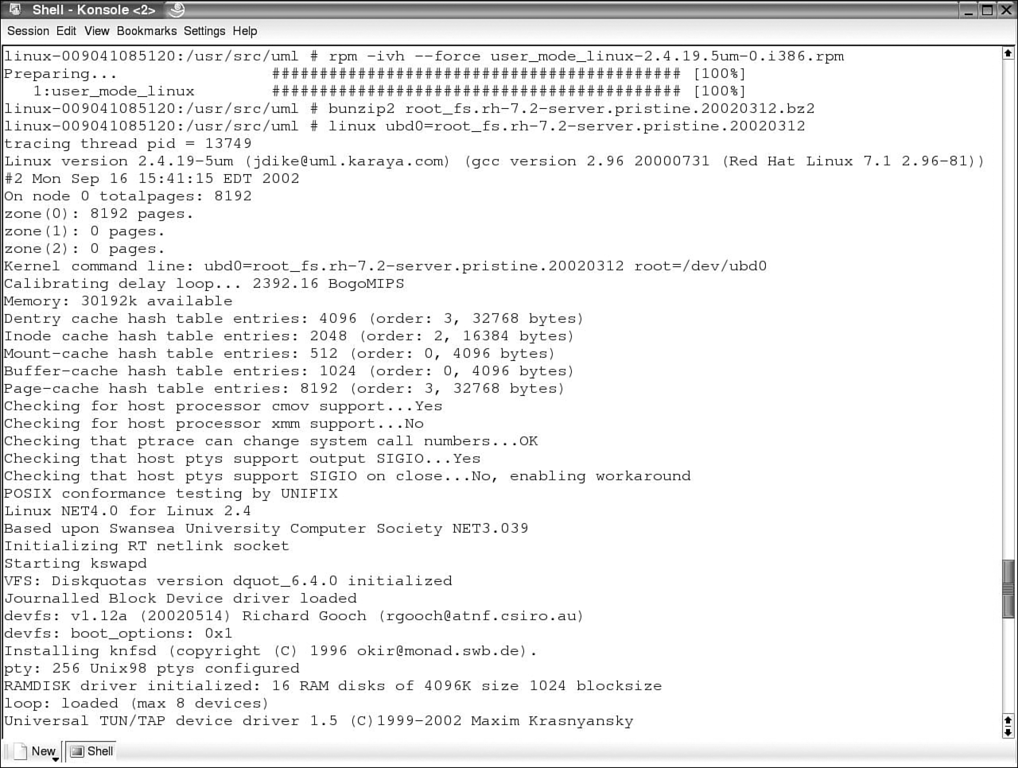
Figure 1. Installing the UML rpm, setting up the root image, and booting the UML kernel.
When the linux command is executed, the terminal shows that a new Linux operating system is booting. Figure 2 shows the booted system, ending with a login prompt. Logging in with the user root and the password root gives you access to the operating system.

Figure 2. The UML kernel booting up.
The login requires the root password to be changed, and bash will be set up. Figure 3 shows UML ready to function as a Linux system.
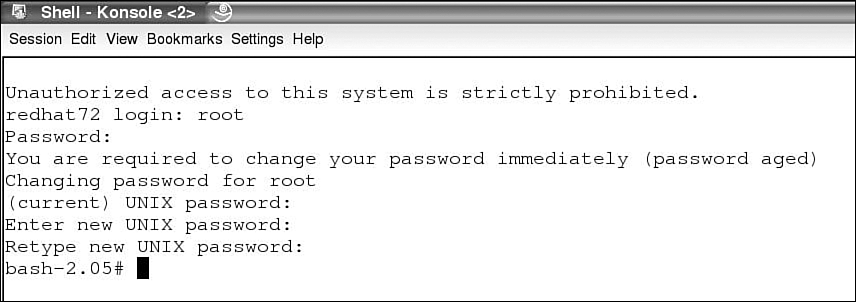
Figure 3. Logging into the UML system.
The next section shows you how to patch, configure, and build a UML kernel.
To build a UML kernel, support for UML must be available in the UML kernel. UML kernel patches are available for many different levels of the kernel. The UML patch is available to be downloaded from the UML web site. The following steps show you how to apply the UML kernel patch to level 2.6.8.1 of the kernel:
Change to the directory where the kernel source is (usually the /usr/src/linux directory).
Use the patch command to apply the kernel change, as shown in Figure 4. The --dry-run option shows whether the patch applies, but it doesn't really apply the patch. If the patch applies cleanly with no rejects, remove the --dry-run option and apply the patch.
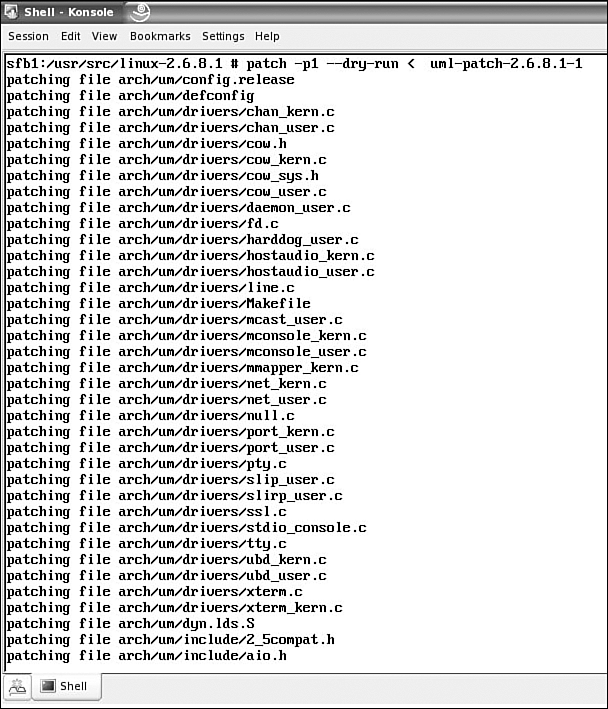
Figure 4. The UML patch being applied to the kernel.
There are no rejects when applying the patch, so the --dry-run option can be removed and the patch is applied to the kernel.
UML is enabled through the UML-specific options menu. If UML isn't enabled, enable it and rebuild the kernel. Figure 5 shows the kernel configuration menu for UML. Fourteen options are available for UML. Other versions of UML might have more or fewer configuration options:
Tracing thread support controls whether tracing thread support is compiled into UML.
Separate Kernel Address Space support controls whether skas (separate kernel address space) support is compiled in.
Networking support adds kernel networking support.
Kernel support for ELF binaries allows your kernel to run ELF binaries.
Kernel support for MISC binaries allows plug wrapper-driven binary formats to run in the kernel. It is useful for programs that need an interpreter to run, like Java, Python, .NET, and Emacs-Lisp. It's also useful if you need to run DOS executables under the Linux DOS emulator (DOSEMU).
Support for host-based filesystems allows for host-based file system support.
Host filesystem allows a UML user to access files stored on the host.
HoneyPot ProcFS is a file system that allows UML /proc entries to be overridden, removed, or fabricated from the host. Its purpose is to allow a UML to appear to be a physical machine by removing or changing anything in /proc that gives away a UML's identity.
Management console is a low-level interface to the kernel; it is similar to the kernel SysRq interface.
2G/2G host address space split causes UML to load itself in the top .5 GB of that smaller process address space of the kernel. Most Linux machines are configured so that the kernel occupies the upper 1 GB (0xc0000000 to 0xffffffff) of the 4 GB address space and processes use the lower 3 GB (0x00000000 to 0xbfffffff). However, some machine are configured with a 2 GB/2 GB split, with the kernel occupying the upper 2 GB (0x80000000 to 0xffffffff) and processes using the lower 2 GB (0x00000000 to 0x7fffffff). The prebuilt UML binaries on the UML web site will not run on 2 GB/2 GB hosts because UML occupies the upper .5 GB of the 3 GB process address space (0xa0000000 to 0xbfffffff). Obviously, on 2 GB/2 GB hosts, this is right in the middle of the kernel address space, so UML doesn't even load-it immediately segfaults. Turning on this option allows UML to load correctly in this kernel configuration.
Symmetric multi-processing support enables UML SMP support. UML implements a virtual SMP by allowing as many processes to run simultaneously on the host as there are virtual processors configured.
Highmem support adds the UML arch support for highmem.
/proc/mm support is used to support skas mode.
Real-time Clock makes UML time deltas match wall clock deltas. This should normally be enabled. The exception would be if you are debugging with UML and spend long times with UML stopped at a break point. In this case, when UML is restarted, it calls the timer enough times to make up for the time spent at the break point.
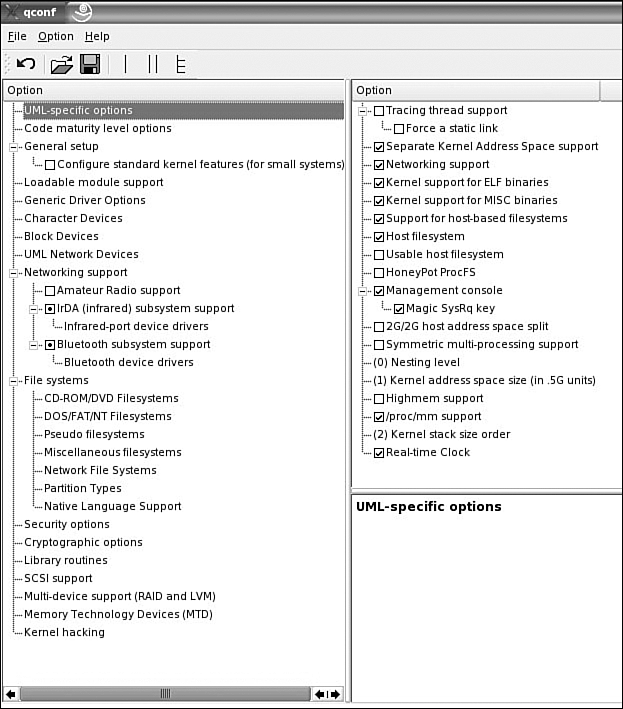
Figure 5. The UML-specific options kernel menu.
The UML menu in Figure 5 shows that all the UML options that are turned on will be built directly into the kernel. A check mark in the configuration menu means that the option will be built directly into the kernel. A period in the configuration menu means that the option will be built as a module for the kernel. No mark in the configuration menu means that the option hasn't been turned on.
UML can be used as a debugging mechanism (source code debugging for kernel-level code using gdb) for systems running on 2.4.x and 2.6.x kernels. This section is focused on using the UML support that is available for the 2.6.x kernel. The 2.6.8.1 kernel is used for the examples in this chapter. The steps listed in the section "Building the Kernel" build the UML kernel that will run on the Linux host system.
Some Linux distributions have added the UML patch to their kernel for both the 2.4.x and 2.6.x levels of the kernel and provide a UML kernel with the distribution. The first step is to check the kernel config and see if UML is enabled. One way to do so is to use the make xconfig ARCH = um command in the directory of the kernel source tree, usually in the /usr/src/linux directory. The UML kernel is enabled on the "UML-specific options" support menu. Enable the UML options and build the kernel.
The UML network devices are enabled on the UML Network Devices menu, as shown in Figure 6. The main menu option is Virtual network device. If this option is enabled, seven transport options are available. Versions of UML other than the one shown here might have more or fewer configuration options.

Figure 6. The UML Network Devices kernel menu.
The following transport types are available for a UML virtual machine to exchange packets with other hosts:
Ethertap
TUN/TAP
SLIP
Switch daemon
Multicast
pcap
SLiRP
The TUN/TAP, Ethertap, SLIP, and SLiRP transports allow a UML instance to exchange packets with the host. They may be directed to the host, or the host may just act as a router to provide access to other physical or virtual machines.
Once the virtual network device is enabled, the following options are available:
Ethertap transport allows a single running UML to exchange packets with its host over one of the host's Ethertap devices, such as /dev/tap0. Ethertap provides packet reception and transmission for user space programs. It can be viewed as a simple Ethernet device that, instead of receiving packets from a network wire, receives them from user space. Ethertap can be used for anything from AppleTalk to IPX to even building bridging tunnels.
TUN/TAP transport allows a UML instance to exchange packets with the host over a TUN/TAP device. TUN/TAP provides packet reception and transmission for user space programs. It can be seen as a simple point-to-point or Ethernet device that, instead of receiving packets from physical media, receives them from the user space program and instead of sending packets via physical media writes them to the user space program.
SLIP transport allows a running UML to network with its host over a point-to-point link.
Daemon transport allows one or more running UMLs on a single host to communicate with each other but not with the host.
Multicast transport allows multiple UMLs to talk to each other over a virtual Ethernet network.
pcap transport makes a pcap packet stream on the host look like an Ethernet device inside UML. This is useful for making UML act as a network monitor for the host. libcap must be installed in order to build the pcap transport into UML.
SLiRP allows a running UML to network by invoking a program that can handle SLIP encapsulated packets.
The UML menu in Figure 6 shows that all the UML options that are turned on will be built directly into the kernel.
Kernel debugging is enabled on the Kernel hacking menu, as shown in Figure 7. Six options are available for UML, as shown in the figure. Other versions of UML might have more or fewer configuration options:
Debug memory allocations has the kernel do limited verification on memory allocation as well as poisoning memory on free to catch use of freed memory.
Debug spinlocks usage has the kernel catch missing spinlock initialization and certain other kinds of spinlock errors.
Enable kernel debugging symbols are included in the UML kernel binary.
Enable ptrace proxy enables a debugging interface, which allows gdb to debug the kernel without needing to attach to kernel threads.
Enable gprof support allows profiling the UML kernel with the gprof utility.
Enable gcov support allows code coverage data for the UML session.
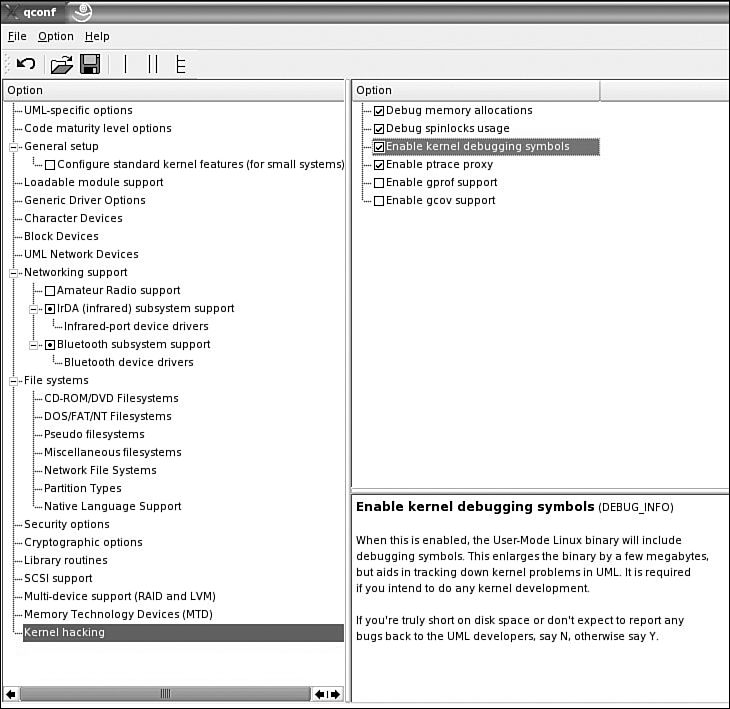
Figure 7. The UML Kernel hacking menu.
To use gdb with the UML kernel, make sure that both Enable kernel debugging symbols (CONFIG_DEBUGSYM) and Enable ptrace proxy (CONFIG_PT_PROXY) are turned on. These compile the kernel with -g and enable the ptrace proxy so that gdb works with UML, respectively.
The UML menu in Figure 7 shows that all the UML options turned on will be built directly into the UML kernel.
UML can be configured to support gcov.
gcov support
gcov allows code coverage to be done on kernel-level code. gcov can help determine how well your test suites exercise your code. One indirect benefit of gcov is that its output can be used to identify which test case provides coverage for each source file. With that information, a subset of the test suite can be selected to verify that changes in the program can be run. Thorough code coverage during testing is one measurement of software quality. For more information about gcov, see Chapter 2, "Code Coverage."
UML also can be configured to support gprof.
gprof support
gprof allows profiling to be done on kernel-level code. Profiling displays where a program is spending its time and which functions are called while the program is being executed. With profile information, you can determine which pieces of the program are slower than expected. These sections of the code could be good candidates to be rewritten to make the program execute faster. Profiling is also the best way to determine how often each function is called. With this information you can determine which function will give you the most performance boost by changing the code to perform faster. For more information about gprof, see Chapter 1, "Profiling."
The following steps show you how to build the UML kernel:
1. Issue the make xconfig ARCH=um command.
2. Under "UML-specific options," select the options that are needed for UML.
3. Under "UML Network Devices," select the options that are needed for UML.
4. Under "Kernel hacking," select the options that are needed for UML.
5. Configure other kernel settings as needed.
6. Save and exit.
7. Issue the make clean command.
8. Issue the make linux ARCH=um command. The result is the binary file named linux in this directory.
If kernel modules are required, they must be installed inside the UML. One way to do this is described next. In this example, the root file system for the UML is called root_fs, and the mount point is called mnt.
9. If modules need to be built, do the following:
Issue the make modules ARCH=um command.
Issue the mount root_fs mnt -o loop command.
Issue the make modules_install INSTALL_MOD_PATH=/path/to/uml/mnt ARCH=um command.
Issue the umount mnt command.
The UML kernel is named linux. For this example you'll copy the UML kernel to the /usr/src/uml subdirectory.
10. Issue the cp /usr/src/linux/linux /usr/src/uml/linux command.
