
Flashkard Printed Output
Hal Stanton's article on FlashKard made me abandon some primitive flashcard software I had been working on. What I wanted now was a way to print the data on, well, flashcards. I was going to write one of my typical hacks--most likely using awk and troff--to print the cards, but I decided to try to work with the XML.
What I mean by work with the XML is I decided to use standard XML tools to format the data for output. I had never done this before, but I knew XSLT was an important buzzword. XSLT stands for XML Stylesheet Language Transformations, and it is a language designed to define transformations from XML to other formats. So, I started reading. Typically, XSLT is used to transform XML into HTML, but there is no restriction on what you can do with it. So I decided to give it a try for my flashcard project.
Having decided to use XSLT, I still needed two more pieces of information before I could continue. First, I had to decide what to transform the XML into. Second, as there would be some program logic involved to place the cards on the page in the right positions, I needed to decide on a general-purpose programming language. After considering the various programming language alternatives--Python being the one that sounded best--I realized that if I simply generated PostScript, I could let the printer itself deal with the placement issues. It seemed strange, but I figured "Why not?".
Having picked PostScript, I sat down to decide how to place the cards on the page. Flashcards need to be double-sided. At first, I thought of printing one side and then running the card stock back through the printer to print the other side. This is a logical nightmare, however, as it is easy to get the paper in the printer incorrectly, have a registration problem or get out of order because of a printer jam.
I decided on an alternative approach that involves another high-tech device called a "glue stick". The idea is to print the front and back of each card on the front of one page, which you then fold in half, glue together and cut into the actual cards. The double layer of paper and the glue make the cards heavy enough to work with without falling apart.
Now, it's time for a confession: this is not a beautiful, finished production system. What it is, however, is something that works and a proof of concept. For a production environment, it is important to define card sizes and fonts in a configuration file. In addition, the message for each side currently is printed in a single line without consideration of size. Line folding needs to be implemented.
Okay, back to work. I picked a 1.5" x 2.5" card size, which makes it possible to get nine cards--both front and back--on one side of letter-sized paper. I set 1" top and bottom margins and .5" left and right margins. In order to make folding and cutting easy, I wanted to print a fold line down the middle of the page--between the front sides and the back sides--and cut marks for the edges of the cards. With this fold, the printing on the back is upside down from the printing on the front. After considering this for a minute, I decided it wasn't important--it simply defined which way to turn over the card when using them.
Everything, that is, the PostScript and the the XSL, is in one file that you can download here. You can ignore the XML stuff for now. Note that if you try to display this in your browser, it does not display correctly because of the XML. You can see the sample output below.
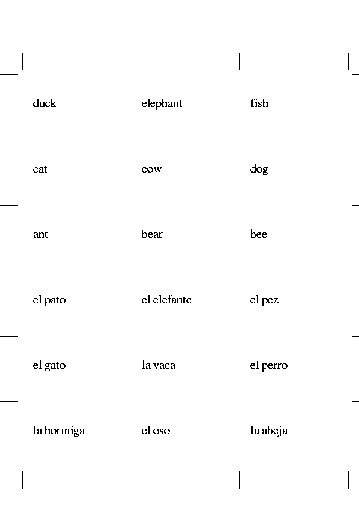
If you have never worked in PostScript, get ready. PostScript is an RPN (Reverse Polish Notation) language. If you have ever used an HP calculator, you know what I am talking about. If not, the quick explanation is that you do things by putting items on a stack and then operating on that stack. For example, to add two numbers, you place the numbers on the stack and then execute the add operator. The operator then fetches the numbers, adds them and puts the result back on the stack. Note: I hate RPN languages.
Disclaimer aside, PostScript actually is a very clean language and not a bad one to do the work we need to do. The way you work with PostScript is to describe everything you want to put on a page--characters, lines, filled-in areas and so on--and then tell it to print the page. That means we don't have to remember a lot of stuff and then work down the page sequentially; we simply move around and put what we want on the page.
In PostScript the basic unit of length is 1/72 of an inch. Personally, I an not very excited about working in such units, so I defined a function, called inch, that takes the current value on the stack, multiplies it by 72 and puts the value back on the stack.
/inch { 72 mul } def
This way, I add the word inch after a number and it is multiplied by 72.
If you look at the cutmarks function, you can see a whole bunch of moveto and lineto statements. As you might expect, these operators take two values off the stack--an x and a y coordinate, where the 0,0 is the lower left corner of the page and a positive move to the right or up--and either move the current location to the specified coordinates or draw a line from the current location to the specified location.
Going down to the startit function, you can see all the setup work for the page. I define three, nine-element arrays--x, yf and yb--that contain the x and y coordinates (yf for front, yb for back) of where to place the text for each of the nine cards. (Note that arrays in PostScript are indexed starting at 0.) The other two initialization steps are to define the font and font size to be used for the text and to set the card number counter cardno to 0.
Two other utility functions are defined, cardstep and pageout. pageout checks the current card number. If it is greater than 0, pageout draws the cutmarks--by calling the cutmarks function--and then prints the page using the showpage builtin. cardstep increments the card counter. Then, if the counter is greater than 8, cardstep calls pageout to print the page. It then resets cardno to 0 to prepare for the next page.
The last two functions are front and back. They move to the correct location on the page by indexing into the location arrays. They then print the top value on the stack using the show builtin. The back function calls cardstep to move along to the next position. Thus, the following two lines would print a card:
(Front Side) front
(Back Side) back
I said two lines, but the spacing isn't important in PostScript. You would get the same result if this information was on one line. The parenthesis are used to delineate the string that is being placed on the stack.
All of the lines starting with a slash (/) have just-defined functions. The real program starts with the line startit, which calls the startit initialization function. Next, a series of calls to front and back must be entered, followed by a call to pageout to output the last page, if there are any cards on it.
I tested the PostScript part with some sample data, and it worked fine. So, on to the next step, which is translating the XML from FlashKard into what is needed to drive the PostScript code. Two pieces are needed here. First, I need the XSL that I have to write. Second, I need a program to read the XSL and the XML files from FlashKard and then output the PostScript to send to the printer.
The easy part was finding the program; xsltproc is exactly this program. One thing down. It now was time to write something in a language I had never seen before. But, could it be worse than writing in an RPN language?
As it turns out, there really isn't much to do. After some XSL boilerplate (<xsl:stylesheet ...>), I needed to define the output format to be text, as HTML is the default. What text means is "anything else". This is done with
<xsl:output method="text">
The first thing I want to output is the PostScript program itself. This is done by including it immediately after a <xsl:template match="/"> tag. The match of / matches the whole XML, so it is processed at the start of the file. Note that I have put the %!PS on the same line as the XSL tag. This is necessary so that the printer can see this as the beginning of the first line of data. Otherwise, the print spooler thinks this is more text and prints rather than interprets the PostScript.
There is one other XSL tag before the matching </xsl:template> tag, which is <xsl:apply-templates/>. This tells xsltproc that any other matching template is to be applied here.
One other template has a match expression of match="e". This matches the block describing an individual card, and it is explained in a comment to the FlashKard article. Within that block is an o block for the original language entry and a t block for the translation. Using the value-of feature, I grab these values, put them in parenthesis and follow them with either front or back.
That's it folks. Assuming the XSL in in ks.xsl, entering the command
xsltproc ks.xsl creatures.kvtml | lpr
gives you your first set of flashcards.
As I mentioned before, this is a proof of concept. Generalizing the PostScript, dealing with line folding and writing a shell script wrapper for this command line would clean things up and make a useful program.
Copyright (c) 2004, Phil Hughes. Originally published in Linux Gazette issue 98. Copyright (c) 2004, Specialized Systems Consultants, Inc.
Phil Hughes, Group Publisher of SSC, likes to get his hands dirty every now and then. But, you won't find him driving a car with an automatic transmission or using Emacs.

