
Migrating to Drupal
Drupal is often mentioned in discussions about blogging tools or Web-based forum software. Sure, you can run a blog or an on-line forum using Drupal, but that is only part of what Drupal can do. Drupal is better described as a framework that provides an infrastructure for on-line collaboration and communities. It can be used to run corporate Web sites, intranets, news portals and many other types of Web sites.
The Drupal Project has its roots in an internal message board system built by University of Antwerp student Dries Buytaert for his student dorm. In 2001, Dries released the software as an open-source project named Drupal (pronounced “droo-puhl”). Others started using Drupal and began contributing to the project. Drupal is built using open-source technologies: the PHP programming language and the MySQL or PostgreSQL databases. Licensed under the GNU General Public License (GPL), Drupal can be downloaded and used for free. As with many successful open-source projects, Drupal is maintained and developed by a thriving user and development community. Five years old in January 2006, Drupal has evolved into a robust content management platform.
Working at a Web development firm, we have successfully built many Web sites for our clients based on Drupal. In this article, we share what we have learned, and we tell the story of our most complex Drupal project to date.
Planetizen is a community Web site for urban planners, architects, developers, environmentalists and other professionals. It offers daily news summaries, editorials, jobs and many other services. Launched in 2000, Planetizen has grown into a popular Web site with a large international audience. To manage a constantly updated Web site, such as Planetizen, a content management system (CMS) is a must. We had built our own custom CMS using PHP and MySQL in 2000. As the Web evolved, we wanted to add new features, but doing so meant expensive in-house development. So, we began looking at alternatives.
By this time, numerous open-source CMS projects had matured and offered many of the features we wanted to add. Migrating to a pre-built open-source CMS made sense. We could cut down on development time, add the features we needed and benefit from all the advantages that come with using open-source software. Because we already had experience using PHP and MySQL, we searched for open-source CMSes built using those technologies. After evaluating and testing several different packages, we selected Drupal. (See “Seven Criteria for Selecting Open Source Content Management Systems” in the on-line Resources.)
Drupal has many of the features you would expect from a modern CMS, such as user management; access control; work flow; separation of content, presentation and logic; and Web-based editing and administration. Drupal appealed to us for many reasons—here are the top five:
5) Sensible URLs and URL aliasing: many CMSes generate long, convoluted URLs that are difficult to share via e-mail or over the phone. Drupal arguably generates the sleekest URLs in the CMS world. Most Drupal URLs are in the format http://www.planetizen.com/node/156. Also, Drupal's URL aliasing feature makes it is easy to create URLs that make sense to readers. Using URL aliasing, the above URL can be mapped to http://www.planetizen/about/faq.
4) Syndication and aggregation: community Web sites, such as Planetizen, benefit from information flowing in and out of the site. Content stored in Drupal easily can be syndicated to readers or other Web sites using RSS feeds. Also, a news “aggregator” to pull in syndicated content via RSS feeds is built in to Drupal.
3) Modular architecture: Drupal's functionality is organized into modules that can be switched on and off. This approach makes it possible to build different kinds of Web sites with Drupal. If we were going to invest a lot of time into learning a CMS, it might as well be one that can be adapted for other projects as well.
2) Developer-friendly: we anticipated the need to customize any CMS we selected. We felt comfortable with Drupal's elegantly designed architecture and the consistency of the code. It was relatively easy to understand a feature and start making modifications. Features such as the devel module that displays database queries and variables for each page later proved to be invaluable in migrating to Drupal.
1) Taxonomy: our single-most important reason for selecting Drupal was its powerful taxonomy system for categorizing content. It is possible to create a set of descriptive terms and associate content with those terms. The taxonomy system makes it possible to adapt Drupal for a diverse set of content management needs.
You can download the latest stable release package from the Drupal Web site. Installing Drupal is a fairly straightforward process. It involves creating a MySQL database, importing tables, copying files, setting file permissions and editing a configuration file. Most of the Drupal options can be configured using its Web-based administration interface. Refer to the INSTALL.txt file available with the downloaded package for detailed installation instructions. Additional configuration instructions are available on the Drupal Web site.
In Drupal, most of the content is stored as a node. A node could be a page, a poll or one of the many node types. For example, the page node has a title, body, author, date and some basic attributes. Some modules provide their own node types, which may have additional attributes.
The visual presentation of content is controlled by a theme. Drupal comes with a selection of themes, and it is easy to create your own. Most themes have a central content column and left and/or right sidebar columns. Sidebars can contain blocks of information. Filters control the input format used to store text in nodes or blocks. For example, you can store content in filtered HTML, which limits the HTML tags that can be used. You even can store PHP code snippets.
The basic Drupal install leaves you with a usable Web site to which you can start adding content immediately. But, what you see after installation is only the core functionality. Drupal offers much more. In most cases, you will want to tailor Drupal to your particular content management needs. This is where Drupal's flexibility can become overwhelming. After building several Web sites with Drupal, we believe the key to creating successful Drupal implementations—“recipes” if you will—lies in understanding the interplay of five Drupal “ingredients”: module selection, configuration, access control, taxonomy and theme.
A module is additional code that extends Drupal's functionality. Drupal comes with a set of core modules, and additional modules can be downloaded and installed as needed. The Drupal Web site lists a large collection of contributed modules created by the community. If you need a particular feature, look for a module that offers it. Several modules may offer similar features or even different implementations of a single feature (Figure 1).
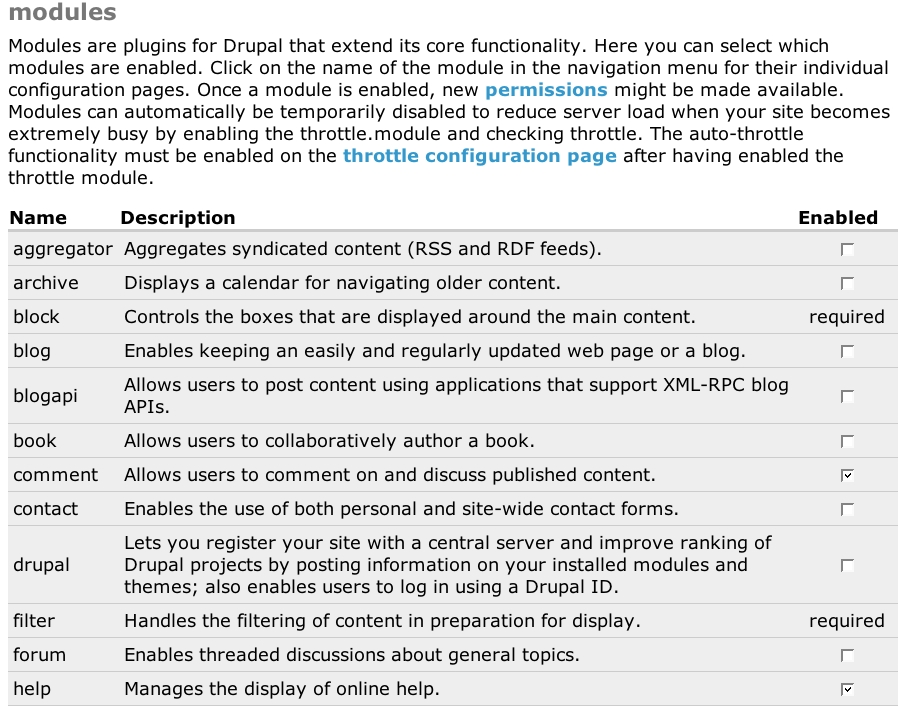
Figure 1. Activating Drupal Modules
By changing configuration options for individual modules and site settings, you can substantially alter the way Drupal behaves. Many modules add features in blocks that appear in a node's sidebar. Often a particular CMS behavior or work flow that you need may just be a matter of configuring modules in a certain way. Be prepared to spend some time experimenting with different settings (Figure 2).

Figure 2. Configuring Drupal
Accounts allow you to control what users can see and do on a Drupal Web site. The first user account is considered to be a root account with complete administration privileges. For the other users, you can set what they can do by assigning them to roles. Drupal comes with two roles: anonymous user and authenticated user. You may want to add additional roles, such as editor or manager, and specify what those roles can do. A user can be associated with one or many roles (Figure 3).
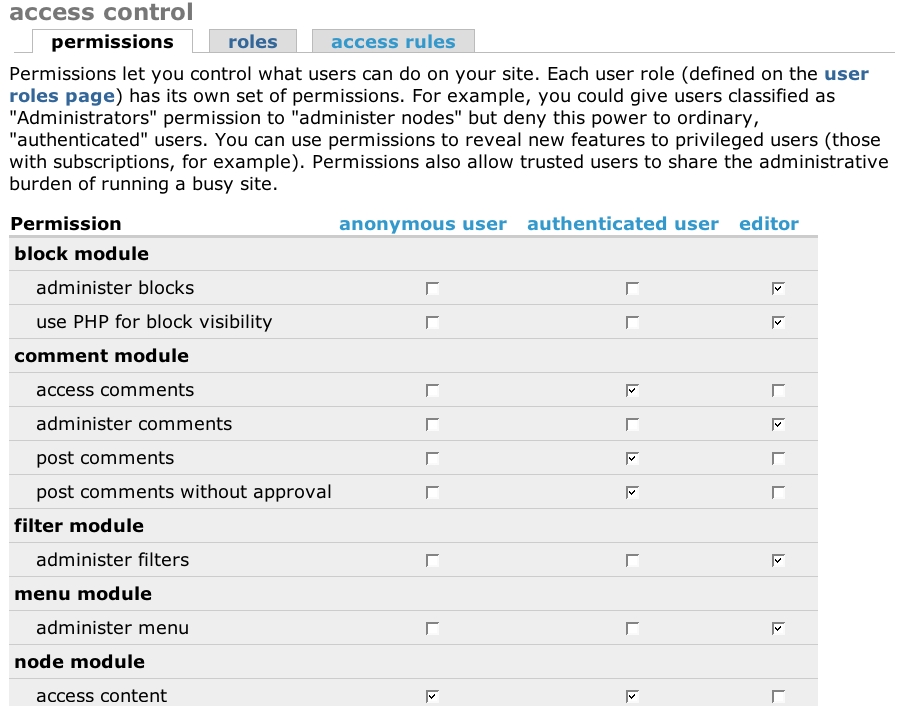
Figure 3. Setting Permissions for User Roles
Drupal's taxonomy system enables you to associate a node with one or many descriptive terms. You can create multiple sets of terms called Vocabularies. Vocabularies can be flat or hierarchical lists. For each vocabulary, you can specify which node type it applies to. This combination can help you create a classification system for content that suits your particular information architecture needs. Many other features and modules depend on the taxonomy. For example, you can generate navigation elements, control access to content or switch visual presentation based on taxonomy. Take the time to develop good taxonomy vocabularies and design them so you can expand them easily in the future (Figure 4).
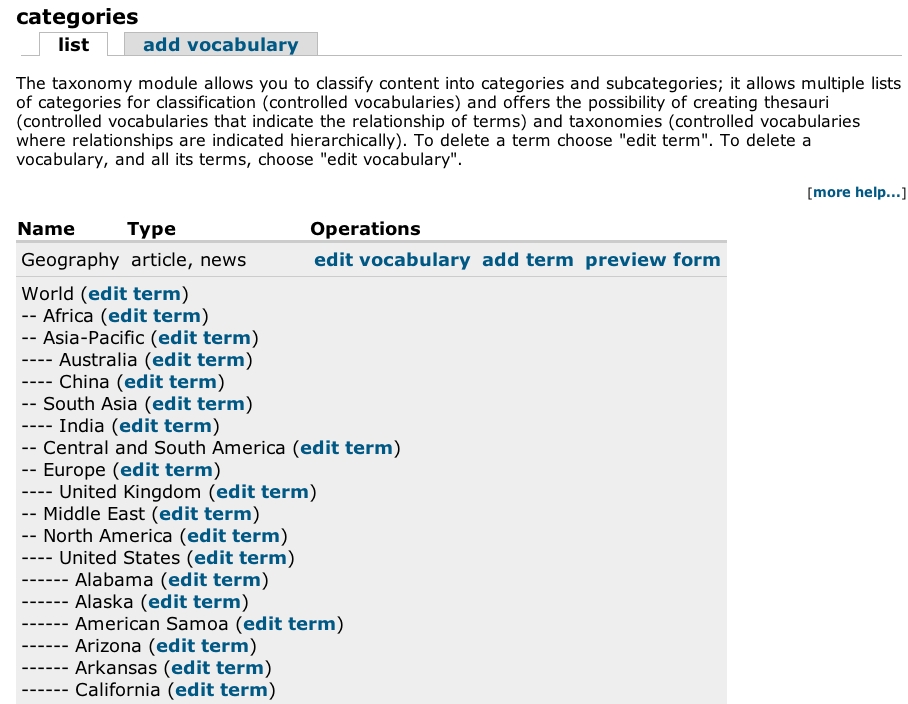
Figure 4. Planetizen's Taxonomy
Drupal allows you to customize the layouts of pages easily using an extensible theme system. A convenient way to build a custom theme for your Web site is to base it on one of the themes packaged with Drupal. You can use different themes for certain users or in association with taxonomy terms.
Various combinations of the above five ingredients will result in surprisingly diverse solutions. Search the Drupal Web site for “recipes”. If you still cannot achieve what you need, you can customize Drupal or build custom modules.
We started Planetizen's migration by making a list of all the features we would need and identifying which Drupal modules would provide that functionality. This required testing different modules and configuration settings. We identified requirements that could not be met using Drupal modules. These features would require custom development. We then developed the taxonomy, defined user roles and permissions, and decided on the work flow. To maintain the original look and feel in the Drupal-based version, we developed a custom theme. Moving to a new CMS is also a good time to rethink current business logic and improve it. We took this opportunity to prune out less-popular Web site features.
The biggest migration challenge was pulling in five years' worth of data into Drupal—more than 15,000 news stories. Drupal story and page node types provided only basic title and body attributes for a node. Each news item stored in Planetizen had several other attributes. What we needed was our own custom content type. Drupal's flexinode provides an easy way to create custom content types without programming. Unfortunately, it turned out that the flexinode route would be an inefficient solution for us. Using flexinode, each Planetizen news story would have taken up to eight separate table inserts as opposed to the standard single insert, due to the way flexinode stored data.
Drupal's wealth of third-party modules came to the rescue. We discovered that a book review module was very similar to what we needed. By examining its code, we were able to customize the book review module to create the content types we needed. We then created custom scripts to insert Planetizen's data into the appropriate fields directly in Drupal's MySQL tables.
We did encounter some limitations with Drupal. One limitation was the mechanism for maintaining time zones and daylight savings time in Drupal. Our workaround was to use only the PST/PDT time zone and manually update the time zone when it was time for a daylight savings time change. This is a known issue and is being addressed by developers.
Flexinode makes it possible to create custom node types without programming, but as we discovered, it has its limitations. The alternative is to develop custom node types as modules. Drupal provides a solid foundation for creating your own modules, but it requires programming experience. The Drupal team is addressing this issue with the Content Construction Kit (CCK), an effort currently under development that aims to make it easier to create custom node types.
One problem we ran into had nothing to do with Drupal. Our production Web server was running an older version of PHP that could not be upgraded, due to some hosting restrictions. This caused the search module to fail; however, we were able to circumvent this problem by modifying the search module. We thanked ourselves once again that we were using an open-source CMS.
Security patches and core code updates for Drupal are released on a regular basis. This is a good thing, but upgrading customized Drupal installations can be cumbersome. We recommend limiting customizations to specific modules or developing custom modules. Also, using a version control system, such as CVS or Subversion, can help in tracking your customizations against official Drupal releases.
We launched the new Drupal-based Planetizen Web site in September 2005 and received positive feedback from readers. Since the launch, we were able to add new sections and features without having to develop them from scratch (Figures 5 and 6).
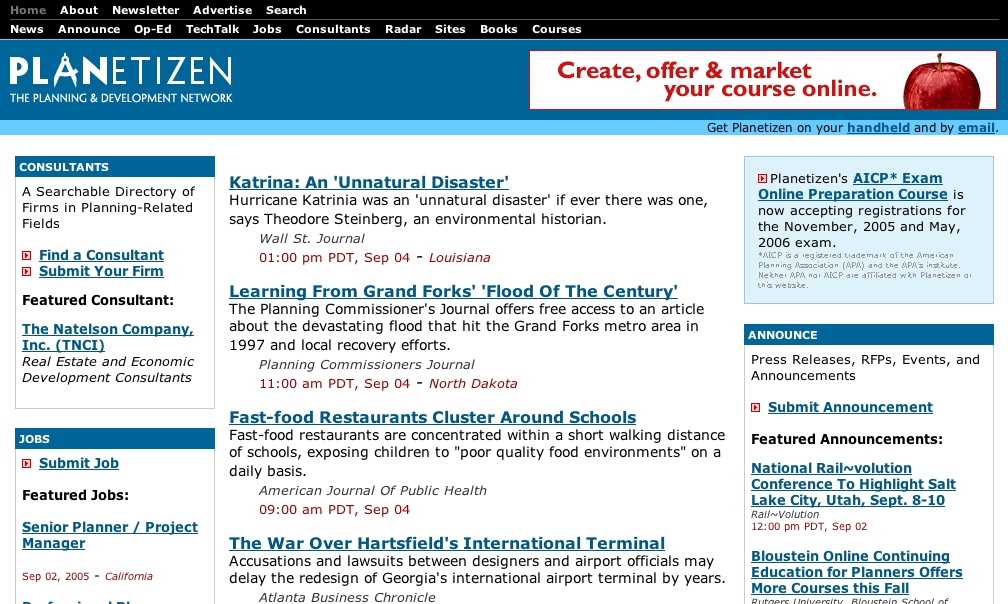
Figure 5. Planetizen before Migration
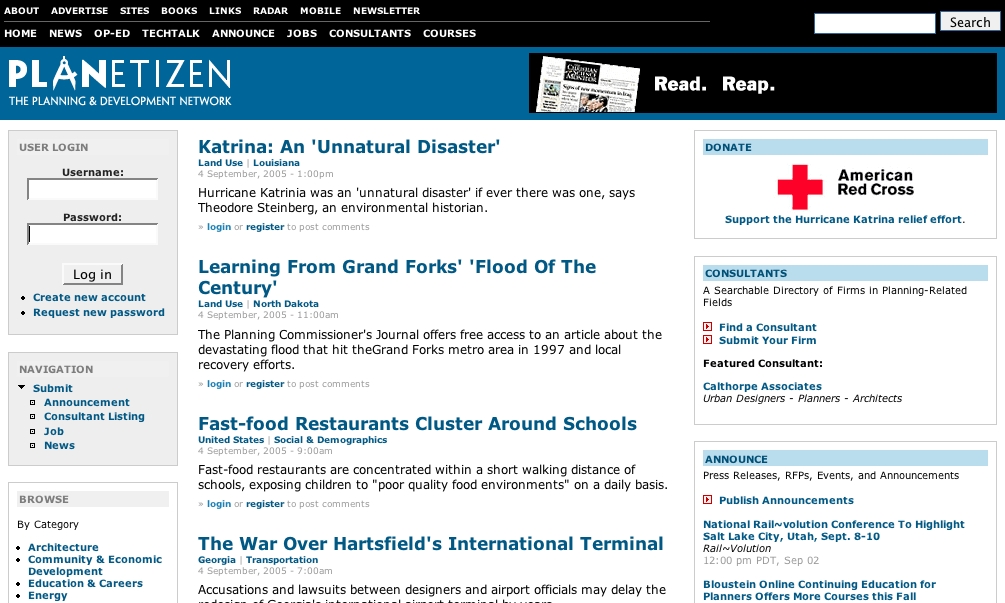
Figure 6. New Drupal-Based Planetizen
As we write this article, Drupal's next release, version 4.7.0 is in beta. Improvements include a better default theme engine, refined search functions, improved PostgreSQL support, themeable forms, Ajax-enhanced administration interface and a better upgrade script. Also promising is the development of the CCK that could, along with actions, workflow and views modules, make Drupal even more flexible and powerful.
Some people in the Drupal community predict that the trend to watch in 2006 is the emergence of application-specific Drupal distributions—re-packaged versions of Drupal catering to a particular need. One such distribution is CivicSpace, a community organizing platform popular with grass-roots organizations, nonprofits and political campaign Web sites. CivicSpace provides a Web-based installer and a configuration wizard that sets up Web sites for common-use scenarios. It includes a selection of Drupal modules relevant to running community organizing Web sites so you don't have to research, download and install individual modules. CivicSpace also includes CiviCRM, a Web-based constituent relationship management application that offers features, such as on-line fund raising, contact management, tracking volunteers, donors and clients. Efforts are underway to develop similar distributions for educators and artists.
We have used Drupal for several different types of projects, including corporate, collaborative, intranet and academic Web sites. What makes Drupal so versatile?
According to its founder Dries Buytaert, Drupal aims to provide “a solid base to extend and implement custom content management solutions”. This may be one of the reasons for its popularity. It strives to be a content management platform that enables developers and users to customize their own unique solutions based on Drupal's core engine. Drupal's modular architecture has resulted in several interesting community-contributed modules. These modules often connect Drupal to other popular programs or services, opening up interesting and unexpected possibilities.
It's true that non-programmers can achieve a lot with Drupal simply by tweaking configurable options. Those with modest HTML or PHP experience can customize themes and layouts or use snippets of code shared by the community on Drupal's Web site. And, of course, PHP experts can create their own custom modules and tweak Drupal as much as they like.
However, its extensibility and flexibility also have made Drupal more complex. The solution you are looking for may be found in a particular combination of modules, configured in a certain way, using a well-crafted taxonomy and carefully thought-out user permissions. Drupal is capable of addressing complex content management needs, but tapping its potential does require a deep understanding of how it works.
What is admirable about Drupal is that it makes it possible—to a certain degree, without writing any code—to shape a diverse range of Web-based solutions built on the same core content management platform. And, it achieves this while remaining true to its stated principles of standards-compliance and collaborative open-source development. Drupal may not have a perfect solution for each problem, but it can meet a lot of different content management needs reasonably well. Ultimately, what matters is that Drupal helps people, whether they are programmers or non-programmers, large organizations or individuals, tap into the collaborative potential of the Web.
Resources for this article: /article/9264.
Abhijeet Chavan is the Chief Technology Officer of Urban Insight, Inc., a Web development consulting firm. He also is the co-founder and co-editor of Planetizen.
Michael Jelks is a Senior Developer at Urban Insight, Inc., with more than 37 dog years of experience implementing Web-based applications with Perl, PHP and MySQL technologies.
