
Top Ten Tips for Getting Started with PHP
There is little doubt that PHP is one of the easiest languages to use to start generating dynamic Web content. PHP, in combination with Linux, Apache and MySQL is so popular, it has spawned the expression LAMP (Linux, Apache, MySQL and PHP). Many pages go on-line without any need for their authors to set up or program anything themselves. They simply find some pre-cooked piece of code with a search engine, paste it as is into an HTML template, upload everything to their Web server, and they are done.
Or so they believe. Even previous programming experience may not help much, because coding for a desktop or for the Web are two very different paradigms. Therefore, pretty often, when people cut and paste PHP code, nothing happens (nothing good, at least). The pages load very slowly or worse, the programmer's choice of PHP code opens a new security hole.
The tips below are written especially for users who already know the basics of programming, but who have never touched PHP before. They might be roughly divided in three categories: how to start correctly, how not to hurt yourself and, finally, how to make their code more efficient. Due to space constraints and the fact that there already is plenty of good on-line and paper documentation for PHP, most tips explain only what to look for and why.
One common source of confusion for PHP beginners is to upload their first Web page on some server and see only the PHP/HTML source code in the browser instead of the expected content. This happens because the Web server doesn't recognize the file as something that should be passed to the PHP interpreter. The reason for this is that the system administrator forgot to associate the PHP file with the PHP interpreter. You can do this in the Apache configuration file or in a local .htaccess file. Here is a sample configuration line:
AddType application/x-httpd-php .php3 .php
As a matter of fact, it is possible to know how things stand simply by uploading this really short page to your Web space:
<HTML>
<HEAD>
<TITLE>PHP Configuration Check</TITLE>
</HEAD>
<BODY><? php phpinfo() ?>
</BODY>
</HTML>
With any luck, the result will be similar to what is shown in Figure 1. The phpinfo() function prints out how PHP was compiled and the value of all configuration variables. This function gives you a lot of useful information. Its output probably will be the very first thing you'll be asked for whenever you seek support on an on-line PHP forum.
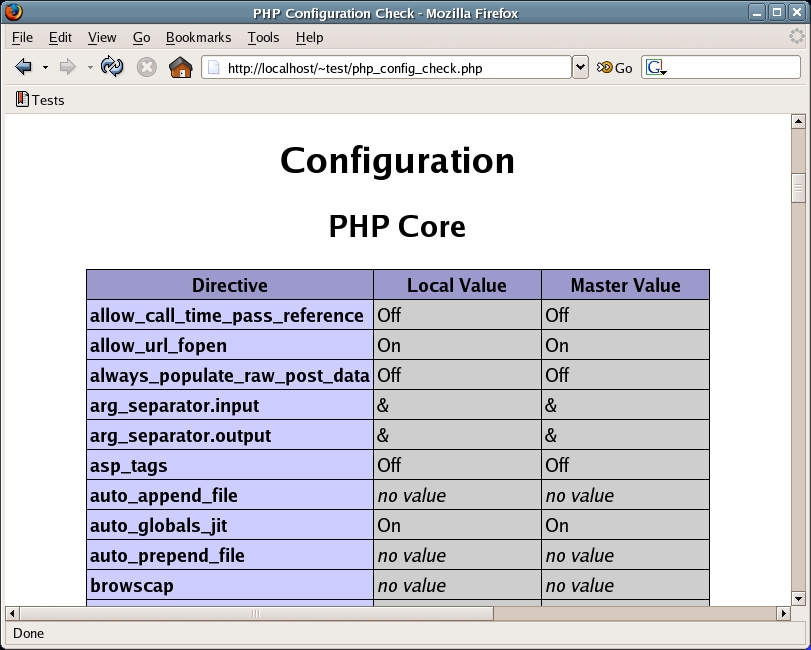
Figure 1. Sample PHP Information Generated by the phpinfo() Function
In order to speed up debugging, you can tell both PHP and the Apache Web server which errors must be reported and when. The error_reporting variable in the php.ini configuration file can be seen as a series of (bit) flags. Each of them can be set individually to detect (or not) a specific category of errors. This instruction, for example:
error_reporting = E_ALL
sends anything from simple warnings to serious bugs to the browser, but only if the other variable display_errors is turned on. General PHP settings in the php.ini file can be overridden at the Web server level. When using Apache, the instruction equivalent to the one above would be (in httpd.conf):
php_flag  display_errors      on
php_value error_reporting	2047
Should you have no access to the PHP/Web server configuration, as often happens, the same result can be accomplished by adding this command to your scripts:
error_reporting(E_ALL);
Speaking of Web servers, remember also to check their error logs to know exactly which line of code caused a script to crash.
If a script still fails after all these tricks have ceased to find any error, almost surely the bug is in the script logic itself. Somewhere, some variable is assigned a value that you thought not possible for it, and this confuses the rest of the code. This also applies when the variable is actually some SQL statement built on the fly and passed to a database server.
The solution is to display that variable on your browser. You can do this easily with the print() instruction normally used to send HTML code to the browser. The die() statement does the same thing as print(), but it also stops the script immediately afterward.
You can generate and transmit any kind of HTTP header before even starting to build the actual Web page. However, you must remember that header() has to be called before any HTML code or PHP output, including blank or empty lines! Code like this, for example:
<?php /* any PHP command(s) here */ ?>

<?php header("Content-type: image/png"); ?>
will not work. The mere presence of the empty line between the two encoded PHP statements will cause PHP to transmit standard HTTP headers, which almost always will not be what you wanted (otherwise you would not have used that function). Note that the blank line may even be...in another file. That is, the same thing will happen if you load PHP code from some external file that doesn't end exactly with the closing ?> PHP tag.
This is a frequent cause of headaches for programmers who build sites that use cookies. The only way to make cookies work is to handle them before your PHP program sends header information. If you don't realize that a simple blank line sends header information, you can stare at your code for hours wondering why you are having problems with cookies. After all, you do handle cookies before you deliberately send the header. What you don't necessarily notice is that there's a blank line in your program (or included file) that is sending headers without your knowledge, which is why your cookies don't work.
You should always validate data that your pages receive from the Web. JavaScript routines that validate form input on the user browser are useless security-wise. Nothing prevents a cracker from sending malicious data directly to your code. Imagine a PHP shopping cart that can show all the items below the $HIGHEST_PRICE decided by the user. If, without previous checks, you merrily performed a database query with a $HIGHEST_PRICE whose value is something like “delete * from my_database;”, don't complain when your on-line store looks empty!
You can validate data using a combination of three techniques. The first is to analyze the data with regular expressions that explicitly define only the formats that are allowed; a phone number or year of birth, for example, can contain only digits, so pass it through the function is_digit().
The second is to use other functions like EscapeShellCmd(), which can block “data” from executing unwanted system commands, or mysql_escape_string() on variables that must be inserted into an SQL statement.
The last type of validation strictly depends on the actual meaning of a variable and the context in which it is used. Only you can help yourself here. For example, 5555555 is made only of digits, but (in North America) it is not a valid phone number. It should be allowed only if the user declared to be from another country. Similarly, although 18 is a perfectly valid $AGE, a script offering discounts to senior citizens should refuse it, right?
E-mail addresses are particularly troublesome from this point of view. There are several functions that validate their syntactical correctness, like the one at www.zend.com/tips/tips.php?id=224&single=1. They do nothing, however, to guarantee that an address does belong to the person who sent it, or that it exists at all, such as Luke.Skywalker@whitehouse.gov. Well, it's probably a safe assumption that there is no Luke.Skywalker in the White House, anyway. Always ask users to reply to a confirmation message or open a socket to their mail server to check whether they exist.
What will appear in your browser if you load this very simple PHP code?
<? php
$HOME = 'a sweet place';
print "1: $HOME<br>"; // double quotes
print '2: $HOME<br>'; // single quotes
?>
The answer is these two lines of text:
1: a sweet place
2: $HOME
Double quotes make PHP replace any variable inside them with its current value. The content of single quotes is treated like one monolithic, opaque block that can be copied or printed only, not modified. The same applies when you use quotes to build the keys of an associative array. $my_array['$HOME'] and $my_array[“$HOME”] will be different elements. That's it. Still, it is very easy to forget this distinction and use one when you meant the other, or no quote at all. Therefore, when something doesn't have the value you expected, check the quotes first.
Because user data cannot be trusted, PHP can be set up to escape with slashes automatically with all the $_POST sent by an HTML form to the script. Actually, even internal data could contain slashes, to escape special characters, which must be removed before processing them. The solution is to use the stripslashes function, as in this example straight from the on-line PHP manual:
<?php
$str = "Is your name O\'reilly?";
// Outputs: Is your name O'reilly?
echo stripslashes($str);
?>
As stated above, PHP is used together with MySQL so often that the LAMP acronym is one of the most well-known combinations in Web design. Consequently, one of the best ways to write faster PHP scripts is to learn MySQL well enough that it works as much as possible instead of PHP. These two snippets of code illustrate the concept:
<?php //find all the books that Asimov wrote after 1980
$sql = "select YEAR, BOOK from MY_BOOKSHELF where AUTHOR LIKE 'Asimov' ; ";
  if ($sql_res = mysql_query("$sql")) {
    while ($r  = mysql_fetch_array($sql_res)) {
      if ($r[YEAR] > 1980) {// print the book title ;}
   }
?>
And,
<?php //find with MySql all the books that Asimov wrote after 1980
$sql = "select BOOK from MY_BOOKSHELF where AUTHOR LIKE 'Asimov'  AND YEAR > 1980;";
  if ($sql_res = mysql_query("$sql")) {
    while ($r = mysql_fetch_array($sql_res)) {
      // just print all the returned titles ;
}
?>
The second version will run much faster than the first, because database engines are designed to select as quickly as possible all and only the data matching any combination of criteria. They'll always be much faster than PHP is in this kind of task. Therefore, make sure that as much as possible of your selection logic is inside the SQL query, not in the PHP code that builds and uses it. Of course, this whole tip applies as is to any other database engine you would use with PHP.
Line endings in text files are encoded differently on each family of operating systems. Binary files, such as images or compressed archives, are much worse, in the sense that even one corrupted character can make the whole file useless. Practically speaking, this means it is up to you to write code that will manage file contents in the same way on any platform you might use. This remains true even if you are sure that you and your Web server will always and only run GNU/Linux. Otherwise, you could find no error in your image or text processing code until you use it to upload a file from the Windows or Apple computer of a friend!
As far as PHP is concerned, the solution is to make proper use of the t (text mode translation) and b (binary) flags of the fopen() system call. The gory details are at www.php.net/function.fopen. Note that the page explicitly suggests: “for portability, it is also strongly recommended that you re-write code that uses or relies upon the t mode.”
Web pages still are mostly made of text, and the same is true for many databases. This is why optimizing text analysis and processing is one of the easiest ways to make all of your scripts run faster. Regular expressions are made to order for such jobs, but they look like hieroglyphics and may not even always be the optimal solution. PHP, although not going to the same extremes (uh, we mean power and flexibility of Perl), has more than one function working just like regular expressions, only much quicker. We refer to str_replace(), strcmp(), strtolower(), strtoupper(), strtr(), substr(), trim(), ucfirst() and several others. Take some time to study them in the manual, it will be well worth it.
A sure way to make the source of any Web site unreadable and difficult to update is to interlace large chunks of PHP and HTML code, even if each piece of PHP is used only once in the page, as in this example:
myfile.php>
<!-- lots of HTML code for static header, logo, menus...>
<?php lots of PHP code generating a list of the latest news ?>
<!-- lots of HTML code for the central part of the page...>
<?php lots of PHP code creating a per-user list of the
   most popular pages ?>
<!-- lots of HTML code for the user feedback form...>
Instead of making this error, encapsulate every piece of PHP code in one or more functions, then put them all in one separate file (without any HTML code), which will be loaded with the include_once command. The result will be much cleaner and easier to maintain:
myfile.php>
<?php include_once ("common_code.php"); ?>
<!-- lots of HTML code for the static page header, logo,
menus...>
<?php show_latest_news (); /* only one function call */ ?>
<!-- lots of HTML code for the central part of the page...>
<?php show_most_popular_pages (); /* only one function call */ ?>
<!-- lots of HTML code for the user feedback form...>
Anther big advantage of this approach is that, by simply including common_code.php as shown above, any page of your Web site will be able to use those same functions. Even more important, should any function be modified, the new version would be available immediately in all the pages.
Last but not least, all PHP functions must return acceptable data to the code that called them. The tricky part of this apparently superfluous statement is the fact that the meaning of acceptable depends on the whole script, and it may be different at any time. Here is a very dumb, but effective example of what we mean:
function subtraction($A, $B) {
	$diff = $A - $B;
  	return($diff);
}
   $C = 1/subtraction(3, 3);      // ERROR! Division by Zero!
   $D = 1/(1 - subtraction(3,3);
Although calculating $C will make the script crash, calculating (with the same operands), $D will not. The point is that before doing anything with a variable, you should check that it has an acceptable value. In the example above, this would mean assigning the subtraction result to an auxiliary variable and proceeding with the division only if it is non-null.
It is even more important to check return values from system calls, that is, the built-in functions provided to allow interaction with external processes and files. Should you forget to check a return value, data could be thrown away without anyone noticing, as in this example:
<?php
$HANDLE = fopen("newuser.txt","w")); // open a file
fwrite($HANDLE, "New User Data");    // write to it
?>
If fopen fails (because, for example, the disc is full or you had no permission to write) the New User Data is lost for good. Before writing, check that $HANDLE is not null:
<?php
if (!$HANDLE = fopen("newuser.txt","w")) { die "File access failed: newuser.txt"; }
fwrite($HANDLE, "New User Data");
?>
Happy PHP coding!
Marco Fioretti is a hardware systems engineer interested in free software both as an EDA platform and, as the current leader of the RULE Project, as an efficient desktop. Marco lives with his family in Rome, Italy.
