
Fat Man and Little Boy
This month, we're pitting David vs. Goliath. In one corner, we have a massive 70 lb workstation with a pair of dual-core Opteron processors. In the other corner, sits a lithe little notebook with a single Pentium M. It may seem like apples versus oranges, but as the test results show, sometimes looks can be deceiving.
Monarch Empro Custom Workstation
Processors: 2 x Opteron 280 Dual Core
Memory: 4GB PC-3200
Storage: 4 x Western Digital 10K 74 GB SATA Raptor (RAID 10)
Graphics: PNY Quadro 4500 PCI-E 512MB Dual DVI
Motherboard: Tyan S2895A2NRF K8WE Dual Opteron, Dual PCI Express
Includes: Plextor Dual Layer DVD Burner, Asus CDRW Burner
List Price: $8,964 US
Test Results:
postgres: 636 secs
ffmpeg x 1: 209 secs
ffmpeg x 2: 214 secs
ffmpeg x 4: 221 secs
Power draw: 390 Watts
Noise: 51(56) dB front (with door open) / 51 dB sides / 60 dB back
In Summary:
Not a speed demon running a single process, but impressive under multiprocess load. The case is built like a tank, but it's noisy, power-thirsty and has odd placement for some external connectors.
PolyNote MXM915AS
Processor: Centrino Pentium M 2.0GHz
Memory: 512MB DDR2 533MHz
Storage: 60G 5400RPM SATA
Graphics: NVIDIA GeForce Go 6600 128M
Display: 1400x1050 15.1"
Networking: Intel PRO/Wireless 2200BG, Intel Gigabit Ethernet
Includes: DVD/RW burner
List Price: $1,350 US
Test Results:
postgres: 357 secs
ffmpeg x 1: 245 secs
ffmpeg x 2: 483 secs
ffmpeg x 4: 968 secs
Battery life: 1:42
Noise: 40dB (front and sides) / 45 dB (rear)
In Summary:
Surprisingly fast for such an inexpensive system, nice case design and good feel, but the pre-installed Linux needs work.
Monarch Computer's Empro Custom Workstation is certainly an impressive piece of hardware, if size is all that counts. Housed in a full-sized tower with lots of bay space for drives, it has high-end workstation written all over it. Monarch's product rep insisted that I open it up once I got it, and one look inside is all you'll need to see why. The cable management inside the chassis is truly impressive, making the interior look nearly empty in spite of a huge PNY graphics board and four SATA drives.
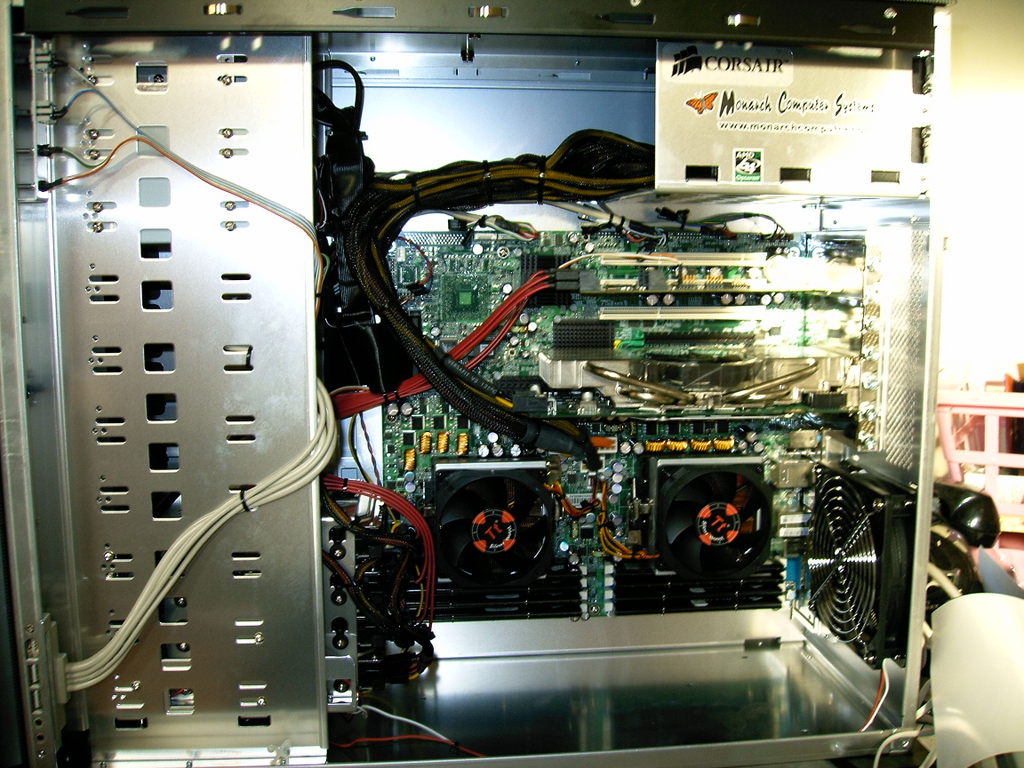
Figure 1. The obsessively neat interior of the Empro leaves enough empty space to park a Volkswagen.
The pre-installed copy of Fedora came up without a hitch, and easily configured itself for my network. Performance on the Linux Journal benchmark suite was fair for the single-CPU tests (postgres and ffmpeg x 1), but really shone on the multiprocessor ffmpeg x 2 and ffmpeg x 4 tests. In spite of the heavy I/O loading and memory requirements that the benchmarks place on the system, the performance was nearly flat, whether I was running one or four jobs. Having two dual-core CPUs available didn't hurt, but clearly the motherboard is doing a good job of keeping competing processes out of each other's hair as well.
This isn't to say that there aren't some negatives to deal with, however. First, this is not a miserly machine when it comes to the power socket. With all four processors churning at full steam, the power meter measured a fuse-blowing 390 Watts. And, of course, where there's power coming in, there's going to be heat coming out.
In addition, this isn't what you'd call a quiet system, certainly not one to stick downstairs as a Media PC. The noise readings at 1' ranged from 51dB at the front and sides to 60dB at the rear, and it was quite loud in an office setting. Things got worse when the front door was open, bumping the level up to 56dB. There is a fan-speed control in the front, but it didn't seem to make a huge impact on overall noise levels.
Finally, there's the matter of the quirky case design. The USB and audio jacks, which are normally mounted on the upper front section of a workstation, have instead been placed on the bottom front of the right-side panel. Not only is this an inconvenient location to reach, but it's also begging to be kicked out by the first passerby.
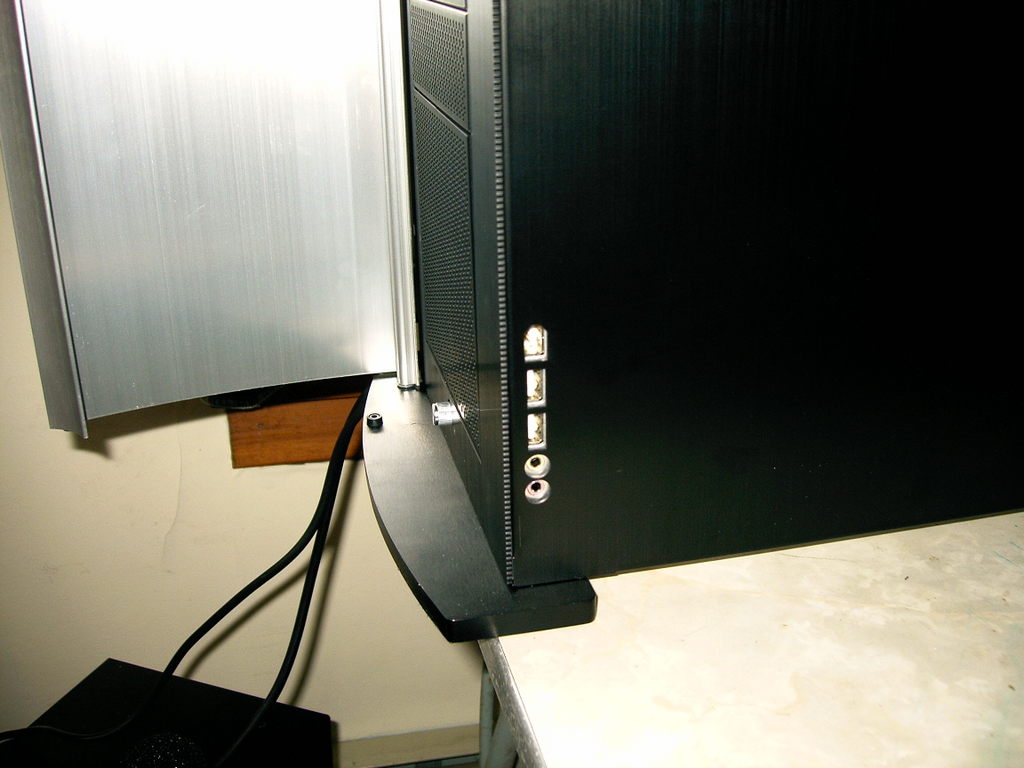
Figure 2. This isn't exactly where I'd put the Monarch's USB ports if I were running the company.
I didn't get a chance to play with the impressive-looking PNY graphics board, complete with 1GB of 512MB of RAM and PCI Express interface. I'm sure it would have chewed up Quake and spit it out the other end. However, you have to wonder about the wisdom of putting a $1,200 graphics board in a system whose real forte is multiprocess performance. If I were purchasing this system, it would probably be in a 4U rackmount configuration for use as a server, and I'd stick in the cheapest graphics card that would do the job.
On the other extreme, the Polywell PolyNote MXM915AS is positioning itself as a turnkey Linux notebook solution, offering a dual-boot Pentium M with SUSE on the Linux side. Unfortunately, my out-of-the-box experience was not a happy one. My first criterion in looking at Linux notebooks is how well the hardware functions as shipped, and the PolyNote failed that test. From all appearances, someone had just stuck a stock copy of SUSE 9.3 on the laptop, and shipped it out. The wireless networking didn't function at all, and the CD drive was misconfigured so that doing a mount /media/cdrom failed.
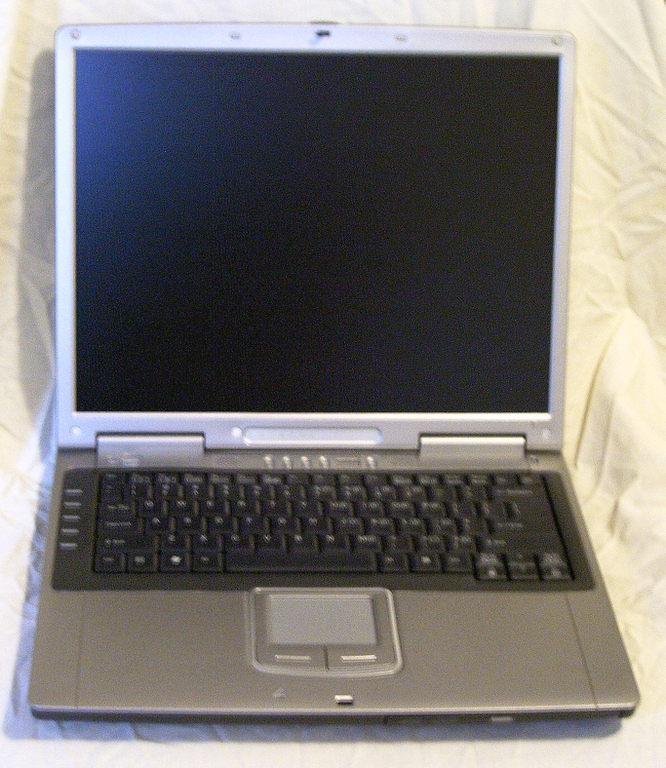
Figure 3. The PolyNote: a generic notebook in Penguin clothing?
The system itself was well designed, with a nice solid feeling and no suggestion of flimsy plastic. It performed very well in benchmarks, actually outscoring the Monarch workstation in the postgres database test, and scoring close to it in the single-process ffmpeg transcode. Because the Pentium M is a single-core processor, no one should expect the kind of straight-line multiprocess performance that multiprocessor systems offer. However, the PolyNote didn't bog down either, running two and four simultaneous processes in essentially two and four times the runtime, respectively. The PolyNote just barely edged out the LJ test laptop (A Toshiba A75-S206 with a 2.8GHz P4) in overall performance, a system currently selling for around $1,200 US on the street.
Power-wise, the PolyNote manages to make it through an hour and three quarters on its battery alone when running the benchmark suite in a constant loop. This compares with one hour on the LJ test laptop. To their credit, the PolyNote did handle suspend and restarting flawlessly—something that's frequently problematic on Linux laptops. It's not the quietest laptop you'll ever encounter, with dB measurements of around 40 from the front and sides, and a noisy 45 near the rear fan port.
The PolyNote weights in at about 5.5 pounds, but still manages to sport a 15.1" screen. The contrast and side visibility was generally good. The NVIDIA graphics processor ran Tux Racer speedily enough, with no tweaking of the X configuration required. The ALSA sound support also worked right from the start.
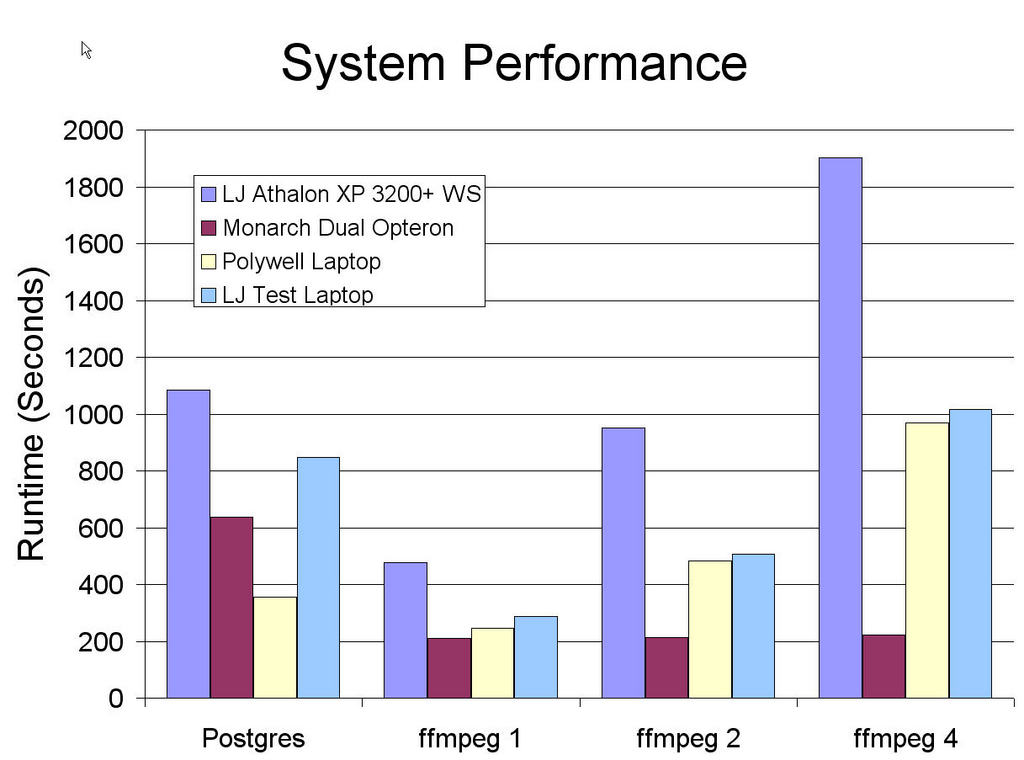
Figure 4. The Monarch Empro cruised through the multiprocessor tests, while the PolyNote did surprising well on the database test.
The Monarch workstation doesn't have the kind of “blow your sox off” single-process performance that would justify the price tag for most users, although in engineering development settings, the multiprocessor capabilities might be useful. It's also a bit too loud to want to use in most offices. The PolyNote is a nice enough laptop, but it's nothing special compared to other notebooks in the same price range. If Polywell wants to compete against vendors such as EmperorLinux who specialize in Linux laptops, they need to work on improving their installs so that everything works the first time.
James Turner is Product Review Editor for Linux Journal. He has written two books on Open Source Java development and is a Senior Software Engineer with Axis Technology, LLC.
