
OOo Off the Wall: Adding AutoText to Your Work Flow
AutoText is a subsystem of macros used to add content to a document. By entering the macro--the shortcut in the terminology of AutoText--and calling the subsystem, you quickly can add blocks of text or objects such as graphics without having to select them from a file manager. And, you can do all of this without having to type more than a few characters.
A large number of AutoText entries are pre-loaded in OO's Writer. They include templates for business cards, brochures and standard business and job application letters, as well as frequently used phrases for business and correspondence. One entry that is especially useful for designers is dummy text, a random group of paragraphs that you can add quickly to a design to see how it works and looks.
Designing and storing your own AutoText entries is simple enough that you easily can add your own. By doing so, you can customize how AutoText works in your OpenOffice.org installation. If you want, you even can print out a list of current entries to help you keep track of them.
AutoText is especially useful for:
Text that you continually are re-using. For example, if constantly are explaining the provisions of the GNU General Public License in your documents, you could create an AutoText entry for your standard explanation instead of continually copying and pasting it. Moreover, because the entry is stored with OpenOffice.org, you wouldn't have to search for the explanation or maintain a separate file for it.
Graphics that you continually are re-using. For instance, if you are a technical writer, you might use a certain graphic at the top of a written warning or caution. You might be able to add the graphic as a special type of bullet to a list style. By making it an AutoText entry, however, you avoid the limitation of having to keep the graphic small enough so as not to distort line spacing in the paragraph to which it is attached.
An alternative to a template. Instead of creating a letter template, for example, you could create an AutoText entry to create a blank letter ready for use.
Special characters that you constantly use. You can achieve the same results by using regular macros. But, OpenOffice.org Writer comes with far fewer AutoText entries than regular macros, so you may be able to keep track of them more easily.
AutoText entries are added to your OpenOffice.org installation rather than to a particular document. In other words, the entries you add in one document automatically are available in other documents.
To add an entry:
1. Select the text and/or objects to be added to AutoText.
If you want the AutoText entry to take on the formatting of the text around it, that text must be in the default of Times New Roman. Otherwise, the entry will use a specific font. Although a specific font may work if it is the one used by your Text Body paragraph style, in most cases, it reduces the entry's flexibility.
When you add an object such as a picture, each object must be:
Anchored As character. You can set this characteristic from the right-click menu.
Have one space or character before and after it.
If both of these conditions are not met, the AutoText tool is not available when the object is selected.
2. Select Edit > AutoText.
The AutoText screen opens.
3. Enter a name for the AutoText entry.
This name is how the new entry will be listed in the AutoText screen. Note, AutoText names are case-sensitive. AUTO is a different name from auto.
4. Enter the shortcut for the AutoText entry.
The shortcut is the characters you type to add the entry using AutoText. You can select the suggestion that Writer makes for the shortcut or choose your own. If you enter your own shortcut, and an existing AutoText item in the same category already uses it, you are warned of the conflict when you save the item.
5. Select an AutoText category for the item. Categories are the items at the top of the hierarchy tree in the AutoText pane. If they are open to display the entries in the category, they have a minus sign beside them. If they are closed, they have a plus sign beside them.
Categories are the equivalent of directories in a file manager. They are a way of organizing AutoText items so you can find them more easily.
6. Select the AutoText button and then either "New" or "New (text only)". As the choices suggest, use New for mixtures of regular text and objects, and New (text only) for entries consisting entirely of regular text.
Your new AutoText entry now is ready for use.
AutoText entries can be added to any document. To add one:
1. Place the mouse cursor where you want to add the text.
2. Do one of the following:
Select Edit > AutoText, and then select the entry followed by the Insert button.
Type the shortcut and then select the F3 key. If you are using AutoText to enter special characters, the shortcut must be entered as a separate word or selected with the mouse before you press the F3 key.
If the "Display remainder of entry while typing" box is selected in the AutoText window, you can move through the list of possibilities by selecting Ctrl+Tab. To move backwards in the list, select Ctrl+Shift+Tab.
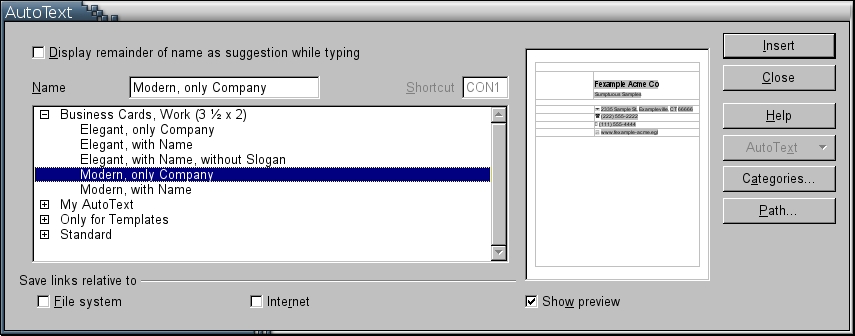
Figure 1. Using AutoText
In either case listed above, the shortcut is removed and the AutoText entry is added to the document instead. The AutoText entry is added using the format of the paragraph that it is in.
The AutoText screen shows a virtual directory list of categories. This list is composed of all the AutoText files found in the AutoText path.
You can customize AutoText by:
Setting new paths to the directories where AutoText files can be stored. Paths for AutoText entries can be added from Edit > AutoText > Path or from Tools > Options > Paths > AutoText. By default, each user has two paths, one for the general installation of OpenOffice.org and one in his own .openofficeorg2 directory. If you want a particular AutoText entry to be available to all users on your system, it must be added either to the general installation path or to a directory for which all users have read permissions. They do not need to have write permissions.
Enabling AutoText autocompletion by selecting the "Display remainder of name while typing" box. Selecting this box enables autocompletion for entering shortcuts. To be used in autocompletion, each shortcut must be at least three characters long. Autocompletion is added after the third character. The name of the suggested entry appears in a yellow text box above the current mouse position in a document.
If more than one autocompletion is possible for the typed characters, you can move through the list of possibilities by selecting Ctrl+Tab. To move backwards in the list, select Ctrl+Shift+Tab.
To accept an autocompletion, press the Enter key or whatever other key is chosen using Tools > AutoCorrect/Autoformat > Word Completion > Accept with.
Creating new categories to organize AutoText entries by selecting Edit > AutoText > Categories. Categories are directories in the virtual directory structure. As you start to use AutoText heavily, you'll find that you need new categories to keep entries organized.
Displaying path names as a filesystem path or as an Internet URL by selecting Edit > AutoText > Save links relative to. Because AutoText is an editing aid rather than a feature of a finished document, this setting exists only for your personal convenience. It has no effect on whether an AutoText entry displays.
You can scroll through all of your AutoText entries in Edit > AutoText. The AutoText list, however, is not the easiest one to scroll through, even when "Show preview" is on. You instead may prefer to print a list of entries to a new document:
1. Select Tools > Macros > Organize Macros > OpenOffice.org Basic > Gimmicks > AutoText > Main.
2. Select the Run button.
A new document opens and a list of AutoText entries is added to it. The list shows entries and their shortcuts, but no preview.
3. To refer to the list more easily, save or print it.
AutoText is neither a flashy nor a complex feature of OpenOffice.org. It has a few eccentricities, but once they are learned, AutoText simply is a dependable workhorse of a feature. If you use Writer for only one- or two-page documents, you may never notice it's there. However, if you're writing long documents and reusing information, it quickly can become a valued member of your writing/editing stable. Spend five minutes acquainting yourself with AutoText, and your investment of time soon will be repaid dozens of time over.
Bruce Byfield is a computer journalist and course designer. His articles appear regularly on the Linux Journal and Newsforge Web sites.
