The Arrival of NX, Part 2
This is the second in a seven-part series written by FreeNX Development
Team member Kurt Pfeifle about his involvement with NX technology. Along
the way, he gives some basic insight into the inner workings of NX and
FreeNX while outlining its future roadmap. Much of what Kurt describes
here can be reproduced and verified with one or two recent Knoppix CDs,
version 3.6 or later. A working FreeNX Server setup and the NoMachine NX
Client has been included in Knoppix now for over a year. Part 1 of the
series, "How I Came to Know NX", is
here.
How important is roundtrip suppression for remote GUI work? To understand
its significance, we first have to grasp a few basic mechanics of the X
protocol.
X Basics
The X protocol regulates communication between an X server and an X
client. The X client typically is a program that needs a GUI
to facilitate user interaction. The X server
is a specialized program that "draws" that GUI and the
GUIs of any other running program onto the screen. Moreover, the X
server also handles keyboard and mouse events issued by the user and
sends them back to the X client program, which then acts on the
user's commands.
Figure 1. The NX login for a remote Windows
session.
If an X client program needs to draw something on screen--such as a new
dialog window--it issues a series of requests to the X server. About 160
different types of X requests, including extensions, are specified in
the X protocol. Each request represents, for example, a primitive
graphic element--a certain, possibly large, set of requests is
required to create any specific window element or complete window. These
requests sometimes are called opcodes. If you are curious, they
are described, in programming language, at the end of the source code
file named Xproto.h. You can find it on your own hard disk if you are
running an XFree86- or X.org-based X server and have its source code
header files installed. On my Knoppix-4.0 system it is in
/usr/X11R6/include/X11/Xproto.h.
Roundtrips
A few of the requests sent by the X client also solicit replies from
the X server. Each request, made by the X client program, and its
reply, from the X server, constitute a roundtrip. Roundtrips slow down
the responsiveness of a GUI program because of the time it takes for
the requests to complete the two-way trip. Often, a user does not notice
X roundtripping. To date, for most uses of working with Linux or UNIX,
the X client and the X server reside on the same machine; that is, they
are physically proximate. This is the most simple and also the most
common use of the X Window System.
This need not be so, however. The X client program and the X server may reside on
different host machines, physically distant from each other. They even may
be many thousands of miles apart. The X protocol does not care: as we
say, it is "network transparent". A local X server can display the GUI
output of a remotely running program to the local user's screen. It
also can send the local user's mouse and keyboard commands to the remote X
client application far away.
Try it. To do so, you need to have a user account on a remote Linux or UNIX
machine. Run this command:
ssh -X your_username@remote_hostname xterm
After some delay, this should make a new xterm command
window appear on your screen. It may look exactly like your local xterm.
The only difference may be that the shell prompt shows a different
username and host. If it doesn't work for you, this could be because
SSH on the remote machine is set up to disallow X forwarding. However,
such a detail is beyond the scope of this article.
When an application starts and its first window is displayed on the
screen, the totality of X client/server roundtrips may amount to many
thousands. So be forewarned--the remote application displayed on your
local screen may feel rather sluggish.
In the all-local case--where the X server and X client program reside
on the same host machine--these roundtrips do not take too long to
complete. The communication between the two is going through UNIX domain
sockets, a custom version of named pipes, which are special files on your hard
disk that serve interprocess communications. The many roundtrips taking place in
the all-local case, therefore, are reasonably fast.
In the remote case--where the X server program is on localhost and the X client
program is on a different host--all interprocess communication is
transported through TCP/IP network sockets and the remote network
connection. This works well, but it is several orders of magnitude
slower than the the all-local case.
###############################################################################


+----------+                                                       +----------+
|          |      --> responses                   <-- requests     |          |
|          |        --> events                                     | remote X |
|          |   X      --> errors                               X   |applicat. |
| local X  | <---------------------------------------------------> |(or compl.|
|  display |     many "round trips": request + response pairs)     |KDE/GNOME |
|(X server)|                                                       | session) |
|          |                                                       |          |
+----------+                                                       +----------+

(c) Kurt Pfeifle, Danka Deutschland GmbH <kpfeifle at danka dot de>
###############################################################################
Although communication between the X client and X server running on the same
machine is handled by way of UNIX domain sockets, the exact same communication
between a local X client and a remote X server is done over network--TCP
and/or UDP--sockets. If this were the only difference, this alone would
cause a large gap in performance. But there is an additional performance
retardant: network latency.
Link Latency
Any link's quality basically is determined by two parameters, the
network's bandwidth and its latency. Bandwidth describes how many bytes
per second can be shoveled into the pipe. The rate of bytes per second
pouring out at the other end should be the same. The network's latency
describes how much time each packet of data needs to travel from one end
to the other.
Typically, a modem link has a latency of 200 to 500 milliseconds. An
ADSL link exhibits a latency of approximately 50 milliseconds. A local
Ethernet LAN link's latency, though, is less than 1 millisecond. A UNIX
domain socket link, such as the internal link within the machine of the
all-local example above, is well below 0.1 milliseconds.
Figure 2. The NX client, while connecting to a Windows XP
machine, encounters the Windows login screen.
You can test the latency of any network link with the ping command.
The ping command shows roundtrip time in your terminal window. If you
are a distance of 4,000 kilometers away from your peer--say, the
distance from California to Massachusetts--your ping can't be faster
than about 44 milliseconds. The speed of light is 300,000 kilometers per
second in a vacuum, and it is approximately 40% slower when traveling
through fibre.
If you send one large chunk of data that takes, say, 60 seconds to
complete its one-way trip, you are likely not to care much about the
latency of the link, even if it adds as much as one second to the total
transfer time. Reducing roundtrip time by 99.9% does not reduce your
overall transfer time significantly, as if you reduced latency from
1,000 milliseconds to one millisecond. Doubling your bandwidth would
help a lot more. Doing so would reduce the required time for your data to
be shoveled into the pipe to 30 seconds, and the receiving end would
acknowledge a completed transfer after 31 seconds.
The situation is radically different if your data flow has an opposite
profile. If you cannot send one large chunk of data but must do many
little ones, and if you have to wait for responses for most of them,
latency increases its influence on overall performance. Only few and
small data chunks, such as packets, can be sent into the pipe within each
single millisecond period. But you may have to wait a comparatively
longer period, on the order of 500 milliseconds, for confirmation or
response from the remote end. If a lot of little data chunks
require confirmation--that is, if they cause roundtrips--these
physical facts really start to impact the remote GUI experience.
About the Verbosity of X11 Programs
In and of itself, X is an efficient protocol, which may sound
surprising at first. However, many GUI programs making use of X are
coded inefficiently. Look at them through the eyes of a user working
remotely over a modem connection, and you can see what I mean.
There are many areas where GUI programs--KDE and GNOME alike--could
be improved to enable them to run faster over the network.
Take a simplified and contrived example as illustration.
The most modern desktop eye candy uses a lot of animation. Take a
pull-down menu: often you see it rolling out in an animated fashion.
By the way, I do not share the opinion of some UNIX purists who deem
these kinds of animations "useless" or "superfluous". They can help
users understand the system. But I digress. How is this animation
expressed in X? The X application tells the X server to draw
one or more rows of pixels at a time. How efficiently is this done in
general? There are both inefficient and optimized ways to do this.
Here, I use a simplified example to highlight each case.
In the "bad" version, the application says to the X server, "Draw these 10 rows
of pixels and report back if you are done." The X server draws and
reports back. The next request is, "Now draw another row of pixels and
report back again." The result is roundtrip after roundtrip, until the nice
menu animation is completed.
The "good" version is a bit different. Here the application request to
the X server translates to this, "Draw this complete series of pixel
rows, one after the other, at a speed of 1 row per millisecond. Report
back when you are all done." This takes only one roundtrip.
The "bad" version of the code may not be distinguished from the "good"
version if the user works only on localhost with his applications. But,
if running in a remote situation across a real network, the difference
starts to become obvious: the "good" version still is executing
smoothly, while the "bad" is slow and looks erratic.
What's the Problem?
Keith Packard had this to say in his "LBX Postmortem" paper:
X applications have usually been developed in a high-bandwidth/low-latency
environment, either entirely within a single machine or perhaps over
a local area network. Such environments exhibit bandwidth in excess
of 1MB/sec and latencies less than 1ms. Moving applications to serial
lines decreases the bandwidth by more than a factor of 100 and increases
latency by a similar amount.
A developer working in a high-bandwidth/low-latency environment does not
notice the inefficiency of his creation if it is run at some other time
in a different environment. A software design engineer writing the
required specification document for new software forgets to make
provisions for low-bandwidth/high-latency tests. Over the years, the
whole UNIX and Linux GUI software development environment drifted away
from a paradigm that held network transparency of X in high esteem.
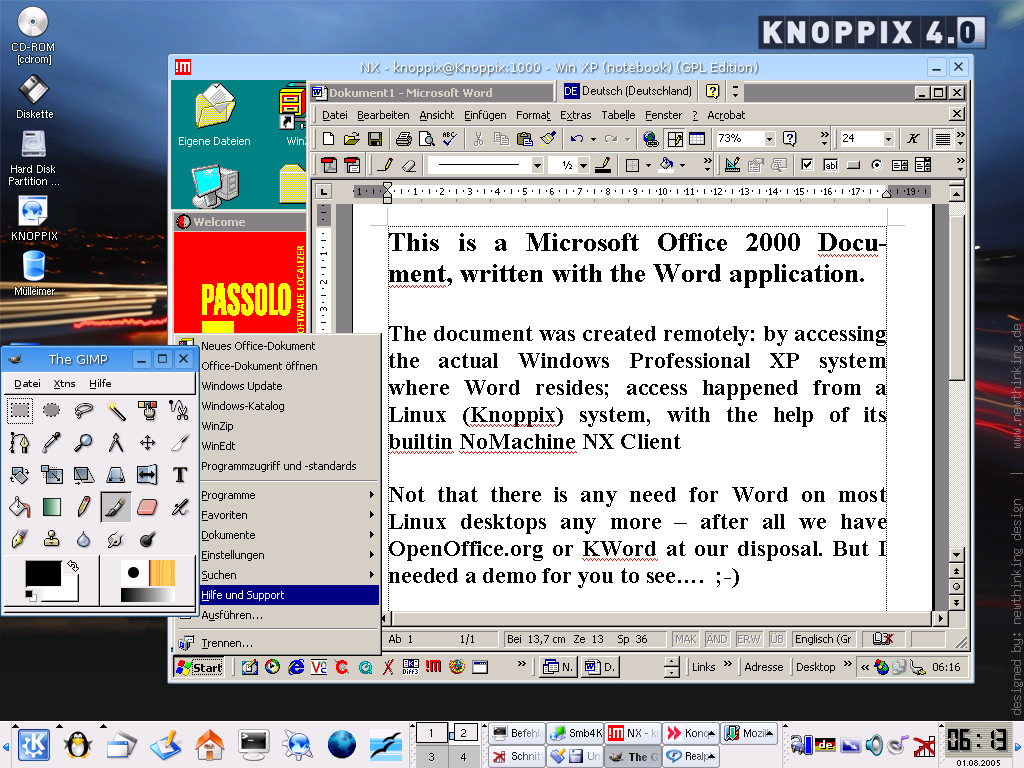
Figure 3. A remote Windows XP session is seen running
within our NX client on Knoppix Linux.
This lax attitude even afflicts toolkits. In many respects, toolkits
have become one of the biggest sources of excessive roundtrips. One
can't blame individual programmers for it, though. A typical KDE or GNOME
developer probably is not aware of the impact his compiled code has
on network performance. Even if he is aware, often he cannot do much
about it. He chose a toolkit to work with, and he is depending on that
toolkit's innate X11 efficiency.
Latency of Links
"But wait", you say. "Hardware gets better and more powerful all the time. Isn't
that coming to our rescue?"
In network computing, bandwidth is not as much of a limiting factor as
is latency. If bandwidth is too low and need is too high, you can add a
cable or two or more. Doing so pushes more data through the wire(s)
within a given period of time. Of course, it costs more money to buy
additional lines, but my point is there is no hard technical limitation.
Additionally, you can hope for increased bandwidth in future networks.
In the case of bandwidth, no hard technical limit is in sight
yet, but the story is different for latency. Latency can be reduced
down to only a certain level. You can't make signals travel faster than
light, not through any medium. Many network connections already are
within 50% of the theoretical optimum--the speed of light--regarding
latency. For latency, the technical limitations are very apparent.
Herein lies the dilemma: increasing bandwidth helps to accelerate remote
X11 connections up to only a certain limit. Once you reach that limit,
adding even more bandwidth doesn't speed up your remote desktop
experience. In the remote desktop context, you don't fill the
capacious wire with little data packets, as many as there may
happen to be. Here, any added bandwidth idles. Instead, you spend most of the
time with an empty pipe, waiting for little roundtrips to complete.
Typical modem roundtrips require 500 milliseconds to complete; typical
ISDN roundtrips need about 50 milliseconds. Under these conditions,
elimination of X11 roundtrips is a decisive means to speed up remote
user desktop interaction.
We discuss more about NX roundtrip suppression and traffic compression
in Part 3 of this article series, titled "How (Well) NX Works."
To learn more about FreeNX and witness a real-life workflow
demonstration of a case of remote document creation, printing and
publishing, visit the
Linuxprinting.org
booth (#2043) at the
LinuxWorld Conference & Expo
in San Francisco, August 8-11, 2005. I will be there,
along with other members of collaborating projects.
Kurt Pfeifle is a system specialist and the technical lead of the
Consulting and Training Network Printing group for
Danka Deutschland GmbH,
in Stuttgart, Germany. Kurt is known across the Open Source and
Free Software communities of the world as a passionate CUPS evangelist;
his interest in CUPS dates back to its first beta release in June 1999.
He is the author of the KDEPrint Handbook and contributes to the
KDEPrint Web site.
Kurt also handles an array of matters for
Linuxprinting.org and wrote most of the printing documentation for the
Samba Project.