Linux in Government: You Can Use the Desktop on a Laptop Now
The reports of my death have been greatly
exaggerated.
---Samuel Clemens, also know as Mark Twain
Many variations of this "reports of my death" quote exist. The original
note was written May 1897 in the author's hand. He wrote, "James Ross
Clemens, a cousin of mine was seriously ill two or three weeks ago in
London. The report of my illness grew out of his illness, the report of
my death was an exaggeration".
Similarly, depending on the writer, many variations exist about the
usefulness of Linux on desktops and laptops. In some ways, I understand
the confusion and the various conclusions people draw. Recently,
I had the opportunity to install Linux on an IBM ThinkPad, and both
ingenuity and a commitment to complete the job were required. That's not what
I expected at the start. I found Linux useful immediately. Later, I
found the software I needed to make it work the way one would expect
from a manufacturer.
As you read this article, keep this Samuel Clemens quote in mind. The majority of us have a tendency to avoid details
and jump on the first generalization that comes around. I'm reminded of
statement attributed to Al Gore that he "invented the Internet". In fact,
he
said, "During my service in the United States Congress, I took the
initiative in creating the Internet". And, if you look at his history,
he did take the initiative and helped create the Internet. The media, on
the other hand, ran with the quote attributed to him. Don't fall
into that trap if you can avoid it.
Desktop Linux on a Laptop
Recently, I bought a laptop. I consulted several friends to get
a consensus as to which one would work best with Linux. Tallying the
results, I decided to go with an IBM ThinkPad. I chose a barely used
model T21 with a Pentium III 800, a 20GB hard drive, 256MB of RAM and
a DVD-ROM. Prices ranged all over the place, but I found a one for less
than $300.
Once the laptop arrived, I began searching around on Google to
see which Linux distributions people used on ThinkPads. I even found a
ThinkPad mailing list and some distribution-oriented laptop ones. Then,
I found a tutorial that convinced me to go with Fedora Core 3.
Laptop or Portable Computer?
Reading through the archives of the mailing lists, I started
to conclude that most people used Linux on laptops as portable
computers. Seeing comments referring to the battery as a UPS gave it
away. Then, I started asking some hard questions and the answers convinced
me that an information void exists. You certainly can use a laptop as
a portable computer, but that's not how I intended to use it.
I went back to my friends and began asking how they used the
function keys and buttons on their ThinkPads. As you might guess, they
didn't use them. They also thought that the battery life seemed short. Of course,
having all laptop functions fully operational at all times reduces
the battery life.
As I continued to research Linux on the laptop, I found a scarcity of
new material. Furthermore, many of the items I did find seemed less than useful. But,
I did find nuggets of gold that allowed me to use my ThinkPad the way
I wanted.
Finding the Best Distribution
Although the Fedora tutorial gave me many of hints on how to configure
tools to take advantage of the ThinkPad's built-in functionality, Fedora
did not work for me. I decided to stay with 256MB of RAM, primarily so
I could help Linux users who could not afford to add the memory needed
to get to 512MB. Perhaps if I upgraded to a higher level of memory,
I could use Fedora. At 256MB of RAM, however, Fedora creeped. I felt like I was
using a memory-starved Microsoft Windows machine.
Call it a challenge, but many postings exist on the mailing lists
I follow from international users who simply can't afford to upgrade
their memory. To an American, it doesn't seem so unrealistic simply to
upgrade. To friends in Hungary, the costs seem high.
I spent the better part of two days trying a variety of
distributions. Before people start writing comments about how much
better their distributions run than the one I chose, let me say I played
no favorites. I wanted performance and I got it with Ubuntu. Contrary
to what some of you might believe, it's not my favorite Linux distro. It
simply performed the best in this case.
Making the ThinkPad Act Like a Laptop
Later this month, I will cross the globe. The first leg
of my journey will take 24 hours, and I have a speaking engagement about 12 hours after
I arrive. So, preserving battery life and connecting wirelessly seem
important. I also want to use the time to work.
I believe a manufacturer should do the things I did to get Ubuntu
working on the ThinkPad. In a way, it helps prove up my argument that if
Linux were bundled on HP, Lenovo, Dell, Gateway and so on, it would be
as acceptable to users as is OS X or Windows. More on that a little later.
Once I installed Ubuntu on the ThinkPad, I had to add packages from
various repositories, including Universe and Multiverse. The first
packages I added include linux-image- 2.6.10-5-686, linux-source-2.10.10
and linux-headers-2.6.10-5. Ubuntu calls their kernel packages linux-images
instead of kernel-image. Once I added the packages, I rebooted into the
Linux 686 environment.
Next, I searched, found and installed the tpb package through Ubuntu's
Synaptic application. According to the tpb
Web site:
TPB is a little program that enables you to use the IBM ThinkPad(tm)
special keys.
With TPB it is possible to bind a program to the ThinkPad, Mail,
Home and Search button. TPB can also run a callback program on each
state change with the changed state and the new state as options. So it
is possible to trigger several actions on different events. TPB has a
on-screen display (OSD) to show volume, mute, brightness and some other
informations. Furthermore TPB supports a software mixer, as the R series
ThinkPads have no hardware mixer to change the volume.
I noticed the ability to change the volume and use other keys
immediately.
Next, using Synaptic, I searched for "thinkpad" and found thinkpad-base
and thinkpad-source. I marked those for installation and clicked
apply. They installed.
According to the
maintainer's
Web site:
This package contains the source code for the loadable driver
modules used by the tpctl utility for configuring IBM ThinkPad laptop
computers. Included are the sources for drivers of the Super I/O and
RT/CMOS RAM chips, for an interface to the IBM ThinkPad SMAPI BIOS,
and for an interface to the ThinkPad APM subsystem.
As the Web page refers to tpctl, I searched for that package in Synaptic
and also installed it.
According to the tpctl Web
site at Sourceforge:
tpctl is a package of configuration tools for Linux.
The centerpiece of the package is tpctl, a program that does some of
what PS2.EXE does under DOS and the ThinkPad Configuration program does
under Windows...
tpctl gives the user access to all the functions of the SMAPI BIOS
that are documented in the various ThinkPad Technical Reference manuals.
It can also control the resources used by the parallel and serial ports.
The USAGE output and the README file should give a rough idea of what
the program can do...
Packages included in tpctl include:
- tpctl -- command line ThinkPad control
program - ntpctl -- ncurses ThinkPad control
program - tpctlir -- a utility that enables or disables the
infrared subsystem on ThinkPads with Programmable Option
Select - apmiser -- a daemon that automatically controls power
expenditure mode (using tpctl) according to CPU usage
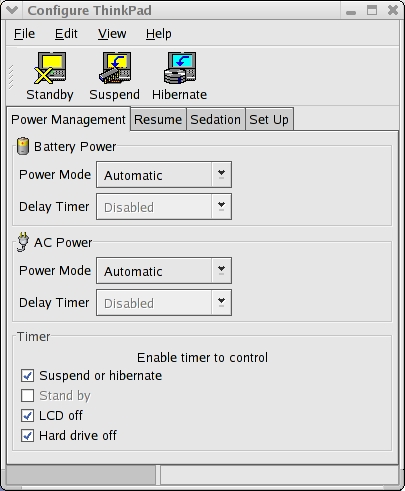
Finally, I discovered configure-thinkpad, a GNOME GUI tool for
tpctl. According to the Web
site: "configure-thinkpad is a GNOME ThinkPad configuration tool written by
Cheuksan Edward Wang. The purpose of this tool is to make configuring
ThinkPad easier. This GUI application uses GNOME 2 and is based on tpctl
and ntpctl."
Unfortunately, I didn't find configure-thinkpad in the Ubuntu
repositories. You can download the tarball from the tpctl site, though, and
configure it using these steps, once you satisfy all the dependencies.
- Uncompress the tar.gz file
- cd into the uncompressed file directory
- Run the ./configure command as user
- Run sudo make
- Run sudo make install
Figure 1. Screenshot of
configure-thinkpad
Here, you need to do some command-line work to get Ubuntu to work with
the packages you downloaded. Let's take them one at a time. First, you
need to provide the Linux kernel source. When you
installed linux-source, it downloaded linux-source-2.6.10.tar.bz2 into
the directory /usr/src. Move to that directory, and you will see it.
To unpack it, use the command
sudo tar jxvf linux-source-2.6.10.tar.bz2
Now, your sources are available.
Earlier we referred to thinkpad-base and thinkpad-source. thinkpad-source contains the source code for the drivers. The package is set up
so that make-kpkg compiles the correct driver sources for the kernel
you are running.
tpctl contains everything but the drivers. For this, you need the
thinkpad-modules package, which can be built from the thinkpad-source
package.
David Tansey, a Ubuntu user and contributor who has written HOWTOs
for the community, provided us with some commands through the ThinkPad
mailing list. He suggested going to /usr/src/ and running
tar -xzf thinkpad.tar.gz. Then:
cd modules/thinkpad/2.6/drivers make sudo make install
This creates the /dev/think device needed to run tpctl.
Next, run ./autogen.sh. You need to install the
following dependencies so you can build configure-thinkpad:
libbonobo2-dev libbonoboui2-dev libgconf2-dev libglade2-dev libglib2.0-dev libglade2-dev libgnome2-dev libgnomeui2-dev libgtk2.0-dev
Now You Have a Linux Laptop
When you log out of GNOME and log back into the desktop,
you will find configure-thinkpad on the Applications -> System
Tools menu. When you try to run this application, though, it says
you don't have permission for the device /dev/thinkpad. I suggest
running the command sudo configure-thinkpad from the command line
until we have time to write a HOWTO on changing permissions in the
/etc/udev/permissions.d/50-udev.permissions file. I'm sure we'll get to
that soon.
Final Thoughts
As I stumbled across various information on Linux and Thinkpads, I
discovered that SUSE Professional has the tpctl and configure-thinkpad
components built into its distributions. One of the friends I consulted
runs SUSE on his Thinkpad and didn't notice the presence of either
utility. I found that unusual because he uses several Thinkpads
for varying reasons, as portal computers.
On the tpctl Web site, I couldn't help but notice a new entry that says,
"Cheuksan Edward Wang has written a TrackPoint configuration tool for
GNOME: configure-trackpoint. It uses GNOME 2 and the linux kernel 2.6
TrackPoint driver written by Stephen Evanchik." That reminded me of the
many projects for the desktop that I see reaching maturity today.
Since I began focusing on the Linux desktop in late 2002, I have
seen remarkable developments emerge from the community. In some ways,
the Linux desktop has spoiled me. It works well, even though Red
Hat and others haven't put together all the tools they could to make a
new user's life easier.
To make up for the lack of desktop focus from the major vendors,
many developers, such as Fabio Marzocca, have built applications that provide
more functionality for Linux than you'll find from the so-called desktop
market leaders.
While I enjoyed doing research on the Thinkpad and figuring
out what to do, not all PC users like to solve puzzles. Many want the
product handed to them ready to go. Many people think that's a reasonable
request. I do too.
As part of my work, I had to install and use Windows XP this past
week. I had not used a Windows desktop for a couple of years for anything
but testing. I found using it painful. I finally reorganized the program
menu like my GNOME desktop so I could find programs easier. I installed
Zone Alarm's free firewall, Grissoft's free Anti-Virus program and Spybot
S&D. I made sure every port was closed or at least was running in a stealth mode. I
was surprised at the number of times Zone Alarm warned me that
an application I just launched attempted to access the Internet. That's
really freaky.
It took about a day before the system got infested with spyware and
icons showed up on the desktop leading to various Web sites. I couldn't
believe it. Then, the system began slowing down--in fact, grinding
down. I fed Windows 1 GB of fast DDR RAM, but it didn't seem
to matter. Finally, I defragmented the hard drive, which took an hour.
Soon, programs began to freeze and in the top bar I saw the message
"Not responding". I waited a little while and they eventually came back. I
couldn't believe how many times I had to stop work while XP gathered
itself. And this is what media analysts consider ready for the desktop?
I know I'm not the only one who has written this, but I'll do it
again. If the major manufacturers put as much engineering into the Linux
desktop as they put into Windows, they would produce a superior product for
their customers. I'm sorry I don't have a billion dollars to give
you for marketing so you can keep your stock prices up. Maybe you could
make it the old-fashioned way--by offering a superior product.
Tom Adelstein is a Principal of Hiser + Adelstein, a consulting
and operating company specializing in free and open-source software
solutions and support. Tom is the co-author of the book Exploring the
JDS Linux Desktop, author of an upcoming book on Linux system
administration and has written prolifically since 1985. Tom's business
career began in public accounting where he first learned to program and
develop software and later progressed to Wall Street, where he became
the designated principal of a NYSE firm. He later returned to technology
and has consulted and worked with start-ups as well leaders of the
Fortune 500.


This week 5 lucky Members will receive a copy of The Official Ubuntu Server Book by Benjamin Mako Hill and Linux Journal's very own Kyle Rankin. No entry necessary. Check back here early next week to find out who the lucky Online Members are.


Comments
Linux Laptop and Notebook Installation Survey
This installation report is included in the TuxMobil Linux Laptop and Notebook Installation Survey.
I had the same problem with windows
I did the same thing with windows to figure out a problem to help a friend and I found it very frustrating - download this driver download this anti-something program. very frustrating.
I agree with the article if time was spent in configuring a linux laptop instead of a windows one it would be superior in all aspects. The user would just do their work and have no adminstration tasks. But I guess the vendors would rather download all these anti-programs and give the customer crap software with otherwise outstanding hardware.
Re: Windows Drivers
Well - as long you have an internet-connection, the driver-installation is extremely painless (in Windows-XP), as the latest drivers are downloaded from the MS-Database. Most of the times you don't even need the driver-cd. That's really cool 8-)
Looking for IBM T21 Win/Lin.Modem under Linux 2.6 /Suse 9.3
Hello dear IBM, Linux and Suse, users or experts,
This article seems very interesting and perhaps around it, you could give me some helpfull advices about Linux T21 modem software customization.
I have an IBM Thinkpad T21 on which I have installed Linux 2.6 within Suse 9.3, and
unlucky, there was a winmodem installed on, combined with an ethernet connection.
When it was only under Windows, that seems to be ok.
Now launching it under Linux, it's not the same thing.
When I go out of my home and have to connect me under Linux on Internet through a basic
or standard phone line ... I need that there was a running modem or LinModem
to surf above Internet and retrieve informations or mails outside !
That is very important for me.
Have you already meet a similar issue or matter, or did you know what to do
in that case !?
Thanks a lot for any help and advices ...
PS : I have made some investigations resumed below
> -------------------------------------------------------
>
> "hwinfo --modem" ==> give a big result file
>
> with "hwinfo --pci" ==> I've a light file from which I have extracted the following lines:
>
> The problem is about the modem config with Hardware Class Unknown and not associated with an appli !?
>
> --------------------------------------------------------------------------------------------
> ...
>
> 14: PCI 03.0: 0200 Ethernet controller
> [Created at pci.273]
> Unique ID: ...
> SysFS ID: /devices/pci0000:00/0000:00:03.0
> SysFS BusID: 0000:00:03.0
> Hardware Class: network
> Model: "Intel EtherExpress PRO/100+ MiniPCI"
> Vendor: pci 0x8086 "Intel Corporation"
> Device: pci 0x1229 "82557/8/9 [Ethernet Pro 100]"
> SubVendor: pci 0x8086 "Intel Corporation"
> SubDevice: pci 0x2408 "EtherExpress PRO/100+ MiniPCI"
> Revision: 0x09
> Driver: "e100"
> Device File: eth0
> Memory Range: 0xe8120000-0xe8120fff (rw,non-prefetchable)
> I/O Ports: ......... (rw)
> Memory Range: 0xe8100000-0xe811ffff (rw,non-prefetchable)
> Memory Range: 0x00000000-0x000fffff (ro,prefetchable,disabled)
> IRQ: 11 (9824 events)
> HW Address: 00:10:a4:84:8e:68
> Link detected: no
> Driver Info #0:
> Driver Status: e100 is active
> Driver Activation Cmd: "modprobe e100"
> Driver Info #1:
> Driver Status: eepro100 is not active
> Driver Activation Cmd: "modprobe eepro100"
> Config Status: cfg=no, avail=yes, need=no, active=unknown
>
> 15: PCI 03.1: 0700 Serial controller (16550)
> [Created at pci.273]
> Unique ID: ...
> SysFS ID: /devices/pci0000:00/0000:00:03.1
> SysFS BusID: 0000:00:03.1
> Hardware Class: unknown
> Model: "Intel Mini-PCI V.90 56k Modem"
> Vendor: pci 0x115d "Xircom"
> Device: pci 0x000c "Mini-PCI V.90 56k Modem"
> SubVendor: pci 0x8086 "Intel Corporation"
> SubDevice: pci 0x2408
> Driver: "serial"
> I/O Ports: ....... (rw)
> Memory Range: 0xe8121000-0xe8121fff (rw,non-prefetchable)
> IRQ: 11 (9824 events)
> Config Status: cfg=new, avail=yes, need=no, active=unknown
>
> ...
> --------------------------------------------------------------------------------------------
>
> These lines are they enough to decide which package or customization
> I should prepare ?
>
> Could you advice me on the right way ?
>
>
> Last new, I just arrived to configure and connect through wvdial and Kinternet,
> but the DNS connection and lookup failed to view any internet site...
>
>
> Thanks a lot for your help,
>
> Best regards,
Marc / Paris - France
Laptop / Portable Computer Concept:
Great article. Thanks for taking the time and making the effort.
"You certainly can use a laptop as a portable computer, but that's not how I intended to use it."
Tom; could you expand on this a little more? I've always had one or the other. Right now I have both (a laptop and a beefy tower), but the tower is more of a server than a workstation. I think it would be interesting to hear your take on the function of both, and how you "... intended to use it [the laptop]."
Thanks, Martin
Laptop / Portable Computer Concept
Martin,
I'm glad to expand on the concept.
The first laptops were actually portable computers. They didn't have batteries. The first one I used was an Osbourne. It had two floppies and a small screen plus free software and sold for less than $2000. The next one was a Compaq and finally I bought an IBM portable. None of these had batteries.
In my view, a laptop is a battery powered computer that I can take with me when I board a plane and use it to do work or watch a DVD. It doubles as the computer I use to make presentations.
I have typically used Thinkpads in the past and so I am familiar with them. I did have an iBook a couple of years ago and it was OK but didn't work that well with Linux. I have also had Toshibas and Compaqs. I only used those for presentation purposes.
My partner bought a Thinkpad T21 and has liked it a lot. He also has an iBook. I checked around and other friends were using Thinkpads. So, I just went to eBay and bought one. It turned out to have very little use and the price was fine.
I have a lab with a number of different computers I use for testing and I have many different distributions of Linux running in the lab. Right now, I'm running my primary desktop system and it has Fedora Core 4 running at the moment.
Last week, I took my recently acquired laptop to the Middle East with me and it worked fine. When I got home, I copied my files to this desktop and now I'm set to work again in the US. I may have two trips and three presentations between now and early September and I'll take the laptop with me and use it for both presentation purposes and to work while I'm away.
I found Ubuntu to work best on my particular laptop. It's gnome based and easy to sync directories when I return.
As far as my home computer, I prefer to work on a tower based system because it allows me to use a large LCD monitor, runs much faster and simply performs better than the laptop. That doesn't mean the laptop isn't a great tool for traveling or for heading over to a Starbucks and working wirelessly.
My next adventure will include installing FreeNX on the laptop to see if I can sync my directories while on the road.
To sum up, I suppose that I consider laptops necessary to consultants and sales people. But for doing IT work, I prefer working on a fast and more powerful PC.
I hope that answers your question.
Thanks!
Laptop's Purpose:
Hi Tom;
Nice. As a developer, I made a conscious choice to do my development on my laptop, as opposed to a desktop, so that I could do it "anywhere."
It's nice to know that that are reasonable non-Windows, non-Mac mobile solutions for professionals; thanks for putting another stone on the path that paves the way.
Martin
A bit dated here aren't we.
With all do honesty I began to worry when I saw the all to popular "I've got this old piece of junk that won't run XP right ..... "Let's install Linux!" Followed by all of the usual "problems" usually caused by poor research and not paying attention to details.
1. KDE includes the tools for Viao Toshiba and IBM laptops by default. Once configured there.. the configs hold for Gnome.
2. Before running around like crazy being leet and cool and grabbing software left and right ..... check out what is already there in your distro. Fedora and Ubunto both include tools for IBM laptops. (For example tpctl is part of the Ubunto distro!)
I've been running desktop Linux for over 6 years. (not dual boot either uless you count having more than one OSS OS) On laptops for the last 4, exculsively. (I just replaced my Armada 500mhz .... hardware failure beyond repair.) In fact I've got a couple of old 233mhz Thinkpads running as semi-thin clients. (more like super PDA's) You really did manage to take something as simple as installing Linux and turn it into a problem. BTW 256MB is more than enough.
Linux is (should be) perfect
Linux is (should be) perfect to utilize older hardware because it isn't as bloated as new OSs in order to get more modern functionality. The renown stability of Linux implies being able to go for weeks on a desktop without a reboot by simply doing a quick s3 suspend and resume as we've done with the older Windows OSs. However, it is absolutely maddening to get an IBM T20 (once one of THE most popular laptops) under Linux to do something Windows 95 can do!! - suspend and resume. To a newb, all the hype and promise of Linux evaporates rapidly when faced with that. Every relative newb who tries this thinks there must be something simple they are overlooking to get something so basic to work, hence the newb questions, expecting not a complete set of instructions (which is needed) but a quick one line "just hit this switch or run this one command" - not expecting that to get it to do that is as complicated as it is for them. I get the thing about printer drivers and winmodems and I accept that. But that Linux has such a hard time with suspend and resume IN GENERAL "implies" (I understand why but to newbs this is what it seems like) either someone is asleep at the wheel, or there is some underlying stick in the spokes of the whole Linux OS preventing it from smoothly implementing such a basic function as a suspend/resume. No free Linux distro will suspend/resume out of the box on a T20 except for possibly SUSE, which is almost too big for it.
Having said that, I am using linux on every computer in my house and still believe in it.
Bad Breath in Trolls
Hey Troll, you didn't read the article. Did you. He didn't say anything about a piece of junk that wouldn't run XP so let's try Linux. You said that. He said, the Linux desktop works. If you've been running a Linux desktop since 1999, what were you running? What web browser? What word processor?
You're full of it. You know it, I know it and whoever cares to read this post knows it.
BTW, I've run Linux long before you and we didn't have no stinking desktop.
.. and you weren't reading
.. and you weren't reading too carefully either mate .. not to mention that you appear to have missed the punctuation and spelling lessons in school ..
and why so angry? have you been grounded by your parents perhaps?
Boring.......
That's you. Let's see I've run SuSE since 6.2, RedHat first started about 4.2 (Along with Afterstep) Heavily into Mandrake since 6.0 came out. (Yes I've had more than one computer at a time ... I also know how to multi-Boot.... ooooooooooooo..... first distro I tried was ygdrassil... but slackware was the first one I was comfortable with.) Currently I run mostly Debian.
browsers. Netscape since 3.1 Konqueror... (Ok up until 3.0 not so useful) Opera ... it's Ok but I'm not much of a fan. Links ... when you really need to be fast and light.
Wordprocessors. Most of the time (as in 99.9%) I don't need to create non ascii documents. But reading them is needed. Star office has supplied that for ages. Not to mention a number of "readers" available. OOo is my current office suite. Abiword has always been a better reader than writer up until they finally got it to 1.0. Gnumeric rocks with excel, and has for a long time.
Congrats on not having a desktop. I find that utterly useless to know. I also doubt that you've used computers or Unix before me. Linux... Maybe ... If you know what bootstraping is. If you have who cares. My OS background has been mainly Linux BSD Xenix Unix Amiga, OS/2 and Some DOS (very little pre 3.0) And a number of "unique to the system" OS's in the early 80's. (ok there was a bit of time with a TI-99....)
A bit dated here aren't we.
Who cares about KDE in the first place and whose running around crazy other than you? All this material helped me and I'm obviously not as brillant and charismatic as you. So, I have the same damn laptop and it runs XP and pretty well. But, I prefer running Linux on it and now I'm dual booting with Ubuntu and I like it - what is that some kind of sacred sin?
I hate you Linux people. I find a useful article and it's all creeped out with your mouthy comments. You flame it no matter what it says. It takes a a thick hide to hang around this community.
Flawed comment.
If you plan to write comments, you could at least use proper English and correct your typos. You used the term "hide" when you obviously meant "hyde".
So, if you have a problem with using proper English on a "blog" (Linux Journal's Web site uses blogging software) then please don't comment. It creates a bad experience for the rest of us.
"Hide" is proper (unless you'
"Hide" is proper (unless you're talking about Mr. Hyde).
The poster had a legitimate comment. The information in the article was useful. The added commentary was also useful but it was presented in an adversarial fashion. The author was ignorant of these inclusions (he was running Gnome afterall and many of the "included" configurators were in KDE) and it would have been great to say, "Hey, good info, but did you know that blah, blah, blah....?"
Making people feel like a twit in order to appear superior is a small-minded tactic and does the community no favors. For others to jump on top of that with bogus pedantic rantings merely cements the misconceptions about the community.
reply
flame flame flame.. don't you have something better to do? The person who created this page did do this with the intent to share information. I only can say: good work, and let those lamers who have nothing better to do then to flame, be what they are: lamers. Keep up the good work buddie.
Suspending?
What about suspending your laptop? Either to disk or to RAM, I don't care, it's the one single thing I couldn't get working with Gentoo on my laptop (a Dell Lattitude D800) it does longer on batteries in Linux than in Windows, but not being able to suspend it really is a pain...
It works with gentoo and the ibm thinkpad t21
I have had no problem, well thats maybe an understatement, sometimes after suspending the laptop Xwindow is kind of schrewed up, but this is how I do it.
I use the acpitool -s option, and my ibm thinkpad t21 suspends without problems. Maybe you'll need some extensions for you Dell.
Linux on Laptop
I installed Mandrake 10.1 on my Toshiba Satellite (128mb ram, 20g hard drive) and it has been working GREAT for over 8 months. Worked right 'out of the box'.
Mandrake out of the box.
All your laptops special function keys, suspend to disk, wake-up, etc work "out-of-the-box" with mandrake 10? Now there's a load of BS if I ever heard one.
Oh, wait...you didn't read the article.
Thinkpad and Mandriva - a fan-boy speaks out :-)
Hmmm... funny how people get so cross about mandriva... oh well, moving on...
I have been using mandrake and now mandriva on a standard Thinkpad T23 for two years. I don't use the internal modem and have a pcmcia wi-fi card i.e. it is not a model with built-in wireless card.
Can't speak for the parent poster but yes, I did read the article and yes, I can confirm that the volume and mute buttons and all the special key functions - i.e. reading light on/off, screen brightness, switch to external display, screen off - worked immediately 'out of the box' under mandriva 10.1 . In other words, everything except power-saving. Suspend-to-ram is easily enabled by clicking through a few menus although editing one config file may be necessary. A little extra work is needed pre-install if suspend-to-disk is required.
The trackpoint works too as does a usb mouse and external keyboard. Magic sys-request is enabled and Alt-Graphics is enabled as the Compose key for áccêntèd chðract€rs. Out of the box. I hope these things are not some kind of big deal.
On a slightly different but related issue, tv-out may not work, nor does 3D graphics. AFAIK this is an Xorg issue which is the same for all distros although there is a proprietary free-beer driver available which apparently gives 3D graphics and may support tv-out. Never needed either of these so never tried it.
In 2005LE Fn-F3 (screen off) does not work for me - possibly another X issue - and I have had bigger problems with power-saving but every other button and Fn key again works (ahem) 'out of the box'. Specifically, apm does not work for me at all. ACPI works for suspend-to-ram but not suspend-to-disk. Everything else is perfect and overall it suits my needs but as always, it all depends what you want and what trade-offs you are willing to make.
Tom's article is OK as far as it goes but doesn't really say much except to advise you to install a few well-known Thinkpad utilities. I don't find them necessary and never installed them in 10.1 although they are available without needing any compiling etc. tpctl seems to be installed by default when the installer detects a thinkpad. Maybe the reason Tom's Suse-using friend didn't know they were there was for the same reason (i.e. maybe the laptop works fine with the standard install).
Hopefully Tom will post a follow-up that gives some more detail about exactly what works and what doesn't including installing and configuring the wireless networking which hopefully is as trivial a non-issue in Ubuntu as it was in mandriva. Especially useful are things like the way it automatically switches from using wireless to ethernet for example. Plug-in an ethernet cable and I have ethernet, unplug it and insert wi-fi card and I have wireless networking. Very handy sometimes. I use a couple of different wi-fi cards (SMC 2632W and Aironet 340) and also move seamlessly between home and a wi-fi hot-spot.
Again, hopfully this is not something unusual otherwise I'll start to understand why some people think desktop linux is so difficult. It is of course well-known that although he is a major pundit, Tom never mentions Mandriva in his articles for some reason. Of course, something that works easily doesn't offer much for a professional problem-solver to write about :-)
Ignoring the joky 'fan-boy' subject-line, I do use other distros and now there is a new version of Ubuntu I'll try it again when I have time and see if it now meets my needs, especially regarding the easy networking configuration and use. Like mandriva, it is a distro that supports the Free ethos and has a strong community around it with plenty of online-documentation/support, and it seems to 'just work' for a lot of people. I like that.
Syd Hancock
Norfolk UK
-------------
Finally, for the online record, here is an outline of what I had to do to enable power-saving in mandrake 10.1 . This involved making sure that acpi was off and apm on (lilo and services sections in the Control Center), using the laptop control in the configuration menu (I use KDE) to enable and configure the battery monitoring/power-saving and making a couple of changes to the config file /etc/sysconfig/suspend to fix screen corruption, avoid being asked for a password after resuming and choose services to stop/start. Suspend-to-ram then worked perfectly using the appropriate keys (Fn-F4).
To use suspend-to-disk you need to create the suspend partition first using a utility from the IBM Thinkpad support on the web.
After some false starts I learned to do this before doing the full installation (only needs to be done once, not every re-install etc). I used the partitioning tool in the mandriva installer to shrink the XP NTFS partition first (works very well and no data loss BTW but XP does seem to need a minimum of about 10Gigs space), exited the install, created the suspend partition then installed mandriva. Did the above config steps and Fn-F12 suspend-to-disk was functioning.
--------------
Ubuntu
What performace did you get from Ubuntu that you didn't from Fedora?
I don't think ubuuntu is part
I don't think ubuuntu is particularly faster, it's just that it installs a lot less by default so you don't have a pile of daemons using up your lovely memory and then making everything go v e r y s l o w l y when it starts to swap.
This comment made from a position of relative ignorance as I haven't actually tried either of these distros on my thinkpad (I used plain debian, which also works all the function keys and volume keys 'out of the box' so far as I can tell), but the above is what I have gleaned from postings on the thinkpad mailing list.
it's not the distro that gets you speed, it's the window manager
If you want a snappy window manager on a low powered system, the easy trick is to use a lightweight window manager like Blackbox. The only "fast" distro is Gentoo, but you have to get a little dirty piecing it together.
And that one guy is right about having to be thick skinned to dare posting to a linux board. :)
Ubuntu
Hehe. I can answer that and if you don't know, you should kind out. Ever hear the term B L O A T W A R E?
> If the major manufacturers
> If the major manufacturers put as much engineering into the Linux desktop as they put into Windows, they would produce a superior product for their customers.
I'd say if they put one tenth the effort into a Linux desktop they put into Windows they'd produce a superior product, but then I'm somewhat biased.
IBM is no longer in the PC business
Lenovo http://www.lenovo.com/
I was pretty sure they kept t
I was pretty sure they kept the laptop biz.
IBM is no longer in the PC business
You're kidding. When did that happen? Oh, you didn't read the article.
Not only that but they got the name wrong...
Nice article, but the gentleman's name was spelled "Clemens." "Clemens!"
http://www.google.com/search?hl=en&lr=&c2coff=1&rls=GGLD%2CGGLD%3A2004-31%2CGGLD%3Aen&q=sam+clemens
Not only that but they got the name wrong...
I think you added enormous value to the experience by pointing that out. I don't think I could have survived another hour if I didn't know that. You should write the editor and find out who screwed up the article - was it the author? Maybe the copy editor? Could have been the webmaster?
We should find out and have them banned for life from Linux.
Some HP info
I have HP Omnibook X3 (?) and I just yesterday took it back to daily use. I had very old Gentoo release with outdated packages, so I didn't want't to recompile allmost every package I have. So I changed distro on the way. My choise was Debian without bigger investigations.
Your article is great, but it's bit ThinkPad oriented. So here are some links I found very helpfull.
summary:
http://swiss.csail.mit.edu/projects/omnibook/
including omnibook kernel module:
http://sourceforge.net/projects/omke/
I have still ongoin project with laptop-net and I just started to recearch different powersaving methods...
Hope this info helps somebody.
Some are doing it already
>I know I'm not the only one who has written this, but I'll do it again. If the major manufacturers put as much engineering into the Linux desktop as they put into Windows, they would produce a superior product for their customers.
Just have a look here:
http://www.ubuntu.com/support/custom/hplaptops
you see, it is possible.....
Best regards
That's not what he meant, tha
That's not what he meant, that's support from the distro out, not support from the vendor itself. If you need to run ndiswrapper for something as common (we're talking laptops here) as a wireless card then your system is not well supported.
What he means is that manufacturers should use components with native Linux drivers available and give the option of obtaining the laptop with a Linux distro preloaded, or with no OS, but with the guarantee that every single feature works with Linux, and state that clearly on their sites.
Post new comment