
OOo Off the Wall: What New Users Need to Know About OpenOffice.org
July 14th, 2005 by Bruce Byfield in
What do new users need to know about OpenOffice.org?
The question is worth asking. Any large piece of software has its own ways of doing things, and OpenOffice.org is no exception. In fact, because of its history and its design assumption that users are at least as interested in designing documents as in writing them, OpenOffice.org needs more orientation than most. OOo is not difficult to learn, but if you approach it expecting it to behave exactly like another office suite, especially MS Office, you are setting yourself up for frustration.
To orient themselves to OpenOffice.org, new users need to know its interface shortcomings and the limits of its on-line help. They also need to know the logic of its interface design and the importance of styles and templates in an efficient work flow. The more they know beforehand, the better the chance is that their first encounters with OpenOffice.org will go smoothly.
OpenOffice.org's long history has left it with three main interface standards:
The native one, as seen in the Border and Background tabs common to paragraphs in Writer, cells in Calc and objects in Draw.
The MS Office clone, such as the drawing toolbar in version 2.0.
Individual standards used by a single developer, such as the common design of Laurence Godard's wizards for installing new dictionaries and free fonts.
Any of these standards would be fine on their own. True, MS Office has more than its share of exhibits in the interface hall of shame, but copying it at least gives users a familiar environment. However, when mixed together, the result is an interface that is harder than it needs to be.
Moreover, to make matters worse, many parts of the interface fall into none of the three main levels. For example, in version 2.0, the warning that a Java Run Time environment is required is given in a pop-up window in Files > Document, but as part of the window's text in Tools > Mail Merge Wizard. Similarly, while styles are used in Writer to design page styles within the document, Impress and Draw use master slides, in which the design is set as an abstraction invisible in normal views of the file.
Because of these different interface standards, terminology in OpenOffice.org often is inconsistent. For example, "outline numbering" refers both to a type of list available in automatic numbering and numbering styles and to Tools > Outline Numbering, which sets up an altogether different type of outline numbering. Even more importantly, the latter manages which styles are used by several other tools.
Equally troublesome is the term "conditions". In the broadest sense, a condition simply is a set of circumstances under which a setting comes into effect. Yet, in practice, the word is applied to several different circumstances. In some cases, conditions are logical expressions that are set when a field or section is hidden; essentially, they're means to toggle a feature on or off. However, a conditional text field is one that specifically toggles two alternatives texts on and off. You would think that its name would be similar to the field that allows several alternative texts to be chosen. But, no, that is an input list, and it doesn't use conditionals at all. Then, in paragraph styles, "condition" is used to describe how the style's formatting changes in different contexts. All of these uses are related, but they are different enough that using the same term for all of them creates unnecessary difficulties.
Other confusing terminology includes:
Slides: the pages of a document in Draw. This usage probably reflects the close relation between Draw and Impress, but it is confusing when laying out brochures and other documents that also could be done in a word processor.
Numbering Styles: styles not only for numbered lists but also for bullet lists and quick outline numbering. Happily, this usage has been retired in version 2.0 in favor of the more accurate List Styles
Text Frames: a frame that is added without content for adding text and objects, as opposed to one added automatically when an object is added. Although the term is used in the Navigator, it is confusing because no menu item of that name is available. Instead, you choose Insert > Frame, which could refer to the object that encloses any object.
Faced with such interface consistencies, users may turn, naturally enough, to the OOo on-line help. However, while improving all the time, it has troubles of its own. Common complaints about the help include:
It doesn't always explain when features are unique to a particular operating system. For instance, because Windows supports the OLE standard while other operating systems do not, the Help contains references to using DDE Links that are unavailable under GNU/Linux.
It mentions features that are unavailable.
It does not mention features that are available.
Its explanations are incomplete, misleading or plain wrong.
It asssumes a level of knowledge about a subject that most users don't have.
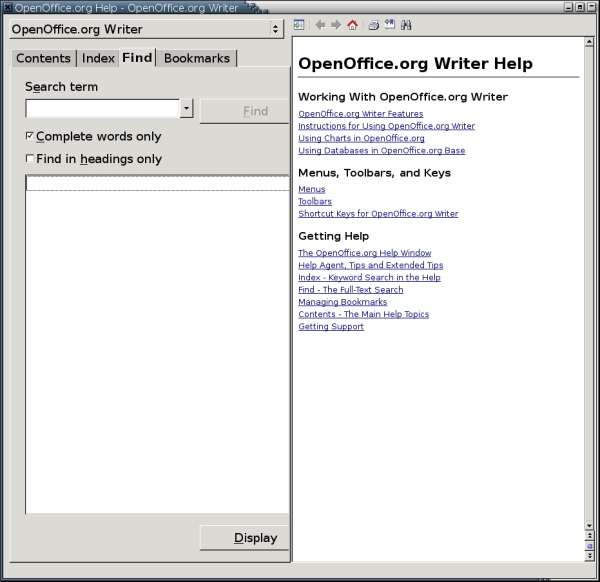
Figure 1. OpenOffice.org's help is improving, but it still has a ways to go. Use it as your first resort, but not your last.
These problems don't occur happen regularly, but they do occur often enough to be a concern.
To be fair to the writers, the on-line help is getting better with each release. In fact, version 2.0's help is looking to be the best yet. Still, the on-line help consists of 90,000 words; it's the size of a small novel. And, despite the strong efforts of the project's Documentation team, much remains to be done.
Fortunately, unlike the shortcomings of proprietary software, those in OpenOffice.org can be combatted. If any of those in OpenOffice.org really disturb you, join the project and file an issue here and then vote for the issue being resolved. You even can campaign for changes if you feel strongly enough.
Several tools in OpenOffice.org create a virtual directory in their file managers. In other words, the view you have in the tool does not correspond to any actual system of folders on your hard drive. You can move around the virtual directory from within the tool, but you cannot move outside it. Tools that have virtual directories include File > Templates > Organize and Tools > Gallery.
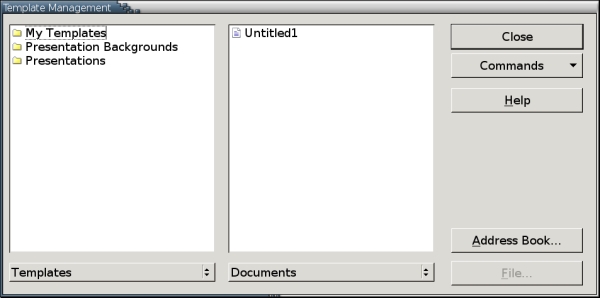
Figure 2. Virtual directories--directories that correspond to nothing on the hard drive--are used by OpenOffice.org to simplify the display. However, they can be confusing if you want to find where the files actually are located.
The main reason for virtual directories is to give a unified view of the templates available from both the main installation and your own customized user account. Instead of forcing you to navigate through a series of directories that are useless for your purpose, OpenOffice.org creates an artificial view.
Think of a virtual directory as something similar to the placement of My Documents at the top of the folder hierarchy in the Windows Explorer. Both are artificial views created for convenience.
In most cases, you should not need to look at the hard drive directories that make up the virtual directories. However, in case you ever need to, you can find them by looking at Tools > Options > OpenOffice.org > Paths.
Styles, graphics, tables and other objects always have names in OpenOffice.org. These names help you to manage your documents. They also extend the functionality of the Navigator, which works better when objects are given meaningful names.
Names are assigned when an element is created or added to the document. Default names consist of the element and the first available number, for example, Graphic1 for the first unnamed graphic in a Writer document.
In a simple document that won't be revised, the default names are usually good enough. But in a longer document with a long shelf life, they can slow you down. For example, what is the name of the file used by Graphic1? You can open the Graphics tab to find out, but you won't be able to tell from the Navigator. By using descriptive names, you can save yourself the trouble of drilling down to find the source file.
The best naming convention depends on your work habits and the elements, but some useful ones are:
By functionality: for example, Chapter Title for a style for chapter titles
By format: for example, Graphic - No Border for a frame
By file: for example, portrait.png for a graphic. How useful this convention is depends partly on how descriptive the file names are.
By caption: for example, Unemployment Figures, 1999-2001. If the caption is numbered, you might want to include that but not alone. Otherwise, you are back to the problem of undescriptive names.
There is no correct naming convention for everybody, simply one that suits your thinking and work habits.
Whatever conventions you choose, decide them at the start and stick to them. You can rename objects by selecting them and opening the right-click window, but the easiest time to name an element is when you make or add it.
Like Adobe's proprietary products, OpenOffice.org always has made heavy use of floating windows. Floating windows are small windows that sit on top the main editing window. They can be moved to whatever position is convenient or docked to one side of the editing window.
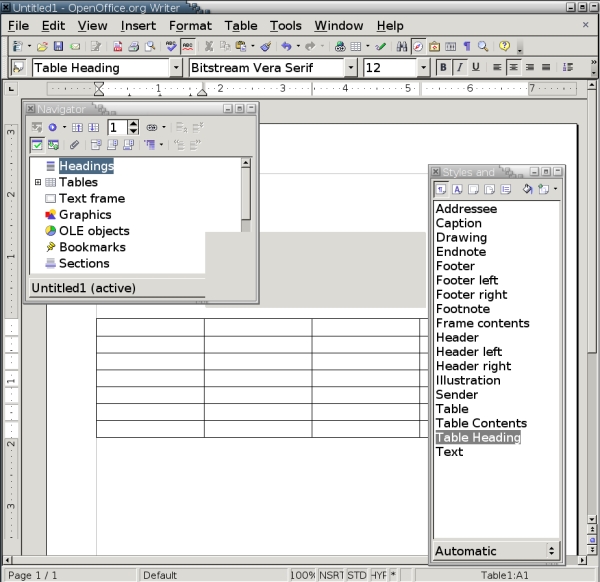
Figure 3. Floating windows, toolbars and tear-off menus are fundamental to OpenOffice.org's internal logic.
OpenOffice.org uses four main floating windows:
The Navigator (F5): a tool for moving around in a document, outlining and managing master documents. It is most powerful when you name objects in a meaningful way.
Styles and Formatting (formerly the Stylist) (F11): a tool for applying and managing styles.
The Data Source Window(F4): a tool for managing registered databases and adding the information in them to documents.
The Gallery (Tools > Gallery): OpenOffice.org's built-in expandable clipart collection
In addition, applications may have other floating windows, such as the Task and Slide Sorter panes in Impress.
With version 2.0, the concept of floating windows has been augmented by floating toolbars. These toolbars open automatically, depending on the cursor position. They replace the sliding menus and the menus opened by a long-click in earlier versions. The only problem with them is they open in the center of the editing window, which usually is precisely where you are working, and have to be moved to one side.
OpenOffice.org has two ways of designing a document, manual overrides and styles. Manual overrides are by far the most common way of designing a document. Using manual overrides, whenever you want to change the default formatting, you select a portion of the document--for example, a page or a group of characters--and then apply the formatting using the toolbars or one of the menus. Usually, it's Insert or Format, although Tools has a role or two to play. Every time you want to format something, you do it individually. This style of formatting is popular only because it requires no special knowledge. In effect, it involves using a word processor as though it were a typewriter.
The alternative is to use styles. Styles are a list of format settings. Their advantage is you set them up in one place and then tag the parts of your document where you want to use them. If you want to change the format of all the tagged areas, you don't have to visit each area individually, the way you do when using manual overrides. Instead, you change the style settings. Instantly, all the areas tagged with that style also are changed.
For example, imagine that you are preparing a 10-page essay for a class. You have decided to use Bitstream Vera Sans with a size of 10 points. An hour before class, you re-read the professor's instructions and find that she only accepts work written with a serif font of 12 points. If you used overrides, you would barely have time to change the font in every paragraph. By contrast, if you used styles, you could change the font to 12 point Bitstream Vera Serif and be ready to re-print your essay in less than a minute. By using styles, you save yourself untold time and effort. You also force yourself to get organized, never a bad thing.
Styles are created by right-clicking on the Styles and Formatting (or Stylist) floating window and selecting New from the pop-up menu.
The advantages of styles are compelling in any office suite. Yet, in OpenOffice.org, they are even more compelling than usual. OpenOffice.org greatly extends the concept of styles. Writer not only has the paragraph and character styles of the average word processor, but it also has styles for pages, lists and frames. What's more, OpenOffice.org makes the concept of styles prominent in other applications, too. Styles in Draw, for example, are a considerable time saver in a graphics project.
This proliferation of styles gives OpenOffice.org more power than rival office suites. However, it also means that if you don't use styles, you won't be able to use many advanced features. They're simply unavailable for use with manual overrides.
Designing a document every time you sat down to write would be overwhelming. Nor would you want everyone working on a project to design his or her own template. In either case, time would be wasted and efforts duplicated. Yet that is what you do every time you start a document using File > New.
Sometimes, of course, you have no choice except to start a new document. However, at the cost of a little planning, you can save enormous time and effort by designing a few templates to meet most of your needs.
Templates are a special category of OpenOffice.org documents that can be used to structure other documents. Templates are not unique to OpenOffice.org. However, because of the program's emphasis on styles, they play a larger role in OOo than in most other office applications. All OpenOffice.org applications except Math use them. Contents also can be stored in them, which is especially important for Impress's Wizard, which lets you choose the structure of a presentation before you start to create it. But the main purpose of templates is to store structure for re-use.
OpenOffice.org comes with a few templates and more can be downloaded. More importantly, you can design your own templates. Designing your own templates begins with thinking about the types of documents that you write. For instance, if you are a student, you might find that you write three main types of documents: essays for classes, informal letters home and formal letters to apply for summer jobs. Therefore, you would want a template for each of these types of documents. Probably, too, you would want to design a generic template for other documents. You could set the generic template as the default, and choose the others as you needed them. Once you create these four templates, save them using File > Templates > Save.
After this initial work, most of your documents already are designed before you have to write them. The only change to your work flow is that instead of starting a document by selecting File > New and a document type, you select File > New > Documents and Templates.
The first time a new user encounters OpenOffice.org, other impressions probably will be lost in the overwhelming sense of difference. If you are used to working another way, you also may jump to the conclusion that OpenOffice.org's way of doing things is inferior.
If you are interested in learning OpenOffice.org, get to know these quirks. Then work with them for a couple of weeks before deciding what you think of them. Only then will you have a chance of getting beyond your initial impression.
It may be that OpenOffice.org's ways aren't yours. If so, you have no shortage of materials. If you prefer to work from the command line, LaTeX may be a better tool for you. If you've always formatted manually and don't want to change, then a less styles-oriented office application, such as Abiword or KOffice, might be a better choice. However, if you know what to expect going in, you can work with OpenOffice.org's quirks instead of being puzzled by them--and make an informed decision rather than one based on the comfort of familiarity.
Thanks to Alexandro Colorado for suggesting that this topic needed to be covered.
--
Bruce Byfield (nanday)
Subscribe now!
Breaking News
| Charter Trades Privacy for Pocketbook | 10 hours 54 min ago |
| SSL Glitch Unlocks Debian, Ubuntu, & Others | 1 day 10 hours ago |
| MySpace Cashes in Spam to the Tune of $234 Million | 1 day 12 hours ago |
| Google Shoos the Trustbusters Away | 2 days 8 hours ago |
Featured Video
Linux Journal Gadget Guy, Shawn Powers, takes us through installing Ubuntu on a machine running Windows with the Wubi installer.
Delicious
Digg
Reddit
Newsvine
Technorati


If you must copy Word, copy Word 4
On August 28th, 2005 R. VanDyke (not verified) says:
The last truly usable version of Word was 4, released back in the mid to late 1980s. Since then Microsoft has bolted on a variety of more or less idiotic new features that are seldom if ever used, and generally near-impossible to use effectively.
The bolting on of superfluous features also means that Word's menuing system is deeply tiered, requiring in some cases four or five descents in order to configure a particular program behavior. The need to go spelunking in the menu system to make a formatting change is bad enough: The problem is compounded by the inability to see the effect of the selection without fully emerging out of the tiered menuing system.
In summary, if anyone is truly foolish enough to want to emulate Microsoft Word, then please let them emulate version 4. Any and all post-4 features can -- and should -- then be implemented with an entirely different usage model as a goal.
Open Office
On August 26th, 2005 Red_Hat_9_User_1 (not verified) says:
Yes, OpenOffice is pretty complicated. I do use Abiword for simple,
single pages of text--for applications where page numbers, footnotes or headers aren't needed. I don't have Koffice. I have never used Koffice. I am totally ignorant about Koffice. This is the first I've heard of it.
I'm using OO 1.0.2. Should I upgrade to version 2 ? Is there any point in upgrading?
In the past, I tried to upgrade Gnumeric, but failed because of numerous missing dependencies, which I never succeeded in getting to work. So I quit the upgrade. (If it ain't broke, don't fix it.) Anyway, I thought the whole purpose of RPMs was to make it a simple, one-step procedure to remove or install applications. Am I confused about something? Am I missing something important?
Truth is good - there's more than convenience at stake here.
On August 21st, 2005 Tim (not verified) says:
I've just scanned down through the comments on this article and there's some good stuff to consider. Some comments suggest that Byfield missed a major point: produce an MS Word/Excel/PP clone then worry about other matters later. Others feel you've become to technical in this level of article.
I'm of the opinion that the article gives a considerably more honest, and detailed, view of the problems of moving to OO than I've yet seen. I work as a technical writer in high tech - chip design and enterprise software products. I've used MS Word as my main authoring tool since 1991 (when I carefully and deliberately switched from WordPerfect) and I've created a few spreadsheets with Excel and thousands of slides with PowerPoint. I have worked with many, many writing tools, partly in an effort to leave MS Office behind because I don't think Gates and MS deserve the revenue they get from their products. I have also used other tools, such as Adobe FrameMaker, which is better suited to commercial document production, solving the robustness problem that MS Word suffers from. I've also used OO as much as I can (reasonably) and it definitely has problems, many of them exactly described in Bruce Byfield's excellent article.
It is an absolute truth that Word is easy to use and that, because we are all used to it and because of its penetration in the word processor market, taking on another word processor is more work than not doing so. But that is not the only point. People hunt down alternatives in many aspects of their lives and put out the extra effort for an ultimate good. With regard to that extra effort, I think we could do no greater good for information technology on this planet than prove that we are not owned by a single product supplier and make the effort to find another office suite. OO is a very good tool, has very good prospects for the future, and is platform independent. That is a very good start.
The notion that MS Word's replacement must necessarily be almost identical functionally in order to attract away existing Word users is a very smart suggestion. It would work, no sweat, if OO suddenly turned into Word. The only flaw is that we will be forever stuck with Microsoft's view of word processing and, IMHO, that would be very tragic. Think about it this way: because of the advent of personal computers, probably the largest artifact that is produced by a distributed effort today is text. And now think about how much of it is produced with MS Word and what a damn mess it makes when you generate HTML with it. A company in a power position such as Microsoft had a huge opportunity to help people do a really good job of producing text and distributing it through the web to the world, but for the sake of making sales, have helped us produce untold mountains of unstructured documents in a very, very nasty proprietary format. I say blow them off while we still have a chance.
But it's going to take some work. I've tried using OO Writer in my work among others who use Word. It's difficult if not possible. OO does too many tragic little things to the word files, like creating dozens of useless paragraph styles and messing up bullets, etc. - and losing track of my dictionary so auto-spell-checking stops working often. Slowness is a problem, but not a tragedy - we're all too speed-oriented anyways.
I've rambled enough. My conclusion: Word is not just a piece of software, it is an industrial artifact, with deep social and commercial context, and sticking with it has consequences far beyond which keys you press and how you create new documents. If you can't stand the thought of using something other than Word, then just use it. Steal it, buy it, whatever you have to do to keep your hands on your model of convenience. I submit that thinking citizens must often take a larger view, and turning to OpenOffice.Org would be a good thing for this world, just not the easiest thing to do in the short term.
Editing Multi-language documents
On August 13th, 2005 Leslie Satenstein (not verified) says:
It would have been nice to read about using OO or setting up OO to handle multiple langauges. I need to sometimes write in French, Spanish and English in the same document.
I can easily do so with MS Office, but I would like to do so with OO.
A follow up article would be appreciated.
Using OOo with foreign languages
On August 2nd, 2006 LeslieL (not verified) says:
I don't have a lot of experience in this area, but I've done documents with parallel text in Turkish and English. I defined two nearly identical paragraph styles: Text body English and Text body Turkish. The only difference between them was under the Font tab in the paragraph style window. That's where you select the language of the paragraph.
One nice result of this was that the English spell-checker caught problems in the English text but didn't complain about the Turkish text. If I'd been able to find a Turkish dictionary it would have caught my (many) Turkish spelling errors.
Is open office better or worse or the same as Microsoft office?
On August 11th, 2005 Anonymous (not verified) says:
The bottom line is does the current version of open office realistically compare to Microsoft office (any version)? Most people just use the word processor, the spreadsheet and the presentations programs in Microsoft office. Can most everyday, average tasks be done just as good, and just as easily, in the stable version of open office? That I think is the only really relevant question. While the article makes for a good skim it is way too technical and doesn't really clearly provide an answer to that basic question, as I see it.
has LJ been subsumed --- by MS's invisible hatred of coding?
On July 29th, 2005 Anonymous (not verified) says:
This is about the most clueless MS-group think article I've seen anywhere--let alone on LJ. Even a Jr High student knows he or she doesn't have "change the formatting for every paragraph in a ten page report ... because ... therefore MS-flipfast think is way cool, 'cus everything can change in a microsecond" [quoting the author's thought more precisely that it could possibly understand from its words alone]. I'm upset at seeing Sun push java overhead into oo and will probably stick with my WP8 -- I setup large 500-page docs for a living and need the ability to format document for *consistency! and stability!" not for speed flipping, as the MS-world think would have us believe is vital. WP has gone downhill from 8, and it's the only one that will allow me to solid and knowable control of the document style, the paragraph styles, and manual overrides where required.
OO should develop a product that has its own internal integrity ... slant it toward the heavy user, by giving him control, control and control, and just forget about acopting the MS philosophy of speed flipping (and the inconsistency and instability which that entails) and the MS philosophy that ... the user to too dumb to know how to code his own documents -- therefore only the MS-insiders should be able to control the codes.
Re: has LJ been subsumed --- by MS's invisible hatred of coding?
On July 29th, 2005 Anonymous (not verified) says:
By the same logic, I suppose you're opposed to object-oriented languages, too? Because styles in a word processor function in much the same way as classes in OO programming.
You also fail to understand that formatting has nothing to do with Microsoft's way of thinking. There are large groups of users for whom formatting matters, even if you don't care about it.
As for the java connection, Fedora Core has built a version of OOo 2.0 using GCJ, which most distros are likely to use.
Incidentally, I find it interesting that you disparage an imaginary "MS group-think" while preferring to use a proprietary piece of software -- and one that you can't know very well, or else you'd know that it had the same emphasis on styles for advanced use as any other office suite. Your position would at least be consistent if you expressed a preference for something like KOffice or Abiword.
OO vs MS OFFICE
On July 24th, 2005 Leslie Satenstein (not verified) says:
There is room for two systems in my life. That of xp pro for a desktop, and linux for development.
When I compare the two office suites, from my perspective, MS OFFICE wins hands down, for the following reasons:
Overhead. The java implementation is excessive. I can run MS OFFICE on a 150 mhz machine, but with OO and Core 4, performance sucks on a 2.4 mhz machine.
I can easily mix two or more languages in my document, and I frequently do so. My keyboard is the Canadian French Version, with accent and Euro support. Somehow, I just find that MSoft put much effort into making an ergonomically designed and integrated office product, and that from my tests, that is lacking in OO. I would say that with a 4.0mhz machine, and sufficient memory, performance of OO will rival that of MS Office on a pentium 166, then concentrate on the ergonomics.
By ergonomics, I also like to use fewer keystrokes to accomplish what I need, and agree with the author, that some parts of the design (intuitive user interface, or ergonomics) was not first and foremost in the programmer's minds.
Leslie Satenstein
Montreal, Quebec, Canada
Strange results
On September 21st, 2005 Anatoli Sakhnik (not verified) says:
I don't know why your 4 MHz FC lacks for OOo. Because when I run the OpenOffice.org 2.0 suite on my PII (366) laptop, I don't waste time waiting for it. But I can't say so about MS Office 2003. The only advantage of MSO in timings of the both office suites is start up.
A little bit other result is noticed under MS Windows. Yeah, the OOo looses by many parameters under it, but who said the life would be easy?
May your system be tuned unoptimally?
Damn it, just make everything
On July 19th, 2005 Anonymous (not verified) says:
Damn it, just make everything work like MSFT stuff first, get everyone to switch over to Linux because it's familiar, and THEN worry about making improvements and better GUIs. I know, MSFT stuff sucks, but worry about features after you have solved the marketing problem of getting critical mass on the desktop.
I have to agree with this com
On July 23rd, 2005 XT (not verified) says:
I have to agree with this comment that OOO should had just made the UI as close to a MSO version(like MSO2K) for the purpose of gaining critical mass. If OOO had done that, it would be so much more easy to convince people to switch over to Linux, at least in the workplace where a lot of people just want a familiar Office suite and a browser.
Having tried to convince several friends and colleagues to give OOO a try, almost everybody went back to MSO because the UI is rather counter-intuitive to them. While MSO's UI may not be naturally intuitive, almost every PC user today have already invested hundreds of hours over the years in familiarizing themselves with its UI.
Personally, being a heavy Excel user, I've found working with Calc a PITA. The forced usage of = for formulas (requires moving hand off the numeric pad), the troublesome way to drag a single cell plus other various irritating quirks simply make using it unproductive.
But I suppose it's way too late in OOO's development to even consider the possibility of a MSO-clone skin.
I enjoyed the article. You di
On July 14th, 2005 Andrew (not verified) says:
I enjoyed the article. You did your research, and presented it well; however, a more thorough job would include a similar run-through of other leading Office Suites, as many of your points apply to others as well. 90,000 word help file: great! In comparison to what though?!
If your aim is to shed light on the potential difficulties of switching from another suite to OOo's, perhaps it should be titled as such. As it stands, I don't believe any of the suites would have an advantage over the others in terms of ease of use/functionality for complete newbies to the Office Suite world. All things being equal on the of ease of use/functionality front, OOo is my #1 choice as it's not proprietary, and much cheaper: free! :)
Cheers,
Andrew
Good Article
On July 14th, 2005 Joseph Ashe (not verified) says:
I applaud you for "telling it like it is" ! (I especially chuckled when you said, "its design assumption that users are at least as interested in designing documents as in writing them.." Amen Brother !
With the exception of Mepis Linux, just about every Linux distro I've looked into, (almost without exception), seems to think that the average would-be office Linux user is just as interested in programming Python, as they are surfing CNN.com ! All that does is add to the intimidation factor your average Joe faces when told the company is looking into switching over to Linux.
However, getting back to OpenOffice, while there's no doubt that it is indeed worthy of praise, too many news-writers sugar coat the difficulties of switching Microsoft Office users over to OpenOffice for these reasons cited in your excellent article.
Again, I'm not saying OpenOffice is bad. It's WONDERFUL... especially for a computer user without much exposure to Microsoft Office. But for office workers who have for years used MS-Office, we have found the transitional problems monumental for the very reasons you make note of in your article.
I too would like to see more written about the differences between OpenOffice and Microsoft Office as well as how to persuade a reluctant office staff to consider Linux.
With the exception of Mepis L
On July 15th, 2005 Anonymous (not verified) says:
With the exception of Mepis Linux, just about every Linux distro I've looked into, (almost without exception), seems to think that the average would-be office Linux user is just as interested in programming Python, as they are surfing CNN.com
I smell FUD, or are you astroturfing?
You would have more credit if you bothered to state which distro and why it allegedly expects the user is coding Python.
Mepis Clarification
On July 15th, 2005 Joseph Ashe (not verified) says:
As imature as your posting was, I can see why you listed your name as "anonymous". Fortunately, the majority of readers act with more professionalism, so, I'll respond to them in addressing your statements.
The article is about the challenges facing adminstrators contemplating a move to OpenOffice. It was not an article on which Linux distribution is best; which office suite is best; Why you should use this program or that program.
The point I was trying to make is that 95% or more of affected office computer users could care less about the "nuts-and-bolts" that go into a program or a distribution. All they care about is getting a job done in the least amount of time. That includes not having to spend time trying to figure out what the programmer was thinking, or, what the programmer is expecting them to do in order to get their job done.
I used Linux distributions to illustrate my point. I often see distributions chock full of EMAC, Libraries, Utilities, etc. that office users could care less about per my above statement. All of these "extras" only add to the intimidation factor the average office computer user will be faced with when asked to give up Windows.
If I may borrow a tactic from your play book "Mr. Anonymous", is it about getting Linux and OpenOffice into mainstream corporations ? Or is it really all about pampering your insatiable ego as you try to impress the rest of us how smart think you are ?
Irrelevant
On July 15th, 2005 Richard Steven Hack (not verified) says:
In actual offices, end users do not install office suits. IT management (or some consultant for small businesses) does.
And no IT management or consultant is going to install the EMACS package or anything else related to such things for an office worker.
Nearly every distro has the ability to pick and choose which packages are installed.
Therefore your criticism is completely worthless.
And yes, you probably are an astroturfer since you know so little about Linux that you could make such a ridiculous comment.
Whatever....
On July 15th, 2005 Joseph Ashe (not verified) says:
It's obvious Richard you've totally over looked the point I was trying to make in regards to introducing something new to an office staff. Instead, you want to make a big deal out of what was probably a bad analogy on my part. And I refuse to engage you on something as pety as that.
Have a great week-end. I'm out of here !
Nice
On July 15th, 2005 E@zyVG (not verified) says:
Very interesting and nice article.
I would like to see few more articles discussing the OOo, especially comparing it to other Office packages and the compatibility between them, which I find it to be very-very important factor.
Comparing MS Office to OO.o
On July 20th, 2005 JP Carsten (not verified) says:
This comparison approach would be helpful to me.
My staff and I are currently on MS Office, current version (whatever that is.) I also do some SOHO word processing and have been trying to find analogous solutions with OOo that I have become used to w/MS Office. The first that comes to mind is writing a business letter. When I get done writing the letter I go to tools, select labels/envelopes-> then envelopes and the addressee is ready to be printed on an inserted envelope, with or without a return (mine) address.
I haven't been able to find this yet in OO.o. I handwrite the address and use a label for the return. If someone can tell me how to access this little envelope routine in OO.o I will be a happy camper. Until then I will continue to use Bill's MS Office for simple business correspondence.
Insert -> Envelope
On July 29th, 2005 Anonymous (not verified) says:
Subject says it. Found this in seconds with Help -> Contents and then Search term "envelope" on the Index tab.
OOo - You're just teasing aren't you?
On July 19th, 2005 webnuts4u2 (not verified) says:
It's a nice article but leaves me wanting more.
Yes, I know there are differences, what I'd like to see in an in depth explanation with samples as to why OOo templates might be superior to MSO.
OOo - You're just teasing aren't you?
On July 20th, 2005 Bruce_Byfield (not verified) says:
As it happens, my first Linux Journal column covered this subject.
See:
http://www.linuxjournal.com/article/7447
OOo - You're just teasing aren't you?
On July 20th, 2005 webnuts4u2 (not verified) says:
Just read the previous article. Good stuff, thanks!
More than just Office
On July 20th, 2005 Brian W. Masinick (not verified) says:
Bruce mentioned near the end of his article several other alternatives that can be used when you want to create a word processing document. He could easily write about them. How about it, Bruce? Perhaps another article, briefly comparing the features of each word processor and how it works would be helpful!
More than just Office
On July 20th, 2005 Bruce_Byfield (not verified) says:
Brian:
That's a good idea. Maybe I'll take it up in the next few months.
Thanks!
Correcting my home page
On July 20th, 2005 Brian W. Masinick (not verified) says:
Ah, so used to typing in .com on the end of references, my ISP is home.comcast.net. Thanks again for a good article, Bruce!