
Linux in Government: VMware Workstation 5

June 27th, 2005 by Tom Adelstein in

A look at the new VMware Workstation release--what it can and cannot do.
Your rating: None

In last week's article, we discussed virtualization and its role in reducing server sprawl. We included VMware server as one of the products used to virtualize a data center. VMware also sells a workstation with a well-established reputation. This week we take a look at VMware Workstation 5.0.

In the past, many analysts have given kudos to VMware workstation for aiding people who want to run different operating systems for development and testing. Some even have claimed that the product accelerates application deployment. Similar suggestions abound about VMware workstation allowing Windows users to play around with Linux without having to format their hard drives.

Journalists who rely on VMware to evaluate and write about Linux on their Windows laptops, however, will never understand the power and sophistication of Linux. VMware Workstation has many uses, but it is not a substitute for a native Linux installation on bare hardware. Reviewers who practice using VMware to evaluate Linux do themselves and the community a great disservice.

Still, VMware workstation has a value proposition and in certain instances, it can give Linux users some help. For example, in previous articles, I have used the example of a major telecommunications company that migrated to Microsoft Exchange while forgetting that 30% of their users had UNIX and Linux desktops. The CIO's solution included buying 30,000 laptops for $4,000 a piece, simply to run Microsoft Outlook.

Ultimately, the company reprovisioned those laptops and added Citrix servers and VMware to the engineers UNIX and Linux workstations, respectively. Although still an expensive proposition, the company realized a considerable cost savings by trading the laptops for VMware and Windows.

What Is It?

VMware Workstation is a $200 software application that creates virtual machines and allows someone to use some Linux or Microsoft Windows desktops to host other operating systems. For Linux users, it provides a way to run Windows on their workstations provided they have an acceptable distribution. According to VMware, Workstation version 5 runs on:

SUSE LINUX Pro 9.2, SUSE LINUX Enterprise Server 9.0, Mandrake Linux 10, Windows Server 2003 SP1 beta (experimental support), and Red Hat Enterprise Linux 4.0.

On 64-bit systems, host operating system support for 64-bit versions of Red Hat Enterprise Linux 4.0, Red Hat Enterprise Linux 3.0, SUSE LINUX Enterprise Server 9, SUSE LINUX Enterprise Server 9 SP1, and SUSE LINUX Enterprise Server 8. Experimental host operating system support for 64-bit versions of Windows Server 2003 SP1 and Windows XP.

To view all the supported Linux operating systems, you should visit this link. VMware supports older Linux hosts in addition to those mentioned above.

Keep in mind you might feel confused by the differences in the release notes and the specifications on the VMware Web site. If you believe the Linux hosts available are limited to the ones listed as newly supported in the release notes, you may miss out on the ability to run older Linux distributions as hosts. Figure 1 shows a screenshot of VMware Workstation 5 installed on a Novell Linux Desktop (NDL9).
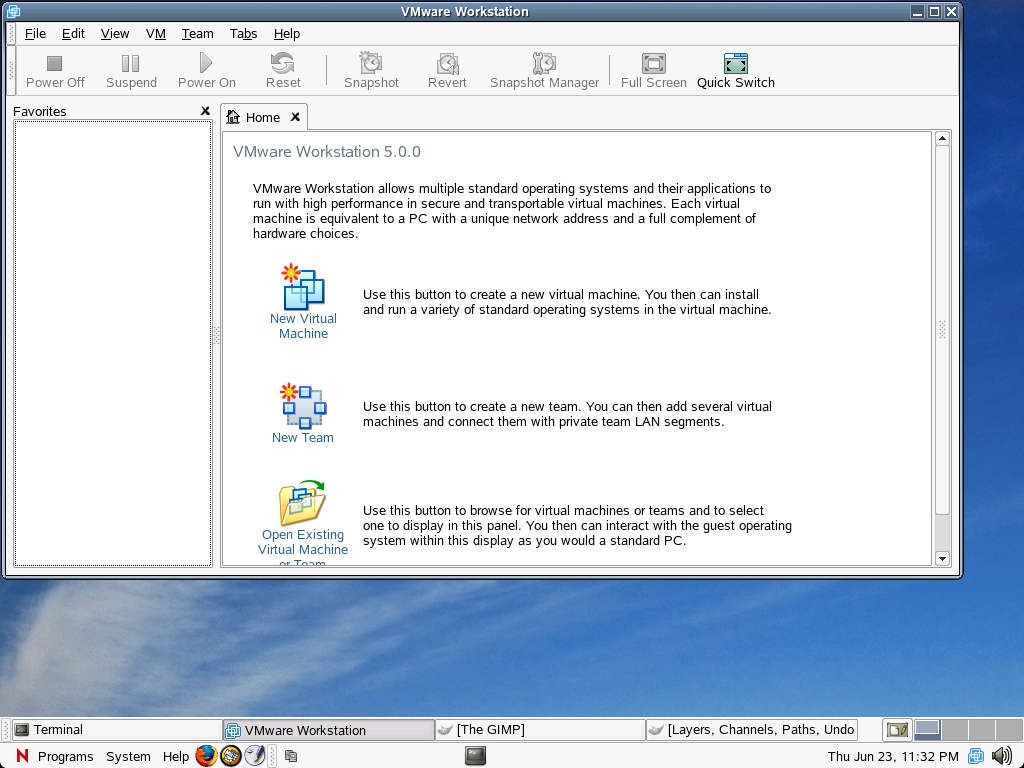
Figure 1. The Start-Up Screen for VMware Workstation 5

I had some difficulty finding a suitable host for VMware workstation. Although the release notes claim that the software runs on SUSE Pro 9.2, it didn't. In fact, I kept getting this error message:

None of the pre-built vmmon modules for VMware Workstation is suitable
for your running kernel. Do you want this program to try to build the
vmmon module for your system (you need to have a C compiler installed
on your system)?

CC [M] /tmp/vmware-config1/vmmon-only/linux/driver.o 
/bin/sh: scripts/basic/fixdep: No such file or directory 
make[2]: *** [/tmp/vmware-config1/vmmon-only/linux/driver.o] Error 1 
make[1]: *** [_module_/tmp/vmware-config1/vmmon-only] Error 2 
make[1]: Leaving directory `/usr/src/linux-2.6.11.4-21.7' 
make: *** [vmmon.ko] Error 2 
make: Leaving directory `/tmp/vmware-config1/vmmon-only' 
Unable to build the vmmon module. 

I decided to try SLES 9 in the form of Novell Linux Desktop and installed it without any updates. VMware did install on the original version. Afterward, I updated NDL 9 and tested VMware Workstation 5 and it continued to work.

You also may find some confusion on the VMware site regarding which Linux distributions can operate as "guest" systems and which operate as hosts. Just remember the host provides space for the guest.

Guest operating systems include:

  • Mandrake Linux 8.2, 9.0, 9.2, 10

  • Red Hat Linux 7.0, 7.1, 7.2, 7.3, 8.0, 9.0

  • Red Hat Enterprise Linux AS/ES/WS 4.0 (32-bit)

  • Red Hat Enterprise Linux AS/ES/WS 2.1, 3.0

  • Red Hat Enterprise Linux Advanced Server 2.1

  • SUSE Linux 7.3, 8.0, 8.1, 8.2, 9.0, 9.1, 9.2

  • SUSE Linux Enterprise Server 7, 7 patch 2, 8, 9, 9 SP1

  • Turbolinux 7.0, Enterprise Server 8, Workstation 8

  • Novell Linux Desktop 9

  • Sun Java Desktop System (JDS) 2

Because I run Linux as my host, I'm not exactly thrilled by the options provided by VMware 5--users have two Mandrake options as well as older SUSE and Red Hat and RHEL options from which to chose. You can find no Debian Linux options, and Fedora isn't supported. The Linux guests lack some excitement too. A glimpse of the list shows that VMware hasn't provided the journalists any state-of-the-art Linux distributions about which they can write.

So What Does It Actually Do?

VMware Workstation 5 allows multiple operating systems and applications to run at the same time on a single physical computer. If you have a lot of RAM, a large hard drive and a serious CPU, VMware performs okay. In this way, it is more of a developer's product than an end-user one.

The guest operating systems live in isolated virtualized machines. VMware maps a hosts computer's hardware resources to the virtual machine's resources, so each virtual machine has its own CPU, memory, disks and I/O devices, so to speak. Each virtual machine appears to the guest operating systems as a standard x86 computer.

Once VMware Workstation installs a guest operating system on the host, you can install and run unmodified versions of Windows, Linux, Novell NetWare and Sun Solaris x86, as well as applications written for those platforms, on one machine. VMware says users can see the benefit of using multiple PCs without the expense, physical setup and maintenance of various hardware platforms. By the time you build a machine with enough resources for the guests to operate at acceptable level, you could have saved money buying separate PCs. But VMware has other advantages at which we should look.

Figure 2 provides a look at VMware Workstation running on NLD 9 with Windows XP Home Edition installed. This should give you an idea of what you can expect to see if you use this product. Notice on the top of the tool bar that an icon lets you select a full-screen mode. By selecting this option, the guest occupies all of your monitor's pixels. It's still not going to give you the benefit of a great visual experience, however.
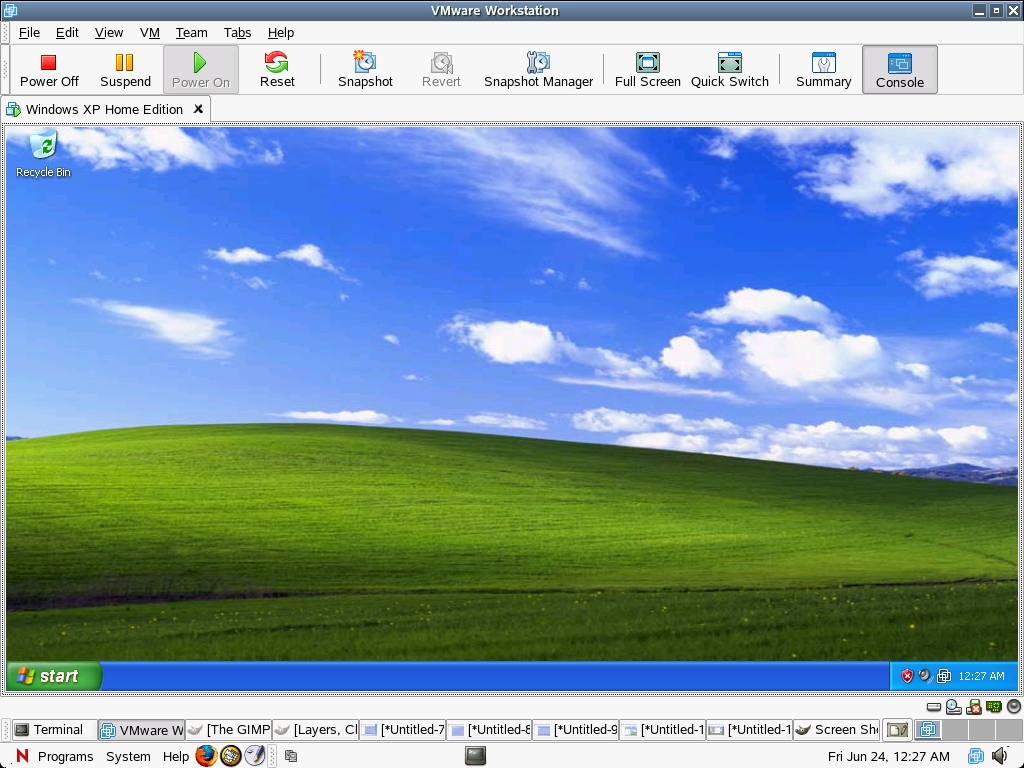
Figure 2. Windows XP Home Edition Running on NLD 9

What's New?

The virtual hardware of VMware 5 runs better than previous versions. With a single Pentium IV or an equivalent AMD processor and 512MB of RAM, one should be able to run two virtual machines simultaneously. The previous versions would grind to a halt in such a scenario.

I wouldn't recommend running your system that way, however. If you have a need to run more than one virtual machine, you should run dual high-end processors and 3GB of memory. Otherwise, you cannot use your host machine and the two virtual machines with any efficiency.

Snapshots of an OS

Version 5 provides for multiple snapshots so a user can take a snapshot at any point and revert to its original or another state when a guest is powered down. Users can configure a virtual machine to take a snapshot when a guest is powered off and preserve an audit trail. If you need to examining a virus, for example, you can take a snapshot before you introducing the malware. If you the virus does damage, a user can restore the virtual machine to the state preserved in that snapshot. The same goes for testing new code or a patch.

Previous versions of VMware allowed for the taking of snapshots. However, once you created a second one, it would overwrite the original snapshot. So, for testing purposes, version 5 provides a significant upgrade.

Virtual Networks

Workstation teams allow users to set up a virtual network or lab on a host computer. You can power up multiple virtual machines as mentioned above. You then can configure networking the way you would on any local area network, however, this network would run on a single computer.

Users can work together in what VMware calls a LAN segment. They are invisible to the host computer's network, which creates the possibility of doing development in a virtual safe house.

Cloning

The new VMware Workstation provides interesting deployment capabilities with what the company calls clones. In VMware workstation terms, two types of clones exist. One it called a full clone, which we might consider to be similar to a ghosted image used to provision another computer. The second type of clone is called a linked clone. It remains dependent on the original image.

VMware's full clone functions as an independent copy of a virtual machine. Once a user makes the clone, it runs separate from the parent. It then can go off and become a unique instance that you can use to make changes or deploy for whatever purpose you see fit.

VMware's linked clone shares virtual disks with the original or parent, conserving disk space. This permits multiple virtual machines to use the same software installation. Also, linked clones take less time to create than a full clone does.

Labs might want to create linked clones to provision to developers, quality assurance engineers, testers or maintenance programmers--literally for different tasks. By storing a linked virtual machine on your local network, other users quickly can make a linked clone. A support team can reproduce a bug in a virtual machine, and an engineer quickly can make a linked clone of that virtual machine to work on the bug.

The files on the parent of a linked clone continue to exist at the time one creates a snapshot and continue to remain available to the linked clone. Changes to the parent don't affect the linked clone, and changes to the disk of the linked clone do not affect the parent.

Looking Back and Forth at VMware

If you have followed the progress of VMware since it started up, you may have thought of it as a way to use Windows applications on your Linux desktop. I know I did. That seemed like the founders' intentions. But, we cannot really know what vision or roadmap the company had.

VMware workstation ceases to have relevance in terms of a way to deploy Windows applications as Linux begins replacing those applications with native versions that run in GNOME, KDE and other desktop environments. The future for VMware lies in the server area, where it has given Linux a leg up in the data center. One can only wonder how much longer the workstation will continue to have a market.

Regardless, VMware has served an important place in the history and evolution of free Linux. Many people still love it and are glad it's around. Hopefully, the company y will innovate and make using Windows applications simpler for Linux users while they grow their server business.

Tom Adelstein is a Principal of Hiser + Adelstein, a consulting and operating company specializing in free and open-source software solutions and support. Tom is the co-author of the book Exploring the JDS Linux Desktop, author of an upcoming book on Linux system administration and has written prolifically since 1985. Tom's business career began in public accounting where he first learned to program and develop software and later progressed to Wall Street, where he became the designated principal of a NYSE firm. He later returned to technology and has consulted and worked with start-ups as well leaders of the Fortune 500.

__________________________


Special Magazine Offer -- 2 Free Trial Issues!
Receive 2 free trial issues of Linux Journal as well as instant online access to current and past issues. There's NO RISK and NO OBLIGATION to buy. CLICK HERE for offer

Linux Journal: delivering readers the advice and inspiration they need to get the most out of their Linux systems since 1994.

Sorry, offer available in the US only. International orders, click here.

Comment viewing options

Select your preferred way to display the comments and click "Save settings" to activate your changes.

fedora as guest on VMWare

On July 10th, 2005 Anonymous (not verified) says:

I currently run FC2 through FC4 as guests on VMWare 5

VMware Linux hosts

On June 30th, 2005 Anonymous (not verified) says:

VMware may not officially support all Linux distro's, but this only means that VMware is shipped with modules matching the default kernel for those Linux versions. What VMware needs to run is vmmon & vmnet modules that match the hosts kernel. Just make sure that there are matching kernel headers and kernel image. Run the ~/vmware-install.pl and it will compile the needed modules. Runs on all version of Debian I have used.
Greg

SuSE 9.2 as VMware host

On June 28th, 2005 Anonymous (not verified) says:

I too had this problem. A little searching the SuSE and VMware forums brought me these commands which did the trick:


$ cd /usr/src/linux
$ make cloneconfig
$ make modules_config
$ vmware-config.pl

Suse 9.2 as VMware host alos works for 9.3

On July 6th, 2005 Anonymous (not verified) says:

Just F.Y.I

I tried this proceedure on Suse 9.3 and it worked there as well.

Suse 9.3 as VMware host

On September 7th, 2005 Shimon (not verified) says:

Hi,

Yes, works well without any problems.

Shimon

SuSE 9.2 as VMware host

On June 28th, 2005 Anonymous (not verified) says:

Thanks for the commands. You sure it was just a little searching?

I never found anything like that and used an earlier version to get it to work.

SuSE 9.2 + VMware

On June 29th, 2005 DJM. (not verified) says:

> I never found anything like that and used an earlier version
> to get it to work.

The problem is that SuSE's 9.x kernels are full of additional patches that Novell/SuSE put there, so that most packages relying on pre-built modules will fail. Workaround: You have to re-compile the modules.

I have this problem with VMware but also with the Linux-versions of a VPN software I have to use (Nortel VPN client).

As for VMware and SuSE 9.2:

Here is how I solve the problem:

cd /usr/src/linux
make cloneconfig
make prepare
vmware-config.pl

With "make prepare" some files that are usually created during a kernel compilation are created too, but nothing more happens, ie. the actual compilation does not take place.

When you call "vmware-config.pl" it will then find all the necessary files as if a fresh kernel had been compiled. Voilà, problem solved.

I use SuSE 9.2 as main OS on my Laptop, and VMware to run other virtual installations, e.g. Windows 2000, other Linuxes, and so on.

Regards,

DJM.

SuSE 9.2 + VMware

On June 29th, 2005 Anonymous (not verified) says:

DJM:

I appreciate your explanation a ton. I was going to sell my SUSE 9.2 on eBay and take a big L-O-S-S.

I followed everyting you wrote and understand it. I wish you would post your work-around on Linux Questions or some of the other support sites.

Search engines don't pick up anything from Linux Journal because of this content management system they use. All this great advice in the comment sections and it's totally useless to the community.

Hey Editors - did you get that?

Cheers!

VMware

On June 28th, 2005 PK (not verified) says:

I too run VMware workstation to use Windows programs. 1GB of RAM with a 1.4mhz Pmobile works pretty well. Mine is running on Ubuntu 5.04 with no difficulties. It is nowhere near as fast as Windows running natively but is acceptable. I have used it on Mandrake (Mandriva), Gentoo, Redhat and Debian without difficulty. It boots somewhat slowly but runs pretty well.

The biggest problem with VMware on a laptop is that the host IP changes with locations. And then the guests cannot find the host to share files without a great deal of effort, every time you change locations. It get's old real quick. I take the laptop home at night and I'm tired of changing guest IP info.

I have never made or intend to make a clone. I don't care about this capability. And I just don't have or intend to get or make the space for two or more VMware instances on my harddrive.

Someday Intuit will release a Linux version of Quicken and possibly Quickbooks and OpenOffice's .doc compatibility will improve to the point that I no longer need Windows and I will delete VMware completely. But until then....

There's a very easy way to sh

On August 9th, 2005 Anonymous (not verified) says:

There's a very easy way to share files between host and guest in everywhere without modifying anything when changing place.

You just have to add another ethernet interface to the guest. Then you can define that eth0 is for the outside world (using bridge mode, probably dhcp enabled for eth0) and eth1 is using host-only mode. Guest can then have a static ip address or dhcp enabled (usually gets always the same ip address). Host has a static ip address (host-only network adapter Vmnet1), so guest OS always finds the host using that ip address. No more trickies and worries about host and guest, they have created a private LAN. Now you can change the place as much as you like.

VMware and applicable hosts

On June 28th, 2005 Anonymous (not verified) says:

I run VMware 5 on Fedora Core 3 with no problems.
One has to update the install for each new kernel release but that is quickly done.

The guest OS is Win2K Pro and it runs fine on my
3.2GHz pentium with 1 GB RAM and 640 GB of IDE and SATA disks.
File IO runs as 15 -20 MB/sec as a GuestOS whereas under W2K
directly I get 7 - 10 MB/sec on a good day.

My only concern is the cost as I only use two apps under Win2K.

VMware performance

On June 28th, 2005 Anonymous (not verified) says:


The virtual hardware of VMware 5 runs better than previous versions. With a single Pentium IV or an equivalent AMD processor and 512MB of RAM, one should be able to run two virtual machines simultaneously. The previous versions would grind to a halt in such a scenario.


I wouldn't recommend running your system that way, however. If you have a need to run more than one virtual machine, you should run dual high-end processors and 3GB of memory. Otherwise, you cannot use your host machine and the two virtual machines with any efficiency.

I don't agree that such a high-end machine is needed to run VMware Workstation. I've run RedHat Linux in VMware on a 600 MHz Pentium III, 512 MB RAM Windows box with almost the same performance as booting directly into RedHat Linux on the same machine.

All you need a machine that is powerful enough to run the applications you want to run in the virtual machine. The overhead of VMware is very less in terms of CPU utilization and moderate in terms of memory.
For example - If you can run applications A, B & C on an OS without VMWare, you can also run A on the original OS, B & C on two virtual machines if you have enough memory.
You can't expect VMware to triple the power of your machine by installing two virtual machines!

How does it differ from QEMU?

On June 28th, 2005 mangoo (not verified) says:

It would be nice if the article outlined some differences between VMWARE and QEMU (which is free and is packaged in many distributions).

Don't forget that VMWare 5 al

On June 29th, 2005 b34r (not verified) says:

Don't forget that VMWare 5 also support DirectX acceleration using OpenGL under a Linux host running a guest XP. While the feature is not yet perfect it already runs a lot of recent game titles that do not work either in Cedega or Wine at more than acceptable performances.

OpenGL != DirectX

On May 21st, 2007 Matt H (not verified) says:

You know that OpenGL and DirectX/Direct3D aren't the same thing, right; they're competing things. You can run DirectX 9c in vmware. you cannot run OpenGL in vmware. Almost all modern windows 3D is directX, things like Compiz on linux etc are OpenGL. important distinction as you can run windows guest games with directX if the host, vmware and guest are turned on, but you cannot run OpenGL in any virtual machine. OpenGL is seen as being at least a decade out of date, although it's making a comeback in the linux world for compositing window managers.

Short version is that QEMU is

On June 28th, 2005 Anonymous (not verified) says:

Short version is that QEMU is an emulator and VMware is a virtualizer. VMWARE makes an x86 look like lots of x86 systems. Qemu in theory makes and x86 look like a sparc,ppc,etc,etc it can also be used to run multiple copies but will have a higher overhead than a virtualizer. From what I have seen, VMware is way easier to setup.

Re: Short version is that QEMU is

On August 27th, 2005 Anonymous (not verified) says:

Sorry, but QEmu is a Virtualizer, to my limited experience no great difference with VMWare (I don't do DirctX &c.) in performance, but $200 cheaper, i.e. free.

Wine is an emulator.

W(ine) Is Not an Emulator.

On March 21st, 2006 Anonymous (not verified) says:

W(ine) Is Not an Emulator. Is a complete replication of M$ libraries on top of Linux. If it is slower is because it is not polished yet, it has a long way to go to replace win2000 totally.

Regards from Spain.

but QEMU isn't hard to setup :)

On June 29th, 2005 mangoo (not verified) says:

All I did in my Mandrake system was:

1) urpmi qemu qemu-launcher

2) Then I started qemu-launcher

3) checked "Use CDROM" and pressed "Launch Qemu"

And that was it, I was able to run another Linux from a CDROM :)

I think the comparison you ar

On June 28th, 2005 Anonymous (not verified) says:

I think the comparison you are looking for is between vmware and xen.

I think the comparison you ar

On June 29th, 2005 Anonymous (not verified) says:

I think the comparison you are looking for is between vmware and UML.

vmware and UML have more in common than either has with xen.

VMware Workstation 5 and slackware

On July 5th, 2005 Anonymous (not verified) says:

So how do u get this to work on a slackware 10.x system?

Featured Videos

Email is one of the least private and least secure forms of communication, although few people realize this. MixMaster is one way to allow secure, anonymous communication even over the very public medium of email. This tutorial will get you started with MixMaster quickly and easily.

In case you were wondering about the fun side of Linux World Expo, we thought we'd give you a peek at our shenanigans. We at Linux Journal love what we do so much, that we can't help but have a ball wherever we go.

From the Magazine

September 2008, #173

Feeling a bit like a Thermian? Never give up, never surrender! Someday, you could go from underdog to top dog. Just take a look at a few of the underdogs we highlight in this issue: Mutt, djbdns, Nginix, Gentoo, Xara and the program voted mostly likely to fail just a few years back—Firefox. If Firefox is not radical enough for you, check out Chef Marcel's column for some more alternatives. Having trouble mapping your program data to your relational database? If so, Rueven Lerner shows you some tricks in his At The Forge column.

Need to run GUI applications on your server in the next state? In his Paranoid Penguin column, Mick Bauer shows you how to do it securely. Kyle Rankin keeps hacking and slashing and shows you a few split screen secrets you may not be familiar with. Finally, we all know what happens next February, but only Doc knows what happens afterward.

Read this issue