
Trying Oracle on Linux in the Enterprise
My company runs its Oracle databases on HPUX11i and Hewlett Packard hardware. Oracle and HP are certified for use with Linux, so I wanted to see how the performance of some of our databases would compare if moved to Linux. My ideal goal was for Linux to do everything HPUX does, interconnecting with our existing infrastructure seamlessly. I wondered whether we'd lose any flexibility in administration.
For my first proper dive into the world of Linux, I chose Intel processors, thereby sticking to the philosophy of not changing too many components at one time. I was curious about how new 32-bit processors would compare to our "old" 64-bit UNIX ones. I'd read that the faster processors would more than make up for being only 32-bit, especially for our environment where most of our databases aren't too large and don't really get hammered that much. Our storage area network (SAN) is integral to our systems, so I really wanted to push to get all the features of our SAN disks from HPUX working on Linux as well. Finally, there's much talk about cost savings with Linux, and I wanted to add my two cents to the wide-ranging differences people find in total cost of ownership (TCO).
I've worked on a number of different *nixes, and learning Linux really was no different. As I find when going to a new UNIX hardware platform, the changes get bigger as you get closer to the hardware layer. Formatting disk partitions and kernel modifications, for instance, reminded me of old SunOS days. These tasks went fine on Linux, but the tasks aren't automated or as easy as Solaris or HPUX. Most of my kernel changes were dynamic, and although making them isn't idiot-proof, they didn't require a recompile/reboot--unlike the equivalent HPUX kernel changes. Because Linux is open, GUI tools are available to make these tasks easier. I like Webmin especially. Also, Red Hat's Disk Druid is a great tool for partitioning disks within the installation program--I don't know why RH doesn't make it available outside installation. While taking a Red Hat course, I asked a Red Hat employee this question. His only reply was something like, "A lot of people ask for that, I don't know why it's not available". Is anyone at Red Hat listening?
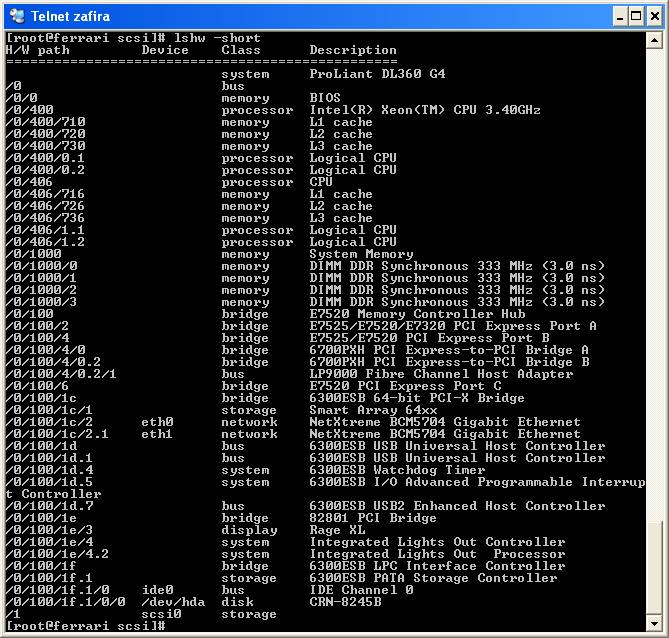
Having spent recent years solely with HPUX, I was glad to find lshw. It's a bit like ioscan, which provides an easy way to see all of your hardware at a glance. In Linux, all of the information is already there, but you need to look through various files in /proc to see them.
I had goofed around with Oracle on Linux on a laptop that I nabbed from our HelpDesk. But before I could trust Linux for our live database, I needed a real server in our computer room. This would mean getting authorization to buy two small servers. My evangelism method was to show that by spending less than £10K once, we would be able to save up to 15K, per HPUX server, repeating year in and year out.
Maybe the math was compelling, or perhaps it was the fact that our IT Director already was a Linux fan, but I was allowed to buy two HP-DL360 G4 (3.4GHz) 1U servers, which we refer to as pizza boxes. This model was the latest incarnation of the same boxes our Windows guys buy, so we already had some experience and confidence in the hardware, as well ass a predefined support channel. We choose Emulex LP9000 fibre cards, as they are our standard and are recommended by our SAN software manufacturers. I also bought a few licenses for HP Instant Lights Out (ILO) software, so I could compare fully that console solution to the Guardian Service Processor on our HPUX servers.
We bought Red Hat Enterprise Server 3.0, which installed fine, but the DL360 server has a SmartArray 6i hardware array for managing the two internal disks. Red Hat didn't have drivers in the 3.0 installation CDs, but it didn't take a RH representative long to point me to the download area on the RH Web site. There I found Update 4 of RH ES 3.0 ISO images. After some downloading and a few ISO burning sessions, this RH media had the needed cciss drivers and therefore recognized the internal disks. I have no complaints with Red Hat's Anaconda installation; it looks good and works fine.
Oracle is certified on many Linux distributions. I had heard in a speech that Oracle is so keen on Linux that it even gives you Linux OS support to help you get up and running. I tested this and found it to be true. Outlined below is the exact script I ran to modify the kernel parameters and set up the environment on a new Linux box for Oracle. I found this all by Googling for the necessary information.
Overall, my main feedback on Oracle on Linux it's great. As my English colleagues like to say, "It does what it says on the tin". Once the sysadmin configures the box for Oracle, your DBA won't even know he's not running on UNIX--the systems are that similar. If you've ever seen Oracle on Windows, you know that Oracle administration is OS independent. I've seen first-hand that the following tasks/components are completely the same for Oracle on UNIX and Linux:
installation program
patching program
.profile
environment variables
initialization files
import and export commands
listener
startup and shutdown commands
backup mode (for hot or on-line backups)
I've imported copies of five of our databases to Oracle on Linux with no problems. Most of these were running on 8.1.6, so any hassles encountered actually had to do with going from Oracle 8 to Oracle 9 rather than going from UNIX to Linux. We've been running our first live database on Linux for a few months now, and performance on these new boxes is great.
With Oracle now running on Linux, I needed to prove that all our infrastructure would still work. It did us no good to put our live databases on a server that couldn't be backed up, monitored, administered and cloned easily.
For backups, we use HP's DataProtector (formerly known as OmniBack), which runs as a server on UNIX and as clients on all of our Windows and UNIX servers. HP hasn't ported DP to Linux for the server; otherwise, I'd plan to manage all our backups from Linux. But HP does offer the DP client for Linux; it can be found on the UNIX DP CD, along with all the versions of UNIX. Most tasks for backups, including installing the client on a UNIX or Windows server, can be run from the GUI, but Linux isn't integrated smoothly yet.
As with many Linux jobs, though, the command line is the answer. Running the DP installation program and answering a few questions gave me an enterprise backup product that plays nicely with my existing setup. I'd say the learning curve here is miniscule.
The next priority for Linux connecting to our existing systems was monitoring. We use an excellent program called Big Brother to monitor our servers. It's free for non-commercial use, and I recommend it to everyone. Because UNIX shell scripting is my language of choice, I love how you can write a script to monitor anything and then plug that into Big Brother to report by way of a Web page. I knew the BB client would run on Linux, because I've already seen it run a BB server. All we had to do was download the program and follow the instructions to compile it once for each new hardware platform.
As before, configuring BB for Linux was exactly the same process as for UNIX. We now use BB to monitor network access, disk space usage, LVM status, Web servers, Oracle SQLplus connection, listener status and many other custom checks.
With availability monitoring covered by Big Brother, we wanted to get our new Linux boxes monitored for processor, disk, memory and swap in regard to performance. We could use standard UNIX tools such as sar, but we already standardised on HP Openview PerfView, which runs from a GUI and creates pretty graphs. We had to upgrade this product to a newer version to get it working with a Linux client, but there were no problems to report here either. This is an example, however, of where you need to decide whether you're going for maximum costs savings and installing open source everywhere. We already were paying enterprise prices for our old UNIX environment and, at least in the beginning, we didn't want to make huge changes and take on more risks. So we're still paying similar costs to have our Linux boxes monitored and backed up, because that's the solution we already have in place here.
When it comes to SANs, Linux works, but not as easily and flexibly as HPUX. To use a new lun on HPUX, you simply need to type <ioscan> and <insf -e>. But with Linux, you either need to reboot or find the hostadapter, SCSI channel, ID number and lun number and then type:
echo "scsi add-single-device a b c d" > /proc/scsi/scsi
DISK LUN TABLE:

a       hostadapter				0
b       SCSI channel on host adapter    	0
c       ID      				0
d       LUN     				0
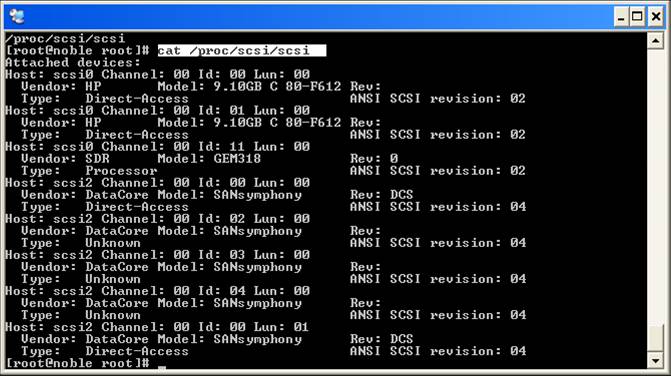
I guess we're still at the early adopter stage, though, so these administration functions should be automated and simplified as time goes by. I believe QLogic has a better toolset, but so far I've only tried Emulex.
The rest of the nuts-n-bolts of Linux that needs to work with UNIX--things such as NFS, NIS, DNS, SSH simple sendmail and NTP--all worked wonderfully as well. Maybe I should have been satisfied with this, but I wanted to push to get as many of my UNIX tools to work on Linux as possible.
HPUX has an admin tool called Ignite that can be used to clone a server, both its configuration and its data. Ignite works like Ghost, but I think it's even better. As for Linux, a number of both commercial and free open-source admin tools are available. So far I've used Partition Image to save an image of an entire Linux partition across our network. You then can boot the same or an identical Linux box using Partition Image and restore that partition from the network, thus building or rebuilding a server for cloning or disaster recover purposes. Does this seem complicated? It's easier than it sounds.
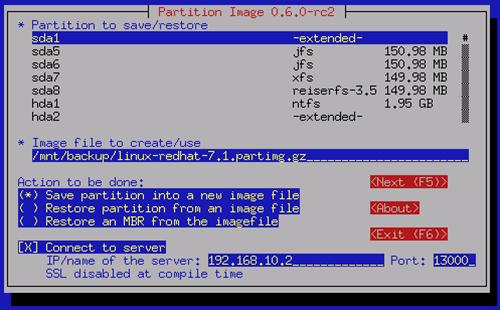
This is good, but because HP hasn't ported Ignite to Linux, I still am looking for something that will make an image of my sever while it's still up and running. Ignite lets me boot a server into a special kernel controlled by Ignite and then install it completely over the network. Our HP servers support PXE boot, which can be used in conjunction with Red Hat's KickStart program to do something like this. It's outside the scope of my evaluation schedule, however, to do this, so I can't give insider tips here. Other things I'm looking into after this article is published include LVM, disk mirroring and snapshotting.
So here's a summary of the various strengths HPUX and Red Hat Linux offer in our situation:
Our Cost Savings
Total cost of ownership is difficult to calculate. Is Linux hard to learn? It depends on how well system administrators learn. If they've proven themselves by transferring expertise from one OS--or even from one flavour of UNIX to another--then it's no problem at all. With a little bit of help, either a training course or some mentoring, I believe any system administrator who wants to learn Linux will succeed.
Is Linux free? There's no such thing as a free lunch. You might be able find out everything you need to know from free Internet newsgroups, such as this one, but is that the way your organization really wants to do business? I assume that in an enterprise environment, the management is willing to pay for some kind of security and accountability regarding support and maintenance. We happily pay for hardware support so we can get help with our new fibre cards when we need it. We also pay for licenses and support for our backup and network monitoring software. This may change, but the company either will pay someone else for their time to develop and maintain the product we use or they will have to pay one of us techies in the company to do this work. Still, even with this compromise, we are saving tens of thousands of pounds each year, both on purchasing and support maintenance.
Linux wins on:
Cost
Cost of the OS
Cost savings from the Intel servers vs. PA-RISC ones
Dynamic kernel changes (no reboot)
HPUX wins on:
Maturity and power of admin tools
Maturity of RAID and fibre card drivers
Repartitioning boot disk (no reboot)
Server cloning software
Easy crash-dumps and remote console access
In conclusion, my opinion is that HPUX is more mature and easier to use, but Linux provides access to enough cost savings to make the switch worthwhile. In a few years, I expect Linux to be even more attractive.
Kevin Cade has been working on computers since his Army days right after high school. He likes learning new things and telling people about them. Texas born, he has settled in Cambridge, England, where he enjoys raising his three wild boys as well as cultivating his eleven year-young marriage.
