
Linux in Government: Optimizing Desktop Performance, Part I
In his article, "Linux for Suits: The No-Party System", Doc Searls makes an observation about Linux that can help us understand why we might want to tweak the performance of Linux desktops. Referring to Linux as raw material with which people can build distributions, he says:
As one Linux programmer once told me, "Linux can't sue anybody." In fact, Linux isn't even a platform of the sort defined by Windows and Mac OS. Instead, Linux is a form of building material that grows in the wild and naturally is suited for making foundations and frameworks. The wild in this case is fertile human mentation, which is why it evolves and improves in the course of being put to use.
People distribute Linux rather than build it. Unlike traditional operating systems, anyone with some knowledge of Linux can pull the pieces together and create a distribution. So, although many different distributions of Linux are available, they come from the same building materials. The differences among distributions take the form of tweaks here and there or various ways in which users perform the same tasks and what kind of themes are used. But as many have said, "Linux is Linux"--and it has flavors. Distributors create those flavors, and underlying these flavors are default configurations.
For most of its existence, people have distributed Linux as a workstation or a server rather than as a desktop. In effect, the default workstation that has evolved has existed mostly for developers. So, when you install a Linux distribution with a graphical interface, it generally looks like what a developer might want. It performs similar to many UNIX workstations, which can seem slow for many knowledge workers.
In this article, we look at the Linux desktop in a slightly different light. We think of it as a computer system that maximizes its strength as a consumer product. When we optimize Linux for the consumer, it becomes a fast interface.
If you have complained about the speed of OpenOffice.org or Firefox or about the amount of time Linux takes to boot up, this set of optimizations should change your perception. Linux can boot up quickly, the word processor can spring open and the browser can fly. So, let's make these adjustments so your computer can fly.
Note: We use the two most popular Linux distributions for this article, Fedora Core 3 and Ubuntu 5.04. Red Hat builds and releases Fedora using an RPM-based package management system. The Ubuntu developers base their distribution on the deb package management system. Mandriva, SUSE and Red Hat Enterprise Linux, among others, use the RPM package management systems. Linspire and Xandros, among others, use the deb package management system.
Many points exist in a PC where an operating system can bottleneck and slow down. One of the most common places for this to happen lies between random access memory (RAM) and the hard drive. Even if your system does have an ample supply of fast RAM, it might decide to conserve it and use virtual disk memory, which is contained in the swap file on the hard drive. The hard drive runs 100 times slower than RAM, so that's one place system speed goes.
You can fix this problem with system speed by adding more RAM. A few years ago, I often bought computers and added memory that doubled and tripled the price of the base system. I had to do this because as a writer I used graphics programs, and they used a lot of RAM. Fortunately, RAM doesn't cost much any more. You can buy a 1GB stick of generic RAM for most desktop computers for about $150. If you use a laptop, the memory costs more. Still, the increased performance of your computer makes the cost seem insignificant.
If you have enough RAM available, Linux uses that instead of the hard drive. In Figure 1, you can see a screenshot of Fedora's performance monitor on a system containing 768MB of RAM. Notice in a couple of places how the CPU jumped up while the memory remained steady. The monitored system is an AMD Sempron 2200 with a 1.5GHz processor. This system came from the Micro Center with 256MB of RAM and sells for approximately $250. It's a PowerSpec SBB1. I added 512MB of memory for $70.
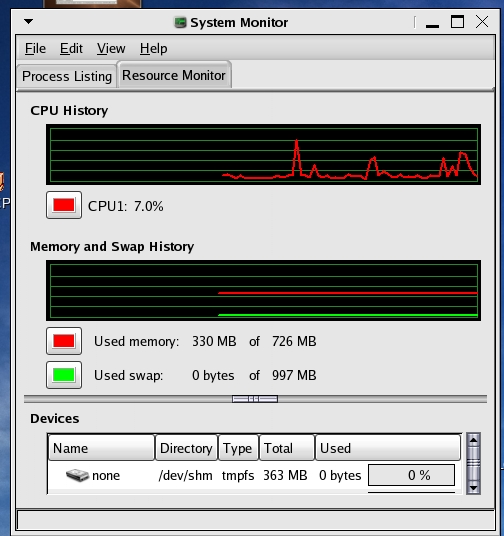
Figure 1. Fedora's System Monitor
To keep this system from immediately accessing the swap drive, I utilized one of the features of the Linux kernel and reduced its propensity for immediately looking for the swap file. People call this kernel aspect swappiness. It's a run-time tunable available through the proc interface for anyone needing to adapt kernel behavior to his or her own requirements.
The higher the parameter, the more the computer uses the disk. So, if you compile a large piece of software, you might want to use RAM for other things while you let the computer sit and compile. But, if you want to write a proposal and need to get to the Internet to do research, answer e-mail and use instant messaging, you probably want to use RAM instead of the disk.
On my system, I reduced the tendency for the kernel to use the swap file. I did so by running this command:
$ sudo cat /proc/sys/vm/swappiness
and found the setting at 60. That's the default set by the kernel developers. I wanted a lower number, so I ran:
$ sudo sysctl -w vm.swappiness=10
and ran the cat command again and it registered 10. I added
vm.swappiness=10 to /etc/sysctl.conf
I put this on the last line. No comments existed for that entry, so it looks naked in the configuration file. I noted an immediate improvement in responsiveness, and with the entry in /etc/sysctl.conf, the system booted up with the value of 10 as the new default.
On a default Linux configuration, distributors provide six text-mode virtual consoles. You can access each console by pressing Ctrl+Alt+F1 through Ctrl+Alt+F6; Ctrl+Alt+F7 switches to the graphical desktop. Each virtual console consumes memory.
Virtual consoles attracted me to Linux and they are one of my favorite features. But, I don't use those consoles much. I like having an extra one so I can get to a graphic terminal if I need, but as a desktop user, I don't need six.
I edit /etc/inittab (see Figure 2) and commented out four or so of the six lines that spawn gettys. This allows me to free up more memory to use with my OpenOffice.org productivity suite, which we'll reconfigure in a few moments.

Figure 2. Disabling Virtual Terminals
One of the major complaints that I hear is how long it takes the OpenOffice.org applications to launch. You can add a quickstart applet to GNOME by installing the program ooqstart- gnome, which may help some. However, an internal adjustment to OOo Writer can improve the entire suite's performance.
To accomplish this, you need to start the word processor, Writer. Next, you need to open the Tools drop-down menu and select options. Once you open the options box, you are ready to adjust the memory and speed up your Linux productivity suite. Let's look at Figure 3.
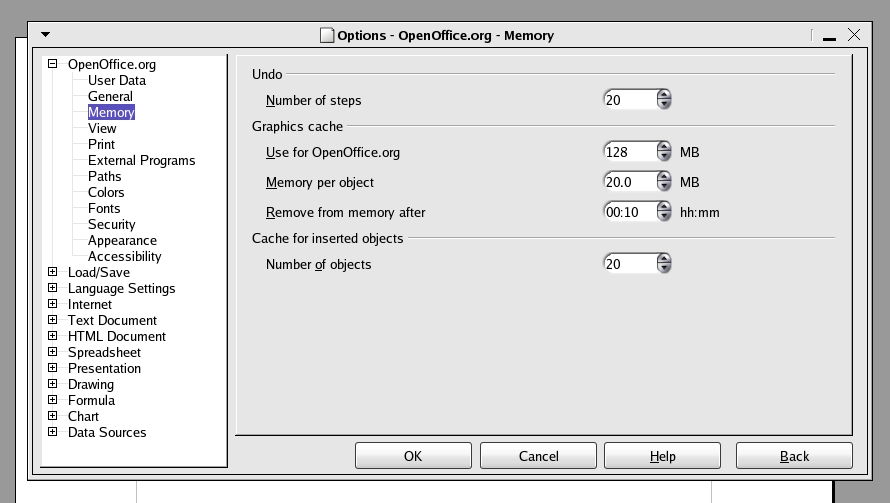
Figure 3. OpenOffice.org Options
In the above figure, you can see that we selected the first expansion box and then clicked Memory with our mouse. This exposed the window you see in Figure 3. I changed the default values under the Graphics cache for Use for OpenOffice.org and Memory per Object. I increased the first value from 6 to 128MB. I also increased the second value from .5 to 20MB.
After clicking OK, I closed the word processor and reopened it two times. On each occasion, the application took less time to open. Under Ubuntu, I found that OO Writer opened in three seconds, and in Fedora it opened in less than six seconds. Previously, it took 30 and 26 seconds, respectively, for the word processor to launch.
Due to space limitations, we have to break this discussion of optimizations into different parts. Hopefully, the first article enables you to make improvements in your desktop's performance. Each change we make in future articles will have a cumulative effect, and soon you will see your entire Linux operating system in a new way--as a fast desktop.
Tom Adelstein works as an Analyst with Hiser+Adelstein, headquartered in New York City. He's the co-author of the book Exploring the JDS Linux Desktop and author of an upcoming book on Linux system administration, to be published by O'Reilly and Associates. Tom has been consulting and writing articles and books about Linux since early 1999.
