
Ubuntu Linux 5.04
Product Information.
Vendor: Canonical
URL: www.ubuntulinux.org
Price: Free
The Good.
Cutting-edge GNOME desktop.
Outstanding package management system.
Free, as in beer and as in freedom.
The Bad.
Only available for x86, x86_64 and PowerPC architectures.
Six-month release cycle sometimes leaves rough edges.
The Ubuntu Linux distribution is produced by a company called Canonical, working together with the Debian Project. Its goal is to make a free Linux distribution that simply works and is localized for as many different languages as possible. You can read the Ubuntu Manifesto on the ubuntulinux.org Web site. The name Ubuntu is an ancient African word that means “humanity to others”.
This is the second release of Ubuntu, code-named Hoary Hedgehog. The previous release was Ubuntu 4.10. The version numbers are based on the year and month of the release; 5.04, therefore, was released in April 2005.
Ubuntu 5.04 provides cutting-edge Linux desktop features and easy administration with Debian's APT package management system. It also is available in a live CD version that runs without installing on the hard drive. Ubuntu is supported on x86, x86_64 and PowerPC architectures, and future plans call for releases to support additional architectures.
The usual way to get Ubuntu is to download a CD image either from the Ubuntu Web site or by using a BitTorrent client. Alternatively, you can order official Ubuntu CDs if you like; remarkably, they are free of charge. The hardware detection in the live CD is identical to the hardware detection in the Ubuntu installer, so if the live CD works, you can be confident that the installer will work as well.
A DVD image also is available for Bittorrent download. The DVD is suitable for installing Ubuntu on a computer without Internet access. It can be used as a live CD or as an install CD.
Installation is a straightforward process. Ubuntu 5.04 has a text-based installer, but it is easy to use and has excellent hardware detection. In the simplest case—installing to a blank hard disk—it handles partitioning and formatting automatically. Manual partitioning is possible as well, allowing you to delete and create partitions and format them as ext3, ext2, ReiserFS, JFS, XFS, FAT16 or FAT32 filesystems, all with LVM or RAID support. By pressing Alt-F2, you can access a second virtual terminal and use a root shell to set up your partitions by hand.
If the system has a connection to the Internet during the installation, the Ubuntu installer automatically finds and installs the latest package versions so your new Ubuntu system is fully up to date. And, thanks to the Kubuntu Project, an install CD that includes KDE also is available. Ubuntu 5.04 also offers support for network installs using Kickstart.
If you want to add additional desktop environments such as Xfce, after the initial install you can enable the universe component (see below) and install the necessary packages. In addition, you can choose the server install option to get a minimal Ubuntu system and then manually install exactly the packages you choose.
As is generally true of Debian-based systems, you need to run the installer only once. Even major releases can be updated using the standard package management tools. However, keep the install CD handy to use as a rescue disk.
If you have an NVIDIA or ATI graphics adapter and you want to use the vendor's proprietary binary drivers, with Ubuntu you can easily install the packages from the restricted package set. Furthermore, as updates to those drivers are released, your system can install them automatically.
Ubuntu Linux 5.04 is based on the GNOME 2.10 desktop environment. It features the latest slick GNOME features from the GNOME developers as well as a few new features added by the Ubuntu developers. It uses the X.org X server.
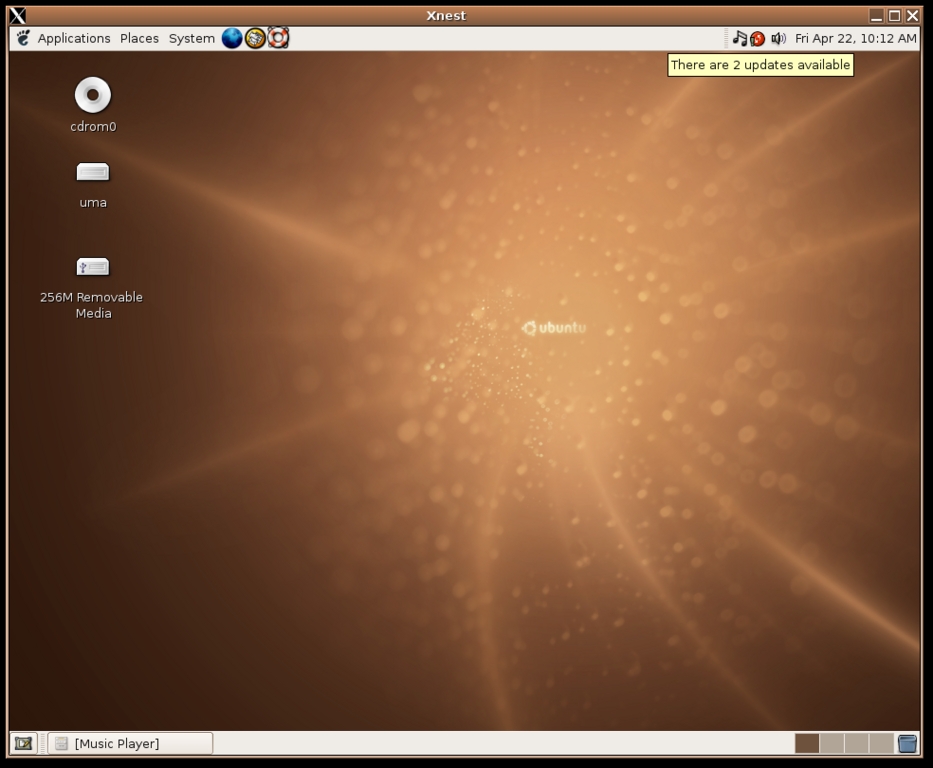
Figure 1. The GNOME desktop with a CD-ROM, a server called uma and a USB Flash drive all mounted. Music is playing. An update is available (red icon, upper right).
The theme, desktop art and applets shown in Figure 1 are all out-of-the-box Ubuntu defaults. I had the mouse pointer hovering over the red update icon in order to read the tool tip saying that two new packages are available; the screenshot tool does not capture the mouse pointer.
Ubuntu is developed on a six-month cycle, as is the GNOME desktop itself. Each Ubuntu release will include the latest GNOME release. Canonical has promised to provide security updates for each release for at least 18 months.
Ubuntu has a clean desktop philosophy, so your desktop initially is completely empty of icons and files. The Ubuntu developers wrote some GNOME applets, however, that allow all features of GNOME to be accessed from GNOME panels. For example, the Trash Can applet gives access to the Trash folder without needing to move any open windows to get to the desktop. Of course, you are free to put icons on your desktop if you prefer.
The GNOME menus are located on the top left of the default Ubuntu desktop, and as of GNOME 2.10, the menus are Applications, Places and System. The Applications menu includes icons to launch applications, filed into categories such as Games and Internet. The Places menu includes icons to open a file manager window for the user's home directory, the user's Desktop and a place called Computer, with all storage devices available on the computer. The Places menu also includes any locations the user has bookmarked from the file manager, as well as a few icons for accessing network servers, searching for files or viewing the most recently used documents list. The System menu is used for setting GNOME preferences, system administration, getting GNOME help and closing a GNOME session. Overall, these three menus are an excellent way to organize the system menus; it's easy to remember where to look for things.
The GNOME 2.10 desktop in Ubuntu is an excellent choice for beginning computer users. Thanks to the GNOME Volume Manager, GNOME does sensible things when a user works with storage devices. For example, when the user inserts a CD audio disk into a CD drive, the GNOME CD player automatically runs.
When the user plugs in a USB Flash drive, it is recognized, mounted and a file manager window opens that shows the mounted device. In addition, an icon appears on the desktop with a name such as 256M Removable Media, and an identical icon appears in the Places menu. Users coming from other OSes should learn to use the Unmount Volume command before unplugging the USB device, but as long as they don't unplug the device while it actually is writing data, nothing bad happens if they simply unplug it. The system simply removes the icon from the desktop and the Places menu.
Other removable devices are handled in similarly slick fashion. Plugging in a device with photos, such as a digital camera, results in a pop-up dialog offering to import the photos.
The GNOME file manager, by default, runs in a spatial mode where each place you can visit with the file manager opens in its own window, and the location and size of each of these windows are remembered. A browser window mode also is available, and a check box in the file manager preferences—Always open in browser windows—can be used to set the browser window mode as the default.
As noted before, Ubuntu is based on Debian GNU/Linux. Debian's package management system, APT (Advanced Packaging Tool) is famously easy to use. As long as your system has access to a server with the package you want, a single command installs the package and automatically brings in any other packages needed by the one you requested. There is no charge for downloading new packages or security updates.
Using the apt-get command-line tool, it also is possible to update your system, automatically retrieving any new versions of the packages you already have. There is also an ncurses-based character-mode tool called aptitude that makes it easy to browse packages, plus a GNOME graphical package browser called Synaptic Package Manager. All of these have been standard in Ubuntu since the first release.
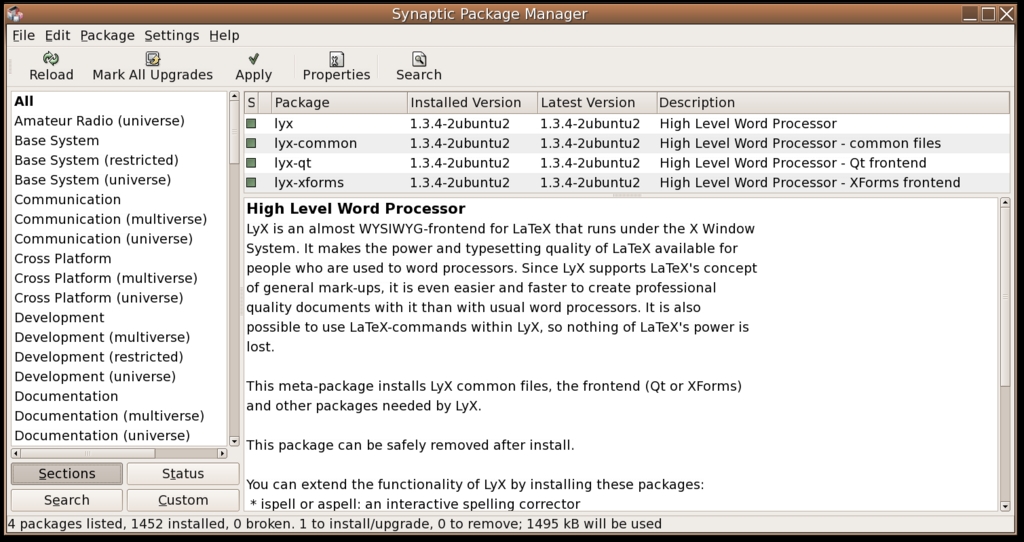
Figure 2. The Synaptic Package Manager showing the LyX packages.
With the 5.04 release, Ubuntu has made package management even easier, and the most common cases are now extremely simple and discoverable. When updated packages become available, a bright red icon appears in the notification area. Clicking on the icon launches the Ubuntu Update Manager, which shows a list of packages with available updates; one click on the Install button updates the Ubuntu system to the latest packages. This handles both security updates and feature updates.
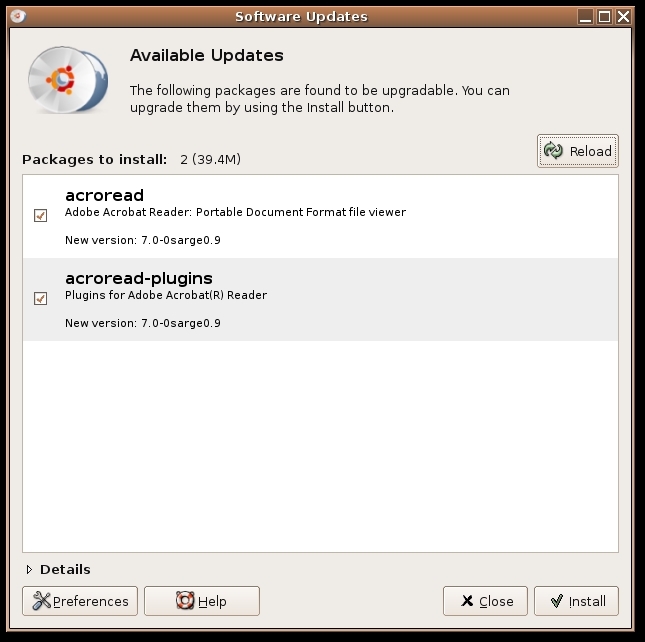
Figure 3. The Ubuntu Update Manager showing that Adobe Acrobat Reader 7 is available for download.
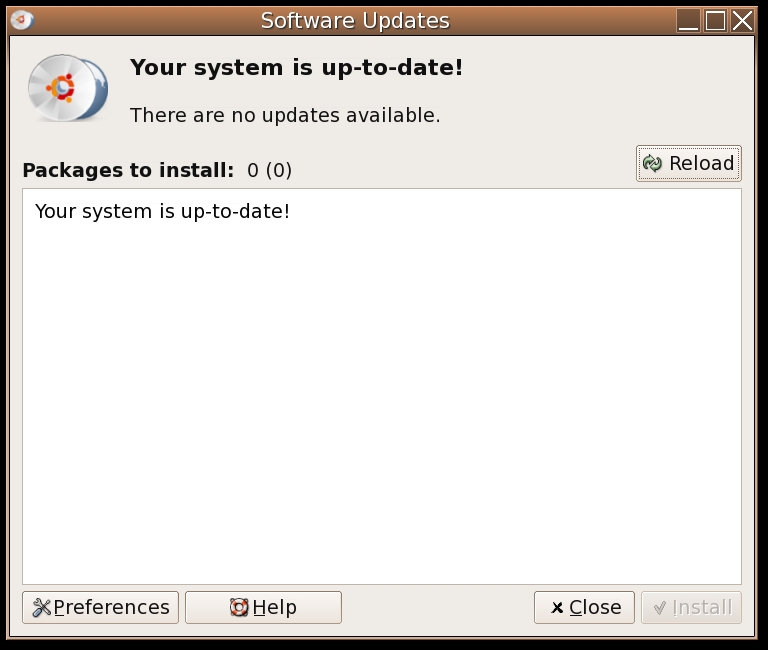
Figure 4. The Ubuntu Update Manager showing that the system is up to date.
Under Applications/System Tools there is a launcher for the Add/Remove Programs dialog, another new feature to Ubuntu 5.04. The most common programs a user might want appear here, along with an icon, a friendly name and a terse explanation of what the program does. Simply marking a check box next to the program name selects that program for installation. Clicking on the Advanced button brings up the Synaptic Package Manager, which can perform any package management task. Expert users probably will go straight to Synaptic or aptitude, but beginners will appreciate this feature.
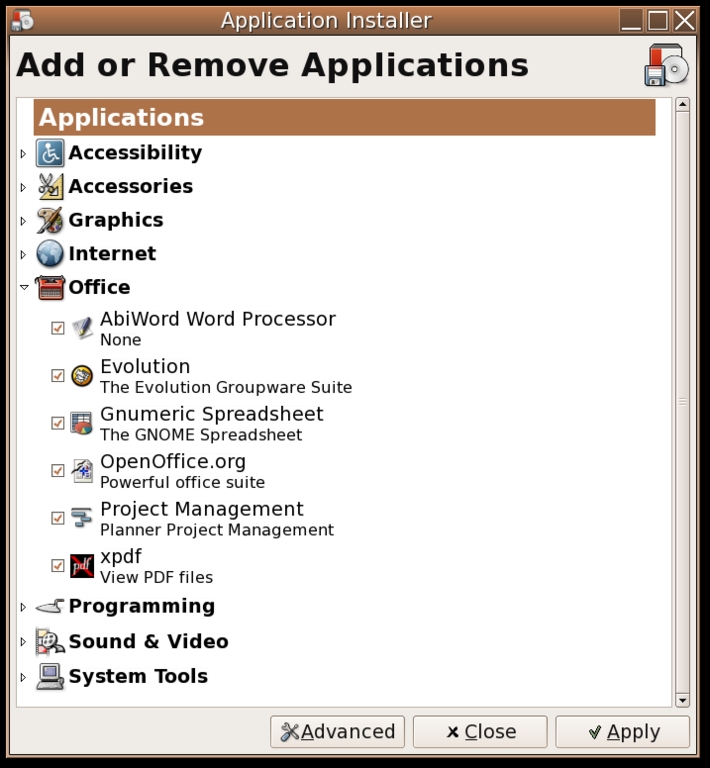
Figure 5. The Add/Remove Programs dialog showing office applications.
The Ubuntu packages are divided among four components: main, restricted, universe and multiverse. With all four package components enabled, an Ubuntu system has access to more than 16,000 different packages. Packages that are installed by default are listed in the main or restricted components. Main contains completely free software, plus some fonts and binary firmware files that are redistributable but not actually free software. Restricted contains non-free proprietary software distributed with restrictions, such as NVIDIA video drivers.
Ubuntu is free to distribute, install and use, and the restricted packages are essential to make a distribution that simply works, out of the box, on all common hardware. If you want to avoid proprietary software, you can remove the restricted component from your package sources.
The universe and multiverse components are disabled by default. Universe contains many thousands of packages from Debian GNU/Linux, compiled for Ubuntu but tested very little and not supported. Multiverse contains proprietary packages, such as Adobe Acrobat Reader 7.
Ubuntu comes standard with a solid assortment of software—OpenOffice.org office suite, The GIMP image editor, Evolution e-mail client and Firefox Web browser—all the basics you would expect to find on a modern Linux desktop system by default.
Using the Synaptic Package Manager you easily can search through the thousands of packages and select new ones; a click downloads and installs them. It's really fun to browse through the package listings, shopping for new software. Any software that Ubuntu does not install by default can be added easily, which is a real strength of the APT package management system.
Before you use Ubuntu, I suggest you look over the tips collected on the Ubuntu Guide Web site. It's a treasure trove of useful information.
A major hole in GNOME 2.10, however, is the lack of a menu editor. GNOME 2.10 adopted the new freedesktop.org menu standard, so older menu editors don't work, and there simply wasn't a new menu editor available to ship as part of GNOME 2.10. However, all of the packages in the Ubuntu base system are good about putting launchers in the menu, so the typical Ubuntu user does not need a menu editor. If you want to install a menu editor, you can install the KDE Menu Editor (provided by the kmenuedit package) or follow the step-by-step instructions from the Ubuntu Guide Web site to install a simple GNOME Menu Editor.
The six-month release cycle may cause this sort of rough edge to appear again in the future. But given how easy it is to update an Ubuntu system, any real problems that turn up can be fixed with updated packages. For example, once there is an official Ubuntu menu editor, all Ubuntu systems will get it when they update their packages.
If you want to use the universe packages, I suggest you set up the Debian menus. The universe packages may not add menu entries to the GNOME desktop menu, but they almost always add entries to the Debian menu. Install the menu and menu-xdg packages, and the Debian menu appears under Applications/Debian.
Ubuntu does not come standard with support for legally encumbered media technologies such as MP3 audio or MPEG2 video. The Restricted Formats page on the Ubuntu Web site discusses the situation.
For system administration, Ubuntu encourages you to use sudo. By default, no root password is set. You can get a root shell by running sudo -s.
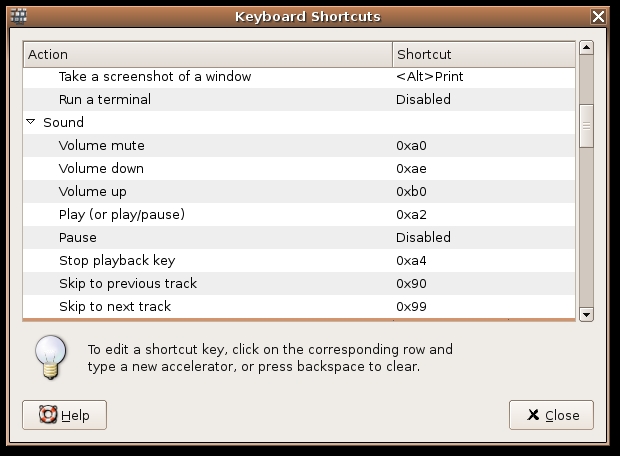
Figure 6. This is the dialog to set custom key shortcuts, with actions bound to the multimedia keys on my keyboard.
Paid support for Ubuntu is available directly from Canonical, and it is the only way Canonical profits from Ubuntu. Canonical offers full support for packages in main, limited support for packages in restricted and no support for software in universe or multiverse. In addition, companies other than Canonical are offering support for Ubuntu. A list of support companies is available on the ubuntulinux.org Web site.
Ubuntu has a large and growing community. Much of the documentation is community-written Wiki documentation. There are also Web forums, mailing lists and an IRC channel.
Ubuntu Linux is an excellent choice for anyone who wants to run Linux on a desktop system. It's easy to install and to administer. Everyone from beginners to experts can use and appreciate it. And it's free. If you are looking for a new Linux distribution, give Ubuntu a try.
Debian and Ubuntu
Debian and Ubuntu have a close relationship. Ubuntu is built on top of Debian, using Debian tools and starting with Debian packages. However, the two projects cannot mesh perfectly.
Debian supports many different architectures, including ones considered obsolete, such as Motorola 68K; Ubuntu currently supports only three. Debian eschews hard deadlines for releases, while Ubuntu has committed to making a release every six months. Ubuntu already has transitioned to X.org's X11 system, while Debian still is using XFree86 release 4.3. Many packages from Ubuntu would install poorly on a Debian system, and vice versa.
Are Debian and Ubuntu fated to drift even farther apart? Debian cannot match Ubuntu's six-month release cycle without making major changes, and it probably shouldn't try. But once Debian finishes its next release, it likely will update Debian from Ubuntu, bringing the two projects somewhat closer together again.
The Debian Project and the Ubuntu Project have similar aims. Some of the Ubuntu developers are Debian developers too, and improvements and bug fixes done for Ubuntu are fed back into Debian as much as possible. Although other Debian-based distributions of Linux have branched off completely from Debian in the past, Ubuntu is making an effort to maintain closer ties.
Resources for this article: /article/8325.
Steve R. Hastings first used UNIX on actual paper teletypes. He enjoys bicycling with his wife, listening to music, petting his cat and making his Linux computers do new things.

