
At the Sounding Edge: What's Going On with Csound?
On April 19, I will board a flight to Germany, where I will be attending the 3rd annual conference on Linux audio. The conference will be held in the lovely city of Karlsruhe at the amazing ZKM, the Zentrum fur Kunst und Medientechnologie (Center for Art and Media Technology). I'm excited about this conference, especially because the last two were so successful in their short- and long-term effects. It's a wonderful opportunity to meet and chat with the leading lights of the Linux audio software world, so if you're in the area, stop by ZKM and check out the festivities. I've included a URL for the conference details at the end of this article; check it out to see what the schedule holds. As you can tell from the topics list, it's going to be another great event.
This year's conference includes at least two presentations on Csound. I'm pleased about this, because Csound is one of the best and longest-developed software sound synthesis (SWSS) languages. A few years ago, members of the Csound community successfully lobbied to revise its original licensing terms to bring it into the truly free and open-source fold, and recent development efforts appear to have vindicated that decision. This article presents a brief look at what's going on in the latest development branch of Csound, known to its programmers and users as Csound5.
Csound has been in development since the 1970s, predating personal computers. As might be expected, its codebase has become a bit dusty, particularly regarding modern programming techniques. Csound's ease of extensibility has promoted a great broadening of its processing powers, but at the lower levels, the code currently is undergoing a complete revision. Almost every aspect of the original source tree has come under new scrutiny that should result in a faster, more efficient Csound.
Incidentally, there are two parallel development tracks for Csound, one for a version that retains much of the classic Csound codebase (Csound4) and another that incorporates extensive and profound changes to the code (Csound5). The tracks are trying to stay in sync with each other, with the understanding that Csound5 will become the eventual successor to the earlier code.
Csound5 introduces much more than a mere reorganization of sources. Modularization has been pursued with a vengeance, many changes have been made at the code level and many new features have been introduced. The code-level changes include improvements such as a wholesale removal of static and global variables and the introduction of a new build procedure--the GNU autotools have been replaced by the SCons system. The focus of this article, however, is the user level, so let's look at what new goodness Csound5 brings to us.
Csound5 for Linux currently is available only in CVS sources. Complete instructions for retrieving, compiling and installing Csound5 are included with the Csound manual (see Resources) so I am not going to repeat them here. However, I must point out that compiling Csound5 requires a number of new tools. For the basic build, you need Python 2.3, the SCons build system, the libsndfile soundfile I/O library and the PortAudio/MIDI real-time I/O system. You also need the FLTK graphics toolkit if you want to enable Csound's graphics opcodes. To build the CsoundVST GUI, you also need the SWIG interface generator and the boost libraries for C++. SCons does a good job of sorting out dependencies, but many of the components required for a full build are not included with mainstream Linux distributions. Therefore, it is up to the user to install and configure correctly the needed software.
Despite its dependencies, actually building Csound5 is not especially difficult. Run scons -h to see what Csound-specific options are available and then run scons with your selected options. For example, on my underpowered laptop, I build Csound5 without CsoundVST like this:
scons buildCsoundVST=0
To install Csound5, I become root and run this command:
scons buildCsoundVST=0 install
To clean the sources, I use scons -c. Nevertheless, putting together all the pieces necessary to get Csound5 up and running is a non-trivial task. If you are not accustomed to compiling programs from source code, you may want to wait for the release of public binaries. Until then, your only other option is to compile Csound5 from sources.
Classic Csound processes two files created by the user, an orc file, which is the Csound orchestra or the instruments; and the sco file, which is the score performed by the orc file instruments. The modern approach dispenses with this dual-file method and utilizes what is known as the CSD file, an XML-like file format that includes both the orc and sco file contents as well as the command-line options required to render the file to sound. Here's a trivial example in Csound's classic mode:
;;; simple.orc

sr=44100	; sample rate
kr=441		; control rate
ksmps=100	; number of samples per control cycle
nchnls=1	; number of audio output channels

instr 1		; begin instrument block
kamp = p4	; amplification value (k = control-rate signal)
kfreq = p5	; frequency value
ifn = 1		; stored function table number (i = init-time value)
aosc oscil kamp,kfreq,ifn   ; invoke oscillator opcode (a = audio-rate signal)
kenv linseg 0,p3*.50,1,p3*.50,0 ; create an envelope
aout = aosc*kenv	; scale oscillator output by envelope
out aout	; send it out as an audio signal
endin		; end instrument block


;;; simple.sco

f1 0 8192 10 1	; store function table #1, a sine wave

    ; The following event statements provide data for instr 1's parameters.
    ; These values are known as p-fields (parameter fields). The first three
    ; fields are fixed-definition fields, where p1=instrument number,
    ; p2=start-time, and p3=duration. The definitions for all other p-fields
    ; are arbitrary. See instr 1 for the meaning of p4 and p5.

i1 0 1 8000 440
i1 1 1 9000 494
i1 2 1 9500 554
i1 3 1 8500 440
e	; end score
This code represents two separate files. To create sound from them requires compiling them with the Csound binary, as follows:
csound -o devaudio -d -m0 simple.orc simple.sco
In this example the audio data is routed to the real-time audio output device (devaudio). The -d and -m options reduce graphics and messaging for better real-time playback. Csound provides many other command-line options; run csound --help for a complete list.
The more modern approach combines all of the elements above into a single unified file format that Csounders call a CSD file. Here's the code above translated to the CSD format:
<CsoundSynthesizer>

<CsOptions>
;;; Command options for simple.csd
-o devaudio -d -m0
</CsOptions>

<CsInstruments>
       instr 1
       kamp = p4
       kfreq = p5
       ifn = 1
       aosc oscil kamp,kfreq,ifn
       kenv linseg 0,p3*.50,1,p3*.50,0
       aout = aosc*kenv
       out aout
       endin
</CsInstruments>

<CsScore>
       f1 0 8192 10 1
       i1 0 1 8000 440
       i1 1 1 9000 494
       i1 2 1 9500 554
       i1 3 1 8500 440
       e
</CsScore>

</CsoundSynthesizer>
Notice that the header block is not absolutely necessary; Csound applies default values for the rates and channels. Also notice that the CsOptions block does not require an explicit statement of either the Csound binary or separate file names for the orc/sco contents. Use the command csound simple.csd to run this file. Options placed on the command-line override definitions found elsewhere, such the CSD CsOptions block, defined by an environment variable--Csound has a number of them--or in your ~/.csoundrc file. You can place your favorite options into the .csoundrc file for automatic reuse. Mine looks like this:
-+rtaudio=alsa --expression-opt -odac2 -d -m0 -M0
These options tell Csound to select ALSA for my sound system, optimize expressions for faster rendering, utilize the third audio device in my system for audio output (dac2 is my M-Audio Delta 66), manage display and messaging output and select the first available MIDI device for MIDI input (-M0 is the external hardware MIDI port on my SBLive). Other possible options include selections for JACK audio support, a MIDI output device and buffer settings for optimal use of your soundcard. Again, see csound --help for details regarding Csound's runtime options.
Although the methods described above are workable, they require separate steps in the workflow. That is, you write the files in your text editor, then you compile them and audition the results, perhaps further editing the audio file in a soundfile editor and then you repeat the process as necessary. It certainly would be nice to have the entire work cycle managed from a single interface, and that is exactly what is provided by CsoundVST.

Figure 1. The CsoundVST GUI
Csound developer Michael Gogins has given us CsoundVST as an integral graphic interface to Csound5 (Figure 1). CsoundVST combines all of the steps in the edit/compile/run cycle and adds a few neat amenities. User-configurable items include VST plugin mode, Csound performance mode and your choice of soundfile editor. Versioning is offered, a nice feature that creates a numbered series of output files. Basic start/stop performance controls also are provided. Figure 2 shows this new Csound GUI in action, running the code from the examples above.
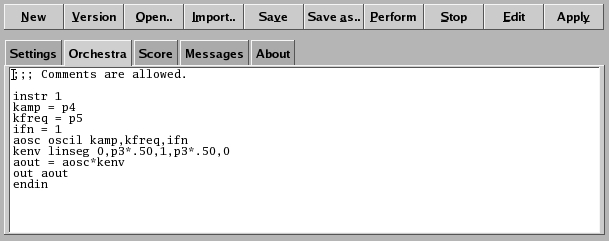
Figure 2. Example CsoundVST Running Code
As you can see in the figures, CsoundVST displays in two sections. The top button bar is fairly self-explanatory, and the tooltips help should clarify any obscure purpose. The tabbed section shown in Figure 1 is in Classic Csound performance mode. When the Python performance mode is selected, the tabbed section changes to the arrangement shown in Figure 3.
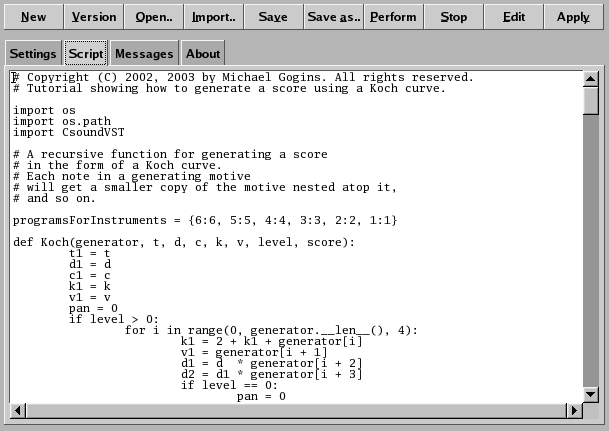
Figure 3. CsoundVST in Python Mode
The code in Figure 3 is from Koch.py, a Python script by Michael Gogins and donated to the Csound5 examples directory. The script uses native Python code to create a Csound score generator. It then utilizes a series of imported Csound-related functions to define a Csound orchestra for processing the generated score. The last lines of the script invoke the Csound binary with appropriate options to run in real time. Click the Perform button in the GUI to render the script, the same as you would render a Csound orc/sco or CSD file.
CsoundVST loads individual orc/sco files, and it also loads CSD files, automatically parsing them into the appropriate sections of the GUI--options, instruments, score. The Save button saves your work in CSD format only; that is, it does not save orc and sco files separately.
The JACK audio server is one of the finest achievements in the open-source audio software world. JACK is designed for robust low-latency and ease of connectivity, and it is no exaggeration to say that support for JACK has become an expected asset to any serious Linux sound program.
Thanks to developer Istvan Varga, Csound5 provides basic support for JACK. At this time, the process of connection is a bit cumbersome, but again the task can be lightened by the use of the .csoundrc file. The following command declares JACK as the audio system of choice and autoconnects Csound's audio output to the first ALSA playback port:
-+rtaudio=jack --expression-opt -b 512 -B 2048 -odac:alsa_pcm:playback_ -d -m0
These settings accommodate my SBLive. The -b software buffer value should equal JACK's buffer size; it must be less than -B, the hardware buffer value, and both buffer flags must be powers of two. Additionally, the JACK sample rate must equal the sample rate of your orchestra. Figure 4 shows how Csound appears as a client in the QJackCtl audio connection tab as a result of these settings.
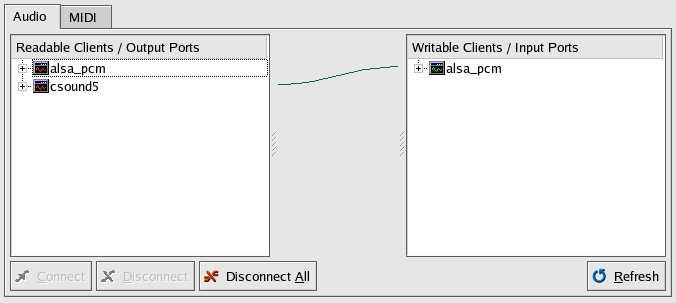
Figure 4. Csound5 as a JACK Client
Future improvements may include support for the JACK transport control mechanism. But even in its current state, Csound5's JACK support is a wonderful addition to the system.
Code fixes have repaired and enhanced Csound's MIDI support, greatly improving this aspect of Csound5. Csound5 now relies upon the PortMIDI system for its basic MIDI connectivity. This change is a great improvement for Csound overall and hopefully will provide a common cross-platform layer for MIDI I/O. Linux users now can enjoy connection to any available MIDI port, including ALSA's virtual MIDI ports, allowing multiple connections to a single port.
Although it is not a part of any official Csound package, I must make special mention of developer Steven Yi's blue, a powerful graphic environment for producing music with Csound. blue is a Java-based application that accommodates any version of Csound and includes a number of graphic tools for the creation of Csound scores and instruments. Alas, I don't have space in this article to describe adequately blue's extensive capabilities, but Figure 5 should give you some idea of blue's resources.
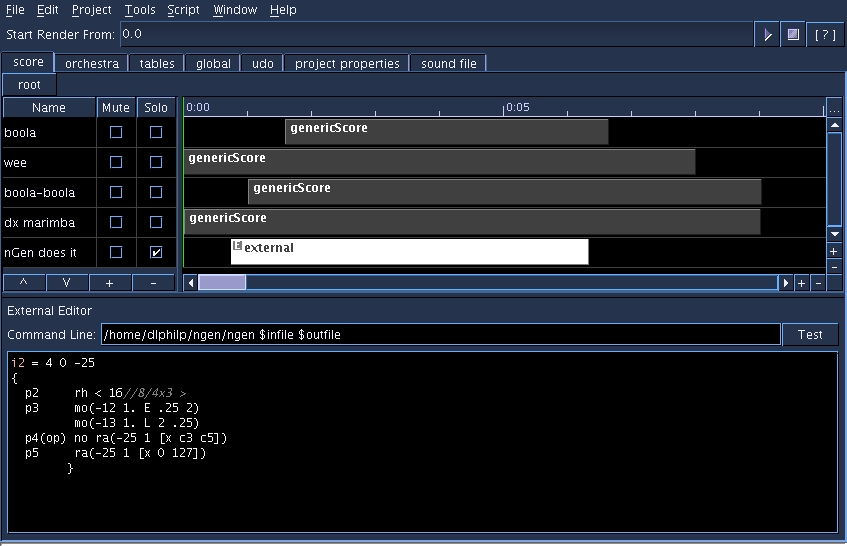
Figure 5. The blue Csound Production Environment
blue provides the Csound composer with some truly unique resources, such as its graphic scoring tools and the blueDX7 GUI for editing DX7 raw sysex patches for use within Csound (Figure 6). The blueShare facility gives the user access to an on-line database of user-defined opcodes. Interfaces are provided for the Jython and Rhino languages, dialect forms of Python and JavaScript, respectively. Also, a graphic instrument builder similar to blueDX7 is available for designing Csound instruments with real-time parameter control panels. If you're looking for the most complete Csound helper application available for Linux then you're looking for blue.
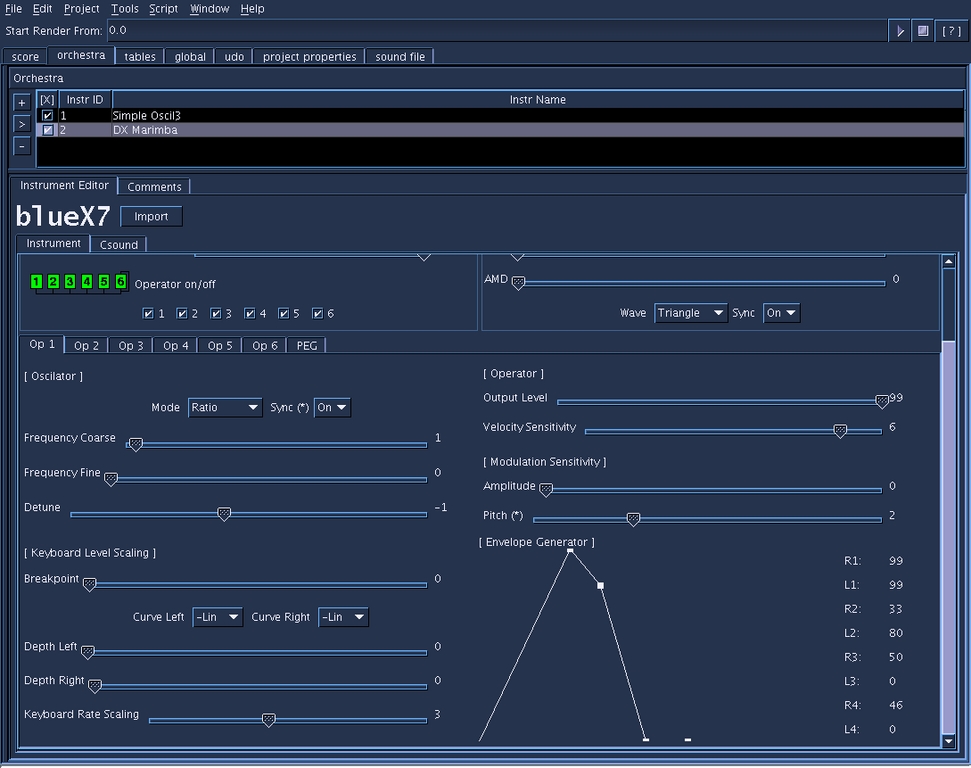
Figure 6. The blueDX7 Instrument Editor
I hope you've been intrigued by this sneak peek at the new world of Csound. For all the new flashy gear and software that the music industry pours forth, none of it seems to equal the sheer power of Csound. Yes, you have to learn how to use it, but ample documentation and many tutorials are available on-line. In addition, a sizable number of excellent pieces composed entirely with Csound can be found on the Internet. Csound may be the oldest SWSS language that continues to be in constant use, and its recent developments indicate that it will be in constant use a good while longer.
I would like to thank the following people for their tremendous efforts in keeping Csound alive and healthy: John ffitch (El Maestro), Richard Boulanger, Richard Dobson, Michael Gogins, Matt Ingalls, Steven Yi, and Istvan Varga all deserve great praise, and I must especially thank John ffitch and Istvan Varga for their dedication to UNIX/Linux Csound and for their unstinting assistance to this perpetual Csound newbie.
