
Book Excerpt: Firefox & Thunderbird Garage
Editors' Note: The following is an excerpt from Firefox & Thunderbird Garage, a new book written by Chris Hofmann, Marcia Knous and John Hedtke and published by Prentice Hall Professional Technical Reference. The excerpt is taken from Chapter 10, "Setting Up Your Mail, RSS, and Newsgroup Accounts Using Mozilla Thunderbird".
If you are migrating from another email client, such as Outlook or Eudora, the first time you run Thunderbird you should get the Import Wizard (see Figure 10-1).

Here is the current list of mail clients that you can migrate from. Remember that it is possible that support for other clients may be added in the future:
Netscape Communicator 4.x
Netscape 6.x and 7.x
Mozilla 1.x
Outlook
Outlook Express
Eudora
Follow these instructions to migrate:
Click the radio button of the mail client you want to import.
The wizard continues and you begin to see information being imported.
Thunderbird also allows you to import mail, address books, and preference settings from other email clients. To accomplish this task, navigate to Tools | Options. The Import Wizard should launch and present a series of radio buttons asking you what you want to import (Address Books, Mail, or Settings). Follow the wizard, and your mail, address books, or preferences should be imported from the directory you specified into Thunderbird.
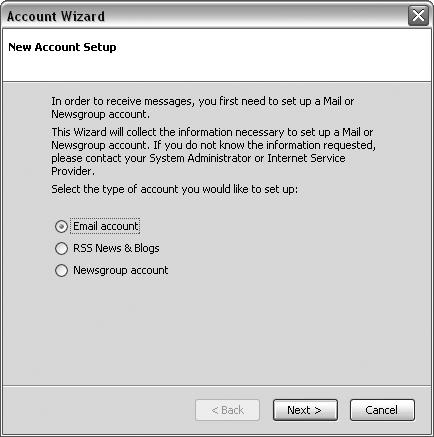
After launching Thunderbird, you first arrive at the New Account Setup Wizard, as shown in Figure 10-2. A series of radio buttons allows you to choose to set up an email account, RSS account, or newsgroup account.
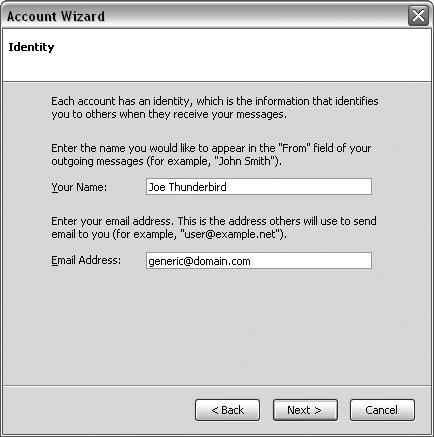
As shown in Figure 10-3, you need to fill in your Identity Information: "From" Name, as well as your email address. Click Next.
Select the type of server you are using, POP or IMAP. Figures 10-4 and 10-5 show the server screens for POP and IMAP. See the "A POP and IMAP Primer" sidebar for more information if you are unsure which type of server you use.
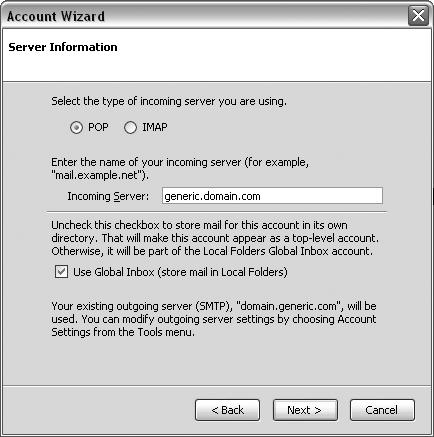

If you choose POP, you need to decide whether to use the Global Inbox feature. The Global Inbox preference is on by default, so you have to uncheck the box if you don't want to use it. Proceed directly to the "Global Inbox" section of this chapter if you are in doubt, because it is easier to set this preference from the outset than to go back and change your accounts to use Global Inbox (although this is certainly possible).
Fill in the name of your incoming server as well as your outgoing (SMTP) server. If you don't have this information, contact your ISP. Click Next.
Fill in your user names (incoming and outgoing names), as shown in Figure 10-6.

Done. Now that you have finished setting up your account, you probably want to get your new mail.
If you need to change any of your mail settings, please consult the "Mail Account Settings" section of this chapter to learn how to make the changes. Before you begin sending and receiving mail, it is a good idea to review the "Account Settings" section to make sure that you have the mail client configured with the settings that will make it easiest for you to manage your mail.
Thunderbird offers you two ways to retrieve your mail: automatically or manually. If you wish to check automatically, you can configure how often Thunderbird checks for new mail by tweaking a preference.
Automatically
When you launch Thunderbird, it automatically checks for new messages every 10 minutes. To change this setting, go to Tools | Account Settings | Server Settings to adjust how frequently Thunderbird checks for new mail.
Manually
To get new mail, you can either click the Get Mail icon or go to File | Get New Messages For and either specify the particular account you want to get mail from or get all your new messages. When you download messages, the mail progress meter on the lower-right portion of the screen should show signs of life as mail is downloaded into your account.
Really Simple Syndication (RSS) is a content-delivery mechanism that allows news and web content to be shared in the online space. The RSS format allows this content to be aggregated and then delivered to the user when changes are made. For a more in-depth explanation of RSS, see the FAQ in this chapter.
You can manage your news content in Thunderbird by creating an RSS account.
To create an RSS account, follow these steps:
Click the RSS News and Blogs radio button.
Name your account.
The account is created and added to the folder pane.
After your account has been created, there are a few ways to manage your feed subscriptions.
You can either do this:
Drag and drop the XML link from the browser directly onto the account.
Thunderbird should begin downloading messages to your account.
Or you can do this:
Right-click the account to launch the RSS Subscriptions Manager.
Click Add.
Enter the Feed URL as well as where to store the Feed articles.
Click OK.
Thunderbird should begin downloading messages to your account.
If this doesn't happen, click Get all new messages or right-click and select Get all new messages for the account and the messages should download.
If you need to change any of your RSS settings (and you might, because sometimes feed URLs do change), consult the "RSS Account Settings" section of this chapter to learn how to make the changes.
Thunderbird also lets you set up newsgroup accounts to manage your life in the Usenet world. To create a new newsgroup account, follow these steps:
Select the Newsgroup Account radio button.
Enter your identity information.
Enter the name of your newsgroup server.
Enter the name of the account.
The account is created and added to the folder pane.
Right-clicking Subscribe leads you to a dialog box (shown in Figure 10-7) that allows you to subscribe to, unsubscribe from, and refresh your newsgroups. If you need to change any of your newsgroup settings, consult the "Mail Account Settings" section of this chapter to learn how to make the changes.

