
The Ultimate Linux Lunchbox
In this article, we describe the construction of the Ultimate Linux Lunchbox, a 16-node cluster that runs from a single IBM ThinkPad power supply but can, as well, run from an N-charge or similar battery. The lunchbox has an Ethernet switch built-in and has only three external connections: one AC plug, one battery connector and one Ethernet cable. To use the lunchbox with your laptop, you merely need to plug the Ethernet cable in to the laptop, supply appropriate power—even the power available in an airplane seat will do—and away you go, running your cluster at 39,000 feet. We've designed the lunchbox so that we can develop software on it, as a private in-office cluster or a travel cluster. The lunchbox is an example of a newer class of clusters called miniclusters.
Miniclusters were first created by Mitch Williams of Sandia/Livermore Laboratory in 2000. Figure 1 shows a picture of his earliest cluster, Minicluster I. This cluster consisted of four Advanced Digital Logic boards, using 277MHz Pentium processors. These boards had connectors for the PC/104+ bus, which is a PC/104 bus with an extra connector for PCI.
As you can see, there are only four nodes in this cluster. The base of the cluster is the power supply, and the cluster requires 120 Volts AC to run. We also show a single CPU card on the right. The green pieces at each corner form the stack shown in the pictures. A system very much like this one is now sold as a product by Parvus Corporation.

Figure 1. Minicluster I used four Pentium-based single-board computers (courtesy Sandia National Labs).

Figure 2. One Node of Minicluster I (courtesy Sandia National Labs)
We were intrigued by this cluster and thought it would be an ideal platform for Clustermatic. In the summer of 2001, we ported LinuxBIOS to this card and got all the rest of the Clustermatic software running on it. When we were done, we had a card that booted to Linux in a few seconds, and that booted into full cluster mode in less than 20 seconds. Power and reset cycles ceased to be a concern.
We provided the LinuxBIOS and other software to Mitch, and he modified Minicluster I to use it. Mitch was able to remove three disks, reducing power and improving reliability. One node served as the cluster master node, and three other nodes served as slave nodes.
Inspired by Mitch's work, we built our first Bento cluster in 2002. In fact, the lunchbox used for that system is the one we use for the Ultimate Linux Lunchbox. This system had seven CPU cards. It needed two power supplies, made by Parvus, which generate the 5V needed for the CPU cards and can take 9–45 VDC input. It had a built-in Ethernet hub, which we created by disassembling a 3Com TP1200 hub and putting the main card into the lid. This cluster used three IBM ThinkPad power supplies. Two of the supplies are visible in the lid, on either side of the Ethernet hub. The third is visible at the back of the case. One supply drives the hub, the other two drive each of the two supplies. The supplies and fan board for each supply can be seen at the far right and left of the box; the seven CPU boards are in the middle.
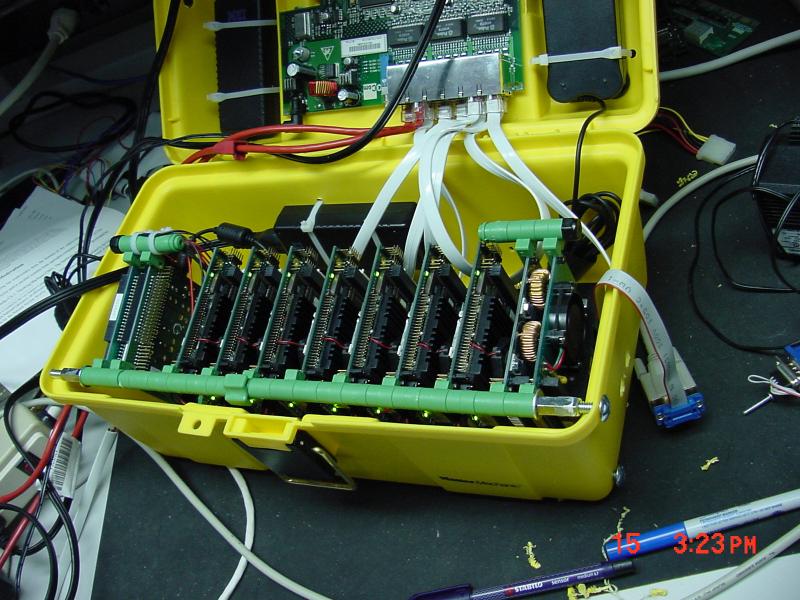
Figure 3. The First Lunchbox Cluster, Bento
Bento was great. We could develop on the road, in long and boring meetings and test on a seven-node cluster. Because the reboot time was only 15 seconds or so for a node at most, testing out modules was painless. In fact, on this system, compiling and testing new kernel modules was about as easy as compiling and testing new programs. Diskless systems, which reboot really quickly, forever change your ideas about the difficulty and pain of kernel debugging.
During one particularly trying meeting in California, we were able to revamp and rewrite the Supermon monitoring system completely, and use it to measure the impact of some test programs (Sweep3d and Sage) on the temperature of the CPUs as it ran. Interestingly enough, compute-intensive Fortran programs can ramp up the CPU temperature several degrees centigrade in a few seconds. The beauty of these systems is that if anyone suspects you are getting real work done, instead of paying attention to the meeting, you always can hide the lunchbox under your chair and keep hacking.
Bento used a hub, not a switch, and Erik Hendriks wanted to improve the design. The next system was called DQ. DQ was built in to an attractive metal CD case, suitable for carrying to any occasion, and especially suitable for long and boring meetings. As our Web page says, we'll let you figure out the meaning of the name. Hint: check out the beautiful pink boa carrying strap in the picture.

Figure 4. The DQ cluster featured an Ethernet switch and a colorful carrying strap.
We were able to get an awful lot of development work done on DQ at a meeting in Vegas. The switch improved the throughput of the system, and the package was bombproof (although we avoided using that particular phrase in airport security lines). The hardware was basically the same, although one thing we lost was the integrated ThinkPad power supplies—there was no lid on DQ in which to hide them. Nevertheless, this was quite a nice machine.
Sandia was not asleep at the time. Mitch built Minicluster II, which used much more powerful PIII processors. The packaging was very similar to Minicluster I. Once again, we ported LinuxBIOS to this newer node, and the cluster was built to have one master with one disk and three slaves. The slave nodes booted in 12 seconds on this system. In a marathon effort, we got this system going at SC 2002 about the same time the lights started going out. Nevertheless, it worked.
One trend we noticed with the PIII nodes was increased power consumption. The nodes were faster, and the technology was newer, and the power needed was still higher. The improved fabrication technology of the newer chips did not provide a corresponding reduction in power demand—quite the contrary.
It was no longer possible to build DQ with the PIII nodes—they were just too power-hungry. We went down a different path for a while, using the Advantech PCM-5823 boards as shown in Figure 5. There are four CPU boards, and the top board is a 100Mbit switch from Parvus. This switch is handy—it has five ports, so you can connect it directly to your laptop. We needed a full-size PC power supply to run this cluster, but in many ways it was very nice. We preserved instant boot with LinuxBIOS and bproc, as in the earlier systems.

Figure 5. The Geode minicluster needed a full-size power supply to deal with the demands of Pentium III-based nodes.
As of 2004, again working with Mitch Williams of Sandia, we decided to try one more Pentium iteration of the minicluster and set our hungry eyes on the new ADL855PC from Advanced Digital Logic. This time around, things did not work out as well.
First, the LinuxBIOS effort was made more or less impossible by Intel's decision to limit access to the information needed for a LinuxBIOS port to Intel chipsets. We had LinuxBIOS coming up to a point, and printing out messages, but we never could get the memory controller programmed correctly. If you read our earlier articles on LinuxBIOS (see the on-line Resources), you can guess that the romcc code was working fine, because it needs no memory, but the gcc code never worked. Vague hints in the available documents indicated that we needed more information, but we were unable to get it.
Second, the power demand of a Pentium M is astounding. We had expected these to be low-power CPUs, and they can be low power in the right circumstances, but not when they are in heavy use. When we first hooked up the ADL855PC with the supplied connector, which attaches to the hard drive power supply, it would not come up at all. It turned out we had to fabricate a connector and connect it directly to the motherboard power supply lines, not the disk power supply lines, and we had to keep the wires very short. The current inrush for this board is large enough that a longer power supply wire, coupled with the high inrush current, makes it impossible for the board to come up. We would not have believed it had we not seen it.
Instead of the 2A or so we were expecting from the Pentium M, the current needed was more on the order of 20A peak. A four-CPU minicluster would require 80A peak at 5 VDC. The power supply for such a system would dwarf the CPUs; the weight would be out of the question. We had passed a strange boundary and moved into a world where the power supply dominated the size and weight of the minicluster. The CPUs are small and light; the power supply is the mass of a bicycle.
The Pentium M was acceptable for a minicluster powered by AC, as long as we had large enough tires. It was not acceptable for our next minicluster. We at LANL had a real desire to build 16 nodes into the lunchbox and run it all on one ThinkPad power supply. PC/104 would allow it, in terms of space. The issues were heat and power.
What is the power available from a ThinkPad power supply? For the supplies we have available from recent ThinkPads, we can get about 4.5A at 16 VDC, or 72 Watts. The switches we use will need 18 Watts, so the nodes are left with about 54 Watts between them. This is only 3W per node, leaving a little headroom for power supply inefficiencies. If the node is a 5V node, common on PC/104, then we would like .5A per node or less.
This power budget pretty much rules out most Pentium-compatible processors. Even the low-power SC520 CPUs need 1.5A at 5V, or 7.5 Watts—double our budget. We had to look further afield for our boards.
We settled on the Technologic TS7200 boards for this project. The choice of a non-Pentium architecture had many implications for our software stack, as we shall see.
The TS7200, offered by Technologic Systems, is a StrongARM-based single-board computer. It is, to use a colloquialism, built like a brick outhouse. All the components are soldered on. There are no heatsinks—you can run this board in a closed box with no ventilation. It has a serial port and Ethernet port built on, requiring no external dongles or modules for these connections. It runs on 5 VDC, and requires only .375A, or roughly 2W to operate. In short, this board meets all our requirements. Figure 6 is a picture of the board. Also shown in Figure 6 is a CompactFlash plugged in to the board, although we do not use one on our lunchbox nodes.

Figure 6. The TS7200, from Technologic Systems, is StrongARM-based, needs no heatsinks and draws only about two Watts (courtesy Technologic Systems).
One item we had to delay for now is putting LinuxBIOS on this board. The soldered-on Flash part makes development of LinuxBIOS difficult, and we were more concerned with getting the cluster working first. The board does have a custom BIOS with the eCos operating system, which, although not exactly fast, is not nearly as slow as a standard PC BIOS.
There are several factors that determine the shape of a minicluster: the box, the size and shape of the board and the board spacing, or distance between boards. The spacing tends to dominate all other factors and is complicated by the fact that PC/104 was not designed with multiprocessors in mind. All I/O boards in PC/104 stack just fine, as long as there is only one CPU board; we are breaking the rules when we stack CPU boards, and it gets us into trouble every time. On all the miniclusters shown, there was at least one empty board space between the boards. Nevertheless, the process of designing starts with the box, then the board shape and then the board spacing.
First, the box: it's the same box we used earlier. Also, we're going to use the same Parvus SnapStiks that we have been using for years to stack boards. We bought the professional set, part number PRV-0912-71. The SnapStik works well in the lunchbox format. One warning: just buy 1/4" threaded rod to tie the stack together. Do not use the supplied threaded plastic rod that comes with SnapStik kits. That plastic rod tends to, well, “snap” under load, and watching bits of your minicluster drop off is less than inspiring.
Second, the size and shape of the TS7200 nodes: there's a slight problem here. The boards are not quite PC/104: they're a little large. One way to tell is that two of the holes in the TS7200 are not at the corners. In Figure 7, the holes are in the right place, but the board extends out past them, leaving the holes too far in from the edge. The board is a bit bigger to accommodate the connectors shown on the right. These connectors caused two problems, which we will show below.
Third, the stack: the tight spacing was going to make the stack more challenging than previous miniclusters. We would have to find a way to make the SnapStiks work with a nonstandard board form factor and the close spacing.
To solve the SnapStik problem, we spent some time seeing how the supports could fit the board. The best we could find was a configuration in which three SnapStiks fit on three of the holes in the board, as shown in Figure 7. Notice the threaded metal rod, available in any hardware store.
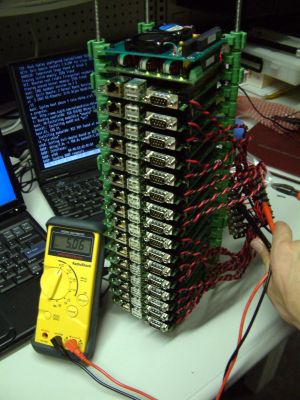
Figure 7. Stack Showing Three out of Four SnapStiks Connected
For the fourth hole, we set up a spacer as shown in Figure 8.

Figure 8. The Spacer in the Fourth Hole
The spacer is a simple nylon spacer from our local hardware store. The bolts and nuts allow us to create an exact spacing between the boards. We needed the exact spacing for the next problem we ran into.
The boards cannot be stacked at exactly a one-per-slot spacing. There is an Ethernet connector that needs just a bit more room than that—if the boards are stacked too closely, the Ethernet connector on the lower board shorts out the Ethernet connector pins on the higher board. The spacing could be adjusted easily with the nut-and-bolt assembly shown above, but how could we space the SnapStiks?
If you look at the Geode cluster shown in Figure 8, you can see some white nylon spacers between the green SnapStiks. That is one way to do it. But that spacing would have been too large to allow 16 nodes to fit into the lunchbox. We needed only about 1/32 of an inch in extra spacing.
Josiah England, who built this version of the lunchbox, had a good idea: small wire rings, which he says he learned how to build while making chainmail. The fabrication is shown in Figures 9–11. The wire rings add just enough space to create enough clearance between the boards, while still allowing us to put 16 boards in the lunchbox.

Figures 9–11. Medieval solution to a 21st-century hardware problem: wire spacing rings constructed chainmail-style (courtesy Josiah England).


With this fix, we now had a stack that was spaced correctly. The stack shown above was finished off with a Parvus OnPower-90 power supply and a Parvus fan board, which you can see at the top. This supply can provide 18A at 5V, more than enough for our needs, as well as the 12V needed for the switch.
Our next step was the Ethernet switch. At first, we tried using several cheap eight-port switches in the lid, as shown in Figure 12. By the way, these miniclusters always include a bit of improvisation. The switches shown are bolted to a shelf from our departmental mailbox. The shelf is a nice, gray plastic and was ideal (once we trimmed it with a hacksaw) for our purposes. Notice the nice finger hole, which can be used for routing wires under the lid. We'd like to think we used the Erik Hendriks mailbox shelf, since Erik's bproc work was so important to our minicluster development. Erik is now at Google.

Figure 12. First try at switches: the gray panel is a mailbox shelf.
The cascaded switches worked very poorly. The nodes would not come up on the network reliably. It all looked great, with 48 LEDs, but it did not work at all. DHCP requests were dropped, and the nodes took forever to come up.
The second attempt was to get a Netgear 16-port switch, remove the switch from the case and put it into the lid. This required that we sacrifice another mailbox shelf, but we have plenty. This change worked fine. The nodes come up very quickly now, as packets are not getting lost.
You can see the final configuration in Figure 13. Notice the two switches: one switch controls power to the Ethernet switch and nodes, and the other controls power to the fan. We're not yet sure we need the fan but we're being careful.
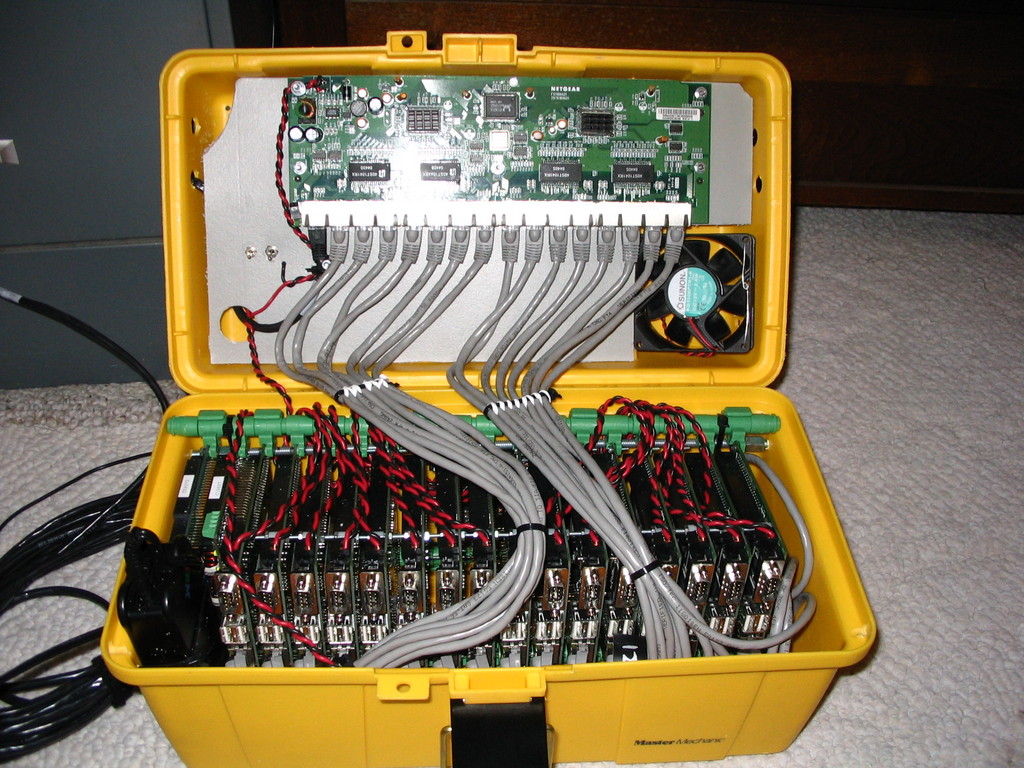
Figure 13. Final design: one of the switches on the gray metal panel, to the left of the Ethernet plugs, controls power to the nodes and the Ethernet switch, and the other one controls the fan.
Regarding Ethernet cables: always label them, and always make it so you can figure out, easily, which one goes into which network switch connector. Put them into the switch in some order, left to right or right to left. Just make sure you can tell, at a glance, which LED on the switch goes with which board. You'll be glad you did.
Okay, we've built the hardware. Now, what is the software?
In years past, it would have been bproc, as found on the Clustermatic site (see Resources). bproc has a problem, however; it cannot support heterogeneous systems. The very nature of bproc, which requires that process migration works, makes the use of different architectures, in a single system, impossible. We're going to have to use something else. We want to continue using our ThinkPad laptop as the front end; there are no StrongARM laptops that we know of. It's clear that we are going to need new software for our minicluster.
Fortunately, the timing for this move is good. As of 2.6.13, there is now support for the Plan 9 protocol in the standard Linux kernel. This module, called 9p (formerly v9fs), supports the Plan 9 resource-sharing protocol, 9p2000. At the same time this code was being ported to the Linux kernel, Vic Zandy of Bell Labs was working with us on xcpu, a Plan 9 version of bproc. One of the key design goals of xcpu was to support heterogeneous systems. The combination, of 9p in the Linux kernel and xcpu servers ported to Linux, has allowed us to build a replacement system for bproc that supports architecture and operating system heterogeneity. Finally, the introduction of new features in 2.6.13 will allow us to remove some of our custom Clustermatic components and improve others. A key new feature is Eric Biederman's kexec system call, which replaces our kmonte system call.
Figure 14 shows a quick outline of the standard bproc boot sequence, as it works on our miniclusters and clusters with thousands of nodes.
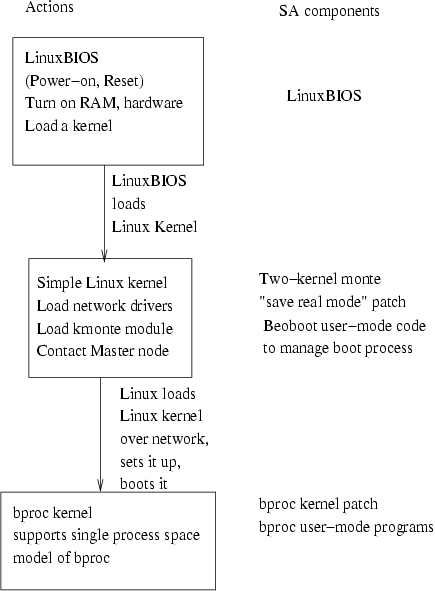
Figure 14. A View of SA Components
The boot sequence, as shown, consists of LinuxBIOS, Linux, Linux network setup, Linux loading another kernel over the network and Linux using the kmonte system call (part of Clustermatic) to boot that second kernel as the working kernel. Why are there two kernels? In Clustermatic systems, we distinguish the OS we use to boot the system from the OS we run during normal operation. This differentiation allows us to move the working kernel forward, while maintaining the boot kernel in Flash.
The new boot sequence is shown in Figure 15. If it looks simpler, well, it is. We no longer have a “boot kernel” and a “working kernel”. The first kernel we boot will, in most cases, be sufficient. Experience shows that we change kernels on our clusters only every 3–6 months or so. There is no need to boot a new kernel each time. Because the 9p protocol and the xcpu service don't change, and the Master node kernel versions are not tightly tied together, we can separate the version requirements of the Master node and the worker node. We could not make this kind of separation with bproc.
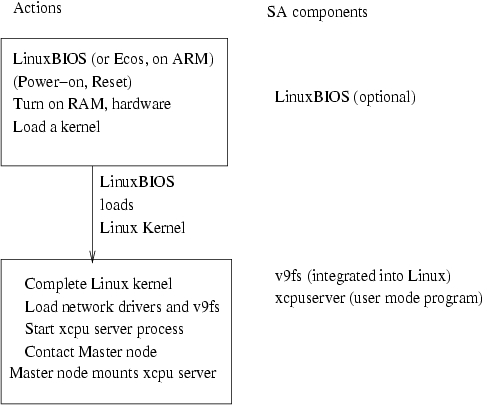
Figure 15. New Boot Sequence
The result is that we can weld the StrongARM boards and the Pentium front end (Master) into one tightly coupled cluster. In fact, we can easily mix 32- and 64-bit systems with xcpu. We can get the effect of a bproc cluster, with more modern kernel technology. Figure 16 shows how we are changing Clustermatic components for this new technology.

Figure 16. Clustermatic Component Changes
In this article, we showed how we built the Ultimate Linux Lunchbox, a 16-node cluster with integral Ethernet switch, in a small toolbox. The cluster is built of hardy PC/104 nodes and can easily survive a drop-kick test and possibly even an airport inspection. The system has only three connectors: one Ethernet, one AC plug and one battery connection.
We also introduced the new Clustermatic software, based around the Plan 9-inspired 9p filesystem, now available in 2.6.13. The new software reduces Clustermatic complexity, and the number of kernel modifications are reduced to zero.
Although there was not room to describe this new software in this article, you can watch for its appearance at clustermatic.org; or, alternatively, come see us at SC 2005 in November, where we will have a mixed G5/PowerPC/StrongARM/Pentium cluster running, demonstrating both the new software and the Ultimate Linux Lunchbox.
This research was funded in part by the Mathematical Information and Computer Sciences (MICS) Program of the DOE Office of Science and the Los Alamos Computer Science Institute (ASCI Institutes). Los Alamos National Laboratory is operated by the University of California for the National Nuclear Security Administration of the United States Department of Energy under contract W-7405-ENG-36. Los Alamos, NM 87545 LANL LA-UR-05-6053.
Resources for this article: /article/8533.
Ron Minnich is the team leader of the Cluster Research Team at Los Alamos National Laboratory. He has worked in cluster computing for longer than he would like to think about.

