
Simple Linux IP Repeaters to Extend HomePlug Range
Power line communication (PLC) technology allows you to transmit data by way of the electric grid's low- and medium-voltage power lines. Any device in a building thus may access a LAN to share resources. Figure 1 shows the Ovislink HomePlug Ethernet Bridges we currently are using.

Figure 1. HomePlug Ethernet Bridge
PLC offers obvious advantages, the main one being that it is unnecessary to lay cables as the network infrastructure already is deployed—the electrical grid. Yet, PLC also has strong limitations, such as:
High attenuation, so it is efficient only across short distances.
Impedance changes with power cycles, due to the presence of nonlinear devices such as diodes and transformers.
Occasional impedance changes due to devices switching on and off.
Reflections due to the home electrical grid topology.
Power lines often lacking a ground connection.
To avoid these problems, HomePlug uses a robust orthogonal frequency division multiplexing (OFDM) scheme with 1,280 orthogonal quadrature amplitude modulation (QAM) carriers. Consequently, HomePlug's maximum point-to-point range is approximately 200 meters.
To extend the range further, we have developed a simple Linux IP repeater. We have implemented it on both desktops and an embedded microcontroller-based development card. The latter yields a small, low-consumption, low-cost device that could be installed easily in any building location.
We divide the network into class C subnets (Figure 2), such that any two devices within the same subnet see each other. The devices in a subnet can communicate without a repeater, so we need it only when connecting devices in different subnets. A subset of the devices in any of the two subnets can see a subset of the devices in the other.
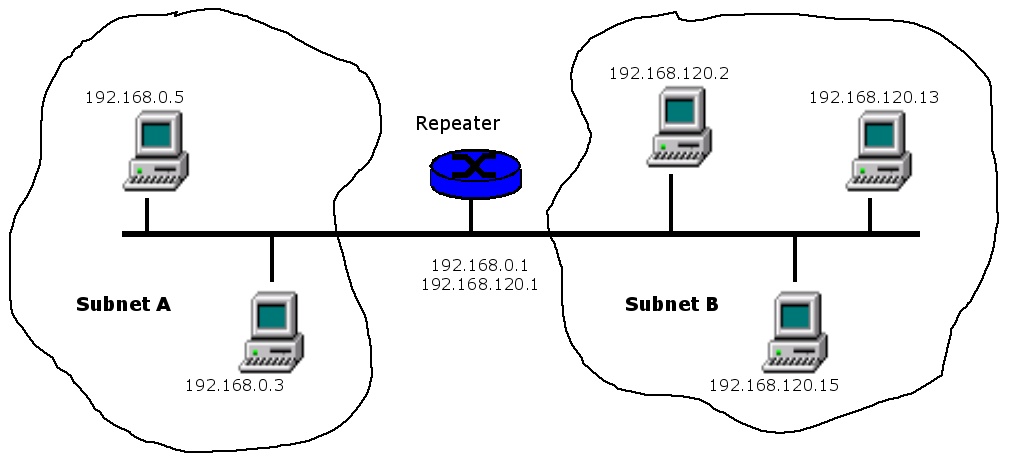
Figure 2. The IP repeater connects two subnets over HomePlug.
Let us assume the repeater initially is installed in parent subnet 192.168.0.X, with address 192.168.0.1 (it could be any address). For any new subnet 192.168.X.X, we reserve IP address 192.168.X.1 for the repeater gateway. When the destination IP address of a packet does not belong to the sender subnet, the repeater routes it. Actually, the repeater does no routing, as the same transmission line supports both packet ingress and egress. Thus, it needs no routing table, and it simply relays packets by using the same medium.
For the repeater to belong to different subnets, it must have several IP addresses. In other words, it is necessary to assign several network interfaces to its Ethernet card. In the example shown in Figure 2, the repeater card has two network interfaces, with respective IP addresses of 192.168.0.1 and 192.168.120.1. In Linux, this is done as follows:
# ifconfig eth0:0 192.168.0.1
# ifconfig eth0:1 192.168.120.1
The number of subnets is unknown beforehand, thus the repeater must autoconfigure itself. In our trials, we set its IP address to 192.168.0.1, as in typical commercial built-in DHCP servers.
We have implemented repeater self-configuration using a program called hprmanager, now available by e-mail from pedro@det.uvigo.es. This program sets the Ethernet card to promiscuous mode and looks for new subnets in order to register them.
The repeater discovers the subnets it interconnects by capturing every packet circulating in the network. In permanent state, even though the Ethernet card is in promiscuous mode, it does not receive all packets due to the PLC modem placed between the network card and the power line (Figure 2). This PLC modem blocks all packets except those whose destination address is a broadcast one, a multicast one or the repeater address itself. However, the repeater necessarily receives broadcast and multicast packets from unknown subnets. In any case, it also is possible to set network interfaces manually.
Each computer must select the gateway in its own subnet. Assuming we are configuring a computer in subnet 192.168.0.X, it must set 192.168.0.1 as the default gateway:
# route add default gw 192.168.0.1
To configure the repeater on a desktop Linux machine, it is necessary to do several things:
Activate the packet forwarding module by adding, for example, the following line to /etc/sysctl.conf:
net.ipv4.ip_forward = 1
Assign the default IP address; as previously stated, the repeater has the address 192.168.0.1.
Start the repeater manager. Assuming it resides in /bin/, simply add this line to /etc/rc.d/rc.local:
/bin/hprmanager &
This procedure works for most Linux distributions. For those without the /etc/sysctl.conf file—such as Debian—it first is necessary to create a shell script file (beginning with #! /bin/sh) called /etc/init.d/local, which includes the line /bin/hprmanager &. Finally, one should add the script to the desired run levels, as in:
update-rc.d local start 80 2 3 4 5
Because μClinux runs on embedded systems, the settings in the previous section must be active immediately after the load. The default installation of a μClinux operating system does not include the packet relaying module. Thus, we first must compile a kernel with packet relaying support, using the following four configuration steps:
Enabling the IP: advanced router option in the Networking options section (Figure 3).
Enabling the /proc filesystem support option in the Filesystems section.
Enabling the Sysctl support option in the General Setup section.
Using the board shown in Figure 5, we must disable the hardware byte-swapping support for CS89x0 Ethernet option in the Ethernet (10 or 100Mbit) section (Figure 4).

Figure 3. Enable advanced router functionality using the Networking options section of the kernel configuration menu.

Figure 4. Ethernet Card Configuration
Finally, we make three key steps of the repeater setup by modifying the initialization script /etc/rc. First, activate the packet forwarding module shown in line 11 of Listing 1. Second, assign the default IP address, as shown in line 15. Third, start the repeater manager, as shown in line 19.
Listing 1. Modifications to /etc/rc
1   hostname uCsimm
2   /bin/expand /etc/ramfs.img /dev/ram0
3   mount -t proc proc /proc
4   mount -t ext2 /dev/ram0 /var
5   mkdir /var/tmp
6   mkdir /var/log
7   mkdir /var/run
8   mkdir /var/lock
9   mkdir /var/empty
10
11  echo "1" > /proc/sys/net/ipv4/ip_forward
12
13  ifconfig lo 127.0.0.1
14  route add -net 127.0.0.0 netmask 255.0.0.0 lo
15  ifconfig eth0 192.168.0.1 promisc \
      netmask 255.255.255.0 broadcast 192.168.0.255
16
17  portmap &
18  cat /etc/motd
19  /bin/hprmanager &
We successfully tested these settings on a Motorola MC68EZ328 DragonBall microcontroller board (Figure 5) with 8MB of RAM, 2MB of Flash ROM, a 10Mbps Ethernet card and the μClinux v2.4.24 operating system.
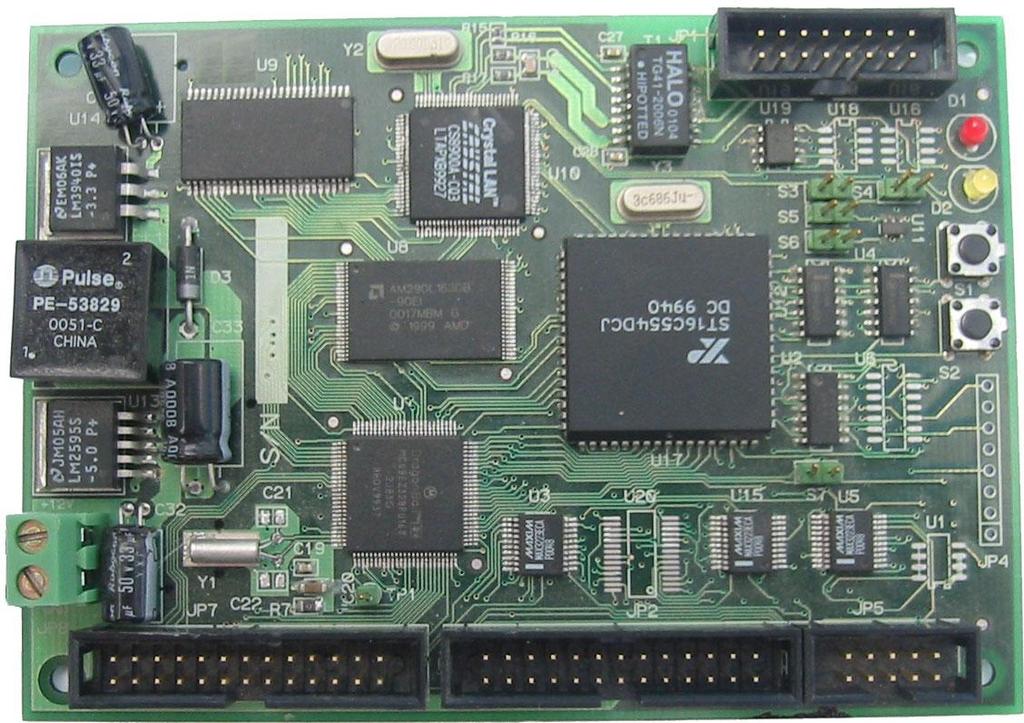
Figure 5. The Motorola development board used for μClinux is based on a DragonBall processor and includes an Ethernet interface.
An extended HomePlug network may have an Internet connection through a modem router. Figure 6 represents this scenario.
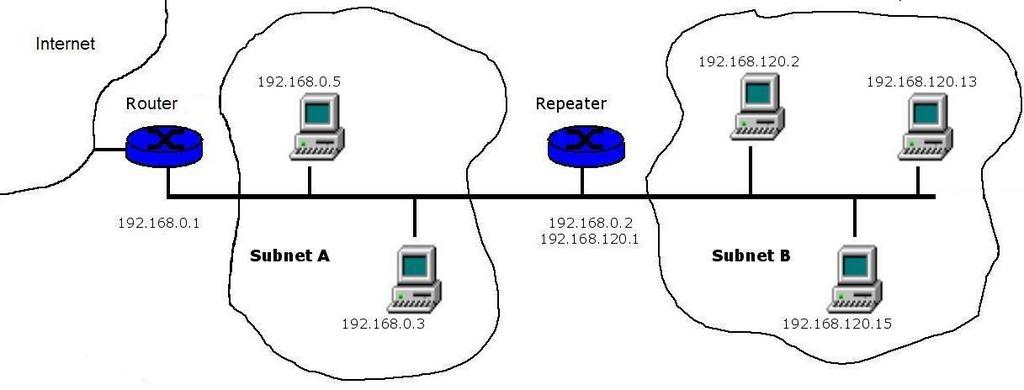
Figure 6. A Typical Scenario Featuring a Repeater and a Router with an Internet Connection
Let us consider the Linux desktop repeater to illustrate a solution to provide an Internet connection. If the router in the parent subnet has the address 192.168.0.1, it is necessary to assign a different address to the repeater. Moreover, the routing tables do change. However, the configuration of the computers in subnet B is the same. They simply route Internet-bound packets through the repeater by first issuing:
# route add default gw 192.168.120.1
The computers in subnet A route packets to subnet B through the repeater, and Internet-bound packets go right through the router. In them, we must execute the following commands:
# route add -net 192.168.120.0 netmask
 255.255.255.0 gw 192.168.0.2 dev eth0
# route add default gw 192.168.0.1
The repeater must route Internet-bound packets through the router by setting:
# route add default gw 192.168.0.1
Finally, the router sends packets to subnet B through the repeater. The configuration procedure depends on the router model. A typical and easy way is to log in to the Web-based configuration by going to the URL http://192.168.0.1 in any Web browser. Then, it is necessary to add route 192.168.120.0/24 through gateway 192.168.0.2.
The most interesting result of our testing is, in addition to the repeater allowing communication beyond the HomePlug range, that it also enhances communications when two nodes barely can see each other. This is because the number of available HomePlug carriers increases.
For the sake of clarity, we assumed a configuration without an Internet connection in the parent subnet for our testing. First, we measured the response time and the throughput between two personal computers in a three-story building that could not see each other without the repeater in place. We tested both for UDP and TCP traffic. We used the Qcheck tool, a network-checking utility from Ixia. With a desktop-based repeater, we obtained response times for TCP and UDP traffic of approximately 100ms and throughput in the range of 2Mbps. This is realistic performance for medium-sized homes.
In a second test, we inserted the repeater between two computers that barely could see each other. The response time for both TCP and UDP doubled when inserting the repeater (50 to 100ms, approximately). However, the throughput grew from 1.5Mbps to 2Mbps.
We currently are testing the μClinux version on cards with a 100-BaseT Ethernet interface, such as the μCdimm ColdFire and the EV-S3C4530, both from Arcturus Networks.
Resources for this article: /article/8527.
Francisco J. González-Castaño is a professor with the GTI Group, Departamento de Ingeniería Telemática, Universidad de Vigo, Spain (www-gti.det.uvigo.es). He works in high-performance networking technologies and distributed computing, among other fields.
Pedro S. Rodríguez-Hernández is a professor with the GTI Group, Departamento de Ingeniería Telemática, Universidad de Vigo, Spain. He works with real-time and embedded systems.
Felipe J. Gil-Castiñeira is an assistant professor with the GTI Group, Departamento de Ingeniería Telemática, Universidad de Vigo, Spain. He works with wireless networking technologies and their applications.
Miguel Rodelgo-Lacruz is a researcher with the GTI Group, Departamento de Ingeniería Telemática, Universidad de Vigo, Spain. He works with high-performance networking technologies.
José Valero-Alonso recently received an Engineering degree from the GTI Group, Departamento de Ingeniería Telemática, Universidad de Vigo, Spain. He is interested in computer architecture and client-server systems.
