
Building a Call Center with LTSP and Soft Phones
A new customer approached us with a need to provision the office. The customer was receptive to open-source software and was interested in using Linux. Being a nonprofit organization, the budget for the project was tight.
We provisioned the new office with a server running software from the Linux Terminal Server Project (LTSP) to make the desktop economical from the start. We then installed an Asterisk server as a PBX for the call center. To make things easier for the staff, we wanted to have a working soft phone on their terminals with headsets for hands-free operation.
This article discusses the installation and use of the LTSP build environment to build Qt and KPhone so the staff members could run KPhone locally on their terminals. I do not discuss the installation of Linux or Asterisk here, but I have included the relevant context for KPhone, which resides in the Asterisk sip.conf file. We used Gentoo for this particular LTSP server, but any Linux distribution can do the job.
The main software packages needed for this project were LTSP, KPhone and the LTSP build environment (LBE). LTSP easily provides thin-client access to a main server. We often recommend LTSP as an economical way to equip an office, because it focuses monetary resources on the main server rather than on the individual stations. The incremental cost of adding a new user to the office is relatively small, and administration is simplified.
The customer's new office is intended to be a small call center, so hands-free phone operation is a big benefit. We wanted to try using headsets and amplifiers that use a computer sound card for their connectivity rather than hardware phones. These headsets, coupled with software SIP phones on each user's local station, allowed us to meet their phone needs without having to buy separate phone equipment.
Because we already were using Asterisk (see the on-line Resources) as the PBX for the office, it seemed logical to use an open-source software phone. We decided to use KPhone (see Resources) as the software SIP phone, because it had proven reliable on standalone systems previously tested. One of the drawbacks of every SIP soft-phone package we investigated at the time was none supported a network-enabled sound protocol. As a result, they were required to run locally on the station that physically has the sound card. As these stations are thin clients that boot from the main server, KPhone needs to be resident in the filesystem on each station. When a user runs KPhone from the desktop, which runs on the server, the KPhone process needs to start in the local terminal environment.
KPhone is not a standard part of the LTSP package, so we needed to build it inside the local stations' root filesystem that is NFS-mounted from the server at boot time. Building software for the terminals' root filesystem requires LBE (see Resources). Building software in LBE also requires that all necessary libraries be present in the filesystem. One of the other benefits of KPhone is the Qt library is the only library required beyond those already in LTSP.
Installation and configuration of LTSP are detailed in the LTSP documentation (see Resources). One deviation from the standard install of LTSP is that the DHCP configuration file must reference the root filesystem that LBE builds rather than the root filesystem installed with the LTSP package (Listing 1).
Listing 1. Our LTSP Section of dhcpd.conf
# LTSP Path Options
option root-path
  "192.168.42.254:/usr/local/src/lbe/opt/ltsp/i386";

#LTSP boot image (relative to the TFTP root)
filename
  "/pxe2/pxelinux.0";
Technically, we did not need the LTSP package because LBE includes the necessary boot image and root filesystem. However, if you are not already familiar with LTSP, I recommend you install that package first and get it operational. Deploying LTSP involves the configuration of other standard software included with almost all Linux distributions: DHCP for assigning IP addresses, boot images and root filesystem information for the stations; TFTP for client stations to retrieve their boot images; and NFS for thin clients to remote-mount their root filesystems and the /home filesystem for running remote applications. Installing LTSP provides demo configurations for all of these packages that makes setup much easier for a novice.
The main LTSP documentation describes well most of the preparation for running applications locally on the clients. Their installation and configuration also are covered on the LTSP 4.1 Web page. In addition to the software mentioned above, you also need to configure SSH client and NIS on the server.
SSH is the means we used for starting the process on the remote client. Notice that the LTSP 4.1 documentation demonstrates the use of rsh for launching the applications. Although that would work, the required dæmons for rsh no longer are part of the LTSP package. SSH is now the norm for launching local applications. You can find information about preparing for SSH launching of local applications in the Local Applications section of the LBE documentation.
NIS is needed because the thin clients need to authenticate users through SSH as they launch the applications. NIS configuration is guided by the NIS HOWTO. One item that was not immediately obvious from the documentation was that NIS would complain that /etc/publickey was not present. Creating that file with touch /etc/publickey solved the problem.
Once all the supporting software is in place, configuring LTSP to run local applications is easy: set LOCAL_APPS = Y in /etc/lts.conf within the LTSP root filesystem. This causes the clients to mount the /home directory from the server with NFS. Also, NIS is made active by /var/yp/nicknames, /etc/yp/conf being created on the clients, domainname being run with the value of the NIS_DOMAIN entry in the lts.conf file and ypbind being run. The sshd dæmon also is activated on the client.
For SSH operations to be transparent to users, we need SSH keys created without expecting users to do it themselves. To accomplish that, we installed superadduser in Gentoo, which is reported to be adduser from Slackware (see Resources) and modified it to generate the SSH keys automatically for the user when the user is created (Listing 2).
Listing 2. Additions to /usr/sbin/superadduser
# su to the user and generate their SSH keys
su - "$LOGIN" -c "ssh-keygen -q -t dsa -C '' -N '' -f "$HME"/.ssh/id_dsa"
#
# cp the new public key to the authorized_keys file
cp "$HME"/.ssh/id_dsa.pub "$HME"/.ssh/authorized_keys
chown "$LOGIN":"$( echo $GID | awk '{print $2}')" "$HME"/.ssh/authorized_keys
#
# update the NIS stuff
(cd /var/yp; make > /dev/null)
Aside from configuring local applications to run on the client terminals, we also need to make sure the sound cards are active when the thin clients boot. Normally, one would set SOUND = Y, SOUND_DAEMON = <nasd or esd>, VOLUME = <default volume level> and possibly SMODULE_01 = <ISA configuration string>. However, doing so not only causes the sound driver to be loaded into the kernel, but it starts the sound dæmon, which we do not want. We need the sound card to be available for KPhone when it starts on the terminal.
What we do instead is set SOUND = N to keep the normal sound system from being activated and MODULE_01 = <kernel module for the PCI soundcard>, because LTSP does not have isapnp support, so audio needs a PCI audio device. We also set RCFILE_10 = "kphone" to run the initial configuration script to ready the system for KPhone by using the audio device. Then, in /etc/rc.d in the clients' root filesystem, we put the KPhone script (Listing 3) to enable access to the /dev/sound/* files. -rwrwrw access is not the most secure, but because only one user is running processes on the terminal at a time, it works fine. Finally, we turn on the microphone and adjust the gain and volume levels.
Listing 3. <LTSP root>/etc/rc.d/kphone
#!/bin/bash
echo Setting up the system for using kphone locally

echo change the permissions on the audio files...
/bin/chmod 666 /dev/sound/*

echo Turn on the microphone, adjust gain and volume
/bin/aumix-minimal -m R

echo Turn gain and volumes up to maximum
/bin/aumix-minimal -m 85
/bin/aumix-minimal -p 100
/bin/aumix-minimal -v 100
Now that you have the LTSP environment configured and operational, you can build the LBE. Getting LBE from CVS is as simple as:
cvs -d :pserver:anonymous@cvs.ltsp.org:/usr/local/cvsroot checkout -s
You then need to su to root—using sudo with the LBE doesn't reliably work—and run ./build_all. You can take a break here, as the build of LTSP in LBE takes some time to complete.
Once you have the new root filesystem for the terminals built, change your DHCP configuration to refer to that boot image and root filesystem, and restart your DHCP server. You probably want to move /etc/lts.conf from your old LTSP root filesystem to the new one. You also should move the system-wide SSH known-host keys—the ones you created as per the Local Applications section of the LBE document—to the new filesystem.
Now we need to build the Qt libraries and then KPhone inside the clients' root filesystem. The LTSP Build Environment (LBE) makes this much more manageable. Adding packages for building in the environment amounts to creating a package.def file in a directory named for the package. The package.def files describe how to get, verify the download, unpack, configure, build and install the package software. The build script in the ltsp-src directory then does a chroot and executes the build process.
Through trial and error and discussions on the LTSP IRC channel (see Resources), we were able to construct the required package.def files (see Resources for those files). Constructing the package.def file for building Qt, in ltsp-src/qt under the LBE root, was a straightforward process. Each build exported the same variables to the build environment. Notice, also, that threading is turned on explicitly at the CONFIGURE stage. KPhone builds much more easily if Qt has threading enabled, but it is not enabled by default in Qt.
Building KPhone was a bit more complicated. The package.def file (see Resources) works well enough, but the x-includes configuration option does not seem to change the resulting Makefiles. This would cause compilation errors when building trayicon.cpp. Manually adding -I/usr/X11R6/include to CFLAGS in kphone/kphone/kphone/Makefile (Listing 4) after the configuration stage seemed to fix the problem, however. The steps to build KPhone in LBE are then:
ltsp-src# ./build --configure --only=kphone
ltsp-src# vi kphone/kphone/kphone/Makefile
   (Add "-I/usr/X11R6/include" to CFLAGS)
ltsp-src# ./build --only=kphone
We also noticed that the icons were not being located properly by KPhone at first. Making a link to ../../share/kphone in opt/ltsp/i386/usr/share from the LBE root—/usr/share from the clients' root—allowed KPhone to find the icons correctly.
Listing 4. Modified CFLAGS in kphone/kphone/kphone/Makefile
CFLAGS=-I/usr/X11R6/include -I/usr/qt/3/include \
  -Wall -O3 -I. -I../gsm -I../ilbc -I../dissipate2 \
  -D_REENTRANT=1 -DQT_THREAD_SUPPORT=1 \
  -DHAVE_LIBX11=1 -DHAVE_LIBXEXT=1 -DHAVE_LIBXT=1 \
  -DHAVE_LIBICE=1 -DHAVE_LIBSM=1 -DHAVE_LIBPNG=1 \
  -DSTDC_HEADERS=1 -DHAVE_FCNTL_H=1 \
  -DHAVE_SYS_IOCTL_H=1 -DHAVE_UNISTD_H=1 \
  -DHAVE_SELECT=1 -DINCLUDE_STDLIB_H=1 $(MOREDEFS)
To run KPhone, we put a script in /usr/bin on the terminal server called kphone (Listing 5). This script simply opens access to the xserver, determines the terminal at which the user is sitting and starts the KPhone process on that terminal.
Listing 5. KPhone Script on the Server
#!/bin/bash
xhost + > /dev/null
HOST=`echo $DISPLAY | awk -F: '{ print $1 }'`
export HOST
ssh ${HOST} env DISPLAY=:0.0 /bin/kphone
To make things easier for the users, we created an entry in the KMenu for KPhone that they can select or move onto their docks if they wish. This entry is created by adding the file kphone.desktop (Listing 6) to /usr/kde/3.3/share/applications/kde on the terminal server.
Listing 6. kphone.desktop
[Desktop Entry]
Comment=
Exec=kphone
GenericName=Office Telephone
Icon=/usr/kde/3.3/share/icons/Locolor/32x32/apps/kab.png
Name=kphone
Path=
StartupNotify=true
Terminal=0
TerminalOptions=
Type=Application
Categories=Qt;KDE;Office
X-KDE-SubstituteUID=false
X-KDE-Username=
The user then can select the KPhone menu item and launch KPhone (Figure 1). The first time the application is run, the user has to select File→Identity to open the Identity dialog (Figure 2) and enter the connection information. The data to enter here must match that information for the SIP accounts on the VoIP server (Asterisk in our case). Because KPhone stores its configuration in the user's home directory, it need be configured only the first time the user starts KPhone. Because /home is NFS-mounted from the server, the station where users log in is their phone, so the phone effectively follows them if they should change workstations. Once users have registered with the server, they can make calls from the call dialog and DTMF panel (Figure 3).

Figure 1. The user's desktop environment runs on the LTSP server, but KPhone runs locally.
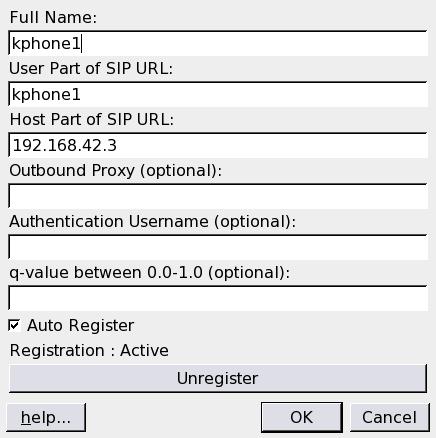
Figure 2. When first running KPhone for a new user, enter the information for the Asterisk server.
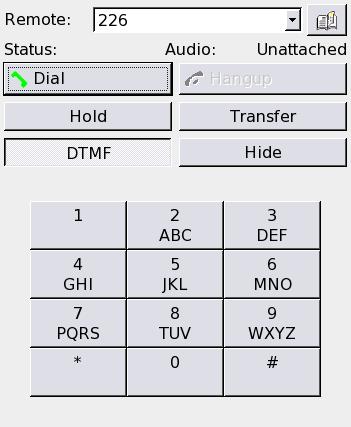
Figure 3. The KPhone call dialog works like a hardware phone.
Initially we had KPhone running, but the response time for any action was horrible. Any time the user would perform an action that caused an SIP message to be sent—dial a number, press a phone button on an active call, answer or hang up the phone—it would take nearly a minute for the action to occur.
We determined that this problem was occurring because of a DNS name resolution issue that was waiting to timeout. The solution was to put entries into /etc/hosts for each of the stations that would be running KPhone, install dnsmasq on the terminal server and have the terminals reference the terminal server as their DNS server, configured in dhcp.conf. There are other, perhaps better, ways to solve this issue, but this solution took minimal time to configure and run, and it worked. Finding the source of the problem was the hard part.
There have been a couple drawbacks to this system. Occasionally KPhone closes for no given reason, which can be quite annoying. We have not yet determined the cause of this problem, and we hoped that upgrading KPhone to 4.1 might help.
The KPhone package.def file contains the necessary lines for building KPhone 4.1.1. The change to the Makefile mentioned above for 4.0.5 still applies as of 4.1.1. Our preliminary tests indicate, however, that 4.1.1 has the same problem of closing suddenly for an unknown reason. We have inquired with the maintainers of KPhone to see if they can help, but so far we do not know the cause of the problem.
Another drawback is that when the phone rings, it rings through the headset and gives a visual alert on the screen. If users are not in front of their terminals with their headsets on, they will not know that their phones are ringing. Once the call center is in full operation, operators probably will spend most of their time at the terminals, so this may not be a problem.
We now have KPhone installed and able to be run from any terminal attached to the LTSP server. Adding another user is as simple as creating an account for them on the server, adding a SIP phone entry for them on the phone system and having them configure KPhone. The terminal server is the single point of maintenance for everyone's desktops. Even though KPhone runs locally on each terminal, the LTSP build environment is the single point of maintenance for all of them.
The cost for the system is concentrated in the terminal server and phone system. The incremental cost for each new user is the cost of a low-end terminal and a sound card headset. This expense is much more cost effective than putting a full workstation at each desktop along with a headset-capable hard phone.
Thanks to James McQuillan at the Linux Terminal Server Project for his excellent documentation (LTSP and LBS) and everyone on the LTSP IRC channels that helped me get KPhone running locally. Also thanks to Thorsten Kukuk for authoring “The Linux NIS(YP)/NYS/NIS+ HOWTO”. Thanks to Mark Spencer, Digium and everyone involved with the Asterisk Project who have made open-source telephony a reality, as well as the author(s) of KPhone. And thanks to Trolltech, the creators of the Qt application framework.
Resources for this article: /article/8460.
Michael earned his degrees in Computer Science from Michigan Technological University and Purdue University more years ago than he likes to admit. He now lives in rural Michigan with his wife and five children. He has been using Linux since 1994 and now works with Ideal Solution, finding new and creative ways to put open-source software, including LTSP and Asterisk, to work for clients. He can be reached at george@idealso.com.
