
Quantcast
Username/Email:  Password: 

Linux in Government: Linux Desktop Reviews, Part 1 - Xandros Business Edition

 in
A new series focusing on the best desktop candidates for deployment in enterprises starts with a look at Xandros Business Edition.


In a recent article published in Government
Computing News
, Carlos A. Soto did an excellent job of
asking if anyone was "ready for a Windows-free desktop"? In fact, he
conveyed a remarkable experience:

Earlier this month, Red Hat Inc. gathered government users, partners
and the press together to launch its federal sales division. Though the
emphasis was on enterprise server deployments, questions inevitably came
around to Linux on the desktop.

One government user was interested in exploring desktop operating system
alternatives but worried whether his agency would be able to use the
programs its users have grown accustomed to. It's an important question
and one not easily answered. But citing the maturity and functionality
of open-source productivity applications such as OpenOffice[.org], former
General Services Administration CIO Don Heffernan, who was sitting on
a panel at the Red Hat event, said Linux was "this close" to being
ready for widespread desktop deployment.

Soto's tone throughout the article remained fairly constant, looking
for an alternative desktop for his readers. In another excerpt, he writes:

Like the vast majority of government users, we in the GCN Lab do our
daily work in Microsoft Windows, specifically Windows XP Professional. But
also like many of you, we're always on the lookout for a better client
OS. It may be unfair to fault Microsoft for being the No. 1 target of
hackers and worm authors, but that's what a near-monopoly brings.

Better security and lower cost of ownership are the primary reasons that
companies not named Microsoft tout alternative operating systems. As
high-profile options continue to mature, we thought it fitting to test
what's out there.

Ultimately, GCN wound up doing what I call the standard reviewer's
article. The team installed three different versions of Linux on different
machines, plugged them into their network and looked to see how much
trouble Linux caused. The GCN team did an outstanding job from its
limited perspective. Still, the team did not conduct a pilot.
Reviewer's Limitations
Last spring, a public relations firm contacted me for assistance in
helping them find qualified journalists to review a Linux desktop
product. While discussing the tasks involved, the publicist expressed
frustration with reviewers in general and especially those that "test"
Linux. Even a publication with its own laboratory, such as GCN, lacks the
ability to deploy operating systems in a live environment and extract
enough experience to inform its readers if a platform or application
will play.

Some of the limitations we experienced working with journalists included
attempts to install Linux on broken equipment, on old and outdated
laptops or into a Windows environment without something such as VMware.
Others attempted to dual boot the system on a laptop without partition space. Of course,
many reviewers turned the press kits over to their IT departments. The
IT people in turn gave opinions that indicated to me that they either
didn't try to install the software or had trouble and gave up.

Given my experience with reviewers, I have to give GCN high marks for
its work on Linux. Although I agree with some of their conclusions, I do
not agree with their final one: "Ultimately, we decided we weren't
ready for the long, uphill struggle that migrating to a new desktop
OS would entail." GCN mistook a mild bump in the road for a hill.
Xandros Won GCN's Review
In that GCN article, Soto wrote, "For three weeks, the GCN Lab put four
alternative OSes through their paces: Mac OS X Version 10.3.7, Novell
Linux Desktop 9, Red Hat Desktop 4 and Xandros Desktop OS 3. (Red Hat
Desktop 4 was a release candidate version when we tested it.)" He also
wrote that "we agree with Heffernan that desktop Linux is getting closer
to prime time--just not the desktop Linux version he might have
suspected."

It came as no surprise to me that GNC liked Xandros because it had more Windows
features than the other desktops offer out of the box. So, if you want a product
that looks and acts like Windows out of the box, Xandros wins. In fact,
Xandros provides you with:

  • a fairly simple installation with up-to-date hardware detection and
    configuration
  • the ability to authenticate against a Windows Primary Domain Controller
    or Active Directory server
  • Sun's StarOffice suite, which reads and writes most Microsoft document,
    spreadsheet and presentation files
  • drag-and-drop capabilities from desktop to folders, Windows network
    shares and FTP sites
  • a file manager similar to Windows explorer, which provides a desktop
    tool with drag-and-drop burning of music and data CDs, access to Windows
    and UNIX network shares
  • Codeweaver's CrossOver Office, which provides the ability to run
    Microsoft Office, Photoshop, Quicken and Dreamweaver and other Win32 applications
    on the Xandros desktop
  • simple updates to programs and the operating system using an update
    tool called Xandros Networks
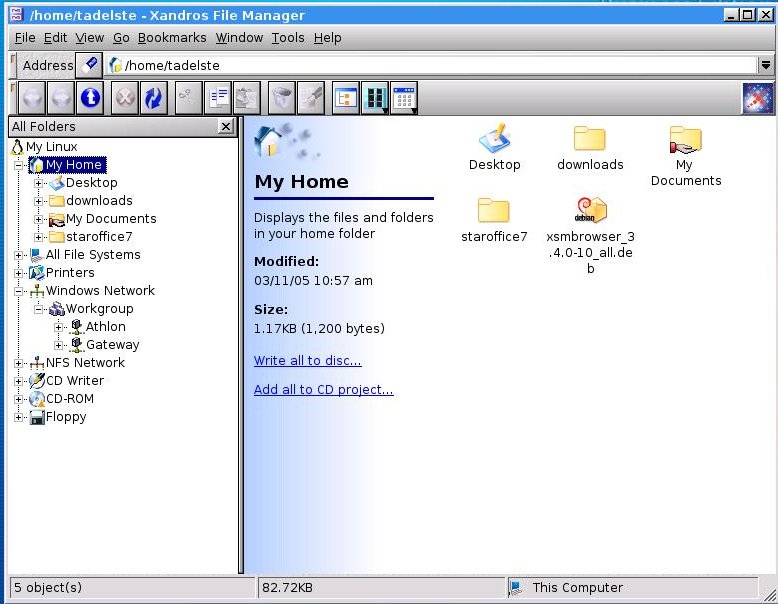
Figure 1. The Xandros File Manager
If you look at Figure 1, you can see Xandros' highly regarded file
manager. In this view, under My Home, you can see a folder called
My Documents, which has a symbol similar to ones seen on Windows
shared directories. Xandros has automated many functions of Samba,
so that Windows-like features appear unique to this distribution. In
this instance, I right-clicked the folder called My Documents and chose
the sharing option. I then chose share-level security so I could view
it from any network browser enabled computer on the network.
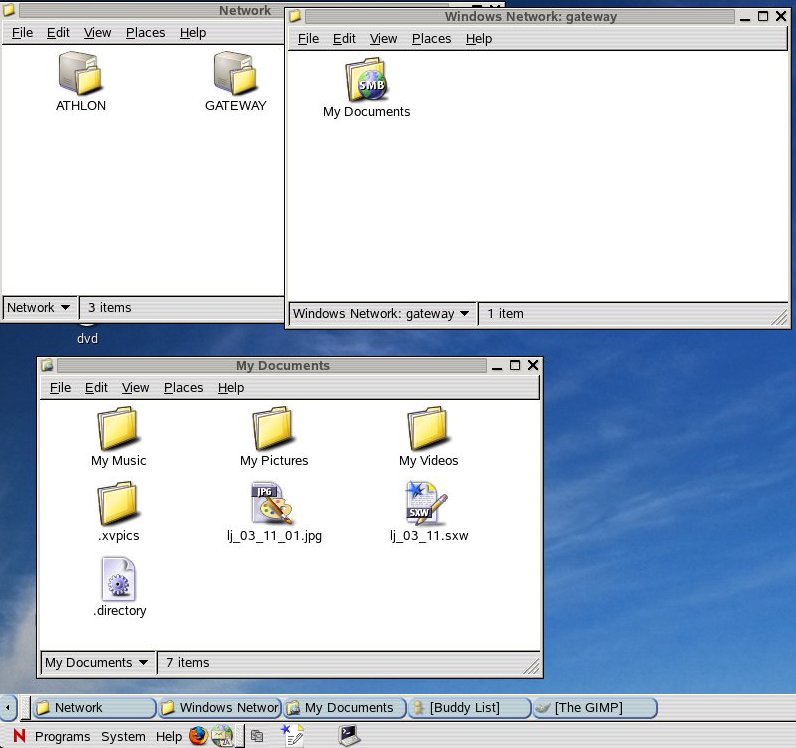
Figure 2. Viewing Xandros from a NLD 9 Desktop
In Figure 2, you can see a screenshot from a Novell Linux Desktop
accessing the Xandros-shared directory. In the top left window of the
NLD desktop, you can see two hosts in the Windows Network directory.
The view represents two Linux desktop computers using the SMB or CIFS
protocol. Neither machine has Microsoft Windows installed. In fact,
the computer called Gateway runs Xandros Business Edition 2.5 on a
Gateway 550 (Pentium III 550 MHz processor) with 384MB of PC 100 RAM
and a 20 GB IDE hard drive.

Unlike the GCN test, we have chosen to run Xandros on a six-year-old
computer. The entire system uses less than 2GB of disk space and performs
as well or better than Windows XP Pro on a Pentium IV 2.4 GHz processor
with 512MB of DDR RAM. From an enterprise point of view, one would think
that maintaining an investment in existing hardware has more value than
whether a distribution automated its Windows protocols off-the-shelf.

The GCN team also liked the Xandros Networks feature, which reminds one of
Windows Update. By clicking on the Xandros Networks icon, one can check
to see if any patches exist for the operating system or applications or
if any new hardware drivers have become available. In Figure 3, you can
see a view of the activated Xandros Networks showing application updates.
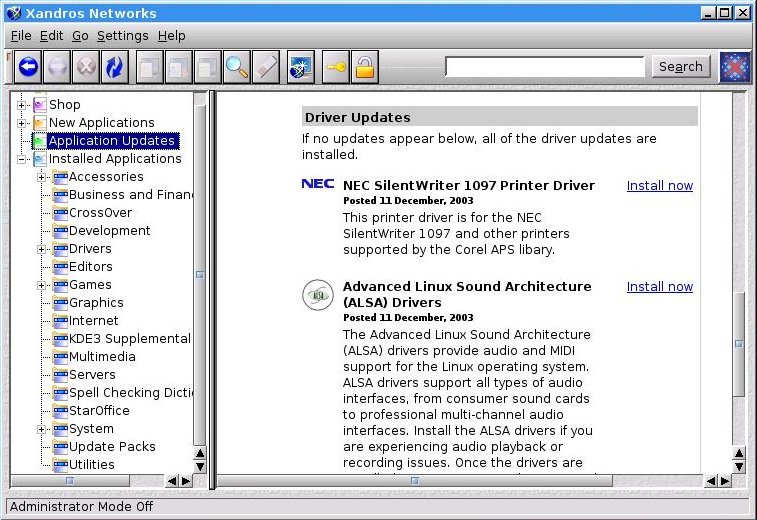
Figure 3. Xandros Networks Application Updates View
For Windows users, Xandros Networks provides a feeling of comfort. Then
again, the major enterprise desktops provide similar functionality:
Novell provides Red Carpet, Red Hat provides Red Hat Network and Sun
provides Online-Update. Still, the Xandros Networks tool provides
significant support to users wanting more than an update service.

In Figure 4, Xandros further differentiates itself from the main
enterprise desktops by offering the full suite of Sun's StarOffice7
productivity tools. (Note: The Sun JDS desktop only offers a portion of
the StarOffice suite).
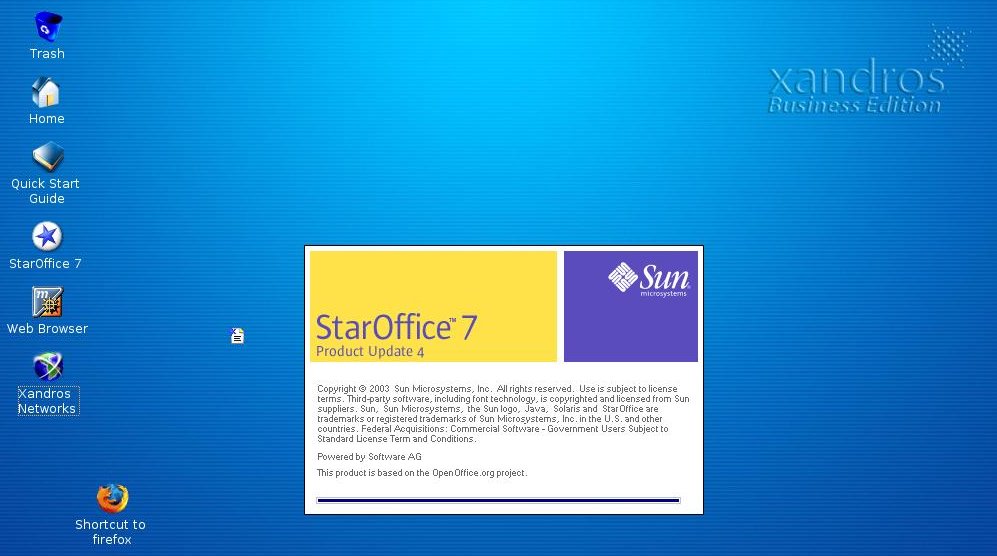
Figure 4. StarOffice7 Splash Screen
Unfortunately, Xandros did not maintain updates for StarOffice7. I went
to the Sun Web site, found the latest service pack and then dug around the
Internet and found out how to install the update. Although one might laud Xandros
for including the extra functionality and features of Sun's productivity
suite, the product needs updating periodically. In this case, Xandros
missed four updates.
Does Xandros Win?
Xandros has many things going for it, including stability and a
dedicated development team. Originally called the Corel Desktop, it's
a Debian-based Linux distribution and continues to evolve as a stable
and well thought out Linux distribution. As with many Linux distributions,
the company provides a freely downloadable version.

You also may consider the Xandros desktop to be suitable for use by people wanting a
modern and trouble-free Linux system. Xandros uses KDE as its windowing
environment instead of GNOME. Fortunately, applications such as Evolution
and the GNOME infrastructure are available as updates to the system,
as are traditional GTK applications, such as FireFox and The GIMP.

If an organization feels comfortable managing its desktops without
help from the vendor, then Xandros has a lot of merit. Unfortunately,
the company lacks many features that enterprise users require. For
example, enterprise customers want answers to questions such as:

  • What kind of support organization does Xandros have related to users? If
    you run into a problem, can you contact someone for help? How, over the
    phone or by e-mail?
  • How big is Xandros' support organization? Does the
    company out-source its support?
  • Does Xandros have a professional services organization? If someone wants
    to buy a large number of desktops, how would Xandros handle a big
    order?
  • Xandros offers documentation for the user. How about technical
    documentation, is there anything for the administrator?
  • What kind of solution-provider ecosystem exists? Does
    Xandros have resellers? How robust is that reseller organization?
  • What is Xandros's server strategy? Does the company y provide back office
    functionality and identity management?
  • What tools exist for rolling out and managing the desktops?
  • Does the company offer on-site
    training?
  • How can administrators and help-desk people learn to
    provide desk-side support in their own companies? Does curriculum exist?

These questions need answers. Government users may love the off-the-shelf
Windows functionality provided by Xandros. If an organization has to provide
its own support and administration, however, perhaps the organization
equally is prepared to add Windows functionality itself.
Resources
"Manufacturing
pioneer saves time, money with Linux management tool"

"Linux in
Government: Providing a Successful Model for OSS Enterprise
Users and Linux Companies">

Xandros Web Site

Tom Adelstein lives in Dallas, Texas, with his wife, Yvonne, and
works as a Linux and open-source software consultant with Hiser+Adelstein,
headquartered in New York City. He's the co-author of the book
Exploring the JDS Linux Desktop and author of an
upcoming book on Linux system administration, to be published by O'Reilly
and Associates. Tom has been writing articles and books about Linux since
early 1999.

______________________

Comments

Comment viewing options

Select your preferred way to display the comments and click "Save settings" to activate your changes.

linux

Mack's picture

I have been using Linux in one form or another since 1996 and it has come a long way! Installing is miles above what it use to be. Kind of like the difference between WIN NT and XP..

M$ have been traveling down a road that will end someday and I don't think it will end the way M$ wants. M$ is so far out of touch with the computer professional it is amazing! My proof of that is simple ..Take server 2003....It doesn't support Java!...Or..how about having that #$%@ dog showing up on the desktop. I don't know about you but most of the IT guys that I know don't need a dog telling them about their systems...They just need more and better control!

Now this is where Linux is going to step in. People get tired of things being shoved down their throats no matter how blindly they blunder. After a while their eyes will clear and they will see other ways to do the things they like.

I have many non-comp friends and when I mention Linux the just say from what they have been told you need to be a computer geek to even try to install Linux!..

This was true many years ago but then I show them SUSE or Mandrake and their eyes open. Just for fun I will give them a copy of Knoppix to play with. I now have several friends that I have loaded Linux along side their XP. They now tell me how much they prefer using Linux over M$. They keep M$ around like most of us. Because there are programs that they/we like that you can't find a Linux alternative ...Yet!..

What most programmers do that I know program in Linux and the port it over to M$. Once companies find out that there is a market for Linux programs I think you will see more and more moving their software over to Linux. Look at Nero!

Linux is like Honda was in the 70's ...everybody laughed and made fun of Honda and their little cars.....Now look at them!.....

Most big companies fall to the wayside because of poor management and when they loose touch with their consumers.

I think of it like this...

M$ is like walking into a restaurant and taking a look at the menu and seeing that there are 2000 different things you can order...

You know with so much on the menu that they can't do anything really well!...

Linux Reviewers and Reviews

Steve Szmidt's picture

This is not a bad article, though clearly kept down in size from becoming very useful. One of the interesting problems I see is that most reviews are made to show how easy, or not, time people have moving onto or using Linux, but most miss the boat in my opinion. This creates a false comparison as today most are already familiar with Windows, and knows how to get around.

In order to produce a useful beginner review, two things are needed. One, a person new to Linux, and enough time to actually get familiar with the O/S. And secondly, a competent Linux administrator to help the tester around the issues that comes up. This would produce an accurate picture for others to see what comes up, and if there's a workable way around it. Otherwise you are left now knowing if it is even possible to get around issues, or how hard it would be to do so.

For example, this reviewer stated that "These questions need answers." He left us with the idea that most of the answers are big mysteries. Of course anyone with a bit of time around Linux can answer those questions positively. (Something I'd expect that he does know.)

F.ex. what kind of support do they have? Well, there's the support offered by each distribution, there's hundreds, maybe thousands of mailing lists, each covering a specific Linux program, where people are helping each other very effectively.

There's IRC chat rooms where you often chat directly to a developer. Additionally there's thousands of people and companies that will train and support companies using Linux. Not to miss the manual pages each program has included on your computer. The HOWTO series of online help pages, often included in your computer. The Linux Documentation Project, http://tldp.org where most documentation is gathered.

Each Linux distribution is very similar to all the others. What each distribution has, is a copy of the same kernel (which is the very core of all O/S's) and a collection of Linux programs, all coming from pretty much the same sources. What differs between distributions is usually only the installation program and various administrative tools. And even those are usually the same, but maybe with a different look and feel. Of course different distributions vary greatly in the amount of direct support they offer. Some have thousands of employee's and others are known to be made up by one or a few people.

The point being that there's a lot of help easily available. Whenever I run into something I don't know, I just look it up or ask someone. Whenever I see something new and interesting/useful, I simply install it and follow the instructions. True, I'm not exactly a newbie. But that's also the point. I know where to look. As a side note I'd like to offer this information; I have been using Linux exclusively sine around 1996. It has been a ride with joy and a lot of excitement. True, it had it's down sides too, as is true with anything. But Linux has helped me stay truly productive and able to use my computer as the tool it is.

desktop

rodrick smith's picture

Linux has come a long way, and the desktop is here but it just needs to be promoted more I think, well in the USA. I bet anywhere else linux desktop is already deployed or is in testing stage. I have Used Suse for a long time now and I have used other desktop like redhat and solaris intel desktop, lindows and many others distro's. I have even setup suse's and other linux desktop for amny people or clients now. My mother and friends all enjoy using the linux desktop not having to worry about viruses. It took a few of them sometime to get use to the icons but with any new OS there will be a learning curve. I have to give it to mandrake because it is the easiest I think to use and it looks and feels like windows so I big plus for windows users that want to give linux a try.

Xandros looks cool

Linuxbuster's picture

From my own experience you have to give the people, what they need. And in today's environment - and there is no doubt - people want to work, like they are used to in their Microsoft Environment.

From the first look at the screenshots on this page - I said to myself: "Hey - this software-compilation can get a footstep into MS-World" 8-)

It does more than _just_ look cool ...

Anonymous's picture

... it is cool ;-)
All kidding aside, I have been using it - in a M$-centric government work area, and it does everything a competent desktop OS should do and more (*1).

1) I can accomplish all of my UNIX Sysadmin duties (telnet/ssh).
-bonus : I can copy any command from text files/or tested locally to one of those shells. Also I have scripted all those connections and my system knows them natively (/etc/hosts).

2) I run Lotus_Notes with crossXover_office - it runs seamlessly.
- bonus : when Notes crashes, you can kill crossXover, and not reboot the unit.

3) For all M$-apps (word, excel ...etc.) I have so far been able to open/edit/create all forms thru OpenOffice_1.1.4
bonus : I have on a few occaisons opened a corrupted document that took down a colleagues WinXP/2000, resent it - then no probs.

4) I can even manage NT2000 units with WinTermClient.
bonus : came with Xandros 2.x (small footprint).

5) My FileManager does so much - it would take several hundred characters, but in a nutshell : i) pre-registered extensions, ii) easy-few-clicks share / connect to : folders in M$ & NFS, iii) built-in CD-burning, iv) zip/unzip - tar/gz-untar-gx, ....

6) TN3270 client for MainFrame pay (yeah, i know - those guys need to upgrade).

=>> All this on an IBM/P2-333mhz, 256 ram, total hdd = 6.x gb.

So Linux is ready for the home/business desktop, I've been running it for close to a year now.

Enjoy.

A.

What would make Xandros better??

Gnosti's picture

Well lets see, the only thing that I can see that would make Xandros better is
A: More software within XN
B: More Server Solutions
C: If it was Gentoo based as opposed to Debian based.

I'm a gentoo boy that has been running xandros for going on nearly a year now and I can honestly say that I love it. The one thing that bothers me about it is it's lack of software support. I have destroyed it on a couple occasions using apt-get with unsupported packages. However the way around this is to compile the unsupported software from source the problem with that is however that most Windusers are not going to know how to do that.

I think Xandros has taken a major step in the right direction however simultaneously taken a step in the wrong direction (or at least from my POV) They have made it border on being a proprietary system.

To see how well it will do with those who aren't computer savy in the least, I installed Xandros on three completely computer illiterate enduser pc's. They're reaction was...... It scared them. 2 of 3 Enjoyed it and had no issues in using it (the 3rd was a 50 year old lady who hated it because "it looked different").

The way I had them test it was to write out a list of 5+ tasks that they would normally preform on a windows based pc and then attempt to preform those tasks (without my help) on The xandros box. There were no issues except in changing the display settings which cannot be changed with a right click. All in all I think Xandros has built a decent desktop OS that could very well be on it's way to a great desktop OS.

Apt-get

Chris's picture

I have installed Xandros, I like it, however I cant get apt-get to work at all, I would like to install a fire-wall, and update Mozilla, I cant do that with the file manager, please help, what exactly do you type into the command prompt?

Post new comment

  • Allowed HTML tags: <a> <em> <strong> <cite> <code> <pre> <ul> <ol> <li> <dl> <dt> <dd> <i> <b>
  • Lines and paragraphs break automatically.
  • Use to create page breaks.

More information about formatting options