
Using an iPod in Linux
The market for portable MP3 players has exploded in the last few years, and Apple's iPod is considered by many to be the gold standard to which other players are compared. Despite the fact that Apple does not offer a flavor of its iTunes music application for Linux, the iPod still is a good MP3 player for Linux users everywhere.
As I write this, I've used a 20GB fourth generation iPod with click-wheel and the iPod Shuffle; the software described in this article, however, should work with all iPods. To use the slick GUI of GTKPod, you will have better luck with a newer Linux distro. If you're a fan of the command line, though, you should have no problems getting GNUpod to work on almost anything that runs Perl.
With GTKPod, the open-source answer to iTunes, you can rock and roll all night with your iPod and Linux. GTKPod is the slick GUI that allows you to transfer MP3, WAV and M4A non-DRM-infected AAC files from your PC to your iPod. You can add files one at a time or you can add an entire directory at one time. You can create and edit playlists, normalize the volume on single tracks or multiple tracks at a time. You also can edit the ID3 tag of files on the iPod or files on your computer. GTKPod is even smart enough to know not to upload files that already exist on your iPod. And, naturally, GTKPod lets you delete songs from your iPod should you start running out of space.
GTKPod is built on GTK2. Originally developed for use with The GIMP, GTK now is used widely in many applications and is the set of tools used to build the GNOME desktop. As sure as GTK is slick software, it also is complex software with a raft of dependencies, inter-dependencies and various requirements so byzantine that compiling the stuff yourself from source code is asking for a trip down the rabbit hole. Lucky for us all, everything you need to use GTK applications such as GTKPod should be on your computer already if you're running a recent distribution of Linux.
If you're already using your iPod, you probably have everything you need to use it in Linux: the iPod itself, a PC with Firewire or USB 2.0 support and a relatively recent Linux distribution. You'll also need a copy of GTKPod (see the on-line Resources). On the GTKPod site, you should find a lot of documentation and links to the source code, as well as GTKPod packages for SUSE, Debian, Gentoo, Mandrake and other popular Linux distros. More RPM packages can be found by searching rpm.pbone.net or rpmfind.net.
Because the iPod simply is a fancy removable hard drive, to use it with GTKPod in Linux, your kernel needs to support fancy removable hard drives. This kind of support has been in the kernel since 2.4, and it has been refined in the current 2.6 kernel. Almost all current distributions use the 2.6 kernel, and removable hard drive support usually is compiled in the kernel or is available as loadable kernel modules. Therefore, you shouldn't need to do anything to your system to make it see the iPod.
You can connect the iPod to your Linux box through a Firewire connection or a USB 2.0 connection. USB 1.1 also works, but we don't recommend it because the connection is so much slower. Another drawback of using USB 1.1 is the iPod can't charge while it's plugged into your PC.
FAT32 on a New iPod
If your iPod is just out of the box, you probably have to configure it before you can use it with Linux. Configure sounds nice and easy, doesn't it? In truth, you are going to reformat it. Scared? Don't be.
Most new iPods are shipped with their hard drives formatted with the Mac OS filesystem HFS+. To use an iPod that just came out of its box with Linux, your kernel needs to have HFS+ support as well as support for Mac-style partitions. Most modern distros do not include this support automatically and require a kernel recompile to enable it. Also, it's been reported that the HFS+ kernel support still is a bit buggy. If you're not in the mood to recompile your kernel simply to use your new toy, there is an easier way.
Because most versions of Microsoft Windows turn up their noses at reading/writing to the Mac filesystem, the first thing the iTunes software does when installing on a Windows system is configure the iPod. iTunes says configure but what it's really doing is reformatting the iPod's internal hard drive to the FAT32 Windows filesystem. So if you've just pulled your iPod out of its box, and you've got a Windows machine handy, you can use the iTunes software install process to format your iPod. The iPod Shuffle comes from the factory preformatted with the FAT32 filesystem, so you should be able to use it right out of the box.
Reformatting your iPod also can be done using the Restore iPod feature in the Windows iPod software. But be warned that this step wipes the iPod completely, causing you to lose the all songs and files you had. If you've been using your iPod on a Mac and now want to use it with Linux without reformatting it, check out the on-line Resources for links to tips from other Mac users who have done exactly this. If you refuse to use Windows or Mac OS or if you don't have a Windows machine handy, the Resources also contain links on how to reformat the iPod using only Linux. It is possible, but it does require HFS+ and Mac partition support in your kernel and the use of the GNUPod tools to lay down the basic directory structure on the iPod's cleaned slate.
Installing GTKPod should be no problem whether you're compiling the source code or installing a precompiled binary package. GTKPod requires the libid3tag library, and the libmp4v2 package is required if you plan on using AAC files (see Resources). The source code for GTKPod compiles easily with the standard
./configure
make
make install
commands. A precompiled binary for your platform should install even easier than that and provides tighter integration with your existing desktop.
Once the iPod is formatted with FAT32 and GTKPod is installed, plug the supplied Firewire or USB cable into your PC, and plug the other end into the iPod. If Linux sees the iPod, you should see the iPod's screen flash the message “Do Not Disconnect”; on the iPod Shuffle, the status light blinks orange. If your iPod doesn't do this, try unplugging it and plugging it back in. I'm using Firewire instead of USB on my 20GB iPod, because the majority of on-line resources provide directions for using it. Also, if you only have the one Firewire device active, it makes things a little easier when disconnecting the iPod. The iPod Shuffle connects as easily and predictably as a USB thumb drive. See the Troubleshooting section of this article if you have problems getting Linux to see your iPod.
If you're using a disk-based iPod that's already FAT32-formatted (see Sidebar), there are two partitions on the drive. One is about 40MB and holds the iPod's firmware operating system, and the second is a huge partition that holds all of your music. If you're using an iPod Shuffle, you have only one partition, and it's already FAT32-formatted from the factory.
Every computer is going to be slightly different, so I recommend tailing your /var/log/messages file, or the analogous file for your Linux distribution, to watch what's happening behind the scenes when you first connect your iPod. The log file should indicate that your system has recognized the iPod and assigned it the next available SCSI drive letter, /dev/sda if you're running nothing but IDE drives. Some systems use the fstab-sync utility to edit automatically the /etc/fstab file to include a mount point for the iPod. Others require that a specific entry in your /etc/fstab file already exists. If you're tailing the /var/log/messages file and you don't see something like this fly by:
fstab-sync[4284]: added mount point /mnt/ipod for /dev/sda2
then it's a good idea to add a line manually to your /etc/fstab file that indicates this:
/dev/sda2 /mnt/ipod vfat rw,user 0 0
Remember that for the disk-based iPods, you want to mount only the large music-holding partition (sda2) and not the smaller partition that holds the OS (sda1). For the iPod Shuffle, which has one partition, an entry like this should do the trick:
/dev/sda1 /mnt/ipod vfat rw,user 0 0
If you haven't done so already, make the mount point /mnt/ipod by running mkdir /mnt/ipod as root.
By default, GTKPod looks for your iPod to be mounted at /mnt/ipod, but you can change this value. The easiest way to mount your iPod is to let GTKPod do it for you. To do this, start up GTKPod and select Edit then Edit Preferences. In the Input/Output tab, check the box that says Handle mounting/umounting of iPod drive. Start up GTKPod again, and your iPod automatically is mounted for you.
GTKPod has many options and features, and the best way to get your feet wet is to put some music on the iPod. Chances are, you've already got buckets of MP3 files on your computer. GTKPod only handles managing files on the iPod. Too create MP3s, you need to use a separate program, such as Grip. To listen to the MP3s, GKTPod relies on an external program such as XMMS; you can specify your favorite MP3 player in GTKPod's preferences.
Once you've got some MP3s to transfer, you can use the Add Files button to add single files or the Add Dirs button to add an entire directory at one time. Figure 1 shows the Beastie Boys' album Hello Nasty being added to my freshly formatted iPod. When you click the OK button to add a directory, GTKPod then processes the files, adds them to your local iTunes database (in ~/.gtkpod/ by default) and lists them by artist, title, album or genre in the lower window pane. The next step in the process is to click the Sync button. This step does the actual transfer of files from your PC to the iPod; it also syncs your local iTunes database on the PC to the one on your iPod. It takes a minute or two to accomplish, depending on how much music you're moving over. When your files have been moved over successfully, GTKPod says “iPod Database Saved” in the lower left-hand corner.
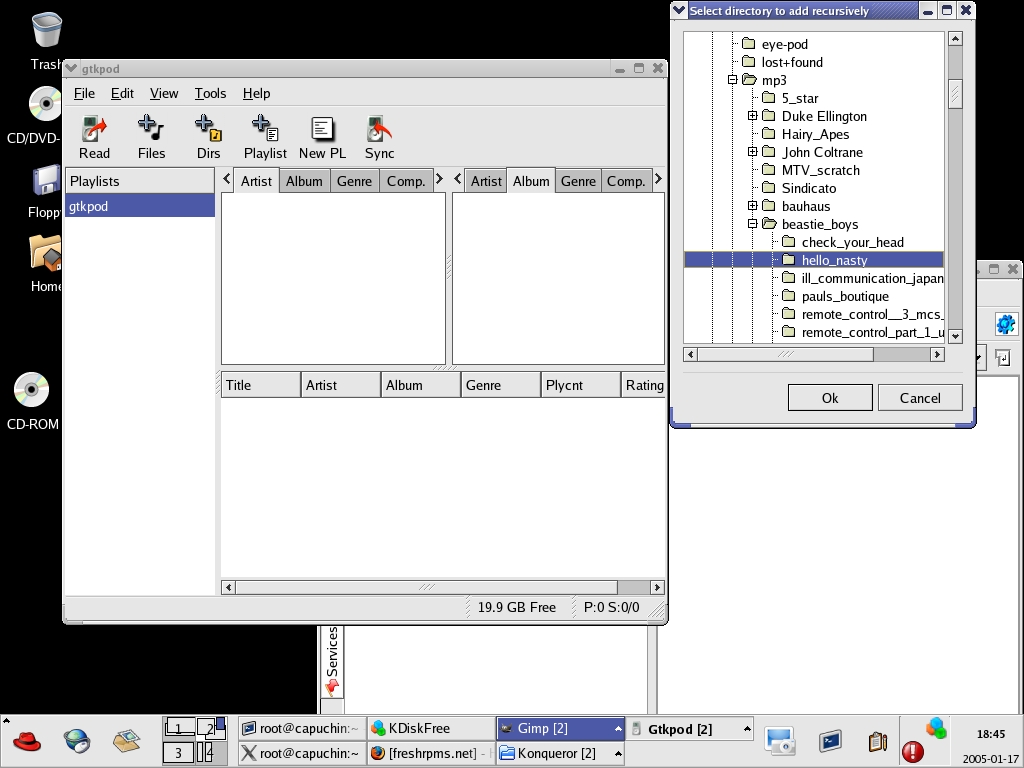
Figure 1. GTKPod organizes your music by all the usual attributes and lets you create playlists.
Don't remove that iPod yet, though. If the iPod still says “Do not disconnect” or if your Shuffle's status light still is blinking orange, then leave it connected. Consider that your iPod has been mounted as a removable hard drive. You wouldn't unplug a spinning hard drive from your system, would you? You first need to make sure the iPod is unmounted. If you're using the automatic mounting within GTKPod, simply exit GTKPod and the iPod is unmounted.
At this point, your iPod still should be flashing the “Do not disconnect” warning. It's only safe to unplug your iPod when this message is gone. The way to remove this message is to unload the kernel module that handles removable hard drives. If you're using Firewire, the module is sbp2, which can be removed by giving the command modprobe -r sbp2 in a root terminal. Only when the “Do not disconnect” message is gone and you see the normal iPod menu should you disconnect it from your PC.
With GTKPod, you have the ability to execute scripts automatically every time you start or stop the program. The files ~/.gtkpod/gtkpod.in and ~/.gtkpod/gtkpod.out—or /etc/gtkpod.in and /etc/gtkpod.out if these files are not in your home directory—are read and run when starting up or exiting GTKPod. In the case of start up, the script is run before your iPod is mounted. So, if you need to load kernel modules or otherwise massage your system before using your iPod in Linux, this is the place to do it. Likewise, putting scripts in a gtkpod.out file can make removing your iPod a snap.
Once your iPod is removed, you should be able to play all of the tracks you transferred. If things didn't work out as planned, check the troubleshooting section of this article or the on-line Resources section for help. If things did work out, you're going to want to add some more music. And once you've added some more music, you'll want to explore some of GTKPod's features for managing your tunes.
To manage the files on your iPod, use the Read button in GTKPod to read the contents of the iTunes database on your iPod. You now should see your recently added tunes. The far left pane shows which playlist is selected. A playlist is exactly what it sounds like it is—a list of songs grouped to be played together. The tabbed window panes show the music on your iPod as listed in its iTunes database and displayed according to the selected tabs. By default, there are two panes, but you can edit your preferences to add more. I've added one pane for a total of three so I can sort through my music with a finer-toothed comb.
Creating playlists gives you the ability to be your own DJ and play the mixes you want when you want to hear them. I don't know about you, but nothing brightens my day quite like that old-school East coast rap. So I'm going to create a playlist for those dark days in the office when I need more of a pick-me-up than a cup of coffee can provide. I click on New PL to create my Old Skool Rap playlist and then use GTKPod to sort through my music to select the proper songs (see Figure 2). With the additional sort window pane, I can sort by genre, artist and then year. I want to hear the Beastie Boys, but only the old stuff, so I click on 1986 and drag and drop it onto my new playlist, and 13 files are copied. Now I move down to RUN-DMC and do the same. By now, I realize that I don't have enough rap ripped, so I need to fire up Grip and get to work.

Figure 2. Building a playlist is as easy as drag and drop.
If you already are using another application to generate playlists, you still can use those playlist files in GTKPod. GTKPod should have no trouble adding preexisting .m3u or .pls files as playlists. Simply click New PL, name your playlist and then click Add File and find your playlist file to add. GTKPod also lets you export an existing playlist to m3u format.
One of my favorite features of GTKPod is the ability to edit the ID3 tag of MP3s on the iPod as well as those on your PC. The ID3 tag is the portion of the MP3 file that contains metadata such as the artists name, album name, song name and the year the album was released. You can name an MP3 file absolutely anything in the world, and GTKPod and your iPod still list it based on the ID3 tag. On the other hand, if your MP3 file lacks the ID3 tag for some reason, it is not listed correctly and shows up under a blank heading in GTKPod or under the All heading on your iPod. To fix this, simply click on the section you want to edit in GTKPod and type away.
If you click on an individual song in the lower window pane, you edit the ID3 tag for that song only. If you want to edit the same field for an entire group of songs, click and edit that field in one of the sort window panes and the changes are reflected for all songs in the bottom window pane. You also can use the Multi-Edit function to edit ID3 tags for several files at once. This feature is optional and must be enabled within your preferences, but it allows you to select several songs at once—highlighting them using the shift key as in Windows—and have the edit for one field, for example, artist, apply to every selected song.
Another great feature of GTKPod that you won't find in Apple's iTunes software is the ability to export songs, copying them from the iPod back to your computer. Of course, this could be done simply by mounting the iPod as an external hard drive and rooting around until you find the exact songs to copy off, but it's much easier to use GTKPod to sort and select the songs to copy. Look under the File menu, then Copy Tracks from iPod. The Delete Completely From iPod option under the Edit menu works as advertised, freeing up precious megabytes from your iPod should you need more space for this week's favorite flavor of music.
One feature notably lacking from GTKPod is the ability to manage music purchased from the iTunes music store. This iTMS music is compressed using the AAC format and then laced with a bit of DRM technology to limit what you can do with it. If you've purchased a lot of music from iTunes and you want to manage it with GTKPod, you've got two options. The first is to use iTunes to burn the music to a CD, then re-rip it using a tool such as Grip. This works, but unless you burn and rip an entire album at a time, the CDDB database doesn't know what to make of your freshly burned CD, and you wind up adding all of the ID3 tags manually. The second option is to use a program such as Hymn to strip all of the DRM ugliness from the music that you purchased. Be warned that because Hymn circumvents DRM, it may not be legal to use if vendor lock-in laws such as the US' Digital Millennium Copyright Act exist in your country.
If you're not much for GUIs and you prefer the simple elegance of a shell prompt, consider GNUpod, a collection of Perl scripts that makes managing the music on your iPod easy. GNUpod's tools do everything from creating the directory structure that holds music on the iPod, to adding or deleting music and managing playlists. It does all this from the command line by passing arguments to various Perl scripts, such as this one:
gnupod_addsong.pl -m /mnt/ipod /tunes/rappers_delight.mp3
GNUpod installs in a snap. The on-line documentation provided by the GNU folks is comprehensive and walks you through everything from getting Firewire working to re-formatting your iPod. At the time of this writing, GNUpod supports all flavors of iPods including the Shuffle. The current version of GTKPod (0.87) does not support the Shuffle, but chances are it will by the time you read this.
iPod + Linux = iPodLinux
The iPodLinux Project takes Linux and puts it on your iPod. It is a port of the uClinux kernel that has been customized to run on the iPod hardware, and it includes Podzilla as a GUI OS. iPodLinux boasts the ability to dual-boot between Podzilla and the regular iPod OS, so if you feel like trying something completely different, give it a shot.
If you do run into trouble, relax. I had a little trouble myself getting everything to run smoothly. Be warned that some of the drivers still are a little flaky. The modules used when running the iPod over Firewire are sbp2 and ohci1394. One of my test systems was a Red Hat Fedora Core 3 system, running the 2.6.10-1.741_FC3 kernel downloaded and installed with up2date. Note: the stock kernel with this distro has a known bug that makes using your iPod with USB a nightmare. Most of the time, there were no problems, although the sbp2 module would hang when I tried to unload it by running modprobe -r sbp2 as root. Once, I had to remove the ohci1394 and reload the ohci1394 driver for my system to see the iPod. Of course, your mileage may vary, based on your kernel version or the chipset of the Firewire card in your system.
If no amount of plugging/unplugging the iPod or loading/unloading the modules gets Linux to see the iPod, don't panic. This happened to me, and the one sure-fire way I found of getting my system to see the iPod was to boot the machine with the iPod plugged in. It's not exactly elegant, but it is effective. Watch your distribution's release notes, and consider helping to diagnose any bugs you experience.
Resources for this article: /article/8210.
Bert Hayes has been a Linux user and administrator since the dark days of the 2.0 kernel. He is an RHCE and a co-author of Snort for Dummies. His hobbies include cycling and restoring an aircooled VW bus.
