
Linux in Government: Setting Up a Linux Desktop in a Small Office Network
In our last column, we said were going to explain how to set up a small office network using Samba 3, Linux and Windows XP. We promised to emphasize a workgroup environment rather than a large domain. In this article, we demonstrate how Linux fits into a desktop infrastructure regardless of the presence of other operating systems.
Also, before we assemble our small office, we want to expand our requirements to allow Windows 98 computers into our workgroup, as that operating system continues to be a large and significant percentage of personal desktop computers in use worldwide. Fortunately, we have a solution for allowing them to work with the latest desktop operating systems from Redmond.
Small office, home office (SOHO) networks command a large majority of the PC market and have many features in common. For example, small networks leave user security to each machine rather than providing server authentication.
The members of small offices, also called workgroups, use peer-to-peer networking. Individual users share their printers and files with others without having to provide a user name and password. If one machine performs functions such as financial accounting and record keeping, it can be segregated from other users by implementing stronger machine level security policies.
If you have a small office network and use Linux while others in your family or office team use Mac or Windows, you soon discover that your system has resources to fit into the overall network smoothly; your machine even provides services the others lack. Even a simple Linux desktop offers more applications for networking than do top-of-the-line Microsoft and Apple operating systems.
Samba, an open-source networking system, provides the glue that allows Linux and other variants of UNIX, such as Apple's Mac OS X, to work with Windows operating systems. Samba implements what is called the Microsoft network stack, a bundle of protocols and information broadcasted over a network that reminds some people of rush-hour traffic in southern California.
If you want to use Linux exclusively in a small office network environment, you have many simple and straightforward options for creating shared folders and printers. Such options originated on the Internet, and they provide Internet security models and include different printer protocols, such as LPRng and CUPS. You can provide File Transfer Protocol or use SSH to allow access to shared files. You also can share devices such as CD-ROMs and modems. Linux provides simple and straightforward solutions, because the GNU/Linux developers implemented Internet and POSIX standards from inception.
When the ubiquitous Windows is a consideration in a network environment, you run into many challenges. First, Win32 networking implements an odd form of the TCP/IP Internet standard. In addition to using TCP/IP addressing and routing schemes, Microsoft provides a number of closed and proprietary ways to identify computers on a network. Most of the MS protocols remain unpublished and undocumented. These include such things as establishing local and master browsers, browser election requests, domain and workgroup registrations and dozens of additional activities that occur on your network. Network traffic grabs a significant amount of bandwidth just so the user can see other computers in the Network Neighborhood; find resources, such as printers; and gain access to the Internet. Even to the brave of heart, understanding the Microsoft network stack presents a major learning curve.
Few people are willing to say that Microsoft is known for having a great security model. In a Windows infrastructure, complexity becomes the order of the day. In addition to the complexity of their network protocols and standards, Microsoft changes its network syntax from version to version--a form of built-in obsolescence. For example, Redmond made major changes in the way its operating systems communicate when it introduced Windows 2000 Professional and, later, XP. Because the Microsoft "gang" of computer manufacturers ship only the latest Windows versions, older but functional products, such as NT Workstation and Windows 98, became obsolete. Your previously functional workstation has given way to computers that need 512MB of fast memory, large hard drives and the fastest processors instead of small hard drives, modest memory and processors.
Given these hurdles, the Linux desktop actually can play an important role in a small office/home office environment. Let's see how.
Figure 1 depicts a typical home network, the kind that accounts for somewhere near 40 percent of the personal computer market. The home network of today uses a broadband connection to the Internet, such as a cable modem, DSL or a high-speed satellite uplink. In other cases, connections simply may use a dial-up modem.
To protect the inside network, many people have chosen to use an Internet appliance such as a BEFSR41 Linksys Broadband Router. This helps protect a home network from external intrusion, but unfortunately, it does not stop spyware from sending out information from your Microsoft systems. Still, within the limitations of the well-documented Microsoft security model, you should consider a firewall a must.

Figure 1. A Mixed Desktop Environment
Going back to Figure 1, we have four computers and a single printer. In this scenario, we have one Windows XP laptop computer, two Windows 98 desktop computers and a Linux desktop computer. We want to share the printer from our Linux box and allow each computer to access a shared directory and reach the Internet.
The two Windows 98 computers can share printers and files with each other. The Linux box can do the same with the Windows 98 and XP systems. In Figure 2, you can see how a Linux desktop running Xandros' file manager can see all of the network, including both Windows 98 computers and the XP desktop. In each of the Microsoft systems, you can browse the network and see the Linux desktop in Network Neighborhood. The Linux desktop appears the same as the other Windows computers.
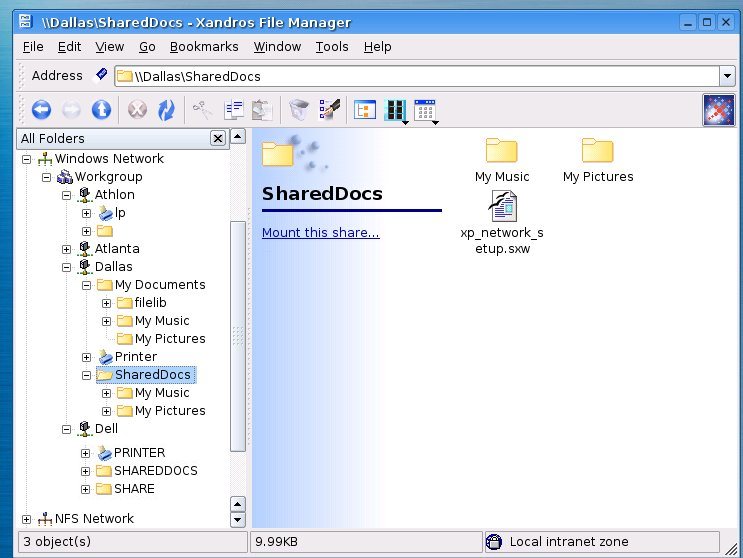
Figure 2. Using Xandros to See the Network
Again, referring to Figure 2, we have highlighted the shared documents folders on the node called Dallas, which is a Windows XP system. You also can see a word processor file named xp_network_setup.sxw, which was saved in the native OpenOffice.org Writer format.
How difficult was it to set up this network? Aside from the standard wiring, Ethernet connections and installation of the firewall and modem, the system basically installed itself. Both Windows 98 machines followed standard setup procedures. After installation, the systems used DHCP to obtain their IP address, DNS servers and route to the Linksys broadband router. The Linksys router provided a private Internet address scheme using the Class C address of 192.168.1.xxx. Once they were established and could reach the Internet, we right-clicked Network Neighborhood, selected Properties and changed the dynamic addresses to static ones.
We then used a method called Simple File Sharing and invoked the Network Setup Wizard. Once we followed the wizard through, XP asked us if we wanted to enable sharing on other computers, referring to other Windows machines. By answering yes, we created a floppy disk and installed the XP protocols on Windows 98. This process upgraded the older systems to the newer protocols. Suddenly, the XP and Windows 98 boxes began communicating. The program furnished by Microsoft is called netsetup.exe.
We then installed Xandros version 3.0 Deluxe Edition and enabled Windows Networking, as shown in Figure 3.
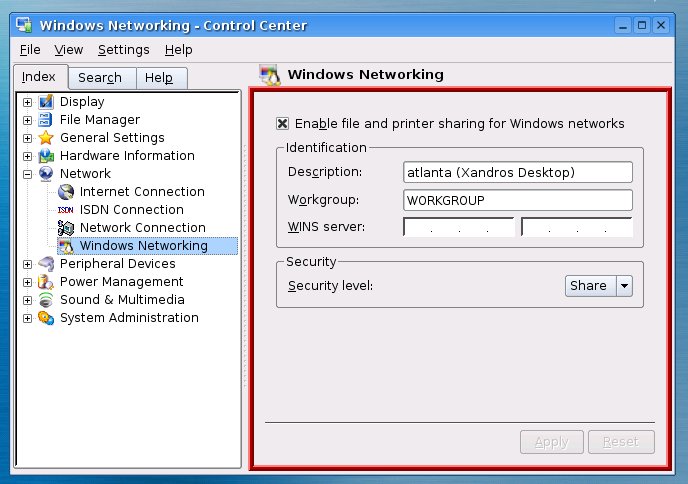
Figure 3. Enabling Windows Networking
Notice that we were able to configure Windows Networking through the use of a dialog window. The Xandros Linux desktop allowed us to specify file and printer sharing, name the computer, define the workgroup and enable share level security, which we used on the Windows computers for home networking.
Other Linux distributions do not have the simple configuration scripts that are available with Xandros, but they soon will be available from a new project called LAN-d. Once LAN-d becomes available, all Linux distributions will be as easy to configure as Xandros. At the moment, Samba requires manual configuration from the command-line interface.
If you use other Linux distributions, such as Fedora, an excellent HOWTO exists, written by JonR from Wiltshire UK, called "SAMBA - An Anonymous FC2 Server for XP Clients". This HOWTO provides an excellent example of the kind of documentation members of the Open Source community contribute freely over the Internet. When you refer to JonR's work, please remember that a Linux desktop running Samba also can be called a server. That's one beauty of putting a Linux desktop in a small network--it provides many services not available in other operating systems.
Finally, you also can find another excellent article "Samba-3: A Simple Anonymous Read-Write Server", by John Terpstra, which provides a case study of using Samba in a charity administration office. This article comes from the book Samba-3 by Example: Practical Exercises to Successful Deployment, which can be used by system administrators to configure Samba for a variety of uses within small and large networks.
Linux indeed has arrived on the desktop and is ready for use. In fact, it provides ample resources for print and file sharing and works and plays well with a variety of systems. With the increasing use of personal computers in small offices, Linux gives users a way to maintain their investment in older yet quite serviceable computer hardware. To function well in a Windows environment, Linux provides an alternative that allows CEOs to finally say that the desktop is no longer the single point of failure in their IT environments.
Tom Adelstein lives in Dallas, Texas, with his wife, Yvonne, and works as a Linux and open-source software consultant with Hiser+Adelstein, headquartered in New York City. He's the co-author of the book Exploring the JDS Linux Desktop and author of an upcoming book on Linux system administration, to be published by O'Reilly and Associates. Tom has been writing articles and books about Linux since early 1999.
