
Linux in Government: How Security Exploits Threaten Government Infrastructures
The Linux in Government series has taken a new format for 2005. This year's articles will provide fundamental information to government technologists about Linux and open-source software. Although we will continue to inform you about agencies and projects specifically using open-source solutions, we also are going to provide information about open-source resources available to governments.
In the day-to-day life of government information technology, procurement issues, vendor relations, support desk calls, system failures and lobbying command most decision makers' attention. The overall picture of keeping critical infrastructures safe rarely commands enough focus. Because of this, many officials have forgotten that a war exists, and technology infrastructures provide easy targets. Yet, if government officials recognized the magnitude of the problem, they could not avoid attending to it.
In this article, we address some aspects of the hostile environment threatening our critical infrastructures and how government CIOs can protect their organizations. This article offers only a glimpse of the problem and urges public administrators to "do something about it".
Every second of every day, tens of thousands of people with sophisticated tools scan our networks looking for vulnerabilities, hoping they can gain entry and steal money, destroy our command and control systems and disrupt commerce and law enforcement. The volume of activity and methods used seems inconceivable. Yet, you do not see much information about the extent of the problem in conventional media, in discussions on the floor of Congress or on the agendas of legislators. Why? Because the large telecommunications companies don't want to spend the time or money necessary to stop the activity.
Below, we show you the kinds of attacks that take place every day by using examples from real life. We're going to start by looking at an incident that occurred on a server sitting behind a firewall. You can see how the perpetrator attempted to break into the system and disappeared into the safe confines of his or her service provider. While reading this first example, keep in mind that security measures taken prevented this attempted exploit from actually occurring.
We run a hardened Linux server located at an ISP that has passed DoD vendor security audits. Each day our server produces a report of attempted exploits that identifies the IP address of all logins, whether successful or failed. On Friday, December 24, 2004, a user with the IP address of 66.126.78.114 ran a program called crack that attempted to guess a user ID and password. The program made 260 attempts to penetrate the system. You can see an excerpt from our log report below:
Failed logins from these:
andrew/password from 66.126.78.114: 5 Time(s)
angel/password from 66.126.78.114: 5 Time(s)
barbara/password from 66.126.78.114: 5 Time(s)
ben/password from 66.126.78.114: 5 Time(s)
betty/password from 66.126.78.114: 5 Time(s)
billy/password from 66.126.78.114: 5 Time(s)
black/password from 66.126.78.114: 5 Time(s)
blue/password from 66.126.78.114: 5 Time(s)
brandon/password from 66.126.78.114: 5 Time(s)
Notice how the cracker's program progressed in systematic order, using different names and combinations of passwords in an attempt to gain entry to the system.
Unfortunately, we receive log reports with attempts such as this on a daily basis. Usually, the perpetrators use multiple IP addresses to defeat our limits on failed logins. Once they reach the limit, the program kicks over to another IP address and systematically continues the attempt to find a combination of user name and password that allows them to gain access to our network.
In this particular case, I decided to track down the person attempting to break into our system. Using a program called whois, I found the origin of the IP address owner. Figure 1 indicates that the perpetrator used PacBell as an Internet provider and that the IP address owner has a range of address from 66.126.78.112-119.
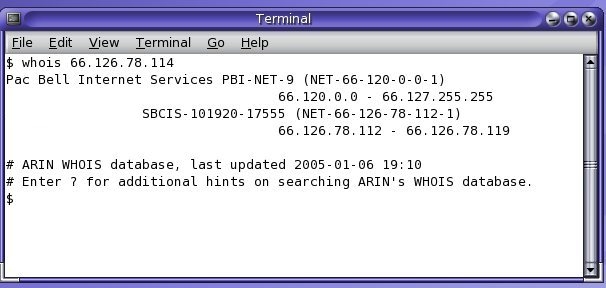
Figure 1. Using whois to Find IP Owner
In this case, I found a name associated with the owner of this range of IP addresses. I eliminated the person's name from the screenshot. This did not provide evidence as to whether or not the owner actually performed the attack. In most cases, Internet service providers assign a different IP address each time a person goes on-line, and names cannot be found.
I contacted PacBell to file a report on the attempted system exploit. After waiting on a service line for over an hour, I received a prerecorded message telling me to contact my Internet service provider, who would have to report the attempted system compromise.
So, I filed a report with our ISP, who took our logs and verified that an attempt was made to break into our system. From there, the issue went to the ISP's compliance office, which contacted PacBell. In Figure 2, you can see an excerpt from the e-mail I received.
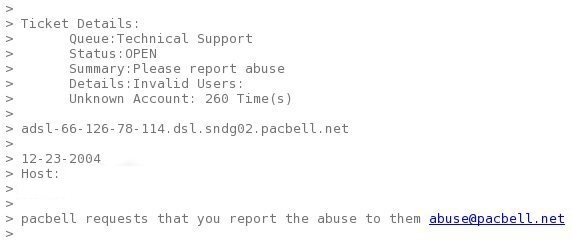
Figure 2. Excerpt of E-mail
After receiving the e-mail from our service provider, we reported the incident to abuse@pacbell.net. After several days, PacBell informed us it would not institute an investigation. Figure 3 provides a copy of the e-mail we received after following PacBell's instructions and indicating that the company "please respond".
Although we know some facts about the situation, we also know that SBC and PacBell have not indicated that they include attempted break-ins as a violation of their acceptable use service agreements. Nor have they indicated that if so, we expect them to enforce the agreements.
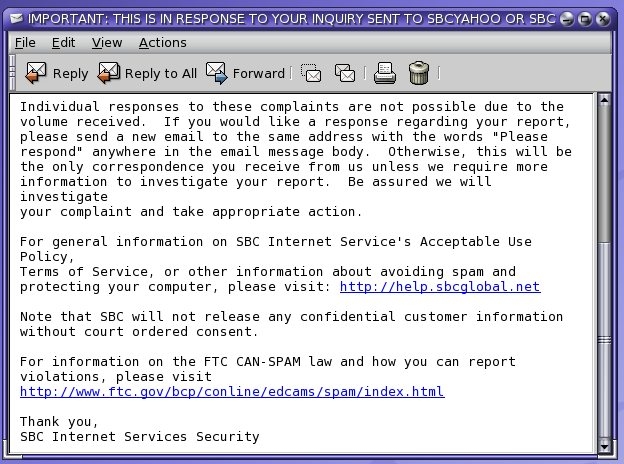
Figure 3. Excerpt of Reply
First, your infrastructures may be exploited. As shown in Figure 3, the ISP says, "Individual responses to these complaints are not possible due to volume received." Consider that another way of saying, "we cannot stop the abuse because too much exists". Also notice that the e-mail says, "Note that SBC will not release any confidential customer information without court ordered consent." Consider that another way of saying, "we will not tell on our customer".
Ultimately, SBC/PacBell has delivered a simple message that we are on our own when it comes to protecting ourselves against the enemy. So, while you may think that you have done everything necessary to protect your infrastructure, you haven't.
The next example demonstrates how an individual can grab enough information to gain access to your network. Figure 4 demonstrates a simple and effective means of getting the information needed.
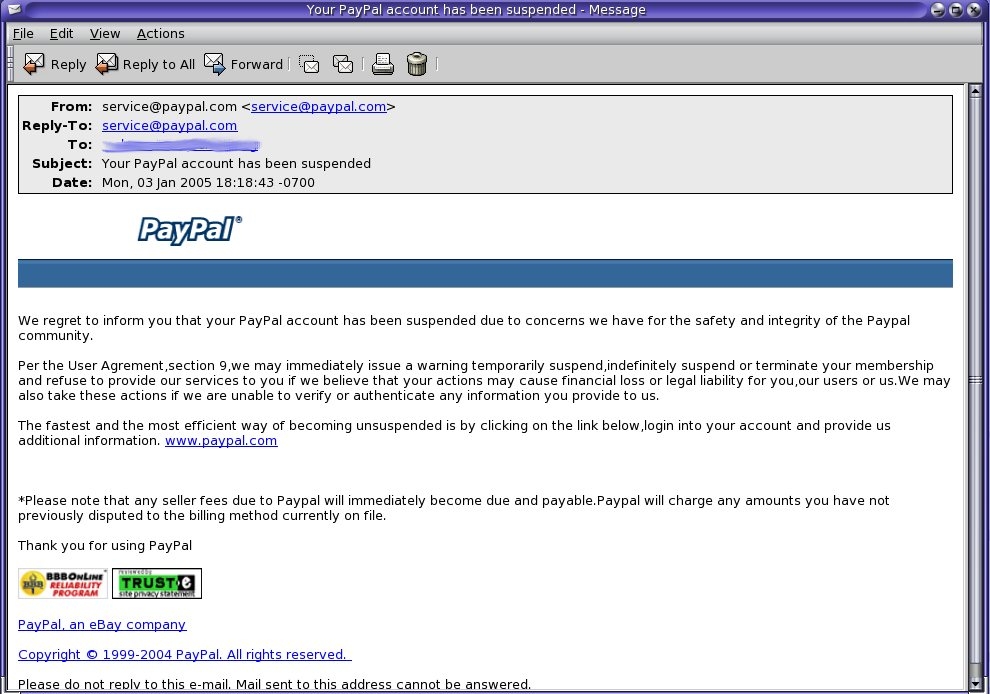
Figure 4. Forged Notice
In this figure, you can see what appears to look like an alert from a well-known provider of e-commerce transactions, PayPal. Anyone with a PayPal account simply could click the Web site address provide to find out what the problem might be with his or her account.
However, if you right-click on the link, copy the link location and paste it into a text editor, you discover that the link actually goes to another location, as indicated in Figure 5. We call this the actual URL link. This Web site hosts a script that downloads a tiny program to a Windows Internet Explorer browser and begins broadcasting information about your network to a server.
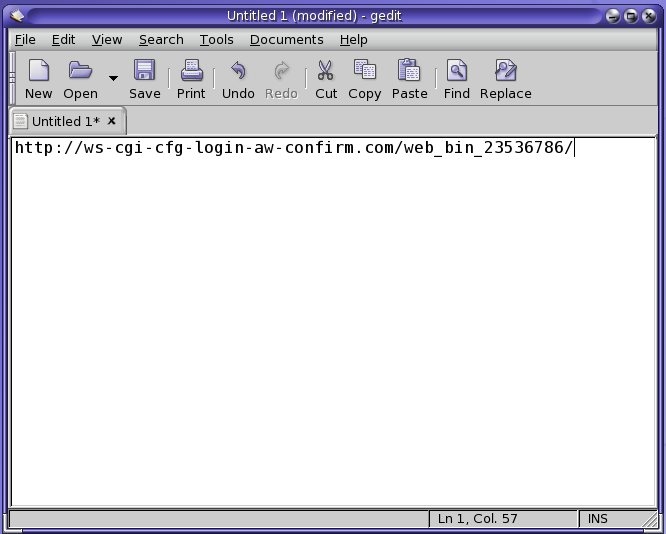
Figure 5. The Actual URL Link
We performed a whois on the URL and discovered a domain registered to someone with a set of jumbled letters as a name and address. After reporting the scheme to PayPal, the company contacted the issuer and took control of the URL. Figure 6 shows the domain registration after the report.
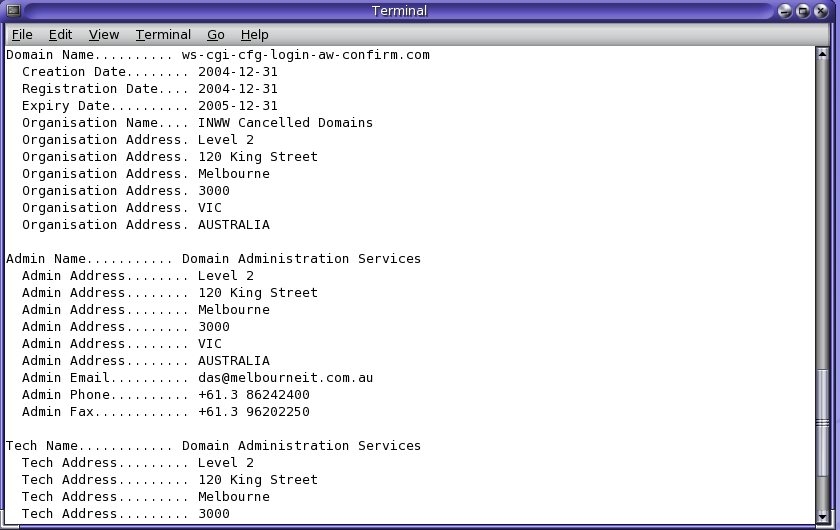
Figure 6. Domain Information After Reporting to PayPal
PayPal handled the matter in less than one day, but we do not know how many spyware programs the short-lived Web site delivered. Nor do we know the location of the server receiving information transmitted to it from inside unsuspecting networks.
Most government infrastructures have used Microsoft networking protocols in the past several years and do not have the kinds of protections afforded them by Linux. Several means of transitioning to a safer environment without a massive effort include using software written for Linux and ported to Microsoft on the desktop and using Linux in place of your Microsoft servers. In fact, many institutions have started using Mozilla Firefox as their default browser, Mozilla Thunderbird as their email client and OpenOffice.org as their productivity suite. These products add a measure of protection not found in Microsoft Internet Explorer, Outlook or Microsoft Office. OpenOffice.org also offers file compatibility with Microsoft Word, Excel and PowerPoint.
Linux also can replace Microsoft NT and Windows 2000 servers. By using Samba and various Linux BackOffice solutions, you can provide a higher level of security than what existing infrastructures offer. Your Windows users will find these servers transparent.
Linux desktops also run nicely on Intel platforms and fit into Microsoft networks without changing the overall infrastructure. Many Linux desktops already can take advantage of Active Directory, network browsing, sharing directories and Microsoft Exchange servers. Within the coming year, most Linux distributions will fit into your existing infrastructures like a hand in a glove.
Tom Adelstein lives in Dallas, Texas, with his wife, Yvonne, and works as a Linux and open-source software consultant with Hiser+Adelstein, headquartered in New York City. He's the co-author of the book Exploring the JDS Linux Desktop and the upcoming book Essential Linux System Administration, to be published by O'Reilly and Associates. Tom has written articles and books on Linux since early 1999.
