
Ten Mysteries of about:config
The Firefox Web browser, built by the Mozilla Foundation and friends is a complicated piece of technology—if you care to look under the hood. It's not obvious where the hood catch is, because the surface of Firefox (its user interface) is polished up to appeal to ordinary, nontechnical end users. This article gives you a glimpse of the engine. It explains how the Mozilla about:config URL opens up a world of obscure preferences that can be used to tweak the default setup. They're an improbable collection and therein lies the beauty of Firefox if you're a grease monkey or otherwise technical. At the end you'll know a little more about Firefox, but only enough to be dangerous.
Like any Linux-friendly piece of software, Firefox responds to preset environment variables. You can, for example, set the MOZILLA_FIVE_HOME or MOZ_PLUGIN_PATH variables prior to startup. They both work like the standard PATH, so no surprises there. The per-process space available for environment variables is, however, limited, and a simple textual concatenation of attribute-value pairs is a fairly inflexible way to store data. Firefox has a large set of runtime configuration options, and the environment isn't a suitable storage area.
Firefox configuration is stored in a small attribute-type-value database called the preference system. You can see a delta of this data set in the ~/.mozilla/firefox/*/prefs.js file. That file holds only the nondefault values selected by the user. The rest of the preferences either are unstated or stated in install files that are part of the standard install. For me, they're in /local/install/firefox/defaults/pref, because /local is my playpen of choice.
For a technical person, this system is a bit problematic because the full list of preferences doesn't appear anywhere on disk, and the standard way to change those preferences is to use the Firefox User Interface, which also is incomplete. That interface provides GUI elements (buttons, fields and check boxes) for only the most basic of the preferences available. Firefox isn't trying to be Emacs, after all. The rest of the preferences have to be dug up from elsewhere.
That other place is the special string about:config, which can be typed in the Firefox Location bar where the addresses of Web sites are entered. Briefly recall the taxonomy of W3C addresses: URIs (Universal Resource Identifiers) are a special case of IRIs (International Resource Identifiers). A URI either can be a URL (a Uniform Resource Locator) or a URN ( a Uniform Resource Name). It's URLs that we see all the time. They consist of a scheme (typically http), a colon (:) and an address (x.org).
You can define your own scheme. Mozilla does that for “about”, which is used to access internal browser resources. Try about:cache, for example. The config resource is a hook into the preference system. When you type about:config, you're navigating to a local resource just as you would navigate to a Web-based resource for an HTTP-based Web page. Figure 1 shows the results of loading the about:config resource.
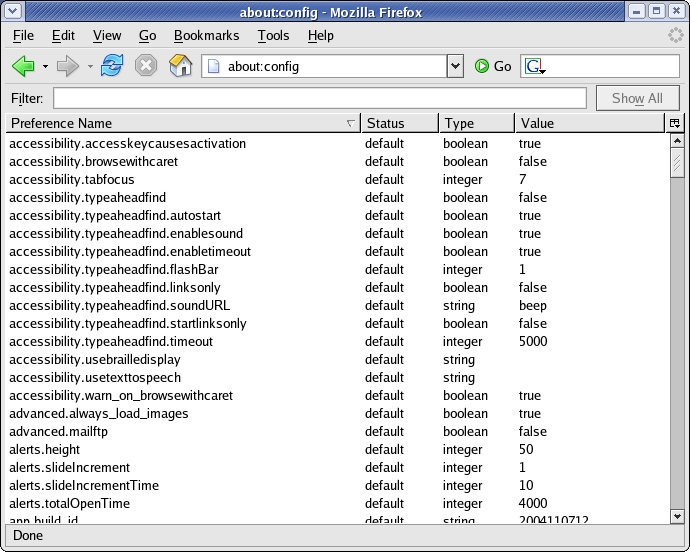
Figure 1. Firefox Showing the about:config Preferences
This preference listing is also a form. Right-click on any preference to modify it or to state a new preference. Shorten the display by entering some text in the Filter box if you want. Many Firefox extensions can provide alternate interfaces to about:config. Feel free to experiment with them.
Nothing is perfect, alas; about:config shows only preferences that already have been set or specified anywhere. It doesn't show preferences that have meaningful uses, which appear nowhere in the about:config list. To add a value for a new preference that doesn't appear, simply right-click anywhere in the main window, and select New from the context menu, then select the type of preference: string, integer or Boolean.
Without further ado, here's a tour of preferences to which the Firefox UI doesn't give you access. Some are unmasked by about:config; some are not. They're all relatively safe to experiment with. If you get into trouble, go back to about:config and unset the preference, or, in the worst case, shut down Firefox and delete the prefs.js file noted earlier. Everything said to this point also applies to other Mozilla products: the Mozilla Application Suite, Thunderbird and so on. Hesitate before deleting the Thunderbird prefs.js file. It contains important pointers to your e-mail.
Here's a simple preference to begin with. You can explicitly set the size of the memory part of Firefox's Web cache. Here's the preference, which has a type of integer:
browser.cache.memory.capacity
Set it to the integral number of KB (Kilobytes) that you want as a maximum. By default, this preference is unstated and has a default value of -1, meaning “expand to fill available memory as required”. That's a little like the Linux disk buffer cache. You might not want that if you're running OpenOffice.org and Firefox simultaneously and working both applications hard. If you do change this preference, you're going the way of Mac OS 9 and lower, where each application gets an explicit memory allocation. That could be a tuning burden if you go too far with it.
The Mozilla Web cache (both memory and disk) is akin to the function of servers like Squid. That is, both types of cache are smart about the use of HTTP headers for caching purposes. If you're in control of the local Web proxy, there's probably more value in a huge Squid cache than there is in a really big local disk cache. A bigger Firefox cache still gives some performance boost though. You can alter caching use through the integer preference:
browser.cache.check_doc_frequency
This preference affects when Firefox accesses the cache, not how the cache itself works. The cache caches Web content every opportunity it gets, but if Firefox fails to check it, such opportunities will come rarely. Set the preference to 0 for one check per URL resource per Firefox Web surfing session, 1 always to use the cache, 2 never to use the cache and 3 (the default) when the HTTP caching rules says it's a good idea to cache.
It's possible for a Web page to implement a denial-of-service attack on the browser user. All you need is a Web page that runs a heap of JavaScript in an infinite busy loop. Firefox can't accept user input when such intensive processing is going on. This integer preference causes script execution to halt if it goes on too long. The units are seconds, and the default is 5:
dom.max_script_run_time
You might have Firefox set up to do some tricky Web spidering. You might have it acting as a bot or running continuously as an unattended console. In any of those cases, set this preference to -1, and Web page scripts run forever unmolested.
The use of various asynchronous mechanisms, such as setTimeout(), support long scripting timelines in a normal Web page. There's no need for preference changes to support such things.
In the Firefox browser, a tab title, Location Bar URL or displayed bookmark can acquire a small image (an icon), which is displayed to its left. Usually it contains a brand mark for the site of the currently displayed Web page. You might not want this to happen. It makes your bookmarks file bigger, and (especially if you're on dial-up) it causes an extra HTTP request when the page first is visited. That request fetches the icon for display. These two Boolean preferences, both with a default of true, can be set to false to disable those fetches and the subsequent icon display:
browser.chrome.site_icons
browser.chrome.favicons
Set either one to false, and these icons are ignored. Bookmarks get the standard bookmarks icon, and elsewhere no icon at all appears.
You might ask, “Why are there two preferences?” Part of the reason is because these icons can be specified in two ways. You can put a 16x16 pixel Microsoft Windows ICO format icon at this URL: http://www.example.com/favicon.ico.
That icon will do for all pages on that site and is officially a Favorites Icon or favicon, to use Microsoft's term. Alternately, you can add an icon per page, using a <link> tag and any 16x16 ICO URL, like this:
<link rel="SHORTCUT ICON" href="/images/mybrand.ico" />
For some historical reason, that per-page use is called a Site Icon.
The other reason for two preferences has to do with parallel development streams in the Mozilla Project, the mess that is bookmark file formats and a shortage of time for trivial cleanup tasks. We're looking under the hood, remember.
If you have a drop of graphics programming in your blood, you might spare a kind thought for L. David Baron, Robert O'Callahan and company—the core developers of the Gecko rendering engine inside Firefox. Displaying a Web page is a fiendish compromise between standards, performance and subjective user perceptions. One of the most difficult constraints that Web pages impose is the need for incremental display. Show me the Web page as it arrives, not all at once at the end. This means constantly reflowing the displayed elements, which may be delivered out of order (a problem word processors don't have). Worse, such documents nearly always are network-delivered with unreliable timing.
To see the difficulty of this job, visit an image-intense Web site such as gamespot.com. Over broadband, the loading page jumps around in an agony of layout updates while chunky content is dumped into the browser in no particular order. On dial-up, the process is slower and more familiar, but the amount of layout labour is even larger, because there's more time to adjust each received fragment of page. Figure 2 shows the image-heavy GameSpot site, rendered while the images are still coming in.

Figure 2. Close-up of a half-received Web site, jumping around as Firefox updates the layout.
Given this kind of problem, you can imagine, therefore, that all kinds of hidden tuning preferences are available—if you know where to find them. This isn't a tuning workshop, so here are two of the more interesting ones.
It's rare to want to tune down Firefox. (You should buy your nice mother a better computer.) It's more likely that you've got lots of CPU and video grunt and want to use it. You probably click the mouse more than 2,000 times a day. Theoretically, you can shave a quarter of a second off your response time—that's an extra coffee break a day—with this integer preference:
nglayout.initialpaint.delay
Set this to 0 (zero) milliseconds. It's set to 250 by default. When a Web page starts to trickle in to the browser, Firefox normally waits a bit after it has organised the page fragments in memory. It makes sense to bunch up the first few bits of content before attempting to show them. If you've got a quick eye, though, you can make it show what it's got ready straight away.
Similarly, Firefox buffers up the incoming raw network content before it bothers to break those bytes down into something ready for display. That's another chunking process that saves the CPU but slows the output on a fast machine. Set this integer preference to, say, 5,000 (microseconds), and incoming network bytes are pushed to the display system much more quickly:
content.notify.interval
Doing so, however, makes Firefox work very hard scheduling updates in response to every drop of content. If you lower this value too much, that extra work merely results in the incoming data buffering further back in the dataflow—perhaps behind a socket in the kernel—while Firefox thrashes around trying to complete a whole display update for every trivial character of text that appears. Lower the preference a bit at a time, and watch the CPU with top(1), perhaps.
For a long time, Firefox, Mozilla and, before that, Netscape 4.x, supported this hidden Boolean preference:
signed.applets.codebase_principle_support
Normally, it's set to false—if you want you can set it to true. It's a poorly understood preference, so here's an explanation. First of all, the name is about as relevant as UNIX's /etc—it's so steeped in history that it's basically wrong. There's no applets at work; there's no Java at work. Mozilla has an amicable separation from Java, where Netscape 4.x was deeply wedded to that technology. Mozilla now handles its own security natively, in C/C++ code. It should be called signed.content.codebase_principle_support—one day, maybe.
This preference is used to assist developers who work with digitally signed content. It has no relation to SSL or to PGP/GPG. An example of signed content is a Web site or Web application bundled up into JAR format and digitally signed in that form.
Roughly speaking, two checks are done if digitally signed content arrives in Firefox. First, the digital certificate accompanying the content is checked against Firefox's list of known certificate authorities (CAs). If that much is fine, the maker of that content is considered authentic. Firefox then lets the content request extra privileges, ones that overcome normal browser restrictions, like access to the local disk. Usually that's done through JavaScript.
When those requests are made, Firefox throws up dialogs to the user. This is when the second check is done—it is done manually by the user. If the user agrees, the content can run with security restrictions dropped and your computer is exposed, or at least the currently logged-in Linux account is exposed.
For a developer, these checks are a nuisance. It's extra effort to buy (with real dollars) a suitable certificate for signing the content and set up the infrastructure. That should be necessary only when the site goes live.
Instead of using a real digital certificate to sign the content under development, suppose you use a dummy certificate—one that's not authentic. You can make a dummy certificate with the SignTool tool, available at ftp.mozilla.org/pub/mozilla.org/security/nss/releases. Next, you tell the browser that it's okay to accept such a dummy certificate. That's what the above preference does.
Setting this preference weakens only the first security check. You always have to perform the user-based check—at least Firefox offers to remember what you said after the first time. Setting this preference means that Firefox accepts a dummy certificate from any Web site, so use this only on isolated test equipment.
Finally, here's a simple way to set up Thunderbird access from Firefox. Set this Boolean preference to true to enable the mailto: URL scheme—the one that appears in Web page “Contact Me” links:
network.protocol-handler.external.mailto
An example of a mailto: URL is mailto:nrm@kingtide.com.au. Secondly, set this string preference to the path of the Thunderbird executable or to the path of any suitable executable or shell script:
network.protocol-handler.app.mailto
Digging out hidden preferences is a bit of treasure hunt. Many are documented on Firefox-friendly Web pages, but the ultimate authority is the source code. Preference names are simple strings, and it's possible to create your own. Many of the extensions that can be added to Firefox dump extra preferences into the preference system. As long as the extension remembers to check and maintain those preferences, they have the same first-class status as the ones that have meaning for the standard Firefox install.
Remember, you always can save a copy of your prefs.js file before an experimental session with about:config and restore the saved copy if things get too weird. Happy config hacking!
Resources for this article: /article/8139.
Nigel McFarlane (www.nigelmcfarlane.com) is the Mozilla community's regular and irregular technical commentator focused on education, analysis, and a few narrowly scoped bugs. Nigel is the author of Firefox Hacks (O'Reilly Media) and Rapid Application Development With Mozilla (Prentice Hall PTR).
