
Linux in the Classroom: an Experience with Linux and Open-Source Software in an Educational Environment
Mountainland Applied Technology College (MATC) is one of several campuses that are a part of the Utah College of Applied Technology (UCAT) system. Our department teaches information technology courses to both high school and adult students. We provide individual technology courses, short-term intensive training (STIT) courses, custom fit courses and an education track that ends with an Associate of Applied Technology degree or Certificate of Completion in Information Technology. We currently have two satellite sites with a probability of adding two more in the 2005–2006 school year.
Until the last few years, we had been reliant solely on Microsoft operating systems in our classrooms. Unfortunately, when you give students sufficient rights to work on their course material and labs, spyware and viruses are introduced despite your best uses of firewalls and virus scanners. These problems have entered the network through means such as Web surfing, floppies and USB thumbdrives.
Starting with the 2001–2002 school year, Mountainland Applied Technology College began offering Linux courses at the Orem MATC campus. Over the next several years, our Linux class enrollments and course offerings continued to grow, matching the growing use of Linux at home and in businesses. Coupled with individual Linux distribution evaluations, teaching these courses was a convincing experience that Linux was a viable operating system for the IT department's infrastructure and for hosting courseware on our classroom machines.
At the start of the 2000–2001 school year, individual classroom servers were running either Microsoft Windows 2000 or Novell Netware. We started using a Linux based firewall/router product called Freesco in the individual classrooms to help deal with the increasing amount of malware and the security inadequacies of Windows.
During the 2001–2002 school year, a Windows 2000 system continued as the main classroom server. Up until this time we still had no main department server. We brought up a system with Linux as a secondary server and started working on integrating Linux into Microsoft Active Directory with great difficulty and little success. We tried using Microsoft Services for Unix, winbind (Samba 2.2.x) and pam_smb, but we still couldn't make things work well and temporarily abandoned our attempt to integrate Linux authentication with Windows Active Directory. During this school year, we also taught our first Linux course for CompTIA Linux+ certification.
During the 2002–2003 school year, we replaced the classroom Windows 2000 server with a Linux system running Mandrake 9.1. We had an epiphany, so to speak, when we changed our paradigm in relation to what to use on our server(s) in the back end. We discovered that using Linux for the back end made it a much easier task to integrate different operating systems, such as Microsoft and Linux, as opposed to using Windows and Active Directory as the back end.
During the second half of the school year, various Linux distributions, such as Red Hat 9 beta and Mandrake 9.1, were beta tested on the desktop. NIS was used for user authentication on Linux clients and Samba, as a domain controller, for user authentication in Windows. Although this setup worked, it was frustrating to deal with multiple passwords for the same user account, and we started looking for a better solution. During this school year, we also taught the first incarnation of our Linux Server Administration course, using what we had learned through our experiences up to this point.
Desktop and Server Software
Server Software Configuration
OS Distribution: Fedora Core 2
Email:
MTA: Postfix
LDA/MDA: procmail + Dovecot IMAP
MUA: Squirrelmail
Filtering: SpamAssassin + ClamAV
User Database: OpenLDAP
User Management: phpLDAPAdmin
Package Management/Updates: APT, APT4RPM, Synaptic and YAM (for repository mirroring)
Web Serving: Apache
File Serving: Samba + NFS
Desktop Software Configuration
OS Distribution: Fedora Core 3
Desktop Environment: KDE 3.3 and GNOME 2.6
Office Suite: OpenOffice.org 1.1.x (We are testing CrossOver Office with Microsoft Office XP as a fallback option.)
Web Browswer: Firefox
Package Management: APT + Synaptic
The 2003–2004 school year was a time when Linux technology, other open-source software and our understanding and ability to use it all caught up with their promised potential. The main IT classroom servers were moved from Netware and Windows 2000 to a single department server running Linux, in this case Mandrake 9.1. We started using OpenLDAP as a central repository for user authentication. LDAP was used as the back-end database for Samba, and we used the pam_ldap modules for Linux client authentication. We started using Linux on the desktop—initially Red Hat 9, Fedora Core 1 or SuSE 9—as the default option in a dual-boot configuration with Windows XP Pro. At this time, the majority of our students chose the Windows option with a few brave souls trying Linux.
We also retained Windows because several courseware packages either required Microsoft products, including the Windows OS, Internet Explorer or Media Player, or the browsers available for Linux were not sufficiently Microsoft-Internet-Explorer-compatible to use some sites. All things considered, we were pleased with the stability of Linux on the desktop. We were impressed particularly with the virtual elimination of problems with viruses, spyware and overly curious students that we suffered with desktop Windows systems.
The 2004–2005 school year has proven to be one of continued and significant improvements. We upgraded the main Information Technology department server to Fedora Core 2 to gain the advantages of the Linux 2.6 kernel. We also started offering students in the Information Technology Department e-mail using Postfix, Dovecot and Squirrelmail, with filtering provided by SpamAssassin and ClamAV. On the Microsoft compatibility front, we upgraded to Samba 3, which provides much better integration with OpenLDAP and creates a new opportunity for us in our quest for a true single sign-on solution.
We now have an environment where our users can log in to either Linux or Windows XP Pro using the same user name and password. Linux clients authenticate using pam_ldap, and users have home directories stored on the server, shared via NFS and dynamically mounted at login time using autofs. Windows clients are joined to a domain controlled by Samba, allowing users to authenticate using the same account information, user name and password as they would if they were logging in to a Linux client. The same home directories on the server that are used with Linux are available in Windows through automatic drive mappings. Windows users' roaming user profiles also are stored in their home directories on the server.
To take a step further in the single sign-on arena, users also use the same account information to access their e-mail. We have provided Web-based access to e-mail, which also is stored in their home directories on the server, through Squirrelmail. Standard POP3 or IMAP access is provided by Dovecot.
Fedora Core 2 or Fedora Core 3 is the primary desktop operating system, depending on the lab. Windows XP Pro also is available as a dual-boot option in some labs, but we strongly are encouraging our students to use Linux. We are finding that, for the most part, our students have had little difficulty making the switch to using Linux as their primary desktop operating system. In many cases, they are enjoying it more than Windows because of the capabilities of KDE and GNOME to be customized to a user's individual taste.
To support software updates and patches between re-imaging, we have set up a centralized software/package repository on our main IT department server that mirrors the updates available on the Web. The lab servers at the remote sites then mirror a copy of the updates from the main server. The individual Linux clients in each lab then are scheduled to pull the updates from their respective lab server using apt4rpm. This method allows for better bandwidth usage, particularly for our sites connected via T1, and a controlled set of software and patches.
What we have developed on our main campus is a robust infrastructure free from many of the problems related to Microsoft Windows. Samba has replaced Windows as our domain controller for those desktops that need to run Windows.The latest version of OpenLDAP has proven robust, and Samba, Apache, Postfix and PAM take full advantage of its capabilities. Refer to Figure 1 to see the complete MATC infrastructure.
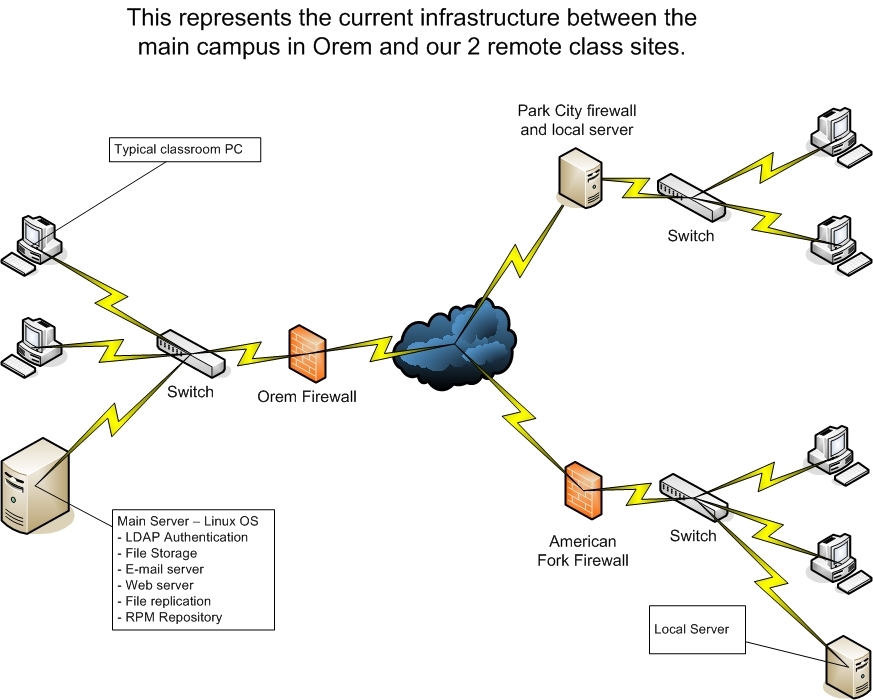
Figure 1. MATC Infrastructure
The MATC main campus is in Orem, Utah, and we have a secondary campus in American Fork, Utah, approximately 10 miles away, that is connected to the main campus by a T1 line. We also have a lab in Park City, Utah, approximately 50 miles away, that we share through a partnership with the Park City School District.
During the 2003–2004 school year, the IT classroom at the American Fork campus was configured with a system running a Linux-based firewall and a separate server based on Fedora Core 2. That server hosted Linux distribution ISO images, pre-made VMware and VirtualPC images and files related to the courses the students were taking. It also provided some storage space for the students' work. The workstations ran Windows XP Pro, and all students logged in using a single user name and password local to the workstation.
Recently, during the 2004–2005 school year, the American Fork server has been upgraded to Fedora Core 3 with the latest versions of Samba, OpenLDAP and other software. The server now provides DNS and DHCP services, stores the home directories for the students that attend IT classes at that site and acts as the backup domain controller for the Windows clients in that lab. All course-related data is synchronized daily from the main server at our Orem campus using rsync. The firewall provides filtering and NAT masquerading and handles all of the Internet traffic for the workstations in that lab. Linux clients mount the home directories stored on the server using NFS. The main IT department server in Orem provides user authentication for all users.
All LDAP requests, generated either by the Linux clients or the Samba server on behalf of the Windows clients, are tunneled through OpenSSL to provide security. Although funneling all authentications back to our main campus is not an ideal solution, it has turned out to be surprisingly trouble free and highly reliable. We had to resort to this method because our attempts to use slapd to synchronize the LDAP servers between the Orem campus and American Fork campus often were interrupted due to circumstances beyond our control, such as high traffic volume and line unreliability. I must interject that we only provide computer services for our department and not the entire school. The result of these interruptions was the LDAP directory being out of sync between these servers.
The shared lab in Park City is located in the Park City Learning Center. As a member of the Park City School District (PCSD) network, the PCs and network are locked down tightly and administered by the highly competent PCSD IT staff. In discussions with the school district IT staff, we reviewed some issues with security that had impacted our ability to teach IT courses during the 2003–2004 school year. We jointly decided on a plan to include a Linux-based server that would provide Network Address Translation (NAT), DHCP and routing, along with hosting Linux distribution ISO images, pre-made VMware images and files related to the courses the students were enrolled in, plus some storage space for our students. Seventeen lab PCs were imaged to dual boot into Windows XP or Fedora Core 2. The PCSD IT staff, with the excellent help of Harold Hanson, provided a VLAN that isolated the Linux server, yet allowed us to change connections quickly so that Windows XP users still could authenticate into the PCSD Novell network. This enables us to provide authentication and other services for our students while they are in the lab, while not interfering with the PCSD IT staff's ability to maintain the network for their students.
The setup in the Park City lab is similar to that in the American Fork lab. The lab server provides file, print, name and address services as well as a mirror of the software and patch updates for the Linux clients. The main server at our Orem campus, using SSL to secure the transmissions, still provides all user authentications. Refer to Figure 2 to see our infrastructure template for remote campuses.

Figure 2. At each remote campus, one Linux file server offers local clients fast access to large files, while a Linux firewall also functions as a DHCP server.
We have, over the past few years, developed a system based around Linux and open-source software that allows us to provide computing services for our students to enhance their learning experience in a manner that is both easy to maintain and simple to extend and replicate. It also has been quite inexpensive to implement, maintain and update. For those in the educational realm, cost is extremely important given the limited financial resources available to most secondary and post-secondary institutions. There is no doubt that more and more schools and businesses will move in a direction similar to ours as Linux and open-source software becomes more recognized and usable. This is one of the primary reasons that we are working so hard to provide Linux and open-source software training. All of our Linux courses have been influenced by our own experiences and include instruction in most if not all of the techniques that we have developed and refined.
Our journey with Linux and open-source software is far from over. We continue to refine and explore new areas to better meet our current and future needs. Things we are working on and plan for the future include:
Testing new groupware solutions, such as eGroupWare and OpenGroupWare.
Testing Windows applications integration with Linux, using products such as CodeWeavers CrossOver Office.
Testing and implementing new Linux distributions, such as Fedora Core 3 and future versions of Fedora.
Increasing use of OpenLDAP as a central user and service information database.
Using new features of OpenLDAP, including LDAP sync replication.
Perfecting software updates from our mirrored apt repositories.
Implementing other centralized administration and management techniques.
Creating, revising and deploying hardware and software templates for labs and remote campus sites.
Joseph Ruffolo (jruffolo@it.mountainlandatc.org) is a faculty member of Mountainland Applied Technology College. He has an IT career spanning 23 years, with expertise in software development, project management and system/software architecture. He currently teaches A+, networking and Linux courses. When he is not working, his hobbies include woodworking, rescuing neglected or abused animals and playing World of Warcraft.
Ron Terry (rterry@it.mountainlandatc.org) currently is serving as the Department Chair of the Information Technology Department of Mountainland Applied Technology College in Orem, Utah, where he also teaches Microsoft, Linux and networking courses. When not teaching, Ron runs a consulting business that specializes in implementing and supporting Linux. He also travels to provide Linux training to businesses and other organizations. When he is not working with computers, as seldom as that may be according to his wife, his hobbies include camping, woodworking and music.
