
Product of the Day: JReport, Java-Based Reporting for the Linux Environment
URL: www.jinfonet.com
Corporate focus on cost-effective, reliable, and adaptable IT solutions is driving the enterprise migration to Linux server platforms. Application development must also deliver on these corporate mandates. Developers are responding by adopting Java technology--leveraging industry standards and modular components--to deliver low cost, scalable server applications. To enhance the value of their applications, developers are embedding precise, flexible reporting tools, like JReport, to provide their users with robust, actionable information.
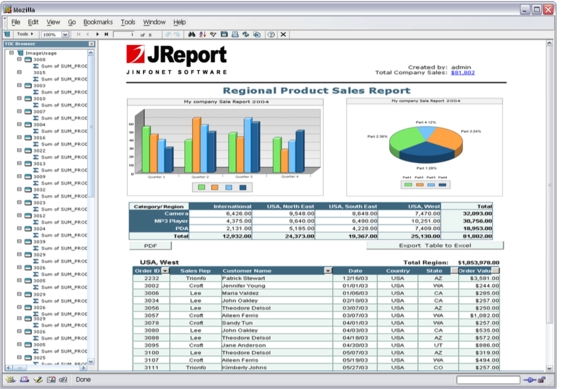
JReport is a 100% J2EE reporting solution that seamlessly integrates into any application, empowering end users with production reporting, ad hoc reporting and data analysis.
JReport's pure Java architecture makes it an ideal solution for embedding in any application environment. The complexities normally associated with application development--multi-threading, scaling, resource pooling, data source connectivity, communication protocols, interoperability, etc.--are minimized because the J2EE environment automatically handles these services.
Developers can integrate JReport as an Enterprise Java Bean or Java servlet directly into their application server. Because servlets and EJBs are platform-independent, minimal configuration effort is required to install JReport. Developers can easily design and customize JavaServer Pages within their Web application, and leverage JReport's tag library to easily define JReport functionality without writing and managing large amounts of code.
Native Java connectivity provides access to data sources from commonly used relational database systems and hierarchical sources like XML. In addition, JReport can utilize a data source's inherent structure for logical grouping of data in reports. As part of its extensibility, JReport provides an API to access virtually any data source, including multidimensional (OLAP) data.
Java reporting solutions differentiate themselves through ease of embedding and customization, a critical distinction for application developers who need to spend time focusing on presentation, rather than on issues like database connectivity. JReport provides a rich set of APIs and Java Beans that deliver a high-level of flexibility and customization options for embedding JReport. Developers can use these reporting "building blocks" to enable any degree of actionable reporting within their application. For example, JReport offers a Web-enabled API that enables developers to integrate interactive report functionality into Web applications or directly into specific reports as Web controls. This allows end users to customize report views through dynamic sorting, filtering, and drill-down capabilities.
In addition to leveraging its own stand-alone security model, JReport can seamlessly integrate with existing security schemes to provide single sign-on capabilities. Security can be controlled at the page, record, column, or cell level--ensuring only authorized end user access to specific information.
System and report management--from performance monitoring to versioning--is critical to an embedded reporting solution. System performance can be monitored and fine tuned remotely, and public and private report folders make organizing and accessing reports and templates straightforward. With JReport, reports can be managed via the Web at the system level or by individual end users.
JReport provides a flexible scheduling interface that allows users to schedule reports to run once or at any recurring interval. In addition, reports can be deployed in a "subscription model"--once a report is run, it is saved in a specific location, and users are notified with a link to that report for viewing. JReport also supports report caching, allowing a single report output to be viewed by multiple users.
In addition to scheduling reports for distribution, JReport enables users to interact with reports and to save and share modified reports. With DHTML reports, for example, users can dynamically sort, filter, and group data to create a unique report view. This view can be saved as a report result and shared with others. Alternately, modified reports can be saved as a template so they can be re-run to refresh data on-demand.
JReport requires no client-side code. End users do not need to install any applets or plug-ins. Reports can be delivered in virtually any format, including HTML, DHTML, PDF, Excel, RTF, CSV, email, and fax.
JReport provides a range of flexibility and functionality to end users--from running reports to modifying report views to easy ad hoc report creation. Through an intuitive drag-and-drop interface, users can easily create and modify reports. This level of self-service helps relieve the burden on IT departments to continually create or edit report templates.
Leveraging Java standards makes JReport an easy, seamless tool that can be embedded in any application. A high degree of customization and focus on ease of use makes JReport the most reliable, cost-effective embedded reporting solution available. JReport extends the value of Linux applications, empowering end users to access, view, and share information when and where they need it. To see how JReport can seamlessly embed into your application, visit our Web site.

