
Spreading Linux within Interamerican University of Puerto Rico
My colleagues and I came to the Bayamón campus of the Interamerican University of Puerto Rico earlier this year to open the SNAP Development Center. Subtitled the "Open Source Laboratory of Interamerican University of Puerto Rico", our vision is to "create a thriving open-source software project within a university setting that will significantly impact the Puerto Rico software industry, generating new opportunities for economic development."
It's not easy when you're the only ones around promoting and using Linux and open-source software, and it had been lonely while we launched our Open Source Laboratory. But now, after six months of work, we finally were ready to change things--we were ready to kick off our first Linux installfest.
Before everyone settled into their patterns at the beginning of the current semester, we decided to shake things up a bit by hosting the first-ever installfest on the Bayamón campus. We knew it would be difficult to set this up, considering the wide range of architectures and technologies spread across the campus, so we decided to host Linux Awareness Days prior to the installfest. The objective of the Linux Awareness Days was two-fold. First, we wanted to give students an opportunity to see Linux and, if they dared, ask questions and try out one of our demonstration machines. The second objective was to create some buzz and anticipation for our Linux installfest.
We scheduled our Linux Awareness Days for August 30 and 31, 2004, with the installfest scheduled for September 9. On August 30 we set up three computers outside the Information and Telecommunications building. We had two desktops and one laptop, all running SuSE Linux 9.1. One of the machines was wired to the Internet. We also had a television monitor playing Revolution OS. During the four hours we were there, about 20 or so students actually came up and asked questions, while some got in a few rounds of Frozen Bubble and Pingus. A larger crowd lurked around but never got too close. We distributed about 150 flyers for the installfest and shut down for the day, expecting to repeat our efforts the next day. Unfortunately, the 31st turned out to be a Hurricane Day, and classes were canceled due to the threat of Hurricane Frances. Frances never hit Puerto Rico, but it did go on to hit Florida.
After the Awareness Day, a stream of visitors started coming to the SNAP laboratory requesting copies of SuSE Linux. We felt certain that September 9th would see a decent turn-out for the installfest. Between the events, we busied ourselves with creating a full day of presentations and demonstrations. We weren't sure how many students might show up to complete actual installations, so we wanted a full agenda of educational and entertaining sessions. We also wanted to make sure we accomplished one of primary goals for the installfest: we wanted to improve the reputation of Linux, open source and our open-source laboratory among students.
On the day of the installfest, right from the start, we saw that participation was going to exceed our expectations. One student arrived early, eager to get started installing Linux on his desktop computer. Following that, students begin to roll in and fill up all of the available seats. I launched our activity with a brief introduction to our project and then proceeded to share my perceptions on the changing Linux marketplace. I also shared my predictions concerning the future of Linux. Throughout the day, I organized presentations for three of our student software engineers: James O'Malley, a leader in the Puerto Rico Open Source community from Altamente.com, Inc.; PJ Cabrera, our software architect; and myself.
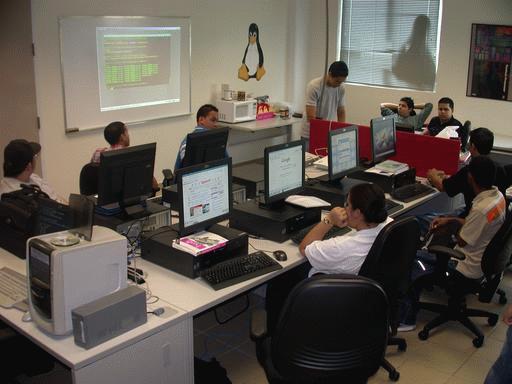
One of the SNAP Development Center student software engineers walks the audience through his "The Command Line: Unleash the Monster Within" presentation.
While I gave my presentation, PJ led the efforts to install Linux on the various computers students brought. Most students wanted to install SuSE Linux Professional 9.1, which had been demonstrated at our Linux Awareness Day. Throughout both of our activities, students constantly asked us about how easy it is to install Linux. I answered by sharing what has been my observation in my limited experience installing Linux. Installing Linux usually is simple, but when things go wrong, they go very wrong.
The results from our first installfest supported my observation. We tried to install SuSE 9.1 on four machines, and all of them were unsuccessful for a variety of reasons. Most of the machines were older models, and SuSE apparently did not have the right drivers for the machines. We even were unsuccessful at booting Knoppix from these machines' CD-ROM drives, because they did not have sufficient RAM to load Knoppix into memory. These machines were a mixture of older machines and new but non-factory standard machines. Our only installation success came when using Linspire. After trying unsuccessfully to install SuSE and Knoppix, we remembered that we had a copy of Linspire around. Linspire installed easily, so the student also took a copy home to install on other machines.
In the end, we were satisfied with the success of our activity. 31 students participated throughout the day, and we passed out numerous copies of SuSE, Knoppix and Linspire. We were able to collect contact information for these students, which will help us when organizing future activities, including the search for additional student software engineers to work with us on the project. Due to James O'Malley's participation in the event, we were able to provide students with an opportunity to network with local companies using Linux and open source. Our only negative comments demonstrate our success: our laboratory wasn't quite big enough and there weren't enough seats.
During the 18 months we have remaining at the Bayamón campus, we intend to host at least five more installfests. I will have to check if the campus auditorium is available--it seats 700.
Kevin Shockey is the program manager for the SNAP Development Center, a research and commercialization initiative for the Bayamón campus of Interamercan University of Puerto Rico. With Bachelors and Masters degrees in computer science, he now is re-inventing himself as an entrepreneur.

