
Benchmarks for Native IPsec in the 2.6 Kernel
IPsec is an addition to IP protocol that allows authentication and encryption of IP datagrams. It is defined in detail in IETF RFCs 2401, RFC 2402, RFC 2406 and RFC 2407 (see Resources). IPsec can be used to secure a rather wide range of scenarios; one of its best-known usages is creating virtual private networks (VPNs). A VPN is a secure, private tunnel between two sub-networks using encrypted communication over the Internet.
FreeS/WAN has been the main IPsec implementation for Linux for a long time. Unfortunately, FreeS/WAN has never been integrated into the Linux kernel itself. Instead, the new native kernel IPsec implementation is based on the KAME project, a part of the UNIX/BSD family.
The USAGI project used the BSD code from the KAME project as a base for integrating IPsec into the Linux kernel. KAME's user-space tools, specifically setkey and Racoon, have been ported to Linux by the IPsec-tools Project (see Resources).
In this article, we implement a simple scenario of setting up a secure connection between two Linux systems, reblochon and gouda. We explain different IPsec user-land tools and how to use them to set up a secure connection between two systems. At the end, we present our benchmarks and discuss them.
To use IPsec, you need a kernel that supports IPsec protocols and user-land tools that allow key management and key exchange. These keys are used for different cryptographic algorithms.
For Linux kernels 2.5.47 and higher, IPsec support is a part of the kernel itself. However, this support is not enabled by default. If you have a Linux distribution such as Suse 9.1 or Fedora Core 2, it already comes with a 2.6 kernel and IPsec is enabled by default. If you use some other Linux distribution, for example, Fedora Core 1, you need to install a 2.6.x version of the kernel--the higher the better. This new kernel must be compiled with the following options enabled. Go to Device drivers -> Networking support -> Networking options to enable:
PF_KEY sockets
IP: AH transformation
IP: ESP transformation
IP: IPComp transformation
IPsec user configuration interface
You also must include all the cryptographic algorithms you plan to use for your IPsec setup.
On the user-land side, the only thing you need is setkey and Racoon, which are part of the IPsec-tools Project (see Resources). The installation of these tools is straightforward: download the source code and proceed as usual with configure, make and make install commands. There even might be a precompiled package for your distribution of choice.
You can use IPsec in two modes, transport or tunnel. Briefly, transport mode is used to secure host-to-host communications, and tunnel mode is used to tunnel securely site-to-site communications. In transport mode, a special header for ESP and AH is added to the normal IP header. In tunnel mode, the IP packet of transport mode with an ESP and AH header is encapsulated in a normal IP packet. That way, the ESP and AH header is not visible directly to routers that might discard a packet with unknown options.
IPsec can be configured in different ways. Here are three ways to configure an IPsec secure connection between two hosts:
Shared Secret Keys: Start with a shared key on two nodes. Upon initialization of a secure connection between two nodes, this common shared secret is used for specified encryption or authentication algorithms. Using shared keys is the easiest way to configure but it also is less secure, as the shared secret most probably is contained in a configuration or script file on both machines. Also, if you do not change your keys often, it is possible that someone could capture enough packets to be able to retrieve the key.
Pre-Shared Key: In this mode, you need to run Racoon. Its functionality is similar to the shared secret key. The only difference is Racoon uses the pre-shared key as a seed to negotiate a complete key and periodically change that key.
X.509 Certificate: The most secure method to manage keys securely is to use the X.509 certificate. This solution requires access to a trusted certification authority (CA); otherwise, you need to set up your own CA. IPsec configuration in this case is not much more complicated, but interactions with a trusted certificate might be a problem.
In our simple scenario, we are more interested in discussing IPsec implementation performance rather than secure connection issues. So here we discuss the configuration of shared and pre-shared keys only.
The following listing is used to illustrate how to set up a secure connection between two computers on different LANs. Below, we provide the script file of gouda that sets a secure connection between two systems. gouda is at IP address 192.168.0.1 and reblochon is at IP address 192.168.0.2.
 1: #!/usr/local/sbin/setkey -f
 2: flush;
 3: spdflush;
 4:
 5: # AH gouda to reblochon
 6: add 192.168.0.1 192.168.0.2 ah 1000
 7:         -A hmac-md5 "1234567890123456";
 8: add 192.168.0.2 192.168.0.1 ah 2000
 9:         -A hmac-md5 "1234567890123456";
10:
11: # ESP gouda to reblochon
12: add 192.168.0.1 192.168.0.2 esp 1001
13:         -E 3des-cbc "123456789012345678901234"
14:         -A hmac-sha1 "12345678901234567890";
15: add 192.168.0.2 192.168.0.1 esp 2001
16:         -E 3des-cbc "123456789012345678901234"
17:         -A hmac-sha1 "12345678901234567890";
18:
19: spdadd 192.168.0.1 192.168.0.2 any -P out IPsec
20:         esp/transport//require
21:         ah/transport//require;
22:
23: spdadd 192.168.0.2 192.168.0.1 any -P in IPsec
24:         esp/transport//require
25:         ah/transport//require;
For reblochon, we use the same script file with only the following differences on line 19:
19: spdadd 192.168.0.1 192.168.0.2 any -P in IPsec
and on line 23:
23: spdadd 192.168.0.2 192.168.0.1 any -P out IPsec
Note the in and out keywords are reversed.
In line 1, the setkey command is invoked. This program inserts or deletes IPsec rules in the kernel. In lines 2 and 3, we use the setkey command to clear all security associations (SA) and security policies (SP), because we want to begin from a clean state.
Before diving into more technical details, we need to become familiar with two basic concepts in IPsec protocol, security association (SA) and security policy (SP). An SA defines the security parameters, for example, the crypto algorithm to be used, to create a secure connection between two systems. An SP, on the other hand, is the security rule defining the security context to be used between the two systems. For example, an SP can specify that we need to use encryption between my desktop and a remote system on the Internet. An SA then is the effective secure connection created between my desktop and that system. Be aware that SAs are unidirectional.
In our scenario, we define two SPs between reblochon and gouda. An SP is defined as:
source | destination | on which kind of traffic to apply the policy (TCP, UDP, port, any) |
the direction in/out | what to do (IPsec/discard/none) | (esp/ah) / (transport/tunnel) /
(IP address of both ends of the tunnel) not required in transport mode / require.
For example, these lines:
spdadd 192.168.0.1 192.168.0.2 any -P out IPsec
         esp/transport//require
         ah/transport//require;
declare a security policy stating that any packets coming from 192.168.0.1 and going to 192.168.0.2 should use IPsec on transport mode with ESP and AH functionality.
Now that you defined the policy between your systems, you need to define SAs in order to be able to achieve that policy. You need two SAs for communication, one from gouda to reblochon and one from reblochon to gouda. The two SAs do not need to use the same algorithm. In fact, unlike this example, for better security you should not use the same key for both SAs.
You define a SA as
source | destination | ah/esp | SPI (Security Policy Index) any number but should be unique
| algorithm and associated secret key.
For example, these lines:
add 192.168.0.1 192.168.0.2 esp 1001
         -E 3des-cbc "123456789012123456789012"
         -A hmac-sha1 "12345678901234567890";
define that if you want to use ESP on a packet going from gouda to reblochon, you should use 3DES as the encryption algorithm with the quoted text as the key and SHA1 as the authentication algorithm.
Now, you finally can run the script on both nodes. You can check the status of different SAs established by using setkey -D. If you want to see existing policies on your system, you can use setkey -DP. At the end, to be sure that the traffic between two systems actually is encrypted, you can use Ethereal to monitor the traffic between two nodes. For example, in Figure 1, we show the traffic between two systems exchanging messages containing the "hello world" text. As you see, the message is encrypted between gouda and reblochon.
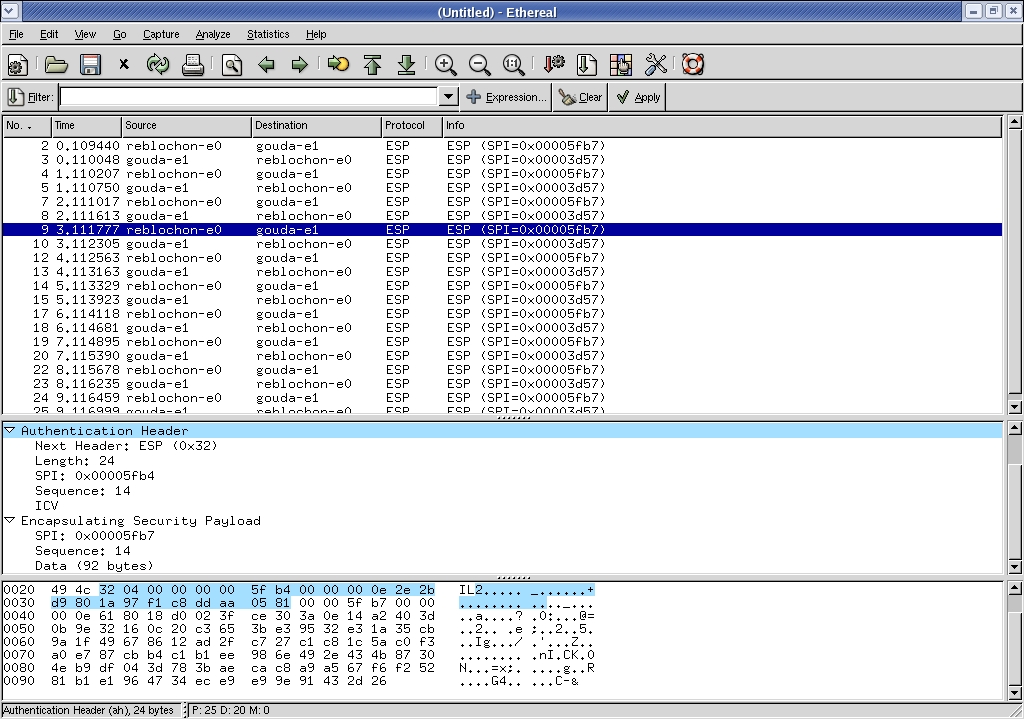
Figure 1: Ethereal Snapshot Showing Encrypted Communications
Now, you certainly can understand why this type of configuration is less secure. Keeping a system secure with secret keys in clear text in a configuration file is not practical. But don't worry, the people behind IPsec have thought about it and have come up with a protocol to negotiate keys and set up secure connections automatically. This functionality is implemented by Racoon. With Racoon, you do not need to specify any SAs; you need to specify only the SP. Racoon dynamically defines the SAs, and of course, you need to configure Racoon. The Racoon daemon runs on UDP port 500, which means that your firewall rules should not block this port on your system. We are not going into the details of setting up Racoon here, but refer to the HOWTO listed in Resources for more information.
We used Netio benchmarking software to test the new native IPsec implementation on a 2.6.7 kernel. We used two Pentium IV 2.2GHz machines with 512MB of memory. Netio measures the throughput of a network by way of TCP and UDP and different packet sizes. We established a secure connection using transport mode with the encryption algorithm 3DES (key size = 192 bits) and SHA1 for integrity checks. You can see the results in Table 1 for TCP and in Table 2 for UDP.
Table 1. Results from Netio TCP Benchmark
| Packet Size | Bandwidth without IPsec | Bandwidth with IPsec |
|---|---|---|
| 1KB | 10905KB | 5157KB |
| 2KB | 10832KB | 5222KB |
| 4KB | 10827KB | 5305 KB |
| 8KB | 10811KB | 5263KB |
| 16KB | 10814KB | 5345KB |
| 32KB | 10729KB | 5374KB |
Table 2. Results from Netio UDP Benchmark
| Packet Size | Bandwidth without IPsec | Bandwidth with IPsec |
|---|---|---|
| 1KB | 11479KB | 4806KB |
| 2KB | 11244KB | 4320KB |
| 4KB | 11698KB | 4985KB |
| 8KB | 11714KB | 5116KB |
| 16KB | 11725KB | 5152KB |
| 32KB | 11743KB | 5271KB |
We can see that IPsec diminishes by half the throughput of a TCP or UDP connection. Although the absolute bandwidth still is high--worst case is 4.3MB/sec--it is enough for most applications.
The new native IPsec implementation has a user-friendly interface to enable users to set up secure connections easily among different Linux systems. The results of our tests show that even though there is need for some improvements with regards to the stability of the implementation, the performance of the new native IPsec implementation makes it a good candidate for use by SOHOs as well as mid-sized enterprises. The new Linux IPsec implementation pushes Linux farther along the path to becoming a natural choice for many security needs of SOHOs and mid-sized companies.
Vincent Roy and Makan Pourzandi work at the Open Systems Lab at Ericcson Canada.
