
Programming Tools: Eclipse 3.0.1
Eclipse has set a new standard in IDEs and component-based development. Most of us get to know it as an IDE, but it can be much more. It also can be used as the basis for developing applications. Other important aspects of Eclipse are:
It is one of the first major open-source packages developed mainly by a commercial entity. IBM started the project and continues to support it.
The quality and the scope of Eclipse sets a new standard in programming environments and raises the expectations for other open-source packages. It will be tough to follow, especially for the normal one- or two-person developer teams found in the Open Source community.
Eclipse has been designed from the ground up to be a feature-based system. It's design uses the idea of plug-in features as the aspects of what the user sees. For a programmer, this means an IDE. For a normal business user, this means applications that run on top of the Eclipse platform.
Eclipse's modular design is based on its feature sets. A feature set is made up of one or more plugins. Plugins are made up of one or more code components. Features are added to the Eclipse platform using either its built-in installer or a more usual external installer.
Many systems and APIs provide many of the tools necessary to develop applications or serve as programming tools. In the Open Source community, Eclipse is the first to do it on a comprehensive scale. Perhaps, only Microsoft's .NET concept on Windows comes close. The advantage of Eclipse is it is platform-independent.
Eclipse is written in Java, but it does not come with a built-in Java Runtime Environment (JRE). Thus, you need to have Java installed. To work with Eclipse 3.0+, the JRE must be version 1.4 or higher.
Installing Eclipse is easy. Simply unzip the downloaded file and the Eclipse system resides in the eclipse subdirectory.
Eclipse's update process puts each new version in its own subdirectory. The subdirectory includes the version number in its name. This allows multiple versions to be resident at the same time, without cross-pollution among versions.
Eclipse's installer allows implementers to mark features as optional. Users then can elect whether to include them in their Eclipse environments. Such optional features can be installed later, if the occasion calls for doing so.
Finally, Eclipse has a built-in update feature that you can run at any time. You can use it to update both Eclipse and any of its feature sets.
A useful set of wizards in the Eclipse package can create many project types. The Help -> Cheat Sheet mechanism worked quite well for me. With it, I could create skeleton Java applications, Java applets, plugins, CVS tasks and SWT applications.
As shown in the two screen snapshots below, Eclipse uses multipaned tabbed windows. The views shown depend on the action being taken. For example, the default view for files is an editor window is geared to the type of file. For building Eclipse's form of a build file, a build view is shown.

Figure 1. Multipaned Tabbed Views
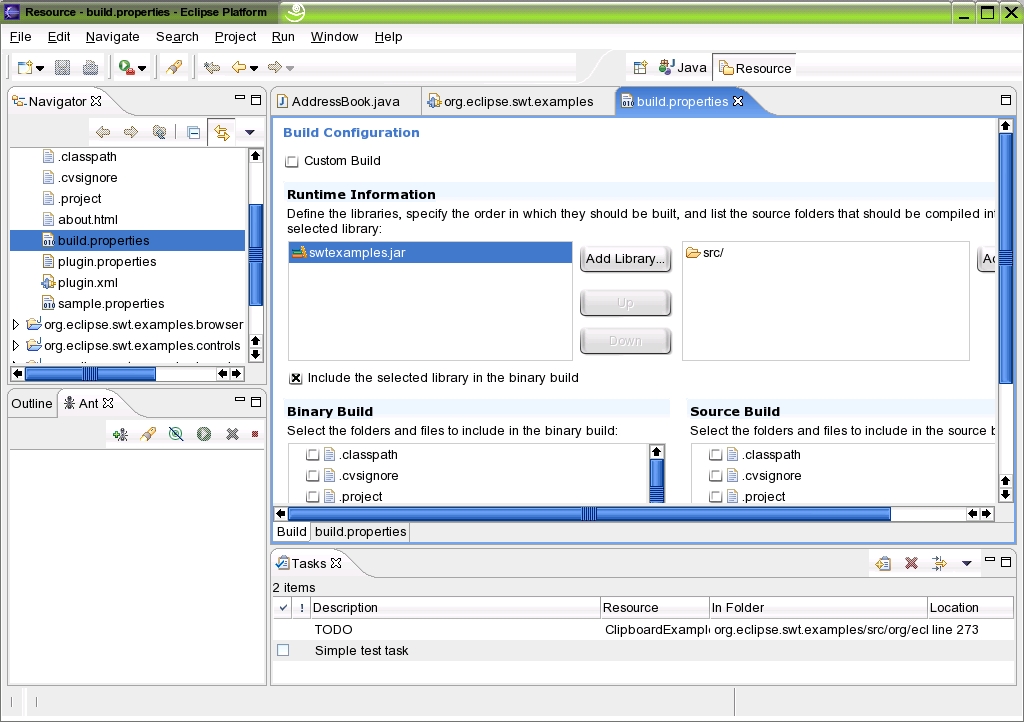
Figure 2. A Build View
Although Eclipse was written in Java and has a well-developed Java IDE, I was curious to see how it would work with languages other than Java and C++. A feature currently in beta testing, pydev, provides a Python IDE within the Eclipse platform. Given the beta nature of pydev, incorporating it into the Eclipse platform went quite well. I tested pydev on some projects I am developing, and it worked adequately. In the future, the promise of Eclipse and its rich set of features makes it a viable contender for a Python IDE.
During my evaluation of Eclipse, I noticed both some problems and some neat features. None of these are show stoppers, but you might as well know what I ran into.
The Help viewer did not allow me to change the font size. On my notebook, this made reading the help files difficult.
The Help viewer did not tell me which files were being viewed. That is, I could not see the path names. This made it difficult to use alternative viewers. (See the previous point.)
Tool tips often appeared to the right of the item over which the cursor was hovering. This made the tool tip unreadable when the item was at the right edge of the screen, because the tip was truncated and the cursor covered the rest; for example, the maximize button on the Help viewer.
The default text editor did not support a word-wrap option. This meant I could not write this column using the default text editor. Also, I tried to define the default TXT editor as KDE's kate, but that had no effect. In fact, I could no longer edit any TXT file in the IDE. Opening an external file went into the bit bucket. I did recover, but it was a trip.
The Search -> File facility was limited to workspaces. I needed to go to the command line to search for a string in any file.
The Go Forward and Go Back on the Help viewer did not work as expected. I needed to click on the Content Tree to get to the next topic.
When I started to create a new project, I found that the creation dialog box was modal, and I was unable to move around the Help system. The Help system should be independent of the modality of the rest of Eclipse.
CVS currently is the only built-in source code control system.
I found some missing help files for the SWT examples. Some of the Cheat Sheets were missing steps. Also, a only a limited number of Cheat Sheets are included.
Icons on tabs are useful. For example, the left icon gives the file's full path when editing a text file. The right icon allows you to close that view.
Use of tasks and markers are neat. Select any line in a resource, and you can create a task associated with that line or resource.
The history log is a poor man's simple source code control system. It doesn't really replace CVS, but it is fine for a series of changes that you have saved but not yet checked into CVS.
A rich set of build files and options are generated for the ANT build system.
Eclipse is a major new way of developing systems. It can serve as an IDE for many popular languages and as a base for any application. However, it is not as mature yet as many standalone IDEs geared to specific languages, such as the offerings from Borland, Active State and, my current favorite Python IDE, eric3. Even with these caveats, it might be time to start thinking of migrating to Eclipse, especially if you have some significant development efforts ahead.
Reg. Charney has been a techie, an entrepreneur and businessman. He also has been a long-time Linux enthusiast and now is developing a series of business applications for Linux. His favorite language is Python.
