
OOo Off the Wall: Macros and Add-ons
Editors' Note: This article has been revised since its original posting.
One of the features that makes the Open Source community so stimulating is its members are not passive consumers of software, but active participants in its direction. OpenOffice.org is no exception. Although slow to develop this attitude--possibly because of the sheer size of the project--in the last year, the OpenOffice.org community has started having an effect on the development of the office suite.
True, basic development still is dependent heavily on employees of Sun Microsystems--too dependent, some might say. However, volunteers are coming into their own now with both macros and add-ons. Macros are scripts written in OOoBasic that run from documents, while add-ons are functions integrated directly into an OpenOffice.org installation, often using another programming language, such as Python. Probably the best examples of this change are Laurence Godard's DicOOo macro, which installs spellchecking, hyphenation and thesaurus dictionaries, and FontOOo macro, which installs free fonts available on the Internet. Both macros have been added as autopilots and were major features of the releases in which they first appeared.
Currently, perhaps two dozen people actively are publishing macros and add-ons. Others are active on the API list, but have yet to make their efforts generally available.
What follow is a small sampling of some publicly available macros and add-ons for OOo. Most are released under the GNU GPL or LGPL, but a few of those available on the Internet use other licenses that you might want to read before downloading, to make sure that they are compatible with your beliefs. After the samples is a brief set of instructions for using and installing them.
Unlike Godard's macro collections, none of these have become an official part of OpenOffice.org, although one or two may achieve that sign of acceptance. However, even if official acceptance doesn't happen, you easily can add their functionality to your copy of OpenOffice.org.
When StarOffice was open sourced, the proprietary elements stripped out included the import and export filters for WordPerfect. WordPerfect hasn't been the dominant office format for almost a decade, but its brief support for Linux several years ago has left a loyal group of users for whom the ability to read the format is important. The WriterPerfect Project, built by William Lachance, Marc Maurer and other contributors, exists to provide that ability for OpenOffice.org, AbiWord and, in the future, KWord, through various uses of its libwpd library.
WriterPerfect itself is an import filter. It compares favorably with the StarOffice WordPerfect filter and, in my experience, seems to do a better job than OOo's MS Word filters. Still, like most filters, its results need tweaking, especially when used on complex documents. My only complaint is neither a static tarball nor a Debian package is available on the site. However, both can be built from source, and wpd2sxw, a standalone program from the project, is now a part of Debian unstable.
This set of macros was one of the first to be made available and continues to be updated. It includes a grab-bag of functions, most of which are well commented and useful (if unspectacular) if you are interested in learning how to write your own macro. For example, two are for converting Writer text to plain text e-mail; one adds two carriage returns to mark the start of paragraphs and another strips out smart quotes and en-dashes so that only the basic ASCII set is used. Others apply heading styles, insert a special character and change the case of selected letters.
The standout in this collection is a selected word count. Although the document containing the macros notes that form items and fields can throw out the count, this macro adds a functionality that is missing from Writer but often requested.

Alexej Kryukov's History Manager is an add-on for adjusting the number of recently used files at the bottom of the File menu. By default, OpenOffice.org shows only four, but most people prefer a longer list. The number of files displayed can be hacked, but History Manager provides a clean interface for editing the list instead.
Danny Brewer's Recent File List Changer provides the same capacity through macros.
ReferenceManager, built by Ian Laurenson, is designed for working with collections of cross-references, set references and bookmarks. The collection of macros allows references and bookmarks to be reassigned and found. It also can delete references without deleting text and find orphaned references. The interface is confusing at first, until you realize the radio buttons above the two panes identify the contents. Otherwise, the macro collection is ideal for academic work. A particularly useful feature is the Demo button, which Laurenson seems to add to most of his macros.
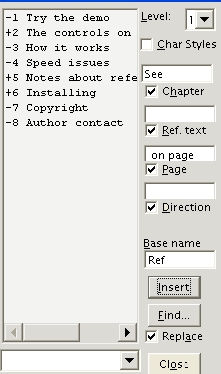
One of the weaknesses of Writer's cross-reference system is the text before and between the cross-references must be added manually. The process can be automated by creating user-defined fields containing the text, but even that requires flipping back and forth between tabs in the field windows and too many mouse-clicks. Ian Laurenson's Outline Cross-Referencer remedies that by providing a GUI in which the entire reference can be composed. Despite a rather cramped GUI and the long lapse between clicking the Insert button and seeing the reference entered in the text, this macro is a must-have if you use cross-references regularly.

In the current version, OpenOffice.org's Export to PDF tool is disappointing. Although it usually produces an acceptable PDF under Linux--it is more problematic under Windows--it sometimes chokes on documents with elaborately formated tables or spontaneously changes fonts. Moreover, even when it works, it cannot generate bookmarks or live links. These features are said to be coming in version 2.0. Meanwhile, Martin Brown's ExtendedPDF not only provides the missing functionality, but handles files that defeat the Export to PDF tool. The interface does warn that paragraph spacing and table spacing at the top of pages can cause hyperlink misalignments, but in a dozen PDFs, most of them lengthy, I never saw any problems.
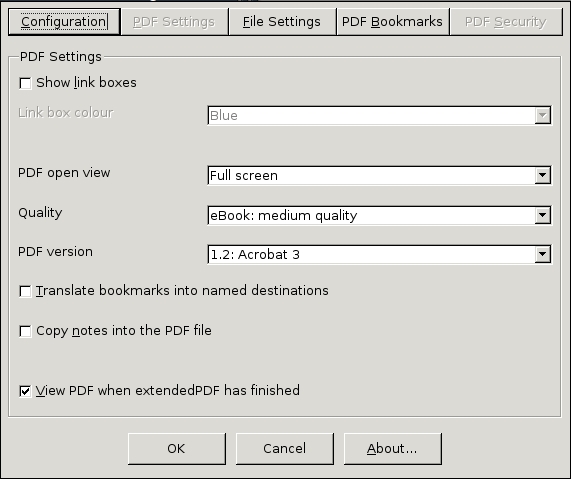
ExtendedPDF requires Ghostscript, which most desktop Linux installations include by default. It also requires the setting up of a postscript printer driver using OpenOffice.org's spadmin tool. These requirements are explained thoroughly in the Writer document in which ExtendedPDF is distributed. The document even includes a standard explanation of how to add the macro to a toolbar.
The macro itself opens in a clean interface. Five levels of quality are available to Export as compared with PDF's three levels, as well as three different versions of PDF. Other choices include the view in which the PDF opens, the output folders and the styles from which to generate bookmarks. A tab for PDF Security is grayed out, but considering the low-grade of copy protection available in PDFs, this lack hardly matters. The settings also include an option to open a PDF after it is created in the viewer of your choice--a small touch, but one that automates a step most people would do anyway.
By providing a GUI for detailed PDF generation, ExtendedPDF fills a gap not only in OpenOffice.org but in Linux desktop productivity. In my book, that makes it the one absolutely essential pick in this collection of macros.
All macros from open documents are listed in the Macro from field when you select Tools > Macros > Macro. If you have chosen to allow macros to run when you open a document, other documents can use its macros. Otherwise, the macros run only in the document to which they are attached.
Instead of opening a document each time you want its macros, you can make its macros accessible from any OpenOffice.org document by following these steps:
Select Tools > Macros > Macro > Organizer > Libraries.
On the Libraries tab, select soffice in the Application/Document drop-down list.
Select the Append button. A file browser opens.
Select the file that contains the macros you wan to add, and then select the OK button. The Append Libraries window opens.
Select the macro libraries that you want to add. Then, click the OK button and close the rest of the dialogues.
To make a macro even more accessible, you can:
Add it to a toolbar by selecting Customize from the toolbar's right-click menu. In the Customize Toolbar window, macros are listed in the Available buttons pane. Use the Add arrow to place a button for the macro in the Buttons in use pane, and the Move Up and Move Down buttons to position the new button where you want it. Use the Icon button to assign an icon or keep the button as text.
Add it to a menu by selecting Tools > Configure > Menu > . Select the macro from the Function section of the window, using the Category pane to navigate through modules and libraries. With the the macro highlighted, either select the macro position in the Menu entries pane and select New > OK. Use the arrow buttons to reposition the macro or the New Menu to create a new top-level menu before adding the macro.
Assign it to a keystroke combination by selecting Tools > Configure > Keyboard. Select the macro from the Function section of the window, using the Category pane to navigate through modules and libraries. Highlight the macro, then choose the Shortcut keys and select Assign > OK.
Some macros, especially ones written in a language other than OOoBasic, are packaged as add-ons. These macros are available as zipped files. They are placed in the /user/uno_packages folder of your OpenOffice.org installation directory and are installed by running pkgchk from the /program folder. When installed, add-ons may add an icon, menu or menu item, depending on how they are packaged. Usually, an add-ons item is added to the Tools menu that lists all installed add-ons on a sub-menu.
These are only a selection of the macros and add-ons available for OpenOffice.org. I have picked ones that are tools for Writer, because that is the most heavily used application in the OOo suite. The OOo Macros Page lists a number of tools for other OOo applications. In particular, Calc users might be interested in downloading David Hitchcock's OOo Statistics, which resembles MS Excel's Analysis ToolPak, while Draw users might find some inspiration for further macros at Danny Brewer's Danny's Draw Power Tools site.
Developers interested in writing their own macros might want to look at the developer's page, OOoMacros or at Andrew Pitonyak's home page. Pitonyak is the author of the recently released OpenOffice.org Macro's Explained. Although largely an unstructured brain dump, Pitonyak's book still is a valuable collection of tips from an acknowledged expert on OOoBasic.
The possibilities of macros and add-ons for OpenOffice.org still are being realized by the Open Source community. Although OpenOffice.org recently completed its fourth year as a project, few of the tools available are more than a year old and many are less than half that. As an outsider observing this sub-community, my impression is the community is only starting to come into its own. Resources finally are starting to become available, and the first results of collaborations are starting to be seen. If this community's potential is realized, the next year should see a thriving community and an endless set of new resources for end users.
Bruce Byfield was product manager at Stormix Technologies and marketing and communications director at Progeny Linux System. He also was a contributing editor at Maximum Linux and the original writer of the Desktop Debian manual. Away from his computer, he listens to punk-folk music, raises parrots and runs long, painful distances of his own free will.
