
Filesystem Indexing with libferris
The libferris Project began in early 2001 in order to create a virtual filesystem operating as a shared library. Many tree-like structures are presented through a single filesystem interface by libferris. Operating in the user address space instead of in the kernel allows libferris to expose a large number of tree-like sources. These sources would be difficult to access from the Linux kernel. All filesystems are accessible through the root:// URI in libferris and include kernel file:// URLs, relational databases, XML files and databases, network-accessible resources like HTTP/FTP servers and other composite files like db4, tarballs and RDF, as well as standard kernel filesystems like ext3 and XFS.
Why libferris?
Here's why you might choose libferris for filesystem indexing and querying:
Plugins can extract text that is trapped in files for full-text indexing.
Unified interface for all data sources used as input for indexing—for example, the following are all indexable with libferris: text inside SleepyCat dbxml files, inside tarballs and in individual messages in mbox files or relational databases.
Metadata trapped inside files can be indexed and searched for. For example, the ID3 tags for audio files can be indexed to provide search-by-artist functionality.
Identical basic add/query commands for all indexing plugins, so you can switch between indexing implementations fairly easily.
Combination searches for full-text and extended attributes for your filesystem. The ferris-search tool allows you to combine many searches into one result set.
Ability to search for files based on the metadata they once had.
Ability to search for files based on Supervised Machine Learning (SML) judgments—spam filtering for your filesystem. Unfortunately, covering SML is beyond the scope of this article.
The notion of files and directories is merged in libferris into a single abstraction. This allows things like tar archives to be mounted as a filesystem implicitly by libferris. In this case, the tarball is both a file and a directory at the same time.
The extended attribute (EA) interface presents data from many sources, including the kernel's listxattr(2) interface, RDF/bdb repositories and dynamically extracted values. An example of a dynamic EA is the width of an image. When an image's width EA is read, libferris uses a plugin to determine the width of the image file. Another example is the sample rate for audio files.
Table 1. EA Examples
| Name-extension | File's extension, such as tar |
| treeicon | The URL of an image that is appropriate for this file. |
| is-audio-object | The MIME major type audio. |
| is-source-object | This file's source code. |
| is-remote | This file remote to this machine. |
| language-human | Human language for this file. |
| a52-channels | Number of audio channels. |
| year | Year the album/single containing this track was released. |
More EAs and their descriptions are listed on the libferris Web site (see the on-line Resources).
This leads to two distinct types of indexes that libferris can create and query—full-text and EA. Full-text indexes allow you to find files based on the words that they contain. EA indexes allow you to find files based on the metadata for the file. The indexing structures needed to resolve queries against full text or EA are significantly different. For example, full-text indexes may store the list of documents containing each word (an inverted file) to resolve queries such as “find all documents containing the word libferris”. EA indexes need to be able to handle range queries such as “find all files modified last month”.
libferris uses plugins to handle the implementation of these indexes. For full-text indexes, you can use any or all of these: an internal format based on inverted files, Apache Lucene compiled with gcj, an ODBC supporting relational database, Xapian or the TSearch2 module in PostgreSQL. For EA indexes you can choose an internal design based on sorted inverted files, LDAP, Apache Lucene compiled with gcj, an ODBC supporting relational database or native PostgreSQL using some PGSQL. The recommended choices for general use are Xapian or TSearch2 for full text, and PostgreSQL or ODBC for EA indexes.
The PostgreSQL modules are similar to those of the ODBC, but they use PGSQL and other PostgreSQL-specific functionality. Using the PostgreSQL TSearch2 plugin for full text requires a template database to be set up on your PostgreSQL server. See the on-line Resources for details.
All indexes exist in their own directory in libferris. Default full-text and EA indexes are in ~/.ferris in full-text-index and ea-index, respectively. Indexes are created with either fcreate or gfcreate from the ferriscreate package. Like many tools in libferris, the gf prefixed tool does much the same thing as the f prefixed tool, but it offers a GTK+2 interface. The following sections describe creation, population and querying of both index types.
Jumping right in, I first create a full-text index in /tmp, add some files to it and then query for files using the index. First, I create a directory for the new index and use gfcreate to set up the new index in that directory:
$ mkdir /tmp/text-index
$ gfcreate /tmp/text-index
The GUI for gfcreate shows the major MIME types in the leftmost tab, with a misc tab for things that can be created and that are considered distinct from MIME. After selecting misc, all the available index formats are shown in a second level of tabs. In Figure 1, I've chosen to create a Xapian full-text index using English for word stemming and ignoring word case.
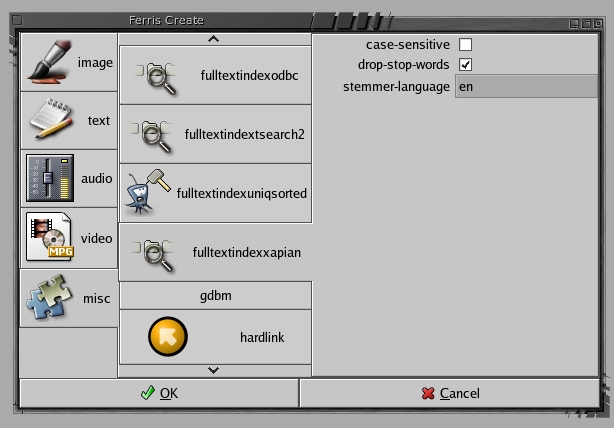
Figure 1. Making a Xapian Full-Text Index with gfcreate
When adding files to the full-text index, libferris attempts to use the as-text EA to obtain a textual representation of the file. Many plugins have been created supporting the as-text EA; PDF files, HTML files, man pages and djvu images all support as-text.
The findexadd and findexquery tools can be told which index to use with the -P command-line option. The following uses a PDF file and man page from the Samba 3.0.3 package as example input. As paths will vary depending on your Linux distribution, prefixes to the files have been replaced with /.../:
$ findexadd -P /tmp/text-index \
/.../samba-3.0.3/docs/Samba-HOWTO-Collection.pdf
$ findexquery -P /tmp/text-index samba
ID 1 99% [file://.../Samba-HOWTO-Collection.pdf]
Found 1 matches at the following locations:
file://.../Samba-HOWTO-Collection.pdf

$ findexadd -P /tmp/text-index /.../samba.7.gz
$ findexquery -P /tmp/text-index smbstatus
ID 1 100% [file://.../Samba-HOWTO-Collection.pdf]
ID 5 93% [file://.../samba.7.gz]
Found 2 matches at the following locations:
file://.../Samba-HOWTO-Collection.pdf
file://.../samba.7.gz
The most interesting options for findexquery are the -P for setting the path to the index, the --ranked option for performing ranked full-text queries and --xapian for passing raw Xapian format queries to the back end (see Resources).
The default query format is Boolean. In this format, all alphanumeric words are looked up in the index and there are four Boolean operators that are used infix. These are & (and), | (or), ! (not) and - (minus). Ranked mode combines all terms and returns a list of documents that are the most interesting based on your query. In Xapian format, libferris hands the query directly to the back end for processing; currently, only the Xapian back end can handle such queries.
The procedure for adding to and querying EA indexes closely follows that of full-text indexing. EA indexes use the feaindexadd and feaindexquery commands, which both accept the -P /path-to-index option.
There are three parameters for overall tuning of EA indexes. These can be set when the EA index is created. They relate to the EA you are interested in indexing for your files. For example, you can create a lean EA index containing only filenames, sizes and some image properties for use in image file searching. You also may choose to ignore some EAs that take a while to calculate or that are not relevant to your search. For example, if you are not planning to use the index for integrity checking, ignoring the MD5, SHA-1 and other checksums saves considerable time, because these checksums require the entire file to be read for each file being added to the index.
The first of the general EA index parameters is the max-values-size-to-index parameter that defines the largest byte length for a value to be added to the index for any attribute. Most EAs should be fairly short values in the range of less than 100 bytes. The default is to be lenient and allow up to 1,024 bytes to be used by any individual EA value. The other two attributes are attributes-not-to-index and attributes-not-to-index-regex. These define the names of EAs to be ignored when files are being added to the index. There is a direct trade-off between indexing all EAs, which makes adding files slower but preserves all information for queries or indexing only a subset of EAs, which makes the adding faster but then some queries will not execute.
The defaults for the not-to-index parameters should allow files to be added fairly quickly but still allow many interesting EAs to be indexed. These defaults for these three parameters can be overridden by running the cc/capplets/index/ferris-capplet-index tool, which sets the defaults for new index creation and alters your ~/.ferris indexes for future file indexing.
For the EA index we use a PostgreSQL database to store the index. For seamless EA index creation, a minor setup step is required before running the fcreate tools. The PGSQL language must be enabled by default for new databases. The command below does this when run as root:
# createlang -d template1 plpgsql
If you don't want to change the template1 database, you can create the PostgreSQL database manually, enable plpgsql for the new database and append db-exists=1 to the fcreate command line below.
For PostgreSQL EA indexes, you also can set the user name, password, host, port and dbname for use by the PostgreSQL database. By default (db-exists=0) the database with name dbname must not exist and will be created for this new EA index.
There is another tweakable parameter for EA indexes that use a relational database as their implementation, allowing you to change how some EAs are normalized in the relational database. Once again, the default values should be acceptable. I explain this trade-off in a moment.
The extra-columns-to-inline-in-docmap gives a list of EAs that are so important to searching they should be denormalized into the docmap table. EAs that have a unique value for almost every file will be stored more efficiently inline in the docmap table. To denormalize an EA in this way, you must provide the SQL type for that EA as well.
Normalization of EA in a Relational Database
To resolve a query on a normalized EA, four tables are involved. The docmap table stores the file's URL and a synthetic integral key, the docid. The attrmap table stores the name of an EA and assigns a synthetic integral key, the attrid. One of many valuemap tables are used, depending on the type of the value, but they all follow a similar style. For example, strlookup assigns varchar values a synthetic integral key, the vid. And finally, a join table, docattrs, joins a docid with an attrid and a vid to record that a file has an attribute with a given value. Thus, to resolve a query (width<=800) if the width EA is normalized requires looking up the attrid and vid to join in the docattrs table, producing a list of docids that have a width satisfying the query.
Normalized EAs are stored directly into the docmap table as a column. To resolve the width query above, the relational database index on the docmap.width column is used to find the matching docids directly. This normalization is a space-time trade-off. Generally, for EAs for which you are planning to search often, you would consider inlining them. Many EAs that are not part of a stat(2) call or deemed very interesting should be left indexed in the attrmap, valuemap and docattrs tables.
For this example, I use my user name and a dbname of lj. The second command below creates the EA index using the non-interactive fcreate tool. The third command then adds all the JPEG files in my shared image directory to that index. You also can use feaindexadd with the -d option to list file paths explicitly on the command line. Without -d, feaindexadd tries to recurse into the paths you supply:
$ mkdir /tmp/ea-index
$ fcreate --create-type=eaindexpostgresql \
--target-path=/tmp/ea-index dbname=lj user=ben
# if you have setup new db, append  db-exists=1
$ find /usr/share/backgrounds/images \
-name "*.jpg" \
| feaindexadd -P /tmp/ea-index --filelist-stdin
My image directory contains 42 JPEG images. Here, I query the index:
$ feaindexquery -P /tmp/ea-index '(width>=640)'
Found 34 matches at the following locations:
file:///usr/share/backgrounds/images/dewdop_leaf.jpg
...
$ feaindexquery -P /tmp/ea-index '(size>=100k)'
Found 42 matches at the following locations:
file:///usr/share/backgrounds/images/dewdop_leaf.jpg
...
$ feaindexquery -P /tmp/ea-index \
'(&(width<=800)(size>=100k))'
Found 19 matches at the following locations:
file:///usr/.../images/space/apollo08_earthrise.jpg
...
The EA index query syntax is based on “The String Representation of LDAP Search Filters” as described in RFC 2254. This is a simple syntax, providing a small set of comparative operators to make lvalue operator rvalue terms and a means to combine these terms with Boolean and (&), or (|) and not (!) operations. All terms are contained in parentheses, with operators preceding their arguments. The operators are kept simple: == for equality, <= and >= for value ranges and =~ for regex matches.
The ODBC (optionally) and PostgreSQL (always) EA indexing plugins allow you to store many versions of EAs for a file in the index. Having many versions of metadata for a file allows you to query for files based on the EA values those files once had.
To use this functionality, you have to select a time range to match the search against when querying by using a special EA. The time-restricting EAs are atime, ferris-current-time, multiversion-mtime and multiversion-atime. The last two EAs match against the mtime and atime for the file you are seeking. The ferris-current-time EA for a version of a file's index data is the time when that file was being indexed. If no time range is selected, only the latest version of metadata for each file is considered when executing a query.
Time restrictions can be given as a string, and libferris tries its best to work out the format of your time string. In the tests/timeparsing directory of the libferris distribution is a timeparse tool that accepts time values and tells you what libferris makes of your time string. More details on the permissible time strings are given in the libferris FAQ item (see Resources).
The following example of a time-based query looks for all image files that were indexed over a year ago with a given width range:
$ feaindexquery -P /tmp/ea-index \
 '(&(width>=1600)(ferris-current-time<=1 year ago))'
If a large image file was indexed two years ago and subsequently replaced with a thumbnail image and re-indexed, the above query returns the file. This is because one of its versions of metadata matches the given query.
Handling the time restriction for EA queries by using the same interface as querying on EA values allows you to use all the standard query mechanisms to select your matching time range. For example, I could select documents that were indexed in 2003 with a given width or those with a specific owner that were modified in the last month:
## note, all one line
$ feaindexquery -P /tmp/ea-index '
(|
  (&
    (width>=1600)(ferris-current-time>=begin 2003)
    (ferris-current-time<=end 2003)
  )
  (&
    (owner-name==sarusama)
    (multiversion-mtime>=end last month)
  )
)
Hopefully, I've conveyed enough of the information on what libferris has to offer in terms of its current implementations for both EA and full-text indexing to raise your interest. The current implementation is a necessary stepping-stone toward the goal of a more formalized semantic filesystem query and browse interaction style.
Resources for this article: www.linuxjournal.com/article/7928.
Ben Martin has been working on file managers for more than ten years. He is currently working toward a PhD combining Semantic Filesystems with Formal Concept Analysis to improve human-filesystem interaction.

