
XML & DocBook: Structured Technical Documentation Authoring
XML is short for Extended Markup Language and is a subset of SGML, the Standard Generalized Markup Language. XML is an HTML-like formatting language. Whereas most HTML-related formats developed in the past adopted the "be conservative in what you send and liberal in what you receive" attitude, XML takes the opposite approach--documents should be 100% compatible. This compatibility is known as "well-formedness" of an XML document. To this end, even when the goal is clear, a document is rejected if it does not follow XML specifications to the fullest extent. In terms of practicality, this approach guarantees interoperability in the long run. Unlike HTML, which is the standard groupname for a lot of sub-protocols that are slightly different and not fully interoperable with one another, the strictness of XML ensures compatibility. XML also improves security dramatically, because there is only one way to interpret expressions, a way on which everybody agrees.
DocBook is an XML Document Type Definition or DTD. It is a subset of XML particularly suited for but not limited to the creation of books and papers about computer hardware and software. DocBook is well-known in the Linux community and is used by many publishing companies and open-source development projects. Most tools are developed for the DocBook DTD and are included in most Linux distributions. This allows for sending raw data that can be processed at the receiver's end--wherever applications able to interpret XML directly are available.
The important thing to keep in mind is XML and DocBook let authors focus on content. In that sense, the presence of the word "markup" in the definition of XML is misleading. With XML, authors specify what type of data they are including, such as text explanations, command names, tables or images. How the content is formatted, laid out and displayed should not be their concern. From a single source, the receiver might generate PDF, PS, plain text, HTML and many other representations of the content.
Another advantage is DocBook XML files are written in plain text. Although many editors are available, such as oXygen and XMLmind, advanced DocBook users easily can write the source texts using vim, Emacs or any other text editor.
Before you can convert or process an XML document, it is best to validate it, because documents that do not strictly respect the XML definitions cannot be processed. Validation consists of two parts: the document must be well-formed according to the rules defined in XML, and it must use valid markup that is part of the XML vocabulary.
The libxml package provides a simple validator called xmllint. It points out inconsistencies in opening and closing tags and does a couple of other basic checks. The xmllint tool is an XML validator by default; for checking the DocBook DTD validity you need to give it options. In other words, the standard behavior is to check well-formedness and not the vocabulary being used.
Checking the vocabulary is done using a catalog. Most systems these days have the file /etc/sgml/catalog, which holds pointers to catalogs for different SGML subsets, which in turn hold references to public or system-local vocabularies. The catalog files are read by the XML processing tools. A common way of processing is to use an XSL processor, which converts the XML file into formatted output. XSL is the abbreviation of Extensible Stylesheet Language, a way of expressing XML stylesheets. Included in the XSL language is the XSL-FO language, for creating Formatted Objects. XSL Transformations (XSLT) are applied by the XSLT processor on the XML file to rearrange the content of an XML file or to convert it into intermediate formatting objects called FO-files. Finally, an XSL-FO processor converts the FO-files into PostScript and PDF output formats. An overview of how these processes are related is illustrated in Figure 1.
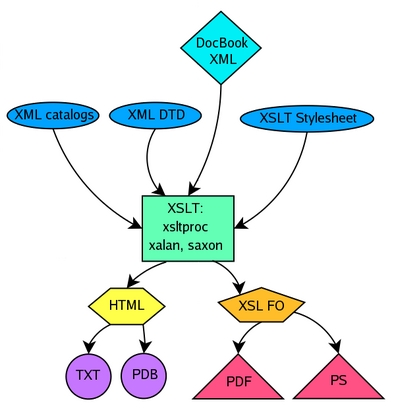
Figure 1. Simplified DocBook Publishing Model
DocBook XML source is fed to the XSLT processor together with the XML DTD, XML catalog and XSLT stylesheet. From this combination, the XSLT processor makes either HTML, which can be converted to TXT or PDB, or XSL-formatted objects, which can be converted to PDF or PS by using FOP, discussed below.
Functionality is provided by, among others, the xsltproc and FOP tools, part of the libxslt and FOP packages, respectively. The libxslt library that provides the xsltproc tool originally was developed as part of the GNOME project, but it operates independently of the GNOME desktop. FOP, the formatted objects processor, is a Java application that can generate, among other formats, PDF, PS, SVG and TXT files. FOP is part of the Apache XML Project. Other popular XSLT processors are Xalan, from the Apache XML project, and Saxon, by the author of the XSLT Reference.
For those who don't want to bother with the intricate and sometimes confusing procedures of XSLT and XSL-FO, other tools, such as docbook-utils and xmlto, are available. The xmlto command applies an XSL stylesheet to an XML document. Docbook-utils provide commands such as db2html, db2pdf and db2ps for easy conversion of XML. Additionally, you can use on-line validators such as Saqib Ali's HTML/XHTML/DocBook XML validator.
Below is a summary of the benefits of using xsltproc and fop tools instead of other tools:
xsltproc and fop are the latest generation of tools to use XSL as opposed to DSSSL (Document Style Semantics and Specification Language). Although the DSSSL-based tools also work with non-XML DocBook--for instance, the DocBook SGML specification--they are not 100% compatible with DocBook XML.
Conversions using the XSL method and xsltproc are more flexible. xsltproc is the fastest processor and is installed by default on many systems.
xsltproc is easier to customize that are other validation tools.
fop is the only freeware XSL-FO processor.
The stylesheets are independent of the XSL processor, and in turn, the XSL-FO processor is independent of the XSL processor.
If you are an author, it is okay to skim or skip the above technical explanations, although it helps if you have an idea about the process. If anything, it ensures that you don't need to bother with formatting and layout, because that all is done after you've written and sent the content.
What you should be concerned about as the author of technical documentation is restricted to things such as choosing the subject and scope of the document, developing a good outline or plan that guides you through the writing process, researching and checking the accuracy of your resources and statements and the like. For easy maintenance, it also might be a good idea to use a versioning system such as CVS. Versioning systems allow you to keep track of changes and to do a roll-back or restore in case of trouble. They also help if multiple people are working on the same set of files.
Once you know what to write and have installed all the tools and subsystems, the time has come to pour your content into an XML file. Whether you have chosen to use an XML editor or a plain-text editor, it is good to have an idea about the structure of an XML document and about the tags available in the standard DocBook vocabulary. Thus, if you want to represent an entity or object, such as a screenshot or terminal input, you know which tags to select or, at least, where to look for an overview of the possibilities. The full element reference can be consulted here. You also can check which tags are allowed to be included within other tags; parent tags are listed along with all possible child tags.
All DocBook XML files start with a declaration of the XML type being used, specifying the XML version, character encoding, document type and location of the DTD. This article you are reading now, for instance, begins with the following lines:
<?xml version="1.0" encoding="UTF-8"?>
<!DOCTYPE article PUBLIC "-//OASIS//DTD DocBook XML V4.1.2//EN"
"http://www.oasis-open.org/docbook/xml/4.1.2/docbookx.dtd">
Documents that contain only a few pages worth of data usually are put in an article structure using the <article> </article> tags around the text that follows the declaration. A simple sample article is represented by the following code:
Listing 1. Example of a Simple Article
<article>
  <articleinfo>
    <title>Example article</title>
    <author>
      <firstname>Machtelt</firstname>
      <surname>Garrels</surname>
    <affiliation>
      <orgname>CoreSequence.com</orgname>
      <address><email>spam.me@my domain</email></address>
    </affiliation>
    <pubdate>20040625</pubdate>
    <abstract>
      <para>This is an example article demonstrating simple DocBook XML
 tags.
      </para>
    </abstract>
  </articleinfo>

  <section><title>This is the first section</title>
    <para>It is a very short section containing only one paragraph, enclosed
by para tags. The section has a title enclosed by title tags and is in
turn enclosed by the section tags.</para>
  </section>

  <section><title>This is the second section</title>
    <para>It also has only one paragraph.</para>
  </section>
</article>
In Listing 1, the first line after the declaration contains the opening article tag. The line after that begins the information about the article, including the title, author, affiliation, publication date and abstract tags. The title tag can be given as a child to many other tags. Next comes the author information, which allows for specifications of name, e-mail address and company or organization. Apart from company or organization, you also can specify organizational divisions, job titles and so on. After the author information comes the publication date, a section that also can contain remarks, trademarks, links and more. Next comes the abstract, a short description of the document's content.
Once the introductory information is supplied and the document has moved on to the main content, divisions in the document can be marked by sections and subsections. Sections and subsections have titles and consist of paragraphs. Normal text usually is enclosed by paragraph tags.
Other types of content can be added using a variety of tags. The DocBook DTD consists of over 300 tags altogether. Among the more commonly used are:
itemizedlist or orderedlist parents and listitem children, used to create lists such as the one you currently are reading
figure and informalfigure parents with mediaobject, imageobject and textobject children, used to include graphics
screen and programlisting tags, used to display terminal output, eventually using another type or size of font in the converted files
command, option, parameter and application tags, used to specify the type of entity between these tags, which usually results in italic or bold rendering or a different size or type of font
qandaset parents with qandaentry, question and answer children, used in a FAQ list
sect1 parents with sect2, sect3 and sect4 children, used to specify subsections
table parent tags with row and entry children, used to specify table rows and columns
Examples of these tags and many more can be found in the DocBook Element Reference and in LDP Author Guide, which contains templates for different types of documents.
Some documents contain too much information for a single XML file. To create entire books or guides, it might be easier to split the content among multiple files. In that case, use book as the document type in the XML file declaration lines. Each of the subfiles making up the bigger document can be called on from a central file or included at any time in one of the other subfiles. However, there should be a central file that names the ENTITY. Entities can be public or local on your system. When writing your own documentation, the most common form is <!ENTITY entity_name SYSTEM "entity_xml_file.xml">.
In the central document or wherever you want to include the extra file, call on it using the &entity_name; statement. A common use of entities is in chapters of a book, where a central file declares the entities and holds the introductory content, while the chapters of the book are individual XML files.
The content of these individual files is formed using the same tags as used for shorter documentation; refer again to the DocBook Element Reference. You do not have to declare the document type again in each subfile. Instead, specify only the type of data; for instance, put content between <chapter> and </chapter> tags when writing a book or guide.
For larger documents, you may want several introductory sections, such as Feedback, Licensing Information and Acknowledgments. These sections usually are created with <section> tags. In the chapters, you are more likely to use <sect1>, <sect2>, <sect3> and <sect4> subsection tags. Books also should also contain a Table of Contents or TOC. The TOC can be generated automatically if you use the <toc> tag around the chapter headings or whatever other headings you want included in the table of contents. The DocBook DTD specifies various other tags for glossaries, indexes, cross-references and bibliographies.
As we explained before, printable files cannot be generated directly from the XML file. We need an intermediate step that generates formatted documents, in which page layout, typography, chapter and section numbering, cross references, icon graphics and a number of other things are specified.
These basic definitions for printed formats can be configured without having to customize the XSL stylesheets. Using xsltproc, specifications are entered on the command line or in a script. Here is an example command:
   xsltproc --stringparam paper.type A4 --stringparam fop.extentions 1
   /usr/share/sgml/docbook/xsl-stylesheets/fo/docbook.xslarticle.xml>
   article.fo
This command tells the processor to generate pages that fit on the standard A4 paper size, using a locally defined stylesheet on the source XML file. It also specifies that the output should be saved in an FO file.
Once we have the FO file, the next step is to transform the file into the desired format. This is done using the fop command:
fop -fo article.fo -pdf article.pdf
Conversion to HTML is somewhat more straightforward, because all that needs to be done, simply put, is to map XML tags to HTML tags. Here's a basic example command, again using xsltproc:
   xsltproc
   /usr/share/sgml/docbook/xsl-stylesheets-1.65.1-1/html/docbook.xsl
   article.xml > article.html
Of course, that would generate a rather ugly and unmanageable HTML file, so usually a Cascading Stylesheet or CSS is applied. This and the XSL stylesheet that is applied can make the same sources look totally different. An example of two different looks of the same document can be found here:
A sober style, adhering closely to the default.
A personalized CSS on top of a personalized XSL stylesheet.
Fine-tuning stylesheets is a meticulous work. Various individuals have made their styles publicly downloadable, however, so you can apply them to your own sources.
DocBook XML is accessible to use, especially for those who have a grasp of HTML already. It is a markup language developed for writing computer documentation. It thus provides hundreds of little ways to specify content. How this content is displayed later--what fonts and font sizes are used, what colors, how the layout is done--should not be the concern of the authors. Authors can write once and publish in any desired format, which saves time, effort and, to a lesser degree, disk space and other computing resources.
This brief article really is not enough space to demonstrate fully the capabilities of DocBook. For instance, we didn't even begin to discuss DocBook's special features, such as the use of cross references, glossaries, bibliographies, automatic index generation, language settings, support for mathematical expressions and so on. Therefore, I recommend the following resources for further reading:
DocBook XSL: The Complete Guide, by Bob Stayton, ISBN: 0-9741521-1-0, published by Sagehill Enterprises.
DocBook, The Definite Guide, by Norman Walsh, ISBN: 1-56592-580-7, published by O'Reilly.
"Take My Advice: Don't Learn XML", by Michael Smith, O'Reilly XML
