Programming Tools: Eric3
I am writing this column for a number of reasons. First, I enjoy programming, and I find writing about it to be a trip. Second, a lot of wonderful programming tools are out there, but many are lost in the noise of competing commercial and non-commercial products. So, part of my job with this column is to highlight some of the tools I think are worthwhile. I will try to be objective, but in the final analysis, it all is subjective. You are free to agree or disagree, as is your wont.
Also, I don't know everything. New tools are introduced and existing ones are changing and expanding all the time, faster than I can keep up. For these reasons, you can tell me what you think and suggest other tools that you have found particularly useful. You, reader, are invited to be a contributor to this column.
In the world of open source, a constant tension exists between commercial and non-commercial products. Because of the limited resources many open-source projects have, I plant to review them more often than commercial products. That said, I have no problem with commercial products as long as they do not lock users into their use. Thus, I happily will review a commercial compiler, say, because you always are free to compile your programs using other compilers. The principle here is as long as the input and output obey open standards, products can do any processing they want--you are not locked in. This conforms to Richard Stallman's definition of free software.
I have a method to my madness is writing this column. When discussing a tool, I will try to cover these points:
Why you should use this tool.
What the major features of this tool are.
What setup or installation you need for this tool.
What resources are required to install and use the tool.
A sample application, hopefully useful, to illustrate the use of the tool.
The pros and cons of the tool.
A chart comparing other similar tools, if appropriate and if I am aware of these other tools.
A semi-subjective rating of the tool.
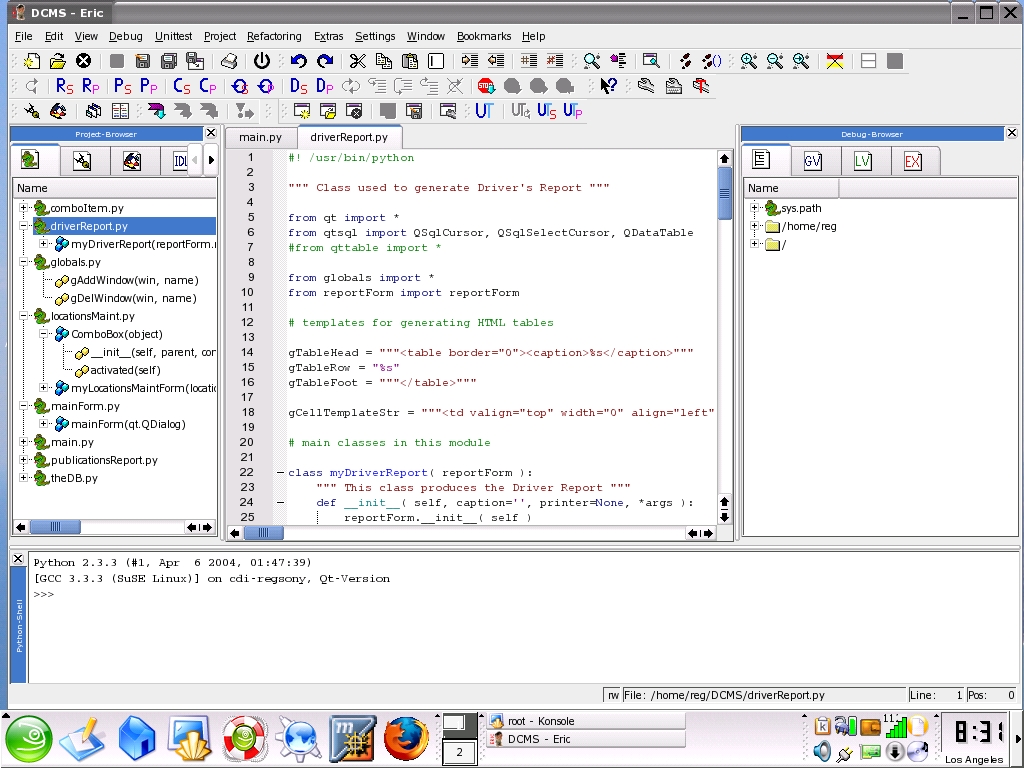
Being a Python developer is one of my many roles. I believe GUI-based IDEs are effective, so I have looked at a number of products, both commercial and open-source, that support Python. I chose the open-source eric3 IDE by Detlev Offenbach. It is written specifically for Python, and it uses PyQt bindings and the QScintilla editor widget. I find the eric3 IDE to be a delight. Figure 1 is a screenshot of a project showing eric3 version 4 beta, the version I currently use.
Here are some of the main features of eric3, the features I find most beneficial:
The main window layout includes tabview, listview and workspace, all of which are configurable.
The editor has syntax highlighting, code folding, auto indenting, brace highlighting, auto completion, calltips, bookmarks and macro recording capabilities.
An integrated project manager shows all the source files, forms, translations and any other file or directory that is part of the project, each displayed on its own tab. The source browser also has built-in class browsing capabilities.
An integrated, full-featured Python debugger that comes in three different flavors: the standard variant, a variant that doesn't need Qt and a variant to debug multithreaded applications. With the help of an additional debugger stub, it can be used to debug mod_python scripts as well.
An interactive Python shell has integrated debugger support and command-line completion.
An explorer window exists for walking through your directory structure with built-in class browsing capabilities for Python files.
Window panes display local and global variables in the current scope while debugging a program.
There are integrated source code wizards: a QRegExp wizard, a Python regexp wizard and several wizards for Qt dialogs.
The integrated refactoring browser uses the Bicycle Repair Man package.
Scripting capabilities are built into eric3.
There is an integrated interface to the Python Module unittest and code coverage analysis.
An integrated help viewer can display HTML help files, or you can choose to use Qt-Assistant to view help files.
You have the ability to start Qt-Designer and Qt-Linguist from within eric3.
You also can compile Qt-Designer forms to produce Qt-Linguist files and release them from within the IDE.
As you can see, eric3 has an impressive list of features, many of which I have omitted.
Installing eric3 is trivial, assuming you have a matching Qt installation already present. Download the eric3 tarball, untar it and then, as administrator, run python install.py. Otherwise, you need to install Qt, sip and PyQt first. The README file is quite clear on the steps you need to follow.
For me, installation was not an issue because I was using Qt as my GUI of choice. Both KDE and wxPython also are supported by eric3.
I develop under SuSE Linux 9.1. As such, I have access to a non-commercial Linux version of Qt 3.3.1. Currently, no non-commercial Windows version of Qt is available. In the case of Windows, licenses for Qt and QScintilla need to be obtained. The former comes from Trolltech. PyQt and QScintilla come from Riverbank Computing (see Resources).
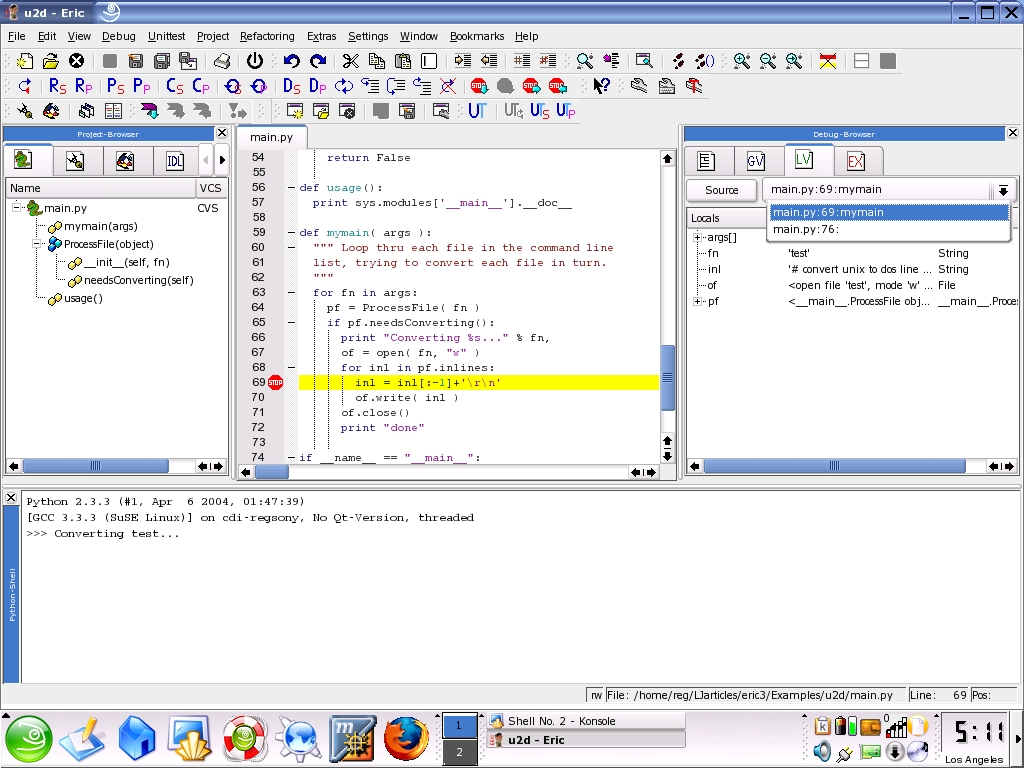
Using eric3 often is intuitive. I spend most of my time in the editor or debugging. See Figure 2 for a screenshot of a debugging session. It shows the class hierarchy, source code, stack trace and display of local variables. They all are readily available once you're using eric3.

Some of the pros for using eric3 are:
Intuitive interface for both development and debugging.
Effective debugger.
Good code editor.
Intuitive project manager.
Speed of operation is good; it comes up fast.
Some nice integrated tools, such as unittest and refactoring.
Cons for this product include:
The editor cannot find or replace within selected blocks of text when the selection is made by cursor movement.
Using the repository feature is confusing for someone who already has the source under some local version control.
More documentation is needed. For instance, no useful documentation is provided for using the Project menu options.
Currently, eric3 supports only Python. There are future plans to support Perl, though.
Installing eric3 for the first time would benefit greatly from a packaging systems similar to Red Hat's RPMs or Debian's DEBs.
The integrated debugger is the best feature. My most serious complaint is the editor not working with selected portions of text. I would give eric3 a suitability score of 4.2 out of 5, a rating of Very Good.
You can use two example utilities to check out eric3 for yourself. The utilities can be obtained as tarballs on the Linux Journal FTP site, listed in Resources below. u2d converts code from UNIX to DOS, and d2u converts from DOS to UNIX. Figure 3 shows u2d.py being debugged.