SpinRite 6.0 for Linux Users

July 19th, 2004 by Leon A. Goldstein in

SpinRite? What is a review of a Windows application doing on the Linux Journal Web site?

SpinRite 6.0, released in June 2004, is not a Windows program. In fact, SpinRite always has run in DOS. The Windows cachet comes from the previous releases, which work only on DOS FAT and FAT 32 partitions. What is new with SpinRite 6.0 is it now can test partitions and recover data on a Linux or multi-OS drive. It also can test a new, unformatted drive.

SpinRite 6.0 now runs independently of any installed operating system and associated filesystem and can work on all Windows formats, DOS FAT and Linux. Even Macintosh owners can use it, although they need to cable the Mac drive to a PC.

Long-time SpinRite users need no introduction to the product. SpinRite is a utility for verifying, maintaining or repairing hard drives. Although Linux utilities such as chkdsk look at file integrity, SpinRite tests magnetic media for data integrity and can warn of impending failure. If SpinRite is used after data is lost, it may be able to recover data by coercing unreadable bits back to consciousness. Other handy uses are identifying partitions on a multiple OS drive and benchmarking.

What distinguishes SpinRite from some other hard-drive tools is it works non-destructively. This is particularly important for newcomers to SpinRite; unfamiliarity with the mouse-less user interface cannot cause damage to data. According to SpinRite's literature: "it first reads the data out of a region, then exercises that region with patterns of data that SpinRite has determined are the most difficult for the drive to read and write. In this way, any weak and failing areas within the region are located and removed from use while none of the drive's original data is being stored there. Only after the region has been made absolutely safe, will the drive's original data be restored to that area."

How to Get It

SpinRite 6.0 is available only by download from the SpinRite Web site. The cost ranges from $89 for a first time buyer to $29 for SpinRite 5.0 owners. Owners of intermediate releases also receive a discounted price: $69 for owners of the original SpinRite or SpinRite II, $49 for owners of SpinRite 3.1 or 4.0. You need the serial number from your original SpinRite floppy to qualify.

How to Install It

The download is a small (170 KB) Windows executable. This is a setup utility. The utility can create a bootable floppy, CD ISO or install SpinRite directly on removable media. The executable can run under WINE or CrossOver Office. I was able to run it and create a burnable ISO with Libranet 2.8.1 and its bundled WINE version.
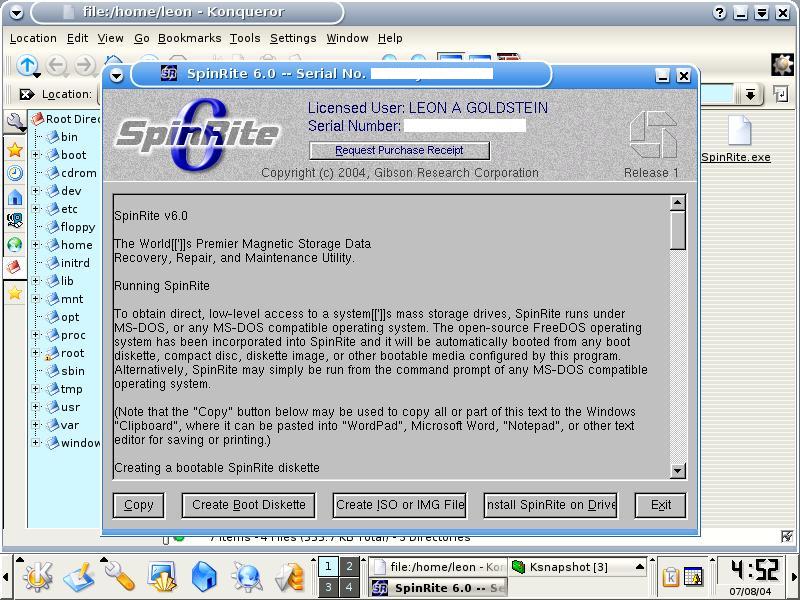
Figure 1. Starting with SpinRite

The ISO already is bootable; it includes FreeDOS. If you use XCDRoast, simply copy the ISO to your image directory and then select it and burn the track.

I had a much harder time creating a bootable floppy. Running the setup under WINE, the utility kept complaining that the floppies were defective. Trying again in Windows 98, it finally made a floppy but only after rejecting a half-dozen other diskettes. The installer claims that it does a media test of the floppy. In fairness, I have been experiencing problems with recently bought floppies. Quality control does not seem to be there any more. The bootable CD is the way to go, however, and making one in a pure Linux environment is fast and easy. This, of course, depends on whether your particular WINE setup is up to it. YMMV.
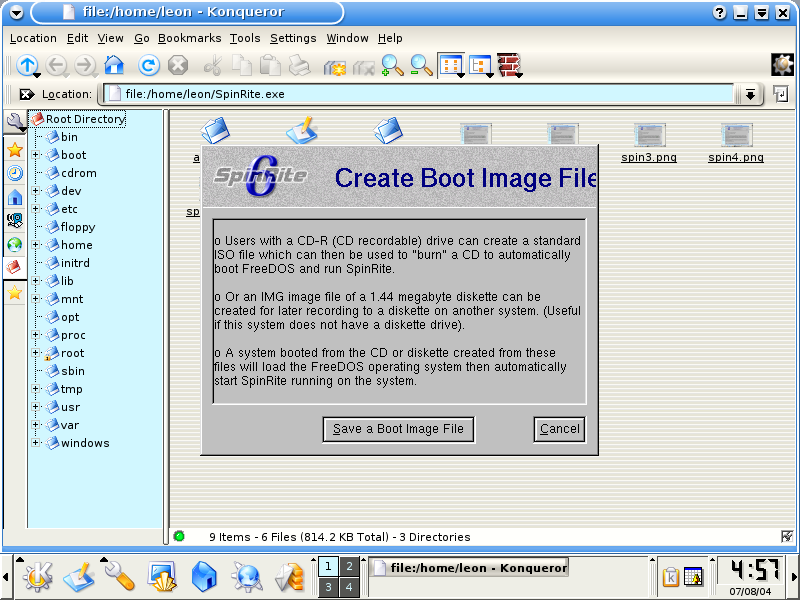
Figure 2. Creating the Boot Image

How to Use It

SpinRite needs direct control of the system, so it must boot to a clean configuration. SpinRite installs a copy of FreeDOS on the bootable media and works without resorting to any memory managers or device drivers. Insert either the bootable floppy or the CD, and you are greeted by a splash screen.

The splash screen switches to a nostalgic DOS title screen, bearing the owner's name. Press any other key--other than Esc, which exits out of the program--and the copyright and license screen appears. Here the owner's license key is displayed. Another keystroke opens another screen that asks if you are running SpinRite 6.0 for data recovery or drive maintenance. It describes two of the five operational levels, level 2 for data recovery or level 4 for maintenance. You can select any of the other operating levels; instructions are displayed.

You can begin running SpinRite 6.0 immediately and go to the Main Menu. The options are:

1. Select Drives & Partitions 2. View or Change Settings 3. Perform Drive Benchmarks 4. Exit

If you select 1, two windows are displayed; the left side lists all of the partitions and free space ("gaps"). The right window displays system information and status; you can toggle through BIOS info, Hardware, and S.M.A.R.T. Stat for details.

Getting back to the left window, scroll down to the partition(s) you want to examine and select it(them) by pressing the space bar. Of course, you can select the entire drive, or you can test a floppy.

Next, go to 2. View or Change Settings and change the operational level of testing if you want. You can select logging either to a floppy or a connected printer. Other settings concern the log format and content. The five operational levels, in order of increasing intensity and time required, are:

1. Examine surfaces. This is the fastest test and is useful for checking out a new hard drive if time is short. 2. Recover unreadable data. 3. Refresh the surface. 4. Locate surface defects. 5. Restore good sectors.
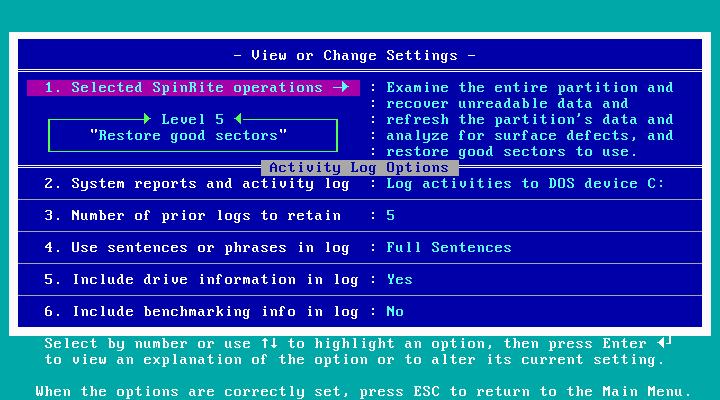
Figure 3. View or Change Settings

These tests are cumulative; for example, level 5 includes all of the tests, level 4 includes level 1 through 3 tests and so on. For a more detailed description of the various SpinRite tests and the technology, please visit the SpinRite Web site.

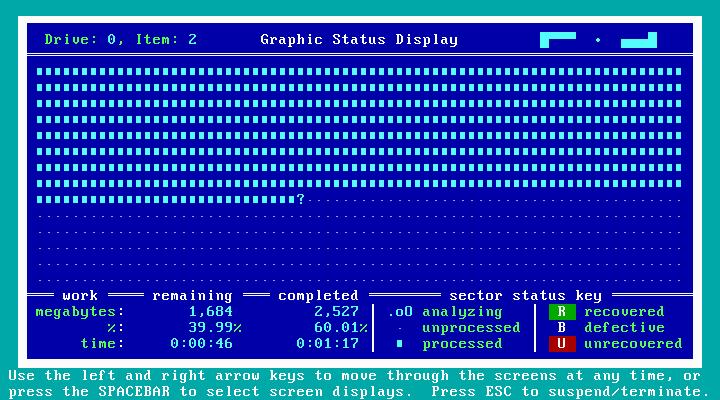
While SpinRite 6.0 is running, you can toggle through seven displays:

1. Graphic Status Display: shows the progress and condition of the medium under test. Any bad sectors detected are coded. FAT partitions display used and unused sectors; NTFS and Linux partitions do not distinguish between used and unused space, however.

Figure 4. Graphic Status Display

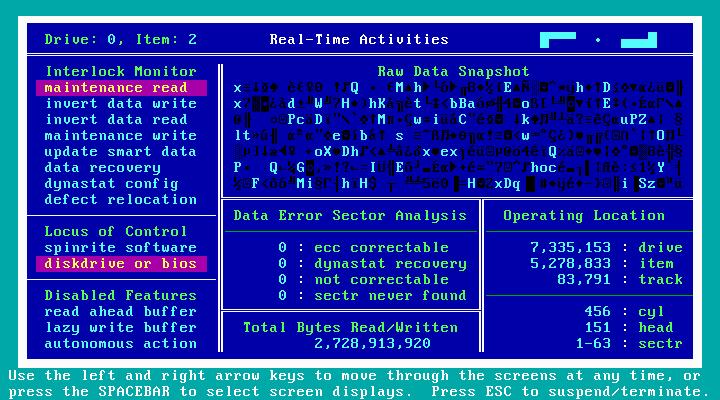
2. Real-Time Activities

Figure 5. Real-Time Activities

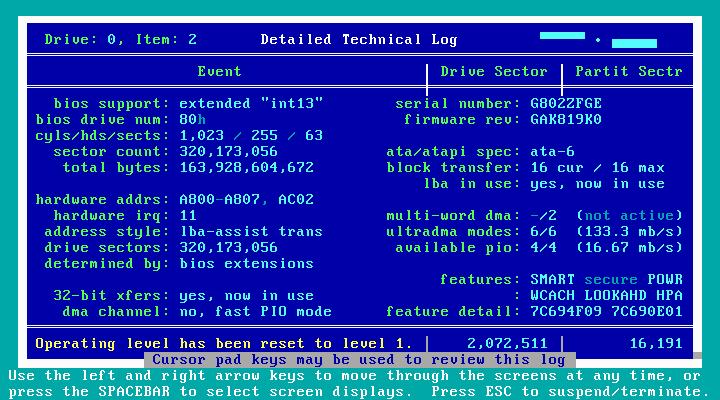
3. Detailed Technical Log: accumulates all of the results and can be copied either to a floppy or to an on-line printer. SpinRite is DOS, so don't expect it to work with a Winprinter.

Figure 6. Technical Log

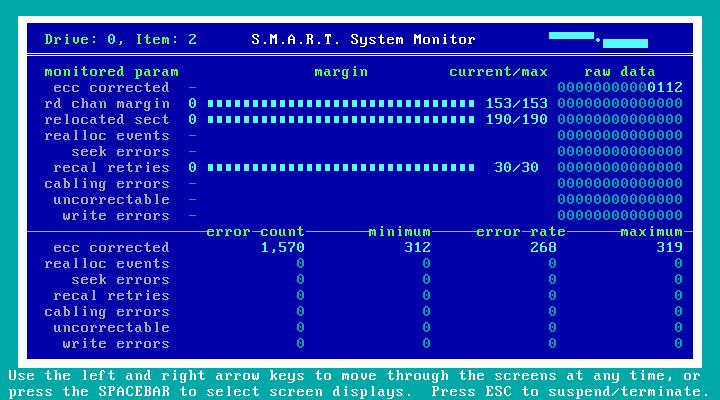
4. S.M.A.R.T. System Monitor: includes temperature monitoring for those drives that support it. Not all drives I tested reported temperatures. My Seagate 80 GB Barracuda reported temperature but not my Maxtor 20 GB or Western Digital 80 GB "Jumbo" drives. I performed all of the tests with ATA 100 hard drives.

Figure 7. S.M.A.R.T. System Monitor

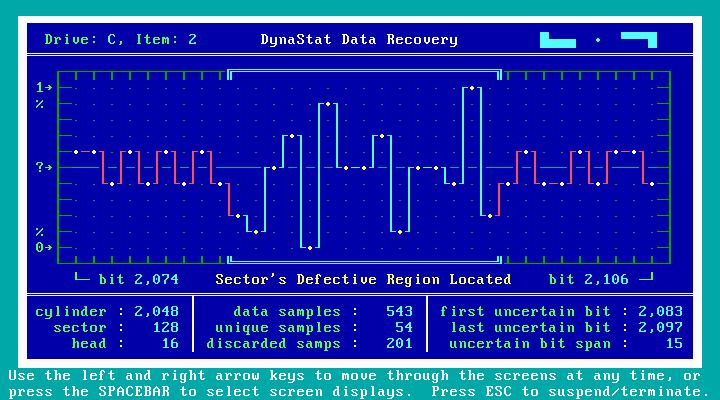
5. DynaStat Data Recovery: the jewel in the crown. If SpinRite detects possible data in a defective location, DynaStat goes to work to coax the data, bit by bit, out of hiding.

Figure 8. DynaStat Data Recovery

6. Change Operational Level: here you can change from among the five test levels at any time.

7. Screen Blanker: a small window dances slowly around the screen that indicates SpinRite 6.0 is running and lists the completion percentage of the partition under scrutiny.
You can suspend or cancel any operation and resume later from where you left off. SpinRite 6.0 reports progress as a percentage with four decimal places; you can note exactly where you left off and resume later. Because drives are big and getting bigger, and because the time to run SpinRite 6.0 can be considerable, this feature lets you examine the drive progressively, over several sessions, if necessary.

How long SpinRite needs to perform its tests depends on your hardware. From my tests with various computers and hard drives, a level-2 test run on a 10 GB partition can take from about four minutes to over 30 minutes. What determines how fast the test runs depends on, in descending order of influence: the motherboard, BIOS settings and interface; the hard drive; and the CPU. For example, my Compaq 5151 Presario, upbrained from a K6-2 350MHz to K6-III+ overclocked to 500MHz, ran the tests faster than my Celeron 1GHz. The Presario has an add-on Promise ATA100 PCI interface card, while the Celeron box supports only ATA66. The hard drives in both are of equivalent performance. At level-4 testing, CPU power becomes more important, because more SpinRite operations are in play. My Presario with the 500MHz K6-III+ needs 59 minutes to complete a level-4 test on a 10GB partition, while my P4 2.2GHz system can do the same job in 18 minutes.

SpinRite 6.0 is a new product, so new in fact that there is no documentation for it yet. Check the SpinRite Web site for further developments. Because SpinRite 6.0 is an evolutionary development, previous users should feel right at home. For newcomers, the extensive downloadable documentation for the previous release will provide useful help until the new user's guide is posted. As mentioned earlier, SpinRite is simple to use, and it has no hidden barbs or traps.

From the SpinRite newsgroup and confirmed in a private e-mail from Steve Gibson, any future dot updates to SpinRite 6.0 will be available to owners at no additional cost.

Spending $89 for a measly 170KB of code may seem extravagant, but you need to lose data only one time to realize the real cost. For previous SpinRite owners, the update is a double good deal: a SpinRite you can use on your Linux system with no learning curve and at a prorated discount to boot.

__________________________

Comment viewing options

Select your preferred way to display the comments and click "Save settings" to activate your changes.

SpinRite

On March 28th, 2008 mikusek (not verified) says:

I am very low level IT and I have seen SpinRite recover Laptop HDDs that were considered hopeless. It works, I am pleased that Gibson Research created a product that WORKS, I am more than satisfied! The first two "hopeless" HDDs recovered more than paid for SpinRite. NO complaints from this direction.

Wonderful Article

On August 14th, 2006 Asma (not verified) says:

You've explained everything here just wonderfully ... specially about the operations part ...!

Thanks!!

Spinrite foolishly depends on BIOS

On June 27th, 2006 Joshua Rodman (not verified) says:

The creaking nature of an assembly-written dos-only program is showing. I commend the entrepreneurial effort to create this special floppy-and-cdrom making package to run the old dos environment, but the approach has serious limitations.

I booted SpinRite 6 from cdrom only to have it tell me that the hard drive which is having problems cannot be addressed in its entirety by the BIOS, and therefore cannot be salvaged. (This disk has 22 specific unreadable sectors and they're in the bios-visible window.)

My system uses the entirety of this disk without a problem because my operating system does not rely on the BIOS for disk access. There are countless other computers where this will be a limitation. The insult to injury issue is that the GRC website does not warn about this issue in the FAQ, and thus it is likely that you will discover the problem post-purchase, as Linux has little care for BIOS disk access. I suspect they may be good gents and refund people caught out, but it is still irritating.

If this technology is worth using, it is worth packaging into a more modern form.

SpinRite and the BIOS

On July 1st, 2006 Steve Gibson (not verified) says:

For what it's worth ...

I understand what this poster is saying, and he's not entirely wrong, but neither are things as hopeless as he implies. I dislike SpinRite v6.0's continuing use of the motherboard's BIOS, and changing that is the next thing I'm going to do with SpinRite (which will be a free upgrade to all v6.0 owners). But as you can see from browsing the recent unsolicited user feedback we continually receive (http://spinrite.info/), this in no way prevents people from using SpinRite right now, today.

The only time someone would encounter a problem would be running a drive larger than 137 gigabytes on an old motherboard whose BIOS was limited to "28-bit LBA" access. If your BIOS shows your drive's full size, SpinRite will see it too and run perfectly.

The new standard is "48-bit LBA" which supports ridiculously large drives and many older motherboards can have their BIOS "flashed" to update them to full 48-bit LBA capability.

So the only place where SpinRite's current use of the BIOS causes trouble is when a drive larger than 137 gigabytes is used on a very old 28-bit LBA limited motherboard for which no BIOS upgrade is available. Users who have hit this trouble, and who need SpinRite's magic, typically put their troubled drive into a more recent motherbaord and turn SpinRite loose for data recovery and repair. But I dislike requiring that, so I'm going to fix it next. (I don't know when, but, as I said earlier, it won't cost anyone anything.)

Steve Gibson,
SpinRite's proud father. :)

SpinRite and the BIOS

On July 22nd, 2006 Richard V. Hale Jr (not verified) says:

Using the BIOS, not having the best Packaging or Interface has not appeared to be much of a limitation (up to this point) for spinrite (which besides best of class does not seem to have any competition).

Drive Reliability seems to follow an upside down bathtub curve with
bad blocks most likely to occur in the first six months and/or after four years. This assumes heat is kept to a minimum and carefully monitored with smart (sustained Drive to Dive Cloning can make toast in the morning - not a good thing for reliability without lots of fans).

Spinrite needs complete control over the machine and does seem to be CPU sensitive (a 2Ghz P4 will complete in half the time of a 1Ghz Machine). Running at night (or dedicating a machine to spinrite on
an as needed basis) seems to make sense.

Whats amazing is when a disk gone wild (with bad blocks) is reformatted and small partitions are created intentionally over the bad block problem areas and Spinrite is run on those bad partitions (level 4 or higher) the bad blocks disappear, never to be seen again (with very little space given up) while IO takes less time.

Perhaps of more significance is how spinrite magically recovers partition (and boot block) data when chkdsk fails. That it can restore good data from surface media going bad is a life saver.

So instead of focusing on packaging (or perceived design weakness) it is imperative that spinrite's most critical attributes continue to take priority *IF* the best possible drive reliability is the customer's most important goal.

For example, running spinrite continuously can overheat a drive (laptops are big toasters without fans) and spinrite will pause giving the hardware a chance to cool down (and perhaps avoid damaging the media). It would be nice if spinrite were to continue once the temperature has cooled down below and operator specified threshold (this be a not be an issue in the newer version and might even be configurable now, this is just to illustrate a point).

The use of Spinrite allows drives to operate at a much higher level of reliability than would otherwise be possible (even with new drives). Given the ever present pressure on drive OEMs to slash pricing keeping spinrite focused on the game ball would appear to be prudent.

Hold a good deal development bandwidth in reserve for critical operations (perhaps super cluster drive cycling and/or multi-core-cpu io issues).

sectors, tracks and clusters! oh my!

On June 4th, 2006 Anthony (not verified) says:

SpinRite is not just for data recovery, in fact, data recovery should always be your secondary use for this product. Any sysadmin or software engineer worth their salt knows the importance of backing up data - no system is completely fool-proof and the more redundancy, the better.

From personal experience, my recommendations in decreasing order of importance:

1. Incremental backups every day or second day (depending on data dynamics)

2. RAID-1 configuration for data redundancy

3. Weekly or fortnightly full backups or system imaging onto dedicate retained storage media

4. Full backup media stored and maintained off-site

5. Mirroring of data stores (such as databases) at a regular interval within the day (for example, updates made hourly, or every three hours)

Even with these full 5 steps data can be lost. The best you may be able to hope for is to roll back to the last update. SpinRite will help you recover data from failed media - including your off-site backups which may suffer degradation due to storage conditions and media life limitations. It will help recover data in the advent of a RAID failure. For these reasons alone it is a great purchase - however, the primary use for SpinRite is preventative maintenance.

Run regularly, SpinRite WILL keep your drives not just in good condition, but excellent condition. The drives themselves will operate faster and more reliably with bad sectors blocked out and surface flux enhancement. SpinRite even updates the drives internal SMART tables, keeping the drive technology in-sync with the changes being made. Any time a sector is read that contains areas where the flux strength is waning the operating system/drive BIOS resort to multiple reads of the same location. On an aging drive, or one that experiences heavy activity, this loss of clarity can perceptibly slow drive operation. IMHO this is the preeminent use for SpinRite! By aligning each sector optimally, even prior to failure or corruption, SpinRite keeps your drives operating at their best - RAID or not.

Even if you are never faced with a data recovery situation that requires SpinRites unique talents, the ability to optimize and maintain drive health is worth the asking price alone!

Cheers!

Anthony

Anthony

My favourite Linux Resource

On September 8th, 2005 Anonymous (not verified) says:

This magazine helped me a lot in understanding the technical detalis which a professional only knows.
Thank to you.

File Recovery Software
Recupero di Dati
Datenrettungs Software

Anyone who's used Spinrite to recover faulty drives is very ha

On June 14th, 2005 J_A_F (not verified) says:

To those that haven't used it.

There are many peole out there who have never used the products they ridicule. I used to be a computer support engineer, (many years ago) and I first came across Spinrite in the late 80s early 90s, (version one I think) it was so good I immediately purchased [at that time] the latest product version three.

I have used several versions since and they have NEVER failed to recover data from drives ALL other software reported back were effectively dead. This includes many of the utilities supplied by the manufacturers.

Personally, I believe that all hard drives should be supplied with a copy, so that if required the user could then recover otherwise 'failing' drives. I still have many drives [total of about approx' 20] that were all seated in, using Spinrite, and continue to work perfectly.

The only drive that I had that had to be returned to the manufacturer, was one I had not had the time to do it with.

Keep going Steve, I don't want to know the atomic, or nano levels of what your product does, I just want to use it, and keep on using it to continue to have healthy hard drives, ever since my first purchase.

It is simple to use and does what Steve say it does, it works (unlike lots of other software about) and that is all I care about! I am now retired, and I continue to use it for my own hard drives and systems.

Cheers
John

S.M.A.R.T test tools under Linux

On April 29th, 2005 Anonymous (not verified) says:

For those who like the idea of what Spinrite is written to achieve, I'd suggest also having a read of the following LJ article, which describes how to monitor and test HDDs using their built in Self-Monitoring, Analysis and Reporting Technology (SMART) system.

Monitoring Hard Disks with SMART

I think it would be interesting to know if Spinrite interacts with the HDD hardware at a similar level and capability that S.M.A.R.T oriented utilties such as smartmontools do.

Regarding this specific text in the article


These self-tests do not interfere with the normal functioning of the disk, so the commands may be used for mounted disks on a running system. On our computing cluster nodes, a long self-test is run with a cron job early every Sunday morning. The entries in Listing 5 all are self-tests that completed without errors; the LifeTime column shows the power-on age of the disk when the self-test was run. If a self-test finds an error, the Logical Block Address (LBA) shows where the error occurred on the disk. The Remaining column shows the percentage of the self-test remaining when the error was found. If you suspect that something is wrong with a disk, I strongly recommend running a long self-test to look for problems.

it is now possible to have the smart monitoring daemon, smartd, execute those tests periodically itself, rather than creating cron job that calls smartctl. I use this facility to execute a short test on my HDDs daily, and a long test weekly.

For reference, here are my HDD lines from my /etc/smartd.conf file :


/dev/hda -a -o on -S on -s (S/../.././02|L/../../6/03) -I 7
/dev/hdc -a -o on -S on -s (S/../.././02|L/../../6/03) -I 7

Real Time Display

On April 10th, 2008 Anonymous (not verified) says:

What use is the real time display and why does it not display in some useful format like hexadecimal? Hexdump is a better tool to agnostically look at a device from end to end.

SMART not so smart?

On September 19th, 2007 EricE (not verified) says:

SMART just tells you what the drives built in diagnostics are up to.

I can guarantee you the drives built in diagnostics are no where near as thorough as Spinrite's. Nor are they as smart. I've had Spinrite return "bad" sectors to use, and had no problems with the drive afterwards.

As others have pointed out, it's not magic - just some very complex and clever algorithms implemented very well in a tiny program that just works. As I pointed out in another post, the main reason hard drive firmware isn't as good as Spinrite is practical - speed. It would slow data transfers to a crawl.

For $80 it's a steal, even if you do have to boot to DOS to use it (boot from CD and go - really not that big of a deal).

Hard Drive Formats & Architecture Info

On December 4th, 2004 Anonymous (not verified) says:

1: Does SpinRite work with SATA / SCSI hard drives and,

2: Given that it is written in assembly, is their any plans to make a 64 bit version (for systems that aren't backwards compatible with 32 bit processors) - a 64 bit same version number free upgrade for previous buyers?. Or something like that.

(sorry if stupid questions, but I can't find answer)

Tk

SpinRite was designed for HDD

On July 4th, 2005 DM (not verified) says:

SpinRite was designed for HDD's - NOT processors, so your second question is irrelevant in terms of 64 bit systems. A HDD is a HDD < . >

Spinrite at the moment is 32

On September 6th, 2005 Anonymous (not verified) says:

Spinrite at the moment is 32 bit if I am not mistaken, and processors that cannot run native 32 bit code would not be able to use spinrite, which is what question 2 related to.

U R Correct Sir !!!

On November 24th, 2006 Anonymous (not verified) says:

U R Correct Sir !!! (SpinRite is a 32Bit Intel Hardware - SOFTWARE PROGRAM) ... OF COURSE IT WONT WORK ON 64bit Native CPUs (This Guy talking about H D D's IS MY IDIOT OF MONTH !!! ( It is Truly Scary that He thinks there is no difference between HDD's an CPU's )

Yes - it runs on x86/x64 machines

On April 29th, 2007 Anonymous (not verified) says:

The program is a 32-bit x86 binary and so will run on any system that supports that. This includes AMD64 and Intel Core2 systems as they both can run 32-bit apps

Many of the newer motherboard

On July 4th, 2005 DM (not verified) says:

Many of the newer motherboards provide a few adjustments in the BIOS to bypass the need for SATA drivers. This will often times allow OS installs without drivers and may or may not allow you to run SpinRite on a SATA drive. Logically it should work, but haven't tried it yet.

Re: SpinRite 6.0 for Linux Users

On August 1st, 2004 Anonymous says:

I am glad that this program is available, but I just bought two 120 GB HDs for $110, which are going to be in Raid 1. If one fails, the other oen goes on. I additionally make offsite backups to DVD, which is now cheap and fast enough.

I think this is the best recovery utility you can have. It's the most fool proof and fastest. It takes me 20 minutes to reinstall Mandrake and 10 minutes to get all my data back.

I would rather have redundancy than a program to help recover my data when my drive fails.

Never-fail versus "get the backup".

On April 11th, 2005 Michael Walsh (not verified) says:

>I would rather have redundancy than a program
>to help recover my data when my drive fails.

Reading all the materials, it's clear that Spinright is for those who would rather have no failures in the first place, and therefor not need to go get the back ups.

As nicely as I can say it, it sounds like you only read about (or concentrated on) Level 2 which resurrects failed drives and, right, a good back-up is better. But there are three more levels in Spinrite which make your back up a redundancy of a redundancy and although you may continue to make backups etc, using Sprinrite level 5 pretty much makes it so you'll never make use of those backups -- since the drive will be "repaired" by Spinrite BEFORE failure. That is to say, the failure won't happen and you won't need your backup. Whether you make backups or not.

>which are going to be in Raid 1. If one fails, the other oen goes
>on. I additionally make offsite backups to DVD, which is now
>cheap and fast enough.
>
>I think this is the best recovery utility you can have. It's
>the most fool proof and fastest. It takes me 20 minutes to
>reinstall Mandrake and 10 minutes to get all my data back.

Quesion: What are you going to re-install that data TO? The dead hardrive? A new one?
This might be a good time to run Spinright on the "bad" drive and if Spinrite sez it's ok, put it back online. Most often it was one or two 'bad' sectors which are now blocked out.
Of course, you could buy a new drive -- and maybe go through the whole thing again. :-)

OH. One thing about Raid; -- it gives you twice as many sectors to go "bad". *grin* Sounds like the more RAID you have the more you'll appreciate Spinrite!

Peace!

Michael

Spinrite which make your back

On August 20th, 2005 Anonymous (not verified) says:

Spinrite which make your back up a redundancy of a redundancy and although you may continue to make backups etc, using Sprinrite level 5 pretty much makes it so you'll never make use of those backups -- since the drive will be "repaired" by Spinrite BEFORE failure. That is to say, the failure won't happen and you won't need your backup. Whether you make backups or not.

There are still moving parts within the harddrive that can fail at any time, heads can crash on the platters, components can fry, which even Sprinrite cannot fix. So to be safe backups are a must!

Backups still necessary

On February 3rd, 2006 DunxD (not verified) says:

This is rather a dangerous suggestion. As a user of SpinRite, I HAVE found hard-drives that it could not recover data from, and even those that I have managed to recover data from have taken several DAYS of running SpinRite - it certainly isn't faster than installing Windows on a new hard drive then restoring from backup.

To make a long story short, SpinRite offers NO guarantees of recovery and, depending on how much you value your time, it may turn out to be more cost effective to buy a new harddrive and restore. If you value your data you might buy both. Nothing beats backing up!

Re: SpinRite 6.0 for Linux Users

On July 23rd, 2004 Anonymous says:

And how this will go work with Server/Storage configured in RAID ( array and containers ) mode ?
Anybody already test make this ?

MhM (Marcio " Head " Maisonette)

Regards,

Re: SpinRite 6.0 for Linux Users

On July 23rd, 2004 Anonymous says:

And how this will go work with configured in RAID ( array and containers ) mode ?
Anybody already test make this ?

MhM

Regards,

Re: SpinRite 6.0 for Linux Users

On July 23rd, 2004 Anonymous says:

SpinRite 6.0 runs in DOS; if your RAID drives can be seen by DOS, then SpinRite can see them. If you need a driver, you will need to find out if your RAID controller provides a DOS device driver. If so, you can add it to the config.sys file on the SpinRite boot floppy.

Leon A. Goldstein

Re: SpinRite 6.0 for Linux Users

On July 26th, 2004 Anonymous says:

Because Spinrite operates at the physical level of the disks you are not going to want to run this against an array. It would be recommended to run spinrite against each individual drive before you build the array.

There are comments from Steve Gibson about this issue in his news groups.

Re: SpinRite 6.0 for Linux Users

On July 22nd, 2004 Anonymous says:

One comment.

The downloaded file from grc.com is the actual spinrite application not a setup file. When it is run in windows it offers to create the iso's/floppy. If you copied that same file to a currently working DOS boot floopy it would run in DOS mode and could scan your hard drive.

Ciao

Which Linux file systems?

On July 21st, 2004 Anonymous says:

It wasn't clear to me from the article which Linux file systems are supported. ext2, ext3, reiserfs, etc? Or is this something somehow filesystem independent?

Re: Which Linux file systems?

On July 21st, 2004 Anonymous says:

SpinRite 6.0 does not "support" any file system per se. It does not depend on any file system. It operates at the bit/byte level when it does its tests and recovery.

My tests were on Linux partitions with Reiser FS, and one partition with ext2. As I mention in my report, SpinRite 6.0 will display used sectors (in contrast to unused space) on DOS and FAT 32 partitions when testing, but not NTFS or Linux. Other than that, there is no difference in the way it works on a drive with various OS's installed.

Leon A. Goldstein

Re: Which Linux file systems?

On October 11th, 2004 Anonymous says:

Disclaimer: I'm anonymous, but I'm not a flamester -- I'm putting forth a factual observation and a request for an explanation.
-----
What always struck me as, um, peculiar, is that SR claims to be "donw to the bits-and-bytes level", yet somehow is constrained by partitions and filesystems.
I don't see how that could make sense -- if you really are looking at individual bits, a one is a one regardless of what (type of) partition it is in, or what file(system) it may be part of.

If you can explain this to me, I'd sure appreciate it.

Why SpinRite must understand your file system

On January 20th, 2006 demerson3 (not verified) says:

I think this is a good question, and that it deserves a reasonable and concise answer here, which many people can understand.

You're absolutely right -- a one is a one, no matter what partition or file system. If your hard drive is in good shape, and will read and write to any sector without error, then the file system type should be irrelevant.

However, the file system type becomes extremely relevant if there's an error. Is that questionable bit a part of a text file, or is it something else? It could be part of a file attribute, permissions or ownership information, or a timestamp; or in the MBR, partition information! It could be part of a directory listing, describing the locations of other files, or quite a number of other things.

Since SpinRite DOES understand these different filesystems, it is able to move files (or fragments of files) within the filesystem, in case bad sectors are found that should be freed from use.

Regarding the flame war... one guy says one mean thing, criticizing linux journal and steve gibson without touching on the merits or demerits of spinrite, and it ruffles everyone's feathers... why? Let's get back on topic, eh? We're discussing SpinRite here, not Gibson as a person, and not system security. Just hard drive recovery -- let's drop the other topics.

Hope the semi-technical explanation was helpful...

Why do you say SR is constrained by file systems?

On April 22nd, 2005 Anonymous (not verified) says:

Not trying to be a prick, but if you have to answer the question, you probably aren't going to understand the answer. the best place for you to start, if you really want to know, is with the ATA/ATAPI specification. If you learn something about the host interface for AT attachment devices, then do some investigation about how an OS manages the disk, you'll have your answer.

So, Spinwrite is going to rec

On August 22nd, 2005 Anonymous (not verified) says:

So, Spinwrite is going to recover anything that depends on file system information except for fat32 partitions? It will take make the data on the disk nice and clean, fixup bad sectors, etc. correct?

Having Spinrite is useful to make sure your surfaces are clean, but if you the disk is in good shape but you have reformatted the drive and you want to recover your data you need another tool. Is this correct?

Not quite...

On September 19th, 2007 EricE (not verified) says:

Spinrite interacts with the drives built in error correcting features. This is what makes it partition/file system agnostic.

When it finds bad blocks, it moves the data and marks the bad blocks using the same mechanisms that the drive firmware uses when it detects bad data.

The OS asks for sector 12, for example - and if sector 12 is bad and the data that was in it has been moved to sector 23,495 the drive handles the request at a hardware level and hands the contents of sector 23,495 to the OS as fulfillment of the request for sector 12. This happens in the controller on the hard drive itself - if you had an analyzer on the IDE or SATA cable between the drive and the computer, you would see the drive respond with the equivalent of "here's the contents of sector 12" even though the drive is physically storing that data on sector 23,495. It's done at an extremely low level inside the hard drive itself.

Yes, drives have error correcting built in - but Spinrite is much more thorough then any drives built in error correcting diagnostics. It's not necessarily because Steve Gibson is a genius (although I do think he is brilliant) and hard drive makers are stupid (sometimes I wonder) it's just that people wouldn't tolerate the speed delays that the intensive algorithm's that Spinrite uses in the day to day usage of their drives. People want their hard drives to be speedy :)

I've had Spinrite recover Tivo hard drives with no problem. Tivo uses a completely proprietary file system (MFS) to store recorded shows on. Spinrite handles Tivo drives with *no* problems, many times (before I wised up and quit buying maxtor and western digital hard drives for my Tivo's) allowing me to copy data of the drives before they totally died.

I've been using Spinrite since the MFM PC XT and PC AT days. It's an indispensable tool, and this article is a good reminder that it does far more then data recovery - I think I will run it on my drives tonight for some good preventative maintenance.

Thanks for an awesome product, Steve!

What a nice advertisement for a shyster

On July 20th, 2004 Anonymous says:

I'd expect more than some cheap advertisement crap posing as an article from a site like Linux Journal.

Steve Gibson's nothing more than a marketing buffoon. Claims he's made about computer security and what he's "invented" have been shot down time and time again by a host of knowledgable people. I'd no more trust him to "save my hard drive" than I would to have him "probe my ports".
He's a snakeoil salesman at best.
http://grcsucks.com/

knowledgable

On July 11th, 2005 Anonymous (not verified) says:

"knowledgable"

(SP)

I think that S-P-E-L-L-S to out, don't you?

Steve Gibson is not a sheiste

On June 2nd, 2005 Anonymous (not verified) says:

Steve Gibson is not a sheister by any reasonable definition of the word. The guy who's bashing him on here is one of those guys who likes easy answers to everything. It's not hard to tell.

Some people have a problem with Steve because he's very smart and they disagree with him (and generally, are less smart). People usually disagree with Steve's definitions of what represents "secure" versus "insecure." He has VERY high standards for what "secure" means, partly because as a smart low-level programmer he knows how to exploit security holes that even most hackers can't. Most of the people who complain about Steve are high-level people who don't see the holes he can see. Still, they have a point that exploiting the holes Steve can see is generally not easy. (Thus, you could say some of his advice may be slightly over-the-top for the average user.)

He likes Zone Alarm as a secure, easy-to-use product. So what? That's a pretty common sentiment. He's tested a bunch of these things and he's right that some of the products have big holes (or at least they used to -- most are a bit better now). I remember him writing at one point that he recommended Zone Alarm for the average user, but that he himself used TINY Firewall because it allowed him to configure it to the tee. I doubt he would have said that if he was just doing a sales pitch routine.

The bottom line is that whoever this poster is who's bashing Steve, he's got a flimsy grasp of the facts about both computer engineering and Steve Gibson, so feel free to ignore him.

p.s. Saying that assembly language isn't useful or in demand is pretty funny. It's not that it isn't needed. It's that few people can do it worth a darn, so most employers know better than to request it. (It's also overkill for certain applications; it would be impractical to write Microsoft Word entirely in assembly.) However, for a low-level disk utility like SpinRite, you don't want the guy writing in Visual BASIC. If this doesn't make sense to you, just ignore it. I write it for people who are here for level-headed analysis rather than "Ooh, look at me!" teenage rants. If you want to post shallow rants about topics you barely understand, there are plenty of other places on the web that are well suited for that.

Oh, and p.p.s. If Steve Gibson is a sheister, he's a bad one. He makes a lot of free utilities, and I found one of them so useful I tried to make a donation. He returned the check.

Whinging Shyster

On January 8th, 2005 The Truth (not verified) says:

A very authorititive post, on what do you base your authority? Someone elses webpage about whom you equally have little or no real knowledge. It is easy to criticise someone elses creativity, try creating something useful yourself first. OK Steve Gibson has repeatedly predicted the end of the Internet every couple of years due to various things (Various Virii, Raw Sockets) that doesn't make him a villain. Spinrite actually works and who knows maybe he will predict the end of the Internet again next year, so what.

Oh dear, did you read the review at all, or just zip straight down to the bottom to copy and paste your diatribe?

Obviously you've never used spinrite, I expect you wave a magnet in front of your failed HDs...

Re: What a nice advertisement for a shyster

On July 25th, 2004 Anonymous says:

Shyster? HELL NO!

I have been using Steve Gibson's SPINRITE since version 1.0
with great success, and occasionally with gratitude. Steve
wrote SPINRITE in assembly lnguage -- more difficult but far
faster, more compact and less prone to compiler surprises.
I'm glad to learn I can now use it in Linux.

That complaint sounds like just more planted FUD.

Re: What a nice advertisement for a shyster

On July 23rd, 2004 Anonymous says:

Well obviously this guy has never used Spinrite. Ignorance is bliss, they say.

Re: What a nice advertisement for a shyster

On July 22nd, 2004 Anonymous says:

Admittedly Steve Gibson may sometimes sound a little extravagant about his claims, but if you read his comments on his website, you'll notice that he makes such comments not only about his own work but also the work of others too. It seems to me that it's only part of his personality and his way of expression. Yes he's sometimes been wrong in the past (who hasn't?), but that doesn't make him a bad person. His free ShieldsUp port-probing facility is extremely useful to test the effectiveness of one's firewall (see https://www.grc.com/x/ne.dll?bh0bkyd. Another useful one is at blackcode.com). I feel that it's unfair to criticize so virulently a person that continues to render useful and free service to the Internet comunity at large.

Are you guys all thick? Shiel

On April 18th, 2005 Anonymous (not verified) says:

Are you guys all thick? Shields Up and LeakTest and all the rest were projects with John McAfee to push ZoneAlarm. With over 60 hyperlinks to ZA, hell their own forum and their own rep hanging out in there, with only one link to any other PFW despite numerous mentions - are you guys thick or something?

Re: What a nice advertisement for a shyster*not*

On July 21st, 2004 Anonymous says:

grcsucks site does not appear to be offering software written in assembly that will recover your hard drive.
I have found spinright from grc.com great.
One guy I know has allowed grc to post his testimonial.
Unlike some, i have no web site, i am not promoting my site. I am just a content software user.

You make it sound like writin

On April 18th, 2005 Anonymous (not verified) says:

You make it sound like writing in assembler is something good. It's not. You can't get a job anywhere in IT writing in assembler. So this guy is so good? Then why has he never but never used anything else? What suckers you are.

Can't get a job for writing in assembler?

On January 7th, 2006 Mram (not verified) says:

You guys are insane. I program in PERL, vb, PLSQL various batch scripting languages on *nix and Windows. I can also run both *unix and Windows servers and desktops without problems - and yes I even have Windows servers that haven't had to be reboot in 3 years despite the inability of some to do so because they were set up correctly. I a company and make very good money doing everything from coding to server setup/maintenance. Most IT people I know consider me among the best they have ever met and guess what? I envy Steve's skills and wish I had spent 20 years to get to the same level myself. Once you start looking at how familiar he is with the low level workings of a computer you will wish you had those Assembler skills too.

He is the man and a true wizard unlike the script kiddies who post here in between downloading "haxor" tools other people have written. Respect your elders and you might learn something - they were around long before you kiddies could sign on to your AOL accounts to post kleet using words you learned in some awful movie with Angelina Jolie.

PERL?

On June 11th, 2007 John Bokma (not verified) says:

You probably mean Perl as in the programming language Perl. Someone programming in that language should at least know how to write its name, especially if you're considered to be "among the best".

Assembly is for engineers

On May 29th, 2005 Anonymous (not verified) says:

Assembly is for engineers - not IT weenies (apologies to IT weenies everywhere). Ever heard of Embedded Programming. That nice Blackberry or Palm Pilot in your pocket. Your cell phone... Where do you think they would be without low-level programming like C and Assembly?

Without assembly, where would your high-level languages be? When you "compile" your code - what do you think happens to it? CPUs run on assembly code - not magic - and certainly not ignorance.

Assembly is alive and well, but not suited to everything

On April 22nd, 2005 Anonymous (not verified) says:

Assembly IS good ... for the right job. For size and speed critical applications it's great, and there are still plenty of people making good livings as assembly language programmers. Have you seen what an experienced BIOS, XROM, or embedded systems programmer commands in terms of salary?

Steve is a creative guy, and he writes great code. Sure he's excentric (if you've been to the old building off Pacific Parkway in Aliso Viejo you know this), but if you've ever worked in high tech (as opposed to being a dockers wearing associate degreed network admin flunky with an attitude, and not enough smarts to know that using the software that someone else wrote doesn't make you their intellectual or technical equal), he doesn't stand out much.

Exactly

On January 7th, 2006 Anonymous (not verified) says:

I'm pretty much such a flunky (at least started that way) but agree totally. I write gui apps like news readers, windows services and *nix daemons and automate pretty much anything now which puts me above most IT flunkies but I remember my roots and still have a long way to go before I get to the level of these guys.

Re: What a nice advertisement for a shyster

On July 20th, 2004 Anonymous says:

Whatever problem you may have with SpinRite and its producer, kindly refrain from drawing me into it.
You are labeling me the exponent of "cheap advertisement crap."

My review is a description and evaluation of a program I have used since its second release with satisfactory results.

I am not associated with Gibson Research in any way , other than as a user of Spinrite. I receive no compensation from Gibson Research for this report. I paid for the copy of SpinRite 6.0 I reported on.

I review the Linux products (Libranet, WordPerfect) I use.
No one pays me to do so.

Leon A. Goldstein