
Music Education With Linux Sound Tools
I lead a rather odd lifestyle, working at home then suddenly taking off for a Linux conference somewhere in the world, and I'm frequently asked just what it is I do for a living. I enjoy the question, because it gives me a chance to expound on how I use Linux to earn my daily bread. My livelihood consists of three major involvements: writing (books and articles), performing (blues and classical music), and teaching (guitar, bass, and music theory and composition). I'm an Old School performer, so you won't see a computer on my stage, but I do use Linux for all my writing activities (vi rules!), and in this edition of my monthly musings I'll describe how I use Linux software for music instruction.
Teaching music requires a number of disparate skills, including the ability to read and write music in various clefs and notation formats, a firm grasp of harmony and counterpoint theory, a demonstrable measure of instrumental skill, and the knack for successfully imparting these abilities and skills to another person. Obviously none of these skills require the use of a computer when teaching, but the machine can make many tasks easier and more enjoyable for both the teacher and the student.
I have quite a crowd of students with a variety of skill levels. They range in age from 10 to 60, some are beginners while others are advanced performers, but all are enthusiastic about their lessons and many have been with me for three or more years. Most of them are guitar and bass students, but I also teach songwriting and composition to a few students. Their musical interests include every genre from AC/DC to Arnold Schoenberg, and I must be flexible towards those interests. One student needs the bass part to a Mudvayne song, the next student wants classical guitar fingering exercises, and the next one is focused on learning chords and accompinaments for playing in a Christian praise and worship group. As I said, I have to stay flexible, and I need good flexible tools to help me do the best job possible. I'm sure no-one reading this article will be surprised when I say that Linux software provides exactly the tools I need.
Linux Resources
Students sometimes forget their music and tablature paper, so I keep some music manuscript templates around for printing blank staff paper and tab sheets. My aging HP DeskJet 660C printer is an indispensable component of my studio, useful for printing lyrics, chords, and tablature pages found on the Web. Typically I print from OpenOffice, Mozilla, or Acroread, and thanks to the CUPS system printing in Linux is as easy and efficient as printing from a Windows machine.
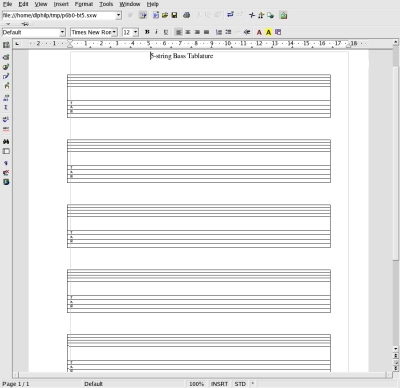
Figure 1: Tab sheets in OpenOffice.org [tab-blank.tiff]
My students often bring in home-burned CDs and MP3 collections containing tunes they want to learn. Some students bring in their portable MP3 players that I can easily jack into the studio sound system. For MP3 play I use the outstanding XMMS, while for playing CDs I prefer Ti Kan's Xmcd. I also have occasion to burn discs for students, which is no problem with the Gcombust front-end for the fantastic cdrecord program.

Figure 2: XMMS, Xmcd, GRip, and Gcombust
I'm frequently asked to figure out a difficult passage from music that has no available tab. If the part is on a CD track I can use Mike Oliphant's GRip software to grab the needed track and convert it to WAV. Then I can load the WAV file into the Snd soundfile editor and use its realtime time-stretching and looping capabilities to help me through the tough passage. With Snd I can quickly excise only the section I want from the WAV, slow down the section without changing its pitch (using the Expand control), and then loop-play the slowed part until I learn it.

Figure 3: Snd with opened controls
Ear-training is a discipline designed to improve aural recognition and identification skills. With the ability to recognize musical intervals (i.e., the distance between two pitches, measured in semitones) you can learn new songs from recordings more quickly, you can improve your improvisational skills, and you can hear more of what's going on in complex musical structures. Ear-training is often considered a boring but necessary part of a complete music education, but there are ways to make it less of a chore. Tom Cato Amundsen's great Solfege actually turns ear-training exercises into an enjoyable game, though I must be quick to add that Solfege is a very serious tool. Exercises are provided to work on the recoginition of intervals, chords, and progressions, and the student may explore any of the exercises in any order. Although I use no Windows in my studio, most of my students have it on their computers, and happily Tom provides Solfege even for users forced to use a Microsoft system.

Figure 4: Solfege
Improving aural skills also involves sharpening the ability to recognize rhythm patterns. Solfege includes a variety of rhythm pattern recognition exercises, but my favorite tool for this job is Aaron Lav's RhythmLab. If a student has problems playing a difficult rhythm I can program RhythmLab to play the rhythm at a slower tempo until the student can comprehend and play it in time. Then I can raise the play speed until the student can play the passage at tempo. I also use RhythmLab as a simple programmable metronome, but its capabilities range far beyond merely keeping time. The program is especially well-designed for learning difficult tuplet rhythms, such as five notes played in the space of four notes, or seven played in the space of three. These tuplets are hard to count aloud, but RhythmLab will define and play the rhythm with absolute accuracy.
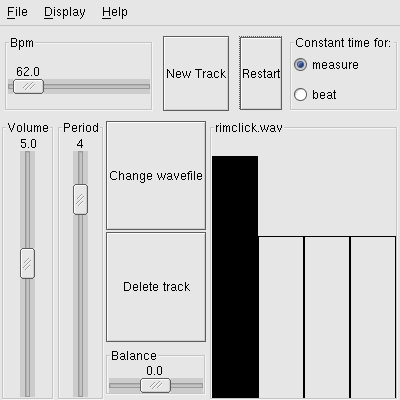
Figure 5: RhythmLab
Instrument tuners abound for Linux, but I use the extremely minimal xtune, a guitar-only tuner. Xtune provides a simple sine wave playback at the pitch for each string, making it very quick and easy to tune the guitar. I simply select the pitch for the string I want to tune, then the program sounds that note until I toggle it off. Xtune is truly minimal: its features include only a waveform selector (sine, square, ramp, and triangle) and a toggle for 8-bit and 16-bit audio output resolution, and it provides no facilities for retuning to non-standard pitch referents. See the listing at http://www.linux-sound.org/mut.html for
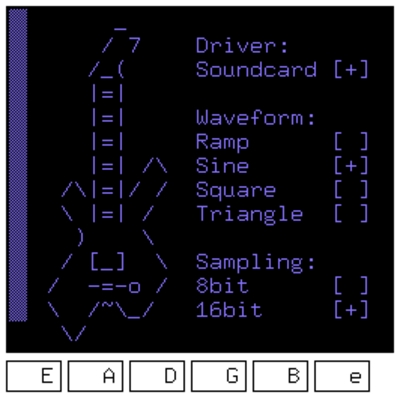
Figure 6: Xtune
I use all of these tools during lessons. I also give a hand-out to new students that describes how they can acquire similar tools and utilities for their own systems (usually Windows and the occasional Mac) via the wonderful Harmony Central site. Harmony Central provides an array of connections to software, on-line lessons, lyrics and tab collections, and other tools and utilities for musicians at all levels.
My hand-out is of course written in and printed from Linux, and I occasionally suggest to a student that he or she might want to consider switching to Linux. Thanks to the new generation of "live" CDs it is possible to check out a complete Linux system on your own hardware without having to install it, i.e., your base system remains untouched. Some "live" CDs are dedicated to Linux multimedia, making it possible to give a student an entire system such as AGNULA/Demudi, Dynebolic, or Apodio. In this way interested students can check out Linux and get a taste of what it offers them as musicians and as a general-purpose operating system.
As well as the daily use described above I sometimes present advanced topics such as software synthesis and algorithmic composition using software running under Linux such as Csound or Common Music. Students bound for university or college music programs also receive an introduction to modern music production software by way of applications such as Ardour and Rosegarden. Perhaps I'll describe my use of those applications in a future article.
Final Comments
Teaching is great fun for me, and I like being able to use Linux as an aid in my profession. However, teaching is also a business, and I need software to help manage my schedules and accounts. At this time I make my own simple schedule and payment templates, but I plan to incorporate as a limited-liability corporation and will soon be trying out software such as GNUcash to help manage my money matters. I haven't decided on a particular scheduling tool, so I welcome any advice for that software. And if you're a teacher of any subject who uses Linux for your class or studio, please let me know what software you find useful and/or indispensable in your work.
Resources
Blank manuscript and tablature paper: www.lib.virginia.edu/dmmc/Music/Musicpaper/
GRip: www.nostatic.org/grip/
Gcombust: www.abo.fi/~jmunsin/gcombust/
XMMS: www.xmms.org/
Xmcd: ibiblio.org/tkan/xmcd/.html
Snd: ccrma.stanford.edu/software/snd/
RhythmLab: www.panix.com/~asl2/music/RhythmLab/
Solfege: www.solfege.org/
Harmony Central www.harmony-central.com/
Dave Phillips is a musician, teacher and writer living in Findlay, Ohio. He has been an active member of the Linux audio community since his first contact with Linux in 1995. He is the author of The Book of Linux Music & Sound, as well as numerous articles in Linux Journal.
email: dlphilp@bright.net
