
The Oddmuse Wiki Engine
In 1995, Ward Cunningham established the first wiki Web site, the WikiWikiWeb, for the Portland Pattern Repository Project. In the years since, a number of wiki engines have been developed in a variety of programming languages. One such wiki engine is Oddmuse, written in Perl by Alex Schroeder.
Although wikis have been around for nearly a decade, they appear to be enjoying a rise in popularity, and many people only now are encountering the wiki concept. Therefore, a brief overview of wikis is in order. If you already are familiar with wikis, you might want to skip to the next section.
The underlying concept of a wiki is simple: a wiki is a Web site that allows any user to add and edit pages by using nothing more than a Web browser. This simple arrangement is quite powerful. It enables arbitrarily large numbers of volunteer editors to contribute to collaboratively created Web sites. It also enables smaller groups or even lone individuals to create and organize information with great ease. Put another way, as Cunningham once said, “[A wiki is] the simplest on-line database that could possibly work.”
In my experience, I've found wikis to be useful tools that make tasks such as organizing projects and creating documentation about almost anything surprisingly less painful and time consuming than they often can be. Perhaps the best way to grasp what wikis are, how they work and the scale and quality of documents that can grow from them, is to explore a mature, established wiki. An excellent example is Wikipedia.
Wikipedia is an encyclopedia, exactly like a multivolume, printed-and-bound encyclopedia. Unlike a bound encyclopedia, however, the Wikipedia has an enormous “editorial staff” composed of any Internet user with a Web browser. In addition, the text of each article is hyperlinked where appropriate to other Wikipedia articles. Any visitor to the site can create and edit articles, additions and changes that become immediately accessible to other users. A revision control system allows changes to be backed out easily, guarding against mistaken or malicious edits.
As an example of how easy it is to contribute content to a wiki, let's say you are reading, on some wiki Web site, an article about rodents. You notice that, although it's a fine article, it fails to mention the world's largest living rodent, the capybara. To correct this omission, you click the Edit text of this page link, after which you are presented with a standard Web form that allows you to edit the text. You do so by adding a sentence about the capybara, and when you save your changes, the new version of the article instantly is available. It's that easy.
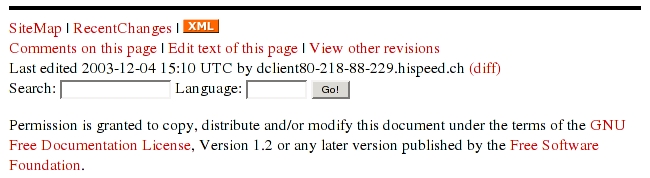
Figure 1. Typical Oddmuse page footer, with links to common wiki functions such as edit text of this page and search.

Figure 2. Typical edit text of this page form. Not shown in this screenshot are the Preview and Save buttons.
Let's also say you made reference in the article to South America, because it's the habitat of the capybara, and you wanted the words South America to be a link to an article about South America. To create that link, you would use one of the simple wiki linking syntax rules—enclosing South America in double square brackets if the site uses Oddmuse—and the wiki engine creates the link to the South American article when it generates the page. If there is no South American article, the wiki engine then creates a link to a form that allows anyone to write one. In this way, article by article, the wiki grows and becomes increasingly useful.
Another example, and one that demonstrates the usefulness of wikis for small groups, is the wiki that my business partner and I use. We use it to record technical information, such as server configuration changes, project documentation, software installations, standard procedures for common tasks and so on. We also use it to track business data, such as client contact information.
The benefits have been abundantly obvious for us. Based on past experience, we've noticed that a much greater percentage of system administration and project documentation is recorded than if we were not using the wiki. Furthermore, the information is searchable and easy to edit. And, because we have an RSS feed for article changes and additions, everyone involved can stay up to date easily.
Oddmuse is a single Perl script. This makes basic installation straightforward and supports another of Schroeder's project goals: to keep Oddmuse simple and easy to use. The potential loss of flexibility is offset by Oddmuse's extensibility. As evidence, you can find a list of available modules on the project Web site.
Aside from the ordinary, requisite wiki features, such as automatic tracking of recent changes, powerful linking syntax, revision control and visual diffs of revisions, Oddmuse has a number of notable features and advantages. One of the first things that impressed me about Oddmuse was the quality of its documentation. Schroeder makes abundant documentation in an assortment of languages a priority, and it shows. Conveniently, he gets to use the tool he's documenting to write and maintain the documentation. A visit to the Oddmuse project Web site is both a demonstration of the engine in action and an encounter with ample information about how to set up, use and customize it.

Figure 3. Oddmuse's visual diff makes understanding what has changed between revisions obvious and clear.
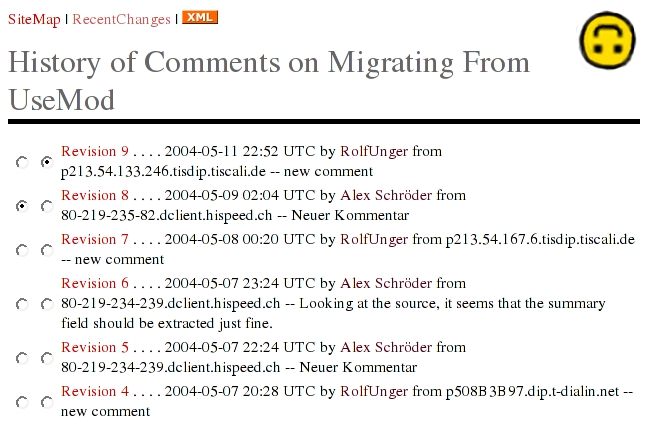
Figure 4. Typical History page. Checkboxes allow the user to define which page revisions to diff.
As someone who strives to adhere to World Wide Web Consortium (W3C) standards, I was pleased to note that Oddmuse produces valid HTML 4.01 Transitional. On a related note, Oddmuse integrates nicely with Cascading Style Sheets (CSS). If you're interested in syndication by way of RSS, Oddmuse supports both an outbound RSS feed for your wiki and inbound RSS feed aggregation.
An obvious concern for any wiki is page vandalism. What, after all, is to prevent someone from editing a page and intentionally making a mess of it in one way or another? If you want to take full advantage of wikis' biggest strength—namely, that anyone can create and edit pages—simply leave the system open and revert defaced pages as they appear. An attentive group of editors can catch vandalism by monitoring the RecentChanges page.
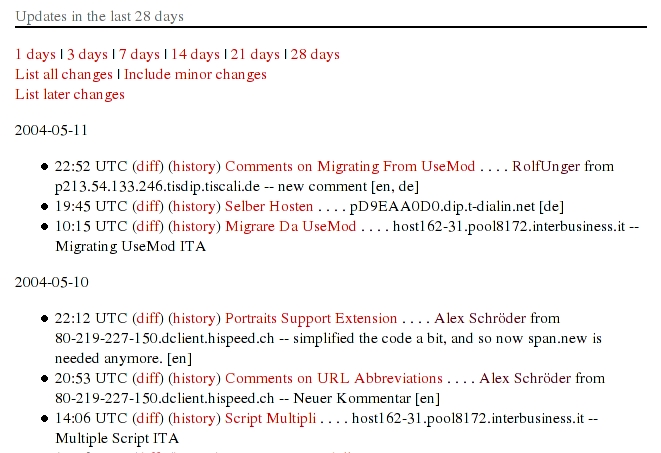
Figure 5. Typical RecentChanges Page
If, on the other hand, you prefer to forgo the advantages of open editing and would prefer to prevent vandalism in the first place, Oddmuse provides two methods for doing so. You can lock specific pages or the entire site and use passwords to grant page editing permission to certain individuals. Your other option is simply to ban problematic users.
Oddmuse uses flat files for data storage rather than a database such as MySQL or PostgreSQL. A good argument can be made for why this is a strength, and an equally good argument can be made for why this is a weakness. On the one hand, using flat files instead of a database means more simplicity and less administrative overhead. On the other hand, databases provide advantages when it comes to data storage and retrieval. If you feel that you must have a database behind your wiki, then Oddmuse is not for you. However, if your concern is speed, it's worth noting that searches are reasonably fast, for instance, on the Emacs Wiki, which uses Oddmuse and currently has 2,242 pages.
The installation section of the Oddmuse Web site has links to the latest version of the script and guides to installing and configuring it. Basic installation is absurdly simple. Once you've downloaded the script, simply place it in your CGI directory and make it executable. It should work immediately. If it doesn't, consult the troubleshooting guide on the Oddmuse Web site.
Even if you have no plans to customize your wiki, you should make one important change before you do anything else. Namely, you should change the $DataDir variable in the script to the absolute path of the directory in which you would like Oddmuse to store its data. If you don't change this variable, Oddmuse uses /tmp/oddmuse as its data directory, and you could lose your data down the road.
Another step you should take, no matter how simple or complex you intend to make your wiki configuration, is setting the administrator and editor passwords. The variables to change are, respectively, $AdminPass and $EditPass. Because the passwords are stored in plain text, the security of your wiki is only as good as the security of your server in general. Nonetheless, you should pick strong passwords.
Although the basic installation provides a fully functional Oddmuse wiki and may be all you need, you might want to consider the more-advanced installation. I chose the more-advanced installation for the Oddmuse wikis I've set up recently, and I've found that the added flexibility is well worth the trivial amount of additional effort required during its setup.
First, I used the wrapper script strategy clearly explained on the Web site. This strategy eliminates the need to define the data directory pathname every time you upgrade the script. Second, I used an external configuration file, and in it I specified an external CSS file.
Now that your Oddmuse wiki is up and running, you can customize it as much as you like. Some configuration is accomplished through the wiki itself, such as locking pages or the entire site if you don't want an open wiki.
In order to perform configuration changes and other administrative functions by way of the wiki, you need to authenticate yourself as an administrator. To do so, you must visit the password page. There's no link to the password page by default, so you must go to the following URL manually: http://www.example.com/wiki/current.cgi?action=password. You must substitute your own hostname and path, of course. Also, the Oddmuse CGI program in the above example URL is called current.cgi per the Oddmuse wrapper script installation instructions. Once you're authenticated, you can use the special menu items that appear in the footer of every page to make the configuration changes you desire.
Other changes are implemented by editing the script itself. A number of configuration variables can be changed to suit your preferences. If you elected to use an external configuration file, you can change configuration variables there instead.
The Web site provides detailed explanations of all configuration variables. Some examples of what they control include the name of the wiki, which stylesheet to use, the URL of your logo, what's displayed in the footer of every page and so on.
I'm glad Schroeder included CSS support in Oddmuse, because it makes altering the layout and appearance of a wiki much easier than it otherwise would have been. Once the wiki was up and running, I spent a few minutes experimenting with changes to the stylesheet until the wiki looked the way I wanted.
Beyond that, you can make significant additional changes to the wiki by using the available modules and extensions or even by writing your own. See the Oddmuse Web site for a full list of modules and extensions. If you want to, you even can make Oddmuse behave like a blogging system.
Once you're satisfied with your wiki installation and configuration, you can begin creating pages. But before you do, I strongly recommend that you read the Text Formatting Rules section of the Oddmuse Web site. Once you know the rules, creating and editing pages is easy to do, but it's invaluable to know what you can accomplish by using those rules.
As founder of a new wiki, you need to know more than only the details of the technology. A successful wiki depends on the participation of contributors, and the social component needs to be cared for as much as any of the technical components. This complicates things significantly. After all, social communities don't come in tarballs with makefiles! You need to encourage and entice people to participate, and you need to nurture the community that grows around the wiki. This takes time and is hardly a precise science.
Fortunately, founders of other wikis have taken the time to write about their experiences. One excellent resource is the WikiLifeCycle page on the MeatballWiki (see the on-line Resources). In it you can learn about best practices for attracting contributors, choosing a name, establishing effective boundaries, defining the mission or goal of the wiki, shaping behavioral norms, preventing stagnation and so on. Now, armed with a well-configured wiki and a grasp of the nontechnical, social issues, the road to a thriving wiki lies open before you.
Resources for this article: www.linuxjournal.com/article/8010.
Brian Tanaka has been a UNIX system administrator since 1994 and has worked for companies such as The Well, SGI, Intuit and RealNetworks. He can be reached at btanaka@well.com.

