
Kernel Korner - Extending Battery Life with Laptop Mode
Laptops give you the freedom to do whatever you want, wherever you want to do it. But when your battery runs out, the fun is over. Fortunately, there are a lot of ways to save power and make your battery last longer. For instance, you can lower the processor speed, dim the display's backlight and spin down the hard drive. The first two tricks work well on Linux, but until recently, spinning down the hard drive could be quite a struggle. Even if you could get the drive to spin down, it never would stay down long enough to save any power. This article explains how you can use Laptop Mode, a feature recently added to the Linux kernel, to spin down the drive for real. I talk only about Linux 2.6 here; a Laptop Mode is available in 2.4, but it is a bit different.
Let's do a little math to find out how much extra battery life you can get by spinning down the hard drive. A typical laptop on the market today has a lithium-ion battery with a capacity of 50–100 Watt-hours of power, which is good for two to four hours. Say we have a laptop with a battery of 50 Watt-hours. If the battery lasts for 3.5 hours with the hard drive on, then we can calculate the average power usage as 50/3.5 = 14.3 Watts. Say the laptop uses a typical laptop hard drive, which uses about 0.9 Watts in idle mode and about 0.3 Watts in standby. In theory we can reduce the power usage by 0.6 Watts, to about 13.7 Watts. This increases battery life to 50/13.7 = 3 hours and 39 minutes. The gain always depends on how much power you save relative to the total power usage. In our example, the spindown saves about 4% of the total power, so the maximum gain in battery life is about 4% as well.
So much for theory, I want to show you some real data. I borrowed a friend's Apple PowerBook G4, installed Debian GNU/Linux and the Linux 2.6.6 kernel and then did some experiments. I wanted to estimate the maximum gain in battery life and the time we needed between spinups to come close to that maximum. I expected a pretty large gain, because the laptop was equipped with a power-hungry 5,400 rpm drive and because I stripped the system of the X server and all dæmons. I wrote a benchmark program that always performs the same amount of disk I/O per hour, but with a configurable inactive period between I/O bursts. During inactive periods, the benchmark program spins down the hard drive. I ran the benchmark with a number of inactive period lengths, and I used the APM battery information to calculate the expected battery life.
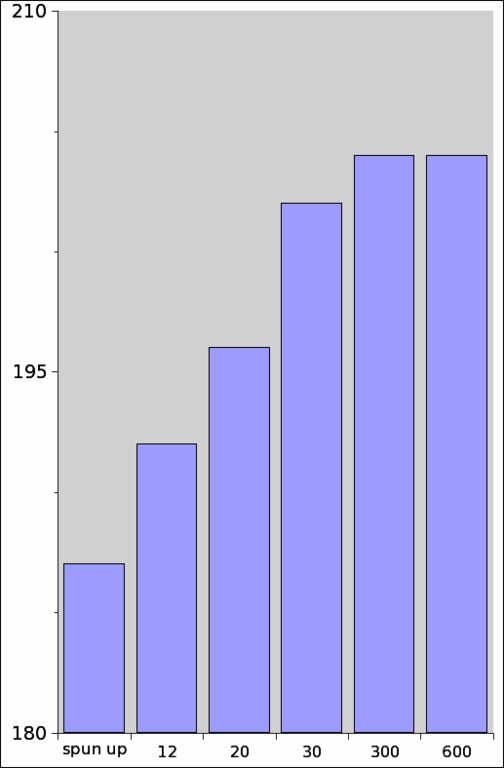
Figure 1. Results of the Battery Life Experiment
I've run this experiment with the disk spun up all the time and with burst intervals ranging from 12 seconds to ten minutes. The results are illustrated in Figure 1. As you can see, as soon as you do I/O less than once every 30 seconds, you have pretty much saved all you can. This seems strange, because spinning up the disk costs a lot of power, right? No, actually, it doesn't. If the drive can spin up in two seconds, that takes about as much power as keeping it running idle for, say, eight seconds. So if you can spin that drive down for nine seconds, you've already saved some power. The 30-second burst interval already leaves room for a pretty long spindown, which is why it shows such good benchmark results.
Laptop Mode is a setting for the Linux kernel that changes how the kernel distributes disk I/O over time. Linux normally does disk I/O in small amounts, nicely spread out over time. But with all that I/O going on, your hard drive never gets a chance to spin down, wasting valuable power. For a laptop, disk activity must be concentrated into short stretches of time, with periods of inactivity between them, like I did with the benchmark. When you enable Laptop Mode, Linux does exactly that. You can get stretches of up to ten minutes without disk activity, which definitely improves your laptop's battery life.
Let's take a look at what Laptop Mode does to get that kind of I/O behaviour. To create periods without disk activity, we need to do as much as we can during the active periods. After that, we need to hold off disk I/O for as long as possible. During active periods, we do a couple of extra things. First, we perform some read-ahead; if that data actually is needed during the inactive period, we've saved a spinup. Laptop Mode sets the read-ahead to 4MB by default. Second, we sync everything to disk at the end of every active period. This keeps your data safe; when the drive has spun down, you can be sure that everything done up to the spindown is stored safely.
During an inactive period, writes are the only kind of disk I/O we can hold off. We can keep the unwritten data in memory for as long as we like or until we're out of memory. Unfortunately, this was not so easy for us to implement, because Linux submits write requests from many places. We needed to tweak all those places to hold off their writes.
The first and most important tweak has to do with modified or dirty data. Normally, when a cached disk page has been modified more than 30 seconds ago, it expires, and the pdflush dæmon writes it to disk. Fortunately, the expiry interval is configurable through /proc/sys/vm/dirty_expire_centisecs. Laptop Mode sets it to ten minutes so that changes stay in memory for up to ten minutes before they're written to disk. Because every active period is ended with a sync, the inactive period starts without any dirty pages. Therefore, during the first ten minutes of an inactive period, we can be sure that no pages are written back because they expire.
The second tweak concerns journaling filesystems, which do a lot of disk I/O themselves. On most of the journaling filesystems supported by Laptop Mode, a change to the filesystem triggers a write operation within five seconds. For instance, in the ext3 filesystem, a filesystem transaction has a maximum lifetime before it is automatically committed, and committing means writing to disk. This maximum lifetime can be configured using the commit mount option. By remounting the filesystem with this option set to ten minutes, we stop ext3 from committing transactions during an inactive period. Again, we start every inactive period with a sync, so no transactions are open when the inactive period starts. Laptop Mode extends a similar treatment to the other supported filesystems, ReiserFS and XFS.
The final tweak occurs in Linux's memory management. If a lot of memory is allocated during an inactive period, the memory manager eventually has to select some memory pages that need to be dropped. It is possible to select a page that needs to be written to disk before it can be dropped, for instance a modified disk page or a page that needs to be written to swap space. But then, it has to spin up the drive to perform that write, and we don't want that to happen. Andrew Morton tweaked the memory manager so that when we're running in Laptop Mode, the memory manager first tries to select pages that don't require a write.
Using these tweaks, Laptop Mode can create up to ten minutes without disk activity. When you're not changing any files at all, you can get even longer periods without spinning up the disk. After all, if there's nothing to write, there's no reason to spin up the disk. Unfortunately, when you've mounted the filesystems with the default options, things change by themselves; the filesystem records access times. Access times are updated even when you're only reading files, and they must be written to disk eventually. To avoid this problem, Laptop Mode remounts all filesystems with the noatime mount option. This makes them stop recording access times, so you actually can get more than ten minutes of time without disk I/O.
As you might have noticed, we're doing some things typically done from user space, such as tweaking /proc. In fact, we've split Laptop Mode into a kernel component and a user-space script. You can use the script to enable laptop mode, and it enables the kernel support by setting /proc/sys/vm/laptop_mode. It then remounts your filesystems and tweaks some other settings in /proc as well.
To set up Laptop Mode on your system, first make sure you have a kernel version that supports it. Laptop Mode is included in Linux 2.6 from version 2.6.6 upward. In the kernel source tree, you can find the documentation for Laptop Mode in Documentation/laptop-mode.txt. Embedded in the documentation is the control script, which you have to extract and save as /sbin/laptop_mode. Give the script execute permissions: chmod 700 /sbin/laptop_mode.
To enable Laptop Mode, run (as root) /sbin/laptop_mode start. This does everything necessary, except it doesn't make your hard drive spin down. To do that, you must set the hard drive's idle timeout using hdparm -S 4 /dev/hda. The value 4 indicates an idle timeout of 20 seconds. If you want to disable Laptop Mode, simply run /sbin/laptop_mode stop.
You probably want to configure Laptop Mode so it starts whenever your laptop runs on batteries. If you have a laptop that supports ACPI, you can set this up like so: extract the files ac_adapter and battery.sh from the Laptop Mode documentation and install them in the indicated locations. Edit battery.sh to configure your hard drive's device name and your preferred idle timeout, and you're ready to roll.
Sometimes your drive spins up for reasons you don't understand. When this occurs, it's time to start debugging. Laptop Mode includes a mode for debugging disk activity, block dump mode. Before you enable it, you first must stop syslogd from logging kernel messages or stop it completely. How this is done depends on your distribution. If you don't stop syslogd, you may put your machine in an endless loop; the debug output is picked up by syslogd, which writes it to disk, causing more debug output and so forth.
To enable block dump mode, run (as root) echo 1 > /proc/sys/vm/block_dump. The kernel output, which you now have to read using dmesg because syslogd is inactive, should show messages such as these:
bash(273): READ block 3242 on hda1
bash(273): dirtied inode 10237 (.bash_history) on hda1
pdflush(6): WRITE block 3242 on hda1
You can read this output as follows. A process named bash, with process ID 273, has read the block with number 3242 on device /dev/hda1. That same process then dirtied a file called .bash_history; the file was changed, but the changes weren't written to disk yet. The pdflush dæmon then wrote block 3242, which most probably is the block that bash modified earlier.
When you've got the debug output, it's time to diagnose your problem. If you're seeing a READ message somewhere, you don't have to look further. Find out why the process needs to read this data and decide whether you want to stop the process, change the application's settings so that it doesn't need that data anymore or perhaps read the data ahead when the drive is spun up. Reading a file ahead is no more difficult than doing cat /my/file >/dev/null, preferably twice, so Linux's read-once logic does not throw the file right out again. Now, if you're seeing only dirtied file messages, there's not much to worry about. Nobody is writing anything to disk; these messages tell you only that a process is making changes that need to be written eventually. If you get these, your disk spins up once every ten minutes to write back the modifications, and that's it.
If you're seeing WRITE messages more often than once every ten minutes, and you're not seeing any READs that could have triggered an active period, there's a good chance that some process is syncing a file explicitly. syslogd is notorious for doing this. If you see syslogd writing at unexpected times, you should adjust your syslog.conf. It probably contains lines like this one:
kern.* /var/log/kern.log
This line tells syslogd to call fsync() after every log message matching kern.*. If you change the line to this:
kern.* -/var/log/kern.log
and restart syslog, syslog no longer calls fsync() on these log messages. Be careful for which log files you make this change, though. For instance, if you care about security, you probably want to keep auth.log synchronized.
Tips and Tricks
MP3 Playing
If you want to play MP3s with your drive suspended, you can try increasing the READAHEAD setting in /sbin/laptop_mode. Alternatively, you can copy a whole set of MP3s to a small tmpfs RAM disk. Make sure you don't make the RAM disk so big that it gets pushed out to swap space or you defeat the purpose. A small RAM disk is good for anything for which you don't want disk activity to occur—but only if your data isn't important.
Custom Spindown Times
It's possible to adjust Laptop Mode's maximum spindown time. To do that, set variable MAX_AGE in /sbin/laptop_mode to the maximum number of seconds you want your data to remain in memory without being saved to disk. By default, it is set to 600 seconds or ten minutes. It really doesn't pay to increase the setting to a higher number, as you can see from the benchmark results that I got on the PowerBook. You can set it to a lower value if you care more about your data and less about those extra two minutes. And if you want to prevent losing some really important data that you've just saved, you simply can execute sync. Laptop Mode respects your sync requests, so this actually writes everything to disk, as it normally would. The sync also resets all timeouts, so that after the sync the disk can stay spun down for up to ten minutes again.
Spinning Down with cpudyn
If you are using cpudyn to control your CPU frequency dynamically, you might be interested to know that it also can spin down your hard drive. I have seen some drives that simply ignore their idle timeout setting if it's too low for their taste. Also, idle timeout settings are done in five-second increments, which means that you can't set it to something like eight seconds. cpudyn comes in handy, because it doesn't rely on your hard drive to detect idle periods, and it can spin it down whenever you want.
Smart Spindown
Laptop Mode performs a sync at the end of an active period and then waits for the disk to spin down on its own. It's even better to sync just before the drive spins down, because then you save data that is up to 20 seconds more recent. Laptop Mode can't do this, because it can't spin down the drive actively. I have written a script to do this called Smart Spindown, which works together with Laptop Mode. It's an unpolished piece of script, but if you really want to save every bit of power there is or if you want to keep 20 extra seconds of data safe, this might be for you; see the on-line Resources section.
Even though I don't have a laptop myself, I've had a lot of fun working on Laptop Mode. I want to acknowledge the efforts of the other guys who have contributed to Laptop Mode, including Jens Axboe, Micha Feigin, Andrew Morton and Kiko Piris. I also want to thank Jeroen Kruis for allowing me to abuse his brand-new PowerBook G4 for my experiments.
Resources for this article: /article/7647.
Bart Samwel initiated the effort to put Laptop Mode in Linux 2.6, even though he does not own a laptop. He studies Computer Science at Leiden University, The Netherlands, and earns his living writing proprietary software. He can be reached at bart@samwel.tk.
