
Part III: AFS—A Secure Distributed Filesystem
The Andrew File System (AFS) is a secure distributed global filesystem that provides location independence, scalability and transparent migration capabilities for data. AFS works across a multitude of operating systems and is used at many large sites that have been in production for many years.
AFS provides unique features that are not available with other distributed filesystems, even though AFS is almost 20 years old. This age might make it less appealing to some, but with IBM making AFS available as open source in 2000, new interest sparked in its use and development. This article discusses the rich features AFS offers and invites readers to play with it.
AFS client software is available for Linux and for UNIX flavors from HP, Compaq, IBM, Sun and SGI. It also is available for Microsoft Windows and Apple's Mac OS X. This makes AFS the ideal filesystem for data sharing between platforms across local and wide area networks.
All AFS client machines have a local cache. A cache manager keeps track of users on a machine and handles the data requests coming from them. Data caching happens in chunks of files, which are copied from an AFS file server to local disk. The cache is shared between all users of a machine and persists over reboots. This local caching reduces network traffic and makes subsequent access to cached data much faster.
AFS is organized in a globally unique namespace. A global view of the AFS file space is shown in Figure 1. Pathnames leading to files are not only the same wherever the data is accessed, the pathnames do not contain any server information. In other words, the AFS user does not know on which file server the data is located. To make this work, AFS has a replicated data location database that a client has to contact in order to find data. This is unlike the Network File System (NFS), in which the client has the information about the file server hosting a particular part of the NFS filesystem.
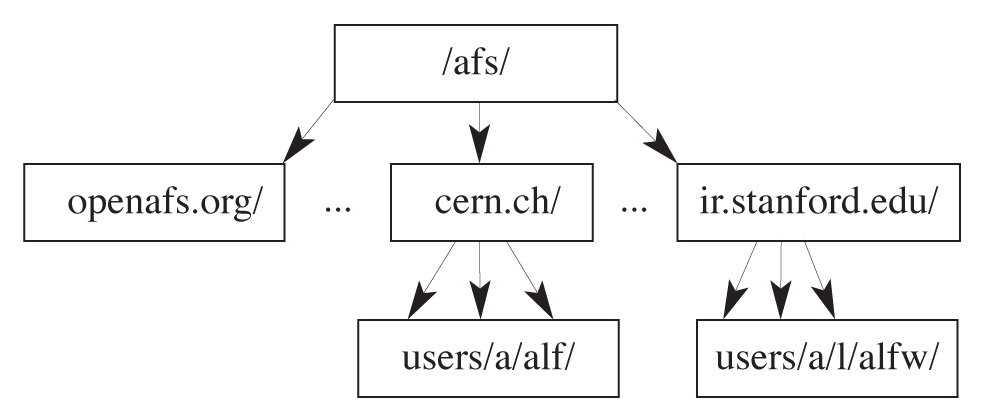
Figure 1. The AFS file space is the same anywhere and does not require clients to know which directory is on which server.
The different independent AFS domains are called cells and correspond to Kerberos realms. A typical AFS pathname looks like this: /afs/cern.ch/user/a/alf/Projects/. This pathname contains the AFS cell name but not the file server name.
This location independence allows AFS administrators to move data from one AFS server to another without any visible changes to users. It also makes AFS easily scalable. If you run out of space or network capacity on your AFS file servers, simply add another one and migrate data to the new server. Clients do not notice this location change. AFS also scales well in terms of the number of clients per file server. On modern hardware, one AFS file server can serve up to about 1,000 clients without any problems.
For users, the AFS file space looks like any other filesystem they have used. With the proper Kerberos credentials, they can access their AFS data from all over the world, facilitating the globally unique namespace. Here is an example: to be able to copy data from my home directory at CERN in Switzerland to my home directory at SLAC in California, I first need to authenticate myself against the two different AFS cells:
% kinit --afslog alfw@ir.stanford.edu
alfw@ir.stanford.edu's Password:
% kinit -c /tmp/krb5cc_5828_1 --afslog alf@cern.ch
alf@cern.ch's Password:
AFS comes with a command, tokens, to show AFS credentials:
% tokens Tokens held by the Cache Manager:

User's (AFS ID 388) tokens for afs@cern.ch [Expires Apr  2 10:30]
User's (AFS ID 10214) tokens for afs@ir.stanford.edu [Expires Apr  2 09:49]
--End of list--
Now that I am authenticated, I can access my two AFS home directories:
% cp /afs/cern.ch/user/a/alf/Projects/X/src/hello.c \
   /afs/ir.stanford.edu/users/a/l/alfw/Projects/Y/src/.
On an AFS file server, the AFS data is stored on special partitions, called /vicepXX, with XX ranging from a–zz, allowing for a total of 256 partitions per server. Each of these partitions can hold data containers called volumes. Volumes are the smallest entity that can be moved around, replicated or backed up. Volumes then contain the directories and files. Volumes need to be mounted inside the AFS file space to make them visible. These mount points look exactly like directories.
AFS is particularly well suited to serve read-only data such as the /usr/local/ tree because AFS clients cache accessed data. To make this work even better and more robustly, AFS allows for read-only clones of data on different AFS file servers. If one server hosting such a clone goes down, the clients transparently fail-over to another server hosting another read-only copy of the same data. This replication technique also can be used to clone data across servers that are geographically far apart. Clients can be configured to prefer to use the close-by copy and use the more distant copy as a fallback. The openafs.org AFS cell, for example, is hosted on a server at Carnegie Mellon University in Pittsburgh, Pennsylvania, and on a server at the Royal Institute of Technology (KTH) in Stockholm, Sweden.
AFS provides a snapshot mechanism to provide backups. These snapshots are generated at a configurable time, say 2am, and work on a per-volume basis. The snapshots then can be backed up to tape without interfering with user activities. They also can be provided to users by way of a simple mount point in their respective AFS home directories. This simple trick eliminates many user backup/restore requests, because the files in last night's snapshot still are visible in this special subdirectory—the mount point to the backup volume—in users' home directories.
The AFS communication protocol was designed for wide area networking. It uses its own remote procedure call (RPC) implementation, called Rx, which works over UDP. The protocol retransmits only the single bad packet on a batch of packets, and it allows a higher number of unacknowledged packets as compared to what other protocols allow.
AFS administration can be done from any AFS client; there is no need to log on to an AFS server. This allows administrators to lock down the AFS server tightly, which is a big security plus. The location independence of AFS data also improves manageability. An AFS file server can be evacuated completely by moving all volumes to other AFS file servers. These moves are not visible to users. The empty file server then can undergo its maintenance, such as an OS upgrade or a hardware repair. Afterward, all volumes can be moved transparently back to the server.
Internally, AFS makes use of Kerberos to authenticate users. Out of the box this is Kerberos 4, but all major Kerberos 5 implementations are able to serve as a more secure substitute. AFS provides access control lists (ACLs) to restrict access to directories. Only Kerberos principals or groups of those can be put in ACLs. This is unlike NFS, in which only the UNIX user IDs are used for authorization. An additional authorization service, the protection service (PTS), is used to keep track of individual Kerberos principals and groups of principals.
To make all these features work, AFS comes in several distinct parts: the AFS client software that has to run on each computer that wants access to the AFS file space. The AFS server software is separated into four basic parts. It uses Kerberos for authentication, PTS for authorization, a volume location server for location independence and two servers for data serving (file server and volume server). All of these different processes are managed on each AFS server by the basic overseer (BOS) server. In addition to these necessary components, more service dæmons are available for AFS server maintenance and backup. How to install an AFS server is beyond the scope of this article.
Due to all of these different server components, the learning curve for AFS is steep at the beginning. However, the payoff is rewarding and many sites cannot go without it any longer. Once a cell is installed, the day-to-day maintenance cost for AFS is in the 25% full-time equivalent ( FTE) range, even for large installations.
For more information how AFS is used at various sites, including Morgan Stanley and Intel, have a look at the presentations given at the recent AFS Best Practices Workshop (see the on-line Resources).
You do not need your own AFS servers to try AFS yourself. Simply installing the OpenAFS client software and starting the AFS client dæmon afsd with a special option allows users to access the publicly accessible AFS space of foreign AFS cells.
The most difficult part of installing an AFS client is obtaining the necessary kernel module. If you are using Red Hat or Fedora, you can download RPMs (see Resources). In addition to the kernel module, the AFS client needs a user-space dæmon (afsd) and the AFS command suite. These come in two additional RPMs.
Once you have these modules, the next step is to configure the AFS client for your needs. First, you need to define the cell your computer should be a member of. The AFS cell name is defined in the file /usr/vice/etc/ThisCell. If you do not have your own AFS servers, this name can be set to anything. Otherwise, it should be set to the name of the cell your AFS servers are serving. The next parameter to look at is the local AFS cache. Each AFS client should have a separate disk partition to contain the client software, but the cache can be put wherever you want. The location and size of the cache are defined in the file /usr/vice/etc/cacheinfo. The default location for the AFS cache is /usr/vice/cache, and a size of 100MB is plenty for a single user desktop or laptop computer. This is the setting as it comes with the openafs-client RPM. The cacheinfo file for this setting should look like this:
/afs:/usr/vice/cache:100000
Next, configure the parameters for afsd, the AFS client dæmon. They are defined in /etc/sysconfig/afs. Add the -dynroot parameter to the OPTIONS definition. This allows you to start the AFS client without your own AFS servers.
Another option to add is -fakestat. This parameter tells afsd to fake the stat(3) information of all entries in the /afs/ directory. Without this parameter, the AFS client would go out and contact each single AFS cell known to it. That currently is 133 cells, as seen if you do a long listing (/bin/ls -l) in the /afs/ directory.
Because AFS is using Kerberos for authentication, time needs to be synchronized on your machine(s). AFS used to have its own mechanism for synchronization, but it is outdated and should not be used anymore. To switch it off, the option -nosettime needs to be added to the OPTIONS definition in /etc/sysconfig/afs. If you don't have a time sync method, use Network Time Protocol (see Resources).
After all the changes have been made, the new OPTIONS definition in /etc/sysconfig/afs should look like this:
OPTIONS="$MEDIUM -dynroot -fakestat -nosettime"
The last step is to create the mount point for the AFS filesystem, which is accomplished by entering % sudo mkdir /afs. Now, you can start the AFS client with % sudo /etc/init.d/afs start. This part takes a few seconds, because afsd needs to populate the local cache directory before it can start. Because the cache is persistent over reboots, subsequent starts will be faster.
Without your own AFS servers but with an AFS client configured as described above, you can familiarize yourself with some AFS commands and explore the global AFS space yourself. A quick test shows that you are not authenticated in any AFS cell:
% tokens
Tokens held by the Cache Manager:

--End of list--
No credentials are listed. See above for an example where credentials are present.
The first thing you should do is retrieve a long listing of the /afs/ directory. It shows all AFS cells known to your AFS client. Now, change into the directory /afs/openafs.org/software/openafs and do a directory listing. You should see this:
% ls -l
total 10
drwxrwxrwx  3 root  root  2048 Jan 7  2003  delta
drwxr-xr-x  8 100   wheel 2048 Jun 23 2001  v1.0
drwxr-xr-x  4 100   wheel 2048 Jul 19 2001  v1.1
drwxrwxr-x 17 100   101	  2048 Oct 24 12:36 v1.2
drwxrwxr-x  4 100   101	  2048 Nov 26 21:49 v1.3
Go deeper into one of these directories. For example:
% cd v1.2/1.2.10/binary/fedora-1.0
Have a look at the ACLs in this directory with:
% fs listacl .
Access list for . is
Normal rights:
  openafs:gatekeepers rlidwka
  system:administrators rlidwka
  system:anyuser rl
This shows that two groups have all seven possible privileges: read (r), lookup (l), insert (i), write (w), full file advisory lock (k) and ACL change right (a). The special group system:anyuser that comes with AFS has read (r) and lookup (l) rights, which allow access literally to anybody.
To list the members of a group, use the pts (protection server) command:
% pts member openafs:gatekeepers -cell openafs.org -noauth
Members of openafs:gatekeepers (id: -207) are:
  shadow
  rees
  zacheiss.admin
  jaltman
The -noauth option is used because this command is run without any credentials for this cell.
Special administrative privileges are necessary to explore the authentication part of AFS, which is standard Kerberos, so I skip it here.
Now, find out where the current directory physically is located:
% fs whereis .

File . is on hosts andrew.e.kth.se VIRTUE.OPENAFS.ORG
This shows that two copies of this directory are available, one from andrew.e.kth.se and one from VIRTUE.OPENAFS.ORG.
The command:
% fs lsmount /afs/openafs.org/software/openafs
↪/v1.2/1.2.10/binary/fedora-1.0
/afs/openafs.org/software/openafs/v1.2/1.2.10/binary/fedora-1.0
↪ is a mount point for volume #openafs.1210.f10
shows that this directory actually is a mount point for an AFS volume named openafs.1210.f10.
Another AFS command allows us to inspect volumes:
% vos examine openafs.1210.f10 -cell openafs.org -noauth
This command examines the read-write version of volume openafs.1210.f10 in AFS cell openafs.org. The output should look like this:
openafs.1210.f10      536871770 RW   25680 K On-line
    VIRTUE.OPENAFS.ORG /vicepb
    RWrite  536871770 ROnly  536871771 Backup      0
    MaxQuota          0 K
    Creation    Fri Nov 21 17:56:28 2003
    Last Update Fri Nov 21 18:05:30 2003
    0 accesses in the past day (i.e., vnode references)

    RWrite: 536871770     ROnly: 536871771
    number of sites -> 3
       server VIRTUE.OPENAFS.ORG partition /vicepb RW Site
       server VIRTUE.OPENAFS.ORG partition /vicepb RO Site
       server andrew.e.kth.se partition /vicepb RO Site
The output shows that this volume is hosted on server VIRTUE.OPENAFS.ORG in disk partition /vicepb. The next line shows the numeric volume IDs for the read-write and the read-only volumes. It also shows some statistics. The last three lines show where the one read-write (RW Site) and the two read-only (RO Site) copies of this volume are located.
To find out how many other AFS disk partitions are on the server VIRTUE.OPENAFS.ORG, use the command:
% vos listpart VIRTUE.OPENAFS.ORG -noauth
We learn that the partitions on the server are:
/vicepa     /vicepb     /vicepc
Total: 3
which show a total of three /vicep partitions. To see what volumes are located in partition /vicepa on this server, execute:
% vos listvol VIRTUE.OPENAFS.ORG /vicepa -noauth
This command takes a while and eventually returns a list of 275 volumes. The first few lines of output look like this:
Total number of volumes on server VIRTUE.OPENAFS.ORG partition /vicepa: 275
openafs.10.src                    536870975 RW      11407 K On-line
openafs.10.src.backup             536870977 BK      11407 K On-line
openafs.10.src.readonly           536870976 RO      11407 K On-line
openafs.101.src                   536870972 RW      11442 K On-line
openafs.101.src.backup            536870974 BK      11442 K On-line
openafs.101.src.readonly          536870973 RO      11442 K On-line
Another command, bos, communicates with a cell's basic overseer server and finds out the status of that cell's AFS server processes. Many more subcommands are available for the fs, pts, vos and bos commands. All of these AFS commands understand the help option (no dash in front of help) to show all available subcommands. Use fs <subcommand> -help (with the dash) to look at the syntax for a specific subcommand.
Several enhancement projects for AFS currently are underway. The most important project right now is to make AFS work with the 2.6 Linux kernels. These kernels no longer export their syscall table. Another project is to provide a disconnected mode that allows AFS clients to go off the network and continue to use AFS. Once they reconnect, the content of files in AFS space is re-synchronized.
Although all the different aspects of AFS can be overwhelming at first and the learning curve for setting up your own AFS cell is steep, the reward for using AFS in your infrastructure can be significant. Secure, platform-independent world-wide file sharing is a concept as attractive as serving your /usr/local/ area and all your UNIX home directories. And, all this comes with only minimal long-term administrative costs.
Resources for this article: /article/8079.
Alf Wachsmann, PhD, has been at the Stanford Linear Accelerator Center (SLAC) since 1999. He is responsible for all areas of automated Linux installation, including farm nodes, servers and desktops. His work focuses on AFS support, migration to Kerberos 5, a user registry project and user consultants.

