
Cross-Platform Network Applications with Mono
Mono is Ximian's open-source implementation of Microsoft's .NET development framework. .NET contains several different technologies: a set of compilers for many different languages (including Microsoft's new language, C#) that generates platform-independent bytecode; a virtual machine known as the Common Language Runtime (CLR) that runs these bytecodes; and a class library full of useful programs for performing actions ranging from file I/O to GUI creation and operation.
The Mono implementation includes a CLR that runs on Linux, BSD-based systems (including Mac OS X) and Windows, plus compilers for C# and Basic. Mono is a work-in-progress, and many parts of the .NET class library have yet to be implemented, specifically the Windows.Forms group that contains classes for working with the Windows GUI. However, the Mono developers have released bindings for the GTK user-interface toolkit, so cross-platform graphical applications can be constructed even without 100% .NET compatibility. This article describes how to use C#, Mono and Linux to write a useful program, MonoBlog, that can run on any system that runs Mono and GTK. Some familiarity with Glade and C# is assumed, but only at a basic level. Helpful tutorials can be found in the on-line Resources section.
The Mono Web site has instructions for installing the system on Linux, Mac OS X and Windows platforms (see Resources). You also need two additional C# libraries, GTK# and XmlRpcCS. The systems that MonoBlog runs on require the base GTK libraries, which are available on most Linux systems. They probably need to be installed on Windows and Mac OS X systems, however; packages can be found on the GTK Web site (see Resources). Instructions for installing these libraries can be found on their respective Web pages.
MonoBlog is a Weblog editor that can add new posts to a Weblog and edit old ones, as well as provide a way for a user to change configuration settings. Most Weblog systems implement a common base of functionality known as the MetaWeblog API. MonoBlog uses this to communicate with a variety of different Weblog programs, rather than write a separate back end for Movable Type, LiveJournal or Radio Userland systems. The complete C# code for this example is available on the Linux Journal FTP site (see Resources).
Figures 1 and 2 show the user interface of MonoBlog, created using Glade on Linux. The main window in Figure 1 has text controls for entering Weblog titles and the content, plus a series of buttons for updating the Weblog, clearing the forms and quitting the program. The expanse of white on the left-hand side is a GTKTreeView control, which displays a list of older posts the user can click on in order to update. The window shown in Figure 2 is a simple preferences panel where users enter the information that allows MonoBlog to communicate with their Weblogs.
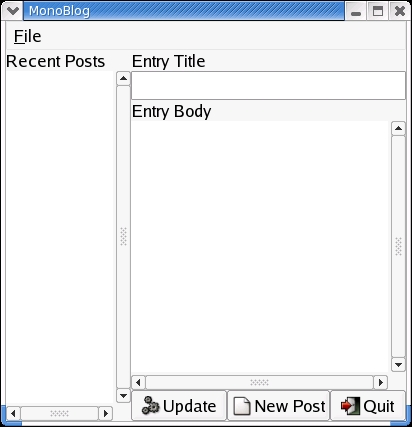
Figure 1. The Main Window

Figure 2. The Preferences Window
One of GTK's useful features is libglade, a library that allows us to construct a program's GUI by reading in the XML files created by Glade, specifying the layout of the widgets in the code itself. The GTK# binding includes this functionality, so building the GUI is quite easy. At the start of MonoBlog, we import the GTK and Glade namespaces with the using statement. Then, in the constructor, we have:
Application.Init();

Glade.XML gxml = new Glade.XML("monoblog.glade",
                               null, null);
gxml.Autoconnect(this);

Application.Run();
The calls to the Application class are required in all GTK programs. Application.Init() performs GTK initialization, and Application.Run() passes control of the program to the GTK main loop, which watches for events and reports signals back when they occur. The standard Glade.XML constructor takes three arguments: a string containing the filename of the Glade file, a string that tells the object the node in the Glade tree where it should start building the interface and, finally, a string that can be used to specify a translation domain for the Glade file in question.
MonoBlog needs to have access to all the nodes in the XML file, both the main window and the preferences panel. No translation is required, so the second and third arguments are null. The Autoconnect() method binds the object given as an argument with the signal handlers and objects defined in the Glade file, allowing that object to respond to events and manipulate widgets. As MonoBlog is a small program, I have contained all the signal handling within the main class. In larger, more complex systems, it might be advisable to separate signal handling out into another class.
To access the widgets, a special declaration is required. The widget must be declared as an instance variable, using a custom attribute:
[Glade.Widget] GTKWidgetType widgetname;
with GTKWidgetType being replaced by the actual object type concerned, and widgetname being the name of the widget as defined in the Glade file. After Autoconnect() returns, these widgets can be used as if they had been created in the program itself.
When the program loads, the first action it performs is to query the Weblog and download the recent posts, displaying them in the TreeView widget. The method getRecentPosts() in the MonoBlog class handles this; it is called in the main constructor if preferences exist, as the method needs to know about the Weblog it is contacting. The MetaWeblog API provides a function call, metaweblog.getRecentPosts, that returns a specified number of old posts or as many as it can find if fewer posts exist than we desire.
The communication with the Weblog is straightforward:
XmlRpcRequest client = new XmlRpcRequest();
client.MethodName = "metaWeblog.getRecentPosts";
client.Params.Add(BlogID);
client.Params.Add(ServerUser);
client.Params.Add(ServerPass);
client.Params.Add(NumberOfPosts);
XmlRpcResponse response = client.Send(ServerURL);
All that is required is to create a new XmlRpcRequest object, set the required API method name, fill in the necessary arguments and send it to the Weblog. The Weblog then returns a response, in this case an array of posts, which is stored in the Value field of the XmlRpcResponse object. Next, we need to update the GTKTreeView control.
In GTK 2.0 and above, this control uses a model-view-controller approach. Here, then, we create a new model object and pass it to the control:
System.Type[] ListTypes = new System.Type[3];
ListTypes[0] = typeof(string);
ListTypes[1] = typeof(string);
ListTypes[2] = typeof(string);
ListStore store = new ListStore(ListTypes);
treeview1.Model = store;
This model object creates a table with three columns. The ListStore object needs to be passed an array of Type objects; each item in the array corresponds to the type of column. A Weblog post contains three items—a title, the content of the post and a unique identifier—all of which are strings, so here all the columns have a String type. The rest of the method cycles through the array, populating the model:
TreeIter iter = new TreeIter ();
foreach (Hashtable post in results) {
  String title = (String) post ["title"];
  String postid = (String) post ["postid"];
  String description = (String) post ["description"];

  store.Append (out iter);
  store.SetValue (iter, 0, new GLib.Value(title));
  store.SetValue (iter, 1, new GLib.Value(postid));
  store.SetValue (iter, 2,
  new GLib.Value(description));
}
This, by itself, isn't enough to display the titles in the tree. For that, we include some code in the constructor, after the call to getRecentPosts():
TreeViewColumn TitleCol = new TreeViewColumn();
CellRenderer TitleRenderer = new CellRendererText();
TitleCol.AddAttribute (TitleRenderer, "text", 0);
treeview1.AppendColumn (TitleCol);
This adds a new column view to the tree. The AddAtrribute() method is hooked to the title column of the model (the first) with the 0 argument. As all the user requires is to see the title of an entry in the TreeView control; no other column views are needed. The information, though, is stored in the model to make the program more efficient.
When a user clicks on an entry, the desired result is for the program to display the old entry in the text entry portions on the right-hand side of the window. The MetaWeblog API has a method called metaweblog.getPost that pulls posts from the Weblog. As they already have been downloaded in the getRecentPosts() method, the program can get the data from the model instead of communicating with the Weblog again. The row_activated signal is bound to the method SelectOldPost using Glade, so whenever an item is double-clicked, this code runs:
public void SelectOldPost(System.Object obj, EventArgs e) {
  TreeSelection currentSelection = treeview1.Selection;
  TreeIter iter;
  TreeModel model = treeview1.Model;
  currentSelection.GetSelected (out model, out iter);
  String selected = (string) model.GetValue (iter, 1);
  String oldTitle = (string) model.GetValue(iter,0);
  String oldEntry = (string) model.GetValue(iter,2);

  TextBuffer buffer = textview1.Buffer;
  entry1.Text = oldTitle;
  buffer.SetText(oldEntry);

  OldPostID = selected;
  EditingOldPost = true;
}
This method obtains the current selected item in the GTKTreeView control and uses an iterator to index into the model and find the required values. It then fills in the text fields with this information and updates two instance variables that are needed when the user clicks on the Post button. If the program is updating an older entry rather than creating a new entry, it needs to make a different MetaWeblog API call, which needs the unique identifier of the post. The variables OldPostID and EditingOldPost are updated to reflect this.
The clicked signal on the Update button is bound to the method OnUpdateClicked. This process is too long to reprint in full in this article, but the operation is simple enough. First, it gets the text from the two text controls and creates a hash table representation of the post; this is required for the MetaWeblog API call. Depending on whether the EditingOldPost flag is set, the method then sends an XML-RPC request to the Weblog, using the metaweblog.newPost or metaweblog.editPost calls as appropriate. When the Weblog returns a successful response, indicating that it has been updated, the method finally clears the text forms and allows the user to start anew.
The other buttons on the main window, New Post and Quit, are short snippets of code. Like the Post button, the clicked signals are bound in MonoBlog. New Post is bound to a method that clears the text forms and sets the EditingOldPost flag to false, allowing the user to start over. Quit, as expected, exits MonoBlog using the Application.Exit() GTK call.
The .NET class library includes classes that handle reading in preferences from an XML file. Listing 1 shows an example MonoBlog configuration file.
Listing 1. An Example XML Configuration File
<?xml version="1.0" encoding="utf-8" ?>
<configuration>
<appSettings>
<add key="ServerURL"
value="http://www.test.com/mt-xmlrpc.cgi"/>
<add key="ServerUser" value="example"/>
<add key="ServerPass" value="password"/>
<add key="BlogID" value="1"/>
<add key="NumberOfPosts" value="10"/>
</appSettings>
</configuration>
The method getConfig(), shown below, reads in these values:
private bool getConfig {
  try {
  AppSettingsReader config = new AppSettingsReader();
  ServerURL = (string) config.GetValue("ServerURL",
  typeof(string));

  ServerUser = (string)  config.GetValue("ServerUser",
  typeof(string));

  ServerPass = (string) config.GetValue("ServerPass",
  typeof(string));

  BlogID = (string) config.GetValue("BlogID",
  typeof(string));

  NumberOfPosts =  (string)
  config.GetValue("NumberOfPosts", typeof(string));

  catch(Exception problem) {
    return false;
    }
  return true;
}
The AppSettingsReader object, by default, looks for a configuration file named executable.config, so here it opens a file called monoblog.exe.config. Then, the GetValue() method is used to determine the required preference values. MonoBlog calls this method in its constructor before it attempts to query the Weblog for old posts, so it has the required information. If the file does not exist or if there is a problem reading the data, the method returns false. The constructor only calls getRecentPosts() if this method returns true, preventing garbage values from being used.
Updating the preferences is a more complex task. First, the Preferences option in the main window's menubar is bound to the method OnPrefsActivate, using Glade's Menu Editor. This brings up the dialog shown in Figure 2 and fills in the fields with the current values, if any are defined. When the user clicks on the OK button in this dialog, MonoBlog updates the variables and writes the new information back out to the configuration file. Unfortunately, the .NET class library doesn't have classes that update configuration files. As the configuration here is fairly simple, I wrote a method called saveConfig() that opens the default configuration file and writes the updated information back out to disk using a series of Write() statements. This could be replaced with a more sophisticated method that builds a proper XML document, but it was easier for this application simply to write out the values in a plain manner.
As MonoBlog makes calls to the Internet where things can go wrong that aren't within the control of the program (network errors, name server problems and so on), it contains some basic error handling functionality. The getRecentPosts() and OnUpdateClicked() methods are wrapped in a try...catch block. The code that accesses the Internet is executed, and if there is a problem, the following catch block runs:
catch(Exception problem) {
  MessageDialog md =
  new MessageDialog(MonoBlogWindow,
  DialogFlags.DestroyWithParent,
  MessageType.Error,
  ButtonsType.Close,
  problem.ToString());

  md.Run();
  md.Destroy();
}
This causes an Error dialog to appear on screen, with the problem as reported by the Mono CLR included as a text message. This allows the user to continue and possibly fix the problem. However, at the time of this writing, exception support is not working in the PPC branch of the Mono CLR, so if the program runs on Mac OS X, the exception mechanism does not work and the program fails silently. Work is proceeding on the PPC port, though, so by the time this article makes it to print, this lack of support may no longer be an issue.
Compiling C# programs is done by way of the mcs compiler. MonoBlog is compiled with this command:
mcs -r gtk-sharp.dll -r glade-sharp.dll \
-r XmlRpcCS.dll -r glib-sharp.dll monoblog.cs
The -r option indicates a resource the program needs; here, we simply need to specify which libraries MonoBlog uses. This produces a compiled bytecode file called monoblog.exe. To run the program, we need to run the Mono CLR with this file as a parameter:
mono monoblog.exe
Now, having developed the program on Linux, we can run the program on Windows or Mac OS X with a minimum of fuss. Simply copy monoblog.exe, monoblog.exe.config and monoblog.glade files to the other platform and run them using the Mono CLR, as shown above.
Figures 3, 4 and 5 show MonoBlog running on Linux, Windows and Mac OS X machines, respectively. No code has to be changed; the program works as is, as long as all the libraries MonoBlog uses are present.
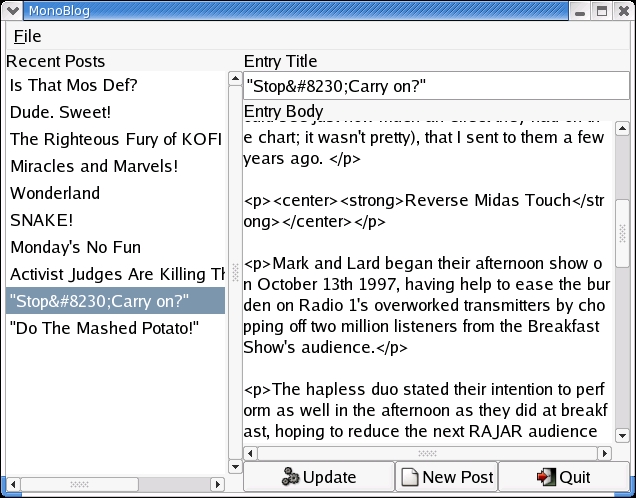
Figure 3. MonoBlog on Red Hat 9
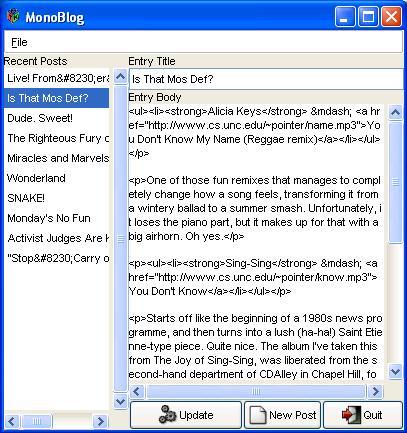
Figure 4. MonoBlog on Windows XP

Figure 5. MonoBlog on Mac OS X
Hopefully, this article has demonstrated how Mono and C# can be used to create cross-platform applications quickly and easily. You can develop on one platform and be assured that the program can run on any platform that runs Mono and the GTK libraries. The MonoBlog program itself is ripe for further experimentation. Some possible areas for improvement are extra formatting options, more detailed error reporting, using the GtkHTML# bindings to create an HTML preview window, and further implementation of the MetaWeblog API, such as adding the ability to delete posts from a Weblog.
Resources for this article: /article/7557.
Ian Pointer is an unemployed Computer Science graduate in the UK. He can be reached at ian@snappishproductions.com.
