
Beating Spam and Viruses with amavisd-new and Maia Mailguard
With spam and e-mail worms on the rise, it's boom-time for the makers of antispam and antivirus solutions. New anti-spam laws in Europe and the US have done little to solve the problem, and this situation has sent many people shopping for technological solutions: spam and virus filters.
Scanning and filtering content at every desktop is expensive and impractical, however. Ideally, the spam and virus problem should be tackled as close to the source as possible, to shield everyone downstream. This strategy lets an organization focus its resources on one place, typically the mail gateway.
Server-based solutions rarely come cheap, however. Most of these products are licensed on a per-mailbox basis, whether as add-on software for mail servers or as standalone content-filtering appliances. These solutions can cost thousands of dollars and often require annual subscription fees for access to updated virus signatures and spam patterns.
In this article, we take a look at an open-source content-filtering solution, amavisd-new, and a powerful extension of this project called Maia Mailguard.
Conceptually, amavisd-new is a mail filter—it receives mail from your mail gateway, scans the mail for viruses and spam, quarantines, rejects or discards offending items, and relays the rest to another mail server downstream for delivery. In practice, amavisd-new often is sandwiched between two mail servers running on the same host, particularly at smaller sites where hosting the mail server and content filters on a single machine is practical. Larger sites may choose to install amavisd-new, SpamAssassin and virus scanners together on a separate content-filtering machine. Massive sites may want a load-balanced array of such machines.
amavisd-new was written in Perl, with security and reliability in mind, and works well on virtually all UNIX platforms. It is an RFC-compliant mail handler, designed never to lose any mail. To that end, amavisd-new does not accept responsibility for a mail item until the downstream mail server has done so. This means any errors that occur while filtering the mail do not cause the mail to be lost; it remains in the upstream mail server's queue. amavisd-new offers four types of filtering: virus/malware scanning, spam filtering, banning dangerous attachment types and invalid mail headers.
amavisd-new is not a virus scanner; rather it's a framework that calls one or more virus scanners. More than 30 popular virus scanners currently are supported, including proprietary products from such vendors as Sophos, Symantec and Network Associates, as well as the open-source Clam Antivirus.
Both command-line and dæmonized virus scanners are supported, though dæmonized scanners are much more efficient than their command-line cousins. If your mail server processes a lot of mail, you don't want to have to load a command-line scanner into memory for each mail item and unload it afterward. A virus scanner that runs as a dæmon gets loaded once and then stays in memory, making the process much faster.
If you have multiple virus scanners installed, you can arrange them in primary and secondary groups. The secondary group is consulted if none of the primary scanners is operational.
Spam filtering is handled by amavisd-new by integrating it with SpamAssassin. amavisd-new calls SpamAssassin once per mail item, no matter how many recipients there are, so mailing-list postings don't consume any more resources than does mail addressed to a single recipient.
SpamAssassin provides a broad-spectrum approach to spam filtering, including feature recognition, DNSBL and SPF lookups, collaborative reporting networks and Bayesian learning mechanisms. All of these tests contribute a numeric score to a total for each mail item, and each user can specify a threshold score for deciding whether an item is spam or ham. This is an effective combination, as the strengths of one method make up for the weaknesses of another.
Feature recognizers check the headers or the body of the e-mail looking for patterns that human beings have identified as markers of spam or ham (non-spam mail). The fact that the Date: header contains a time 12 hours in the future or that the mail contains an image but no text might qualify as spam symptoms, whereas a message containing more than a thousand words is more likely to be ham.
SpamAssassin also can check the IP address of the connecting mail server or client against a number of DNS-based block lists (DNSBLs) to determine whether that address is a known spam source. Unlike the traditional use of DNSBLs, however, SpamAssassin does not consider a listing to be damning by itself; it simply adds a value to the mail's total score. This is a much more flexible approach, one that lets you adjust the scores assigned to each DNSBL according to how much you trust that list and the policies of its maintainers. The upcoming SpamAssassin 3.0 also adds support for Sender Policy Framework (SPF) lookups, which try to verify that the connecting host has the authority to send mail for its domain.
Collaborative reporting networks, such as Vipul's Razor, Pyzor and the Distributed Checksum Clearinghouse (DCC) offer another kind of resource for SpamAssassin to consult. The idea is that because spam is broadcast to millions of recipients, by the time you receive your copy, a lot of other people have received more or less identical copies. If a lot of those people already have reported that particular mail as spam, your own spam filter should be able to use that fact in its own decision-making process.
Last, but certainly not least, SpamAssassin offers a Bayesian learning mechanism, which essentially is an automated feature recognizer. Although the manually designed feature recognizers listed above rely on human beings to point out features that indicate spam or ham, the Bayesian approach tries to pick out these features automatically, based on an analysis of the spam and ham you've received already.
As a fail-safe measure, it often is a good idea to block mail containing executable attachments, even though your virus scanners may claim they're clean. Virus scanners aren't perfect, after all, and brand-new malware might reach your network before your antivirus vendor makes a new signature available to detect it. amavisd-new lets you define a list of file extensions, content classes and MIME-types that should be quarantined, rejected or discarded.
According to RFC 2822, mail headers are not supposed to contain any characters above 127 nor any NUL or bare carriage-return characters. Characters outside this range are supposed to be specially encoded, so that mail software around the world can parse them without confusion. When mail with invalid headers arrives, it could be the product of a poorly written mail client, but often this is a symptom of a specially designed program used by spammers to do their mass mailings. The authors of this so-called ratware often are English speakers, and they don't typically think about the fact that their software might be used by spammers who speak other languages. When those spammers try to use these tools to send their mail, the ratware does not encode the special characters, producing invalid mail headers. With amavisd-new, you can decide how to handle mail with invalid headers: quarantine it, reject it, discard it or let it through.
amavisd-new lets administrators define system-wide content-filtering policies, but these settings can be overridden at the domain and user levels. Some users may want to have their mail scanned for all four suspicious content types—viruses, spam, banned files and bad headers—while others might prefer to disable one or more of those checks. One user might want mail arriving with a spam score of 5.0 or higher to be quarantined, while another user might prefer to have the Subject: header prefixed with a special tag, such as ***SPAM***, if the score is 4.0 or higher but have it blocked only if the score is at least 8.0. This fine-grained control over the filtering process lets administrators accommodate a wide range of users with different needs.
Similarly, amavisd-new provides whitelists and blacklists at all three of these levels. This allows administrators to define system-wide lists; at the other end, users can maintain their own individual lists.
When amavisd-new blocks an e-mail, it can be configured to do a number of things to that mail. The mail can be stored in a quarantine directory or mailbox, including special per-user mailboxes, such as joe+spam. You also can configure amavisd-new to reject the mail, refusing to accept it from the upstream mail server or discard it quietly.
If your organization's policies require that you notify the senders of blocked mail, amavisd-new can be configured to do so. This is a controversial subject, however. A lot of people find virus alerts and spam complaint e-mails to be more of a nuisance than a help nowadays, particularly because the sender addresses of these items often are forged. If you must send virus notifications, amavisd-new provides a mechanism for listing the viruses known to fake the sender's address, so notices are not sent out when those viruses are detected. This list must be maintained by hand and must be matched to the names your particular virus scanners generate. If you find it easier to list the viruses that don't fake sender addresses, you can use an inverse list instead.
The Maia Mailguard Project began its life as a simple Web front end for amavisd-new, designed to let users adjust their content-filter settings and manage their quarantines from a convenient interface. The project proved quite popular with ISPs, Web-mail providers and companies offering off-site content filtering, however, and the needs of these larger-scale clients soon developed Maia Mailguard into something much more sophisticated.
Maia Mailguard is a complete spam and virus management system, consisting of PHP, SQL and Perl scripts, a MySQL or PostgreSQL database and, of course, amavisd-new, SpamAssassin and supported virus scanners. Arrays of content filters can be managed from a single Maia interface, all sharing the same SQL database. Designed to make content filtering, quarantine management and spam reporting easier, Maia Mailguard is in many ways a new kind of tool for mail users.
Maia's Web-based interface lets users authenticate against a variety of sources, including a POP3 or IMAP server, an LDAP server, an external SQL database or Maia's own internal database. Users can be added manually by an administrator or automatically when mail arrives for a local address that Maia hasn't seen before.
Users can have multiple e-mail addresses linked to their accounts, but each e-mail address has its own content-filtering settings (Figure 1). Users can add and remove addresses from their whitelists and blacklists with the Web interface (Figure 2), while administrators manage domain-level and system-wide settings from another set of Web pages (Figure 3). Statistics are maintained for all four of amavisd-new's mail types, as well as blacklisted and whitelisted items, oversized items, false positives and false negatives (Figure 4). Other tables keep track of viruses by type and by how often specific SpamAssassin rules are triggered. Graphical charts can be generated on the fly from this data or generated as static pages at scheduled intervals.
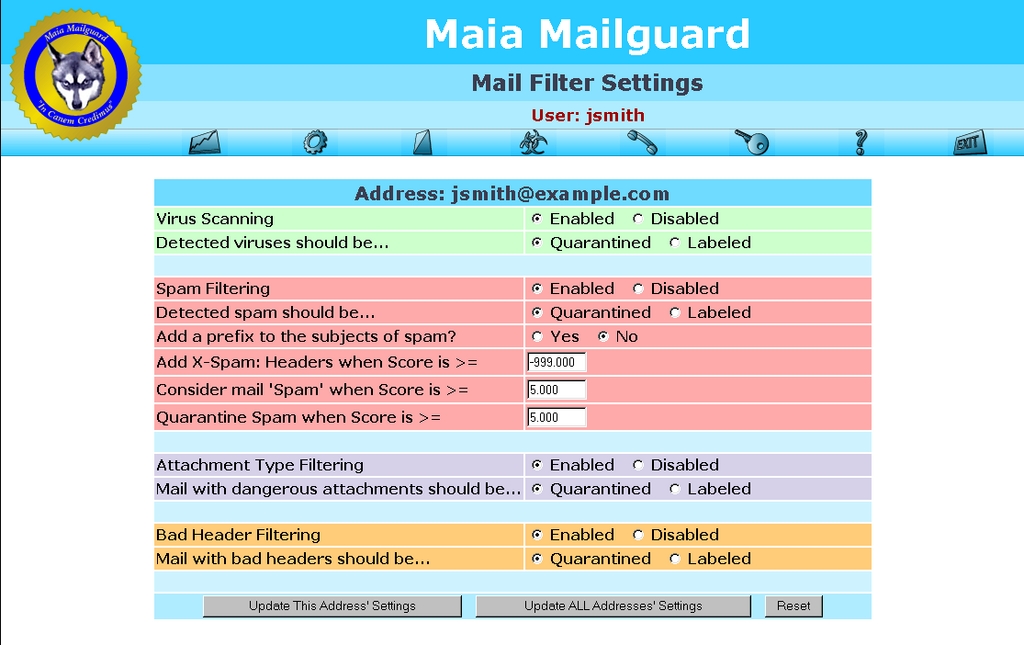
Figure 1. Every e-mail address has its own content-filter settings.
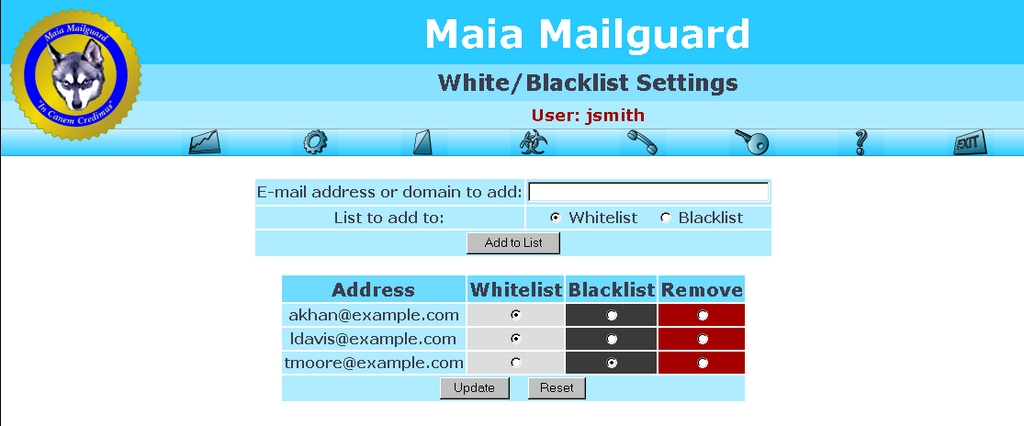
Figure 2. Users maintain their own whitelists and blacklists.
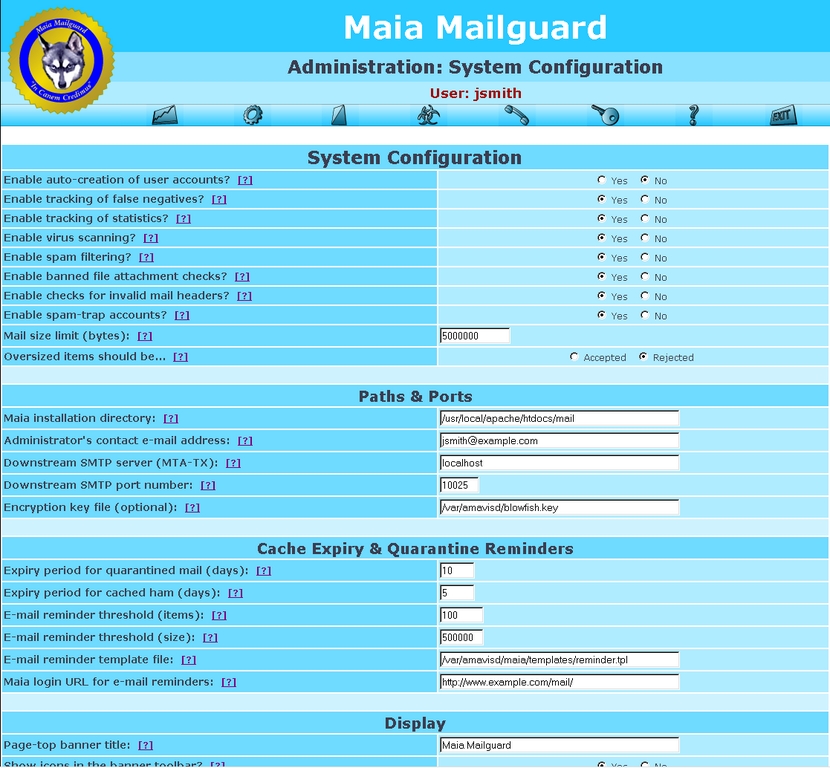
Figure 3. The administrator can configure most global settings from the Web interface.
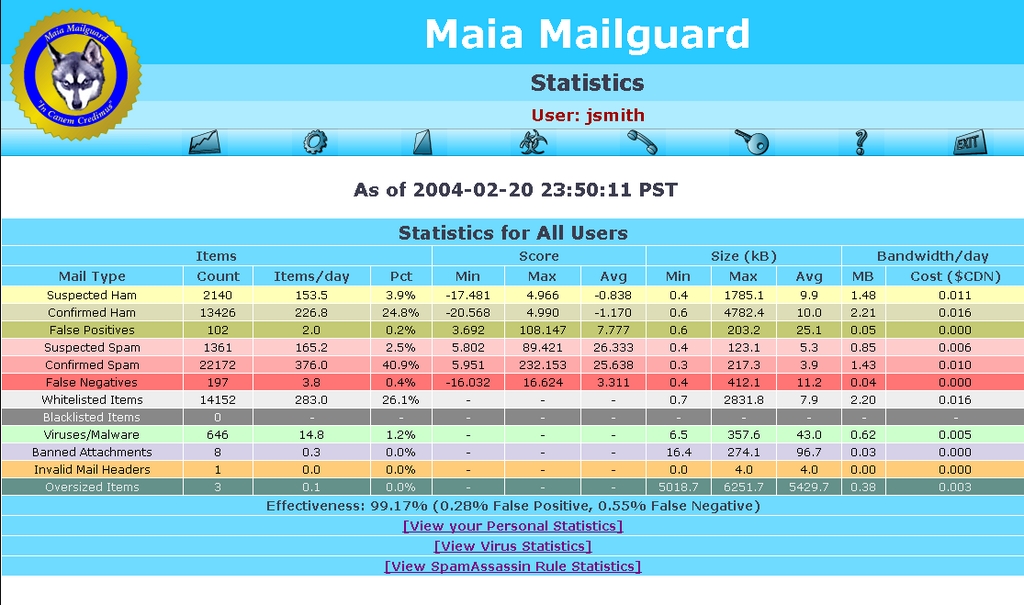
Figure 4. The stats table summarizes what your filters have seen.
Thanks to the fact that Maia puts quarantine management and content-filtering controls in the hands of users themselves, there isn't a lot of work left for administrators to do on a day-to-day basis. With Maia's Perl scripts running at scheduled intervals to report user-confirmed spam and to expire old quarantine items, the system all but manages itself.
When mail gets quarantined on behalf of a user, it's important that the user has a convenient way to access that mail. Maia provides a list of the items in a user's quarantine, sorted by spam score so that the items most likely to be there by mistake—the false positives—are kept closer to the top of the list and are easier to spot (Figure 5).
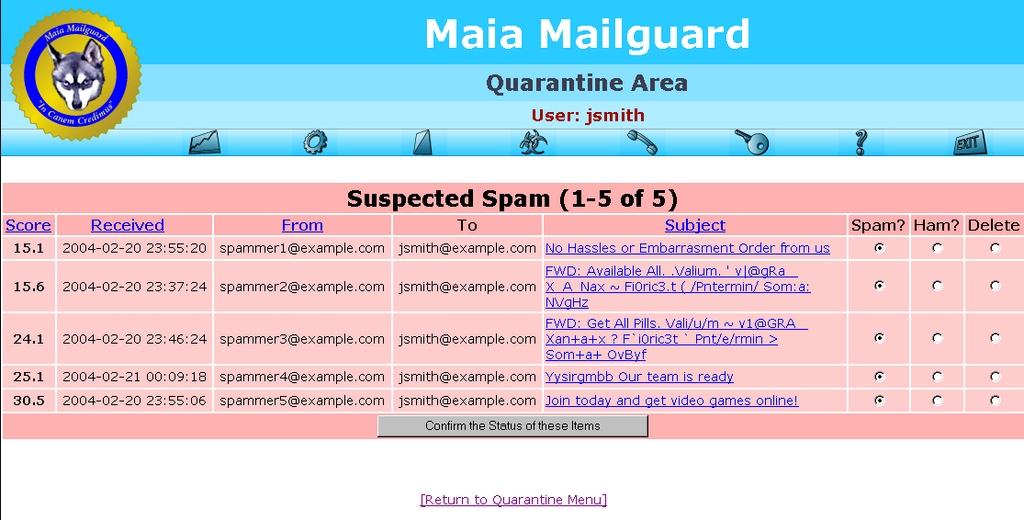
Figure 5. The user's quarantine is sorted by spam score.
If you're not sure from the subject line whether the mail is legitimate, you can click on the subject to open the e-mail in Maia's mail viewer (Figure 6). The mail viewer is safe to use on all types of mail, as it doesn't decode most attachments but does block remote images and strip away HTML tags that could redirect you to another site. You can view the mail in its decoded form or in its raw form, complete with all of the original mail headers.
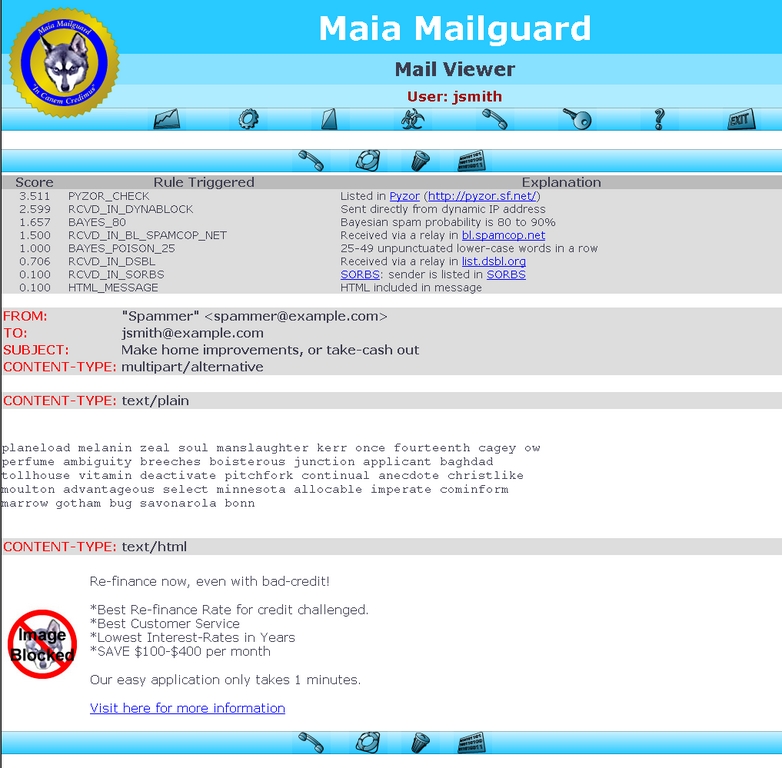
Figure 6. The mail viewer provides a safe way to inspect suspicious mail.
If you decide that the mail is legitimate after all, you can click a button to rescue the item from your quarantine and have it delivered to you. At the same time, Maia tells SpamAssassin about the mistake; the Bayesian learning system is less likely to make the same mistake in the future. You also can configure Maia to add the sender's address to your whitelist automatically when you rescue an item in this manner.
In addition to the quarantine, Maia offers a ham cache, which essentially is a list of the legitimate mail that you've received recently (Figure 7). The purpose of the ham cache is to let you report spam that somehow got past the filters—the false negatives. By marking these items properly as spam, you help to train SpamAssassin's Bayesian learning system.
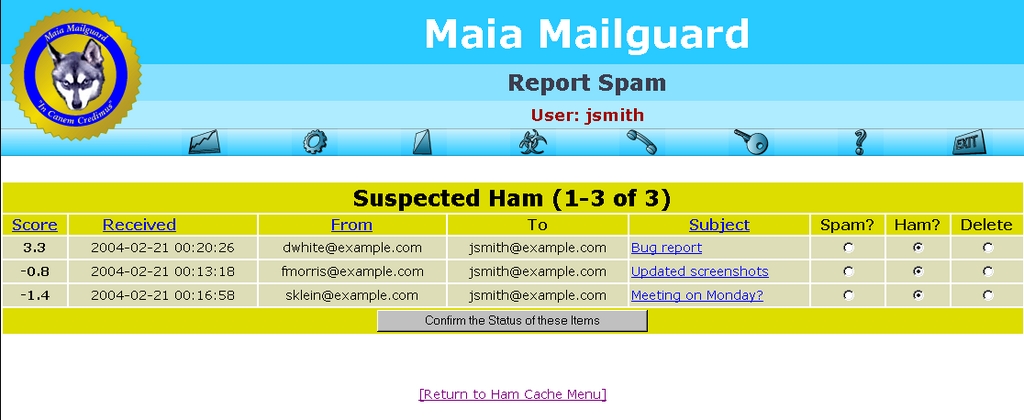
Figure 7. The ham cache allows a user to report false negatives.
The quarantine and ham cache also provide a means for you to confirm the status of the mail you've received. This not only helps train the Bayesian learning system, it also makes it possible to report spam properly, because it's been confirmed by a human being.
Most spam filters are concerned only with defending against the onslaught of spam and do little or nothing to prevent it in the first place. Because Maia allows users to confirm the status of their mail as spam and does nothing to modify the original mail headers, this spam can be reported in a number of different ways. Upcoming versions of Maia will support detailed header analysis and semi-automated reporting to ISPs. These reports help others block spam more effectively and even can result in some form of punishment for the spammer.
Behind the scenes, Maia's automated scripts process the quarantine at regular intervals, reporting confirmed spam to the same collaborative networks that SpamAssassin consults—Vipul's Razor, Pyzor and the DCC. By sharing this information with these networks, you give something back, rather than only benefiting from the reports of others.
In the end, what matters most is how effective the combination of amavisd-new and Maia Mailguard is at keeping spam out of your inbox, while keeping ham out of your quarantine. From my own site's statistics, that figure is a refreshing 99.22%, with 0.26% false positives and 0.52% false negatives. Best of all, those false positives can be recovered easily from the quarantine and the false negatives can be reported from the ham cache.
For viruses and other forms of malware, the effectiveness figure is even more impressive: 100%. In the six months since I installed this content-filtering solution, the virus scanners on my desktop machines haven't caught anything that slipped past the filters. This is largely due to the way amavisd-new allows multiple virus scanners from different vendors to be used together—what one scanner misses, another typically catches.
Performance-wise, any content-filtering solution is going to slow down mail processing to some extent. It often becomes a trade-off between filter effectiveness and speed, as you may choose to disable certain filters and tests to improve mail throughput. My 99.22% effectiveness statistic comes from having every available test and filter enabled, for example, but it also costs 1–3 seconds to process each mail item on a moderately loaded dual-PIII 733MHz with 1GB of RAM. A busier site might not be able to tolerate that kind of delay. They would have to choose between disabling the more time-consuming tests, upgrading the processor and RAM in the content filter and switching to a load-balanced array of content filters. Nevertheless, Maia Mailguard and amavisd-new are being used together at sites hosting more than 50,000 users, processing more than 350,000 e-mails a day, so the solution scales if you've got the hardware to handle it.
As many people already have discovered, some of the best weapons in the war against spam and viruses happen to be open-source tools. With tools like amavisd-new, Maia Mailguard, SpamAssassin and Clam Antivirus, you can provide your network with world-class protection without spending tens of thousands of dollars.
Resources for this article: www.linuxjournal.com/article/7820.
Robert LeBlanc is the president of Renaissoft (www.renaissoft.com), author of Maia Mailguard and resident spam-fighting guru for the AnswerSquad (www.answersquad.com). When he's not reinventing the wheel or building better mousetraps, he can be found in the company of his four Alaskan Klee Kai, Zorro, Sikari, Piyomi and, of course, Maia.

