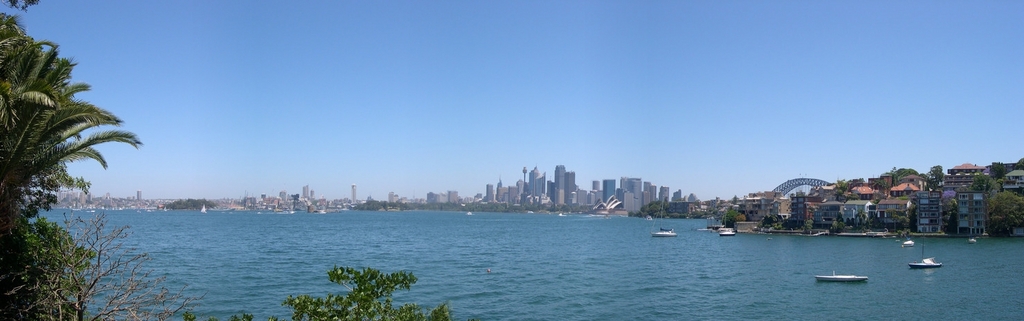
Building Panoramic Images in The GIMP
Panoramic landscapes make for some amazing photos. There's nothing like the feeling of relaxation and tranquility gained by gazing over the vivid images of sweeping wilderness, minus the hassle of actually getting there. Using a digital camera, it's possible to stitch photos together to simulate the expensive effects of a landscape filter. After I'd bought my digital camera (a Nikon Coolpix 4300) and set it up to work under Linux, getting software to stitch photos together was my next task.
The Nikon Coolpix 4300, like most digital cameras, comes with software on CD to perform rudimentary photo-stitching. Unfortunately, the software is not for Linux. Using Google, it was hard to find anything that would do the job under Linux, until I remembered The GIMP. There are two ways to use The GIMP to create a panoramic photo, easy and hard. The hard way is to set up layers out of the different photos, edit filter and layer masks, mess about with transparency and layer them together, manually.
The easy way is to use Pandora. Pandora is a plugin for The GIMP that takes photos and tries to match the edges of the photos together, using a best guess at where one photo ends and the next begins.
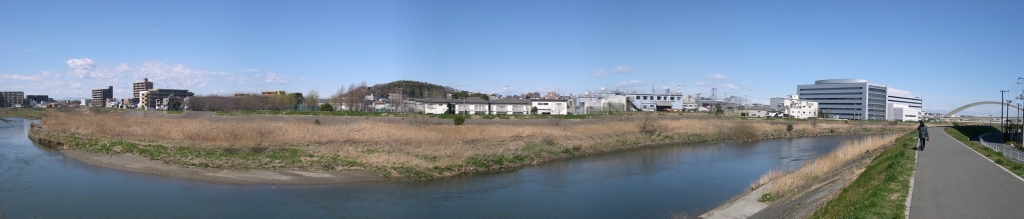
Because Pandora is a GIMP plugin, to install it, you need The GIMP version 1.2 or 1.3, as well as Gimptool, which is provided in The GIMP development package. Untar Pandora to a working directory, cd into it, and run make. Pandora detects which version of The GIMP is available and installs it automatically.
Fire up The GIMP. Pandora should now be available under the Extensions (Xtns) menu as Make Panorama. Select the photos you want to stitch together and click the Add File button; under The GIMP 1.2, you need to add the photos individually, as they should appear from left to right. It's possible to create vertical panoramas, but you need to make use of the rotate feature, as Pandora works horizontally.
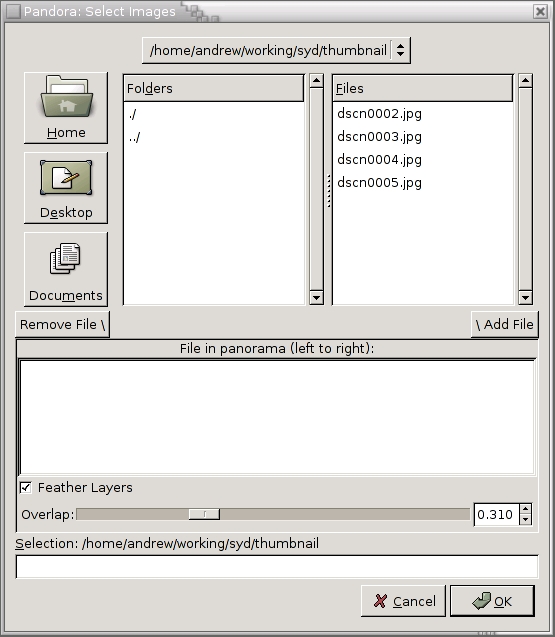
Pandora can be set with some options before it does its work. The option to feather the layers creates a fade toward the edge of the photos, where the photo becomes slightly translucent. Keep it toggled to create a semi-transparent fade at the sides of each photo, making them easier to line up.
Related to feathering is overlap. Often, photos have minor differences in sky colour; overlap helps to blend the difference so it isn't noticeable. The higher the overlap, the further in from the edge of the photo the feathering takes effect.
Once you're happy with your choices, click OK and Pandora starts to perform its magic.
When the processing has finished, you are presented with a set of layers, one for each original photo. The layers, represented with a dotted line at the edge, should be lined up roughly to what Pandora thinks are the common portions of each picture. Because Pandora is mostly a means of automating the layer creation and feathering, your panorama likely may require a bit more work before you can start impressing your friends.
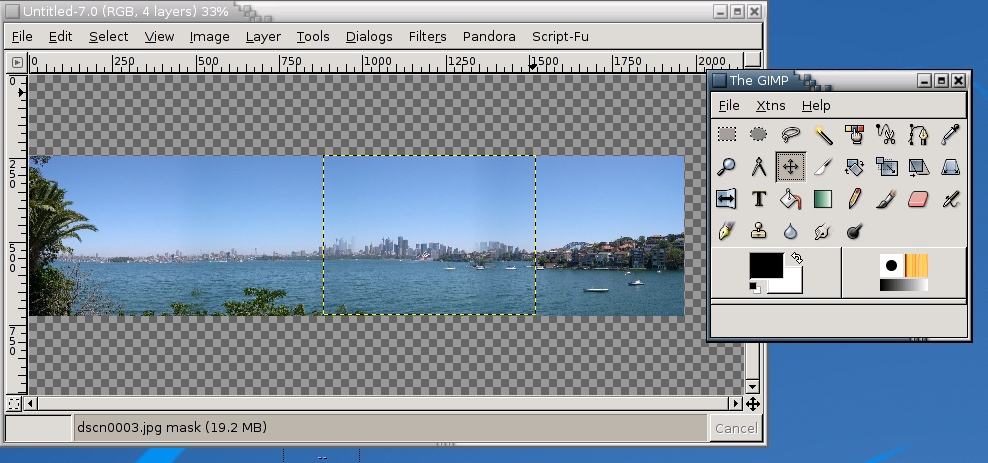
Figure 3. The selected layer is highlighted, and we can move it using the Move layers tool (selected).
Using the Move layers and selections tool (represented by the four-directional arrow), you can select a layer and move it, by holding the left mouse button down while moving the mouse. The easiest way to line the images up is to find a common landmark at the edge of each photo—mountains or trees are ideal—and use these as the anchor around which the images are aligned.
Once the layers are lined up to your satisfaction, you may notice that the pictures have moved out of their perfect vertical alignment, resulting in a jagged top and bottom edge.
Right-click in the image window, and choose Layers→Flatten Image. This merges the layers into one. If you haven't finished lining up the edges, you can undo this last action. Now, using the Select rectangular regions tool, select a region from the bottom left corner to the top right, ignoring all white space caused by the jagged edges mentioned earlier. Copy into a new image, save and you're done.
Today’s modular x86 servers are compute-centric, designed as a least common denominator to support a wide range of IT workloads. Those generic, virtualized IT workloads have much different resource optimization requirements than hyperscale and cloud applications. They have resulted in a “one size fits all” enterprise IT architecture that is not optimized for a specific set of IT workloads, and especially not emerging hyperscale workloads, such as web applications, big data, and object storage. In this report, you will learn how shifting the focus from traditional compute-centric IT architectures to an innovative disaggregated fabric-based architecture can optimize and scale your data center.
Sponsored by AMD
Built-in forensics, incident response, and security with Red Hat Enterprise Linux 6
Every security policy provides guidance and requirements for ensuring adequate protection of information and data, as well as high-level technical and administrative security requirements for a system in a given environment. Traditionally, providing security for a system focuses on the confidentiality of the information on it. However, protecting the data integrity and system and data availability is just as important. For example, when processing United States intelligence information, there are three attributes that require protection: confidentiality, integrity, and availability.
Learn more about catching the bad guy in this free white paper.
Sponsored by DLT Solutions
| Making Linux and Android Get Along (It's Not as Hard as It Sounds) | May 16, 2013 |
| Drupal Is a Framework: Why Everyone Needs to Understand This | May 15, 2013 |
| Home, My Backup Data Center | May 13, 2013 |
| Non-Linux FOSS: Seashore | May 10, 2013 |
| Trying to Tame the Tablet | May 08, 2013 |
| Dart: a New Web Programming Experience | May 07, 2013 |
- New Products
- Making Linux and Android Get Along (It's Not as Hard as It Sounds)
- Drupal Is a Framework: Why Everyone Needs to Understand This
- A Topic for Discussion - Open Source Feature-Richness?
- Home, My Backup Data Center
- Trying to Tame the Tablet
- RSS Feeds
- New Products
- What's the tweeting protocol?
- Dart: a New Web Programming Experience
- Reply to comment | Linux Journal
1 hour 32 min ago - Drupal is an Awesome CMS and a Crappy development framework
6 hours 11 min ago - IT industry leaders
8 hours 34 min ago - Reply to comment | Linux Journal
1 day 1 hour ago - Reply to comment | Linux Journal
1 day 3 hours ago - Reply to comment | Linux Journal
1 day 5 hours ago - great post
1 day 5 hours ago - Google Docs
1 day 6 hours ago - Reply to comment | Linux Journal
1 day 10 hours ago - Reply to comment | Linux Journal
1 day 11 hours ago
Enter to Win an Adafruit Prototyping Pi Plate Kit for Raspberry Pi

It's Raspberry Pi month at Linux Journal. Each week in May, Adafruit will be giving away a Pi-related prize to a lucky, randomly drawn LJ reader. Winners will be announced weekly.
Fill out the fields below to enter to win this week's prize-- a Prototyping Pi Plate Kit for Raspberry Pi.
Congratulations to our winners so far:
- 5-8-13, Pi Starter Pack: Jack Davis
- 5-15-13, Pi Model B 512MB RAM: Patrick Dunn
- Next winner announced on 5-21-13!
Free Webinar: Linux Backup and Recovery
Most companies incorporate backup procedures for critical data, which can be restored quickly if a loss occurs. However, fewer companies are prepared for catastrophic system failures, in which they lose all data, the entire operating system, applications, settings, patches and more, reducing their system(s) to “bare metal.” After all, before data can be restored to a system, there must be a system to restore it to.
In this one hour webinar, learn how to enhance your existing backup strategies for better disaster recovery preparedness using Storix System Backup Administrator (SBAdmin), a highly flexible bare-metal recovery solution for UNIX and Linux systems.


Comments
Good
Nice post............Thanks for sharing
-------------------------------------------
www.deepetch.com
Clipping path,Masking,Retouch,Color correction
copying finished picture to new image
Thanks for the instructions. I was able to use your steps to stitch a panorama photo. But couldn't do last step to get rid of jagged edges... I selecting image with rectangle tool as suggested, but was not able to copy to new image. I copied image, opened new image, and pasted but everything closed up! Can anyone help?
Thanks!
copying finished picture to new image
Thanks for the instructions. I was able to use your steps to stitch a panorama photo. But couldn't do last step to get rid of jagged edges... I selecting image with rectangle tool as suggested, but was not able to copy to new image. I copied image, opened new image, and pasted but everything closed up! Can anyone help?
Thanks!
Gimp as panoramic-maker
Gimp's great stuff to do some almagations like these. I used it e.g. for combining this foto http://www.stoliczek.net/kategorie/logo_user9.jpg ..
Wow!
Extremely informative tutorial, well researched and clearly presented.Thanks for the hard work.
Regards,
panorama stitching
So where's the Windows port?
So where's the Windows port? :-D
So where's the Windows port?
What about 'porting' your PC to Linux? :-D
Never
Never
Re: Building Panoramic Images in The GIMP
Ha, if you want something really straghtforward and s u b s t a n t i a l l y more powerful than what was described in the article, I highly recommend http://xmerge.sourceforge.net.
While its X11 interface is very spartan, its efficiency more than compensates for. But where it shines is the feature set. It's the user who decides which image feature is common for two pictures to be merged and the tool is not only translating but rotating the images as well. You can save the set of merging hints and reload them later. Oh, and unlike pandora, it does merge x-y matrixes, not only uni-dimensional panoramas.
I stumbled upon it while looking for a stitiching program and xmerge was a big relief after trying pandora and some other complex tools whose names I don't recall right now. I successfuly merged imperfect pictures in a 16 X 8 matrix and it was something like a 10 minutes job.
Serban
Re: Building Panoramic Images in The GIMP
It is good to publicize tools like this. The GIMP Plugin registry is good but without binaries it isn't all that useful for end users. It would be great if there were a packages with extra Gimp plugins
(gimp-plugins-extra?)
Pandora will provide a good counter point to the new PhotoMerge tool in Adobe Photoshop.
It is such a shame that there is so much great functionality for the GIMP that users dont even know about because it is hard to find and use.
Re: Building Panoramic Images in The GIMP
Ever considered to use panorame tools? http://www.path.unimelb.edu.au/~dersch/
Also look on sourceforge for hugin, which is a very good user interface for the panotools (which are script driven).
regards
Erik Krause
Re: Building Panoramic Images in The GIMP
Or you can use http://www.vips.ecs.soton.ac.uk/
Re: Building Panoramic Images in The GIMP
If you prefer a standalone application instead of a gimp plugin i would recomend http://hugin.sourceforge.net/.
Re: Building Panoramic Images in The GIMP
Just checked out the website, and the app looks pretty complicated. Pandora is more a 'quick n dirty' way to do it, and appears much simpler.
I didn't know about this one before I wrote the article, though ;)
Re: Building Panoramic Images in The GIMP
It'll get a lot simpler in the next version. basically:
1. give it a pile of images, it will select the control pointss automatically.
2. the optimising stuff will be simplified a lot.
hugin is based on Panorama Tools (with lots of additional stuff), and does perspective remapping correctly.
see the hugin authors websites (cited on hugin website)
for some example panoramas.
Pablo d'Angelo
Re: Building Panoramic Images in The GIMP
This is great. I've been looking to do this for some time now.
Pandora
What a great piece of software! I obtained the rpm release after installing gimptool and on my first attempt created a flawless panoramic view of my apartment; it only took about two minutes. Very impressive--thanks so much for the suggestion.