
Overcoming Asymmetric Routing on Multi-Homed Servers
Asymmetric TCP/IP routing causes a common performance problem on servers that have more than one network connection. The atypical network flows created by asymmetric routes occur most often in server environments where a different interface is used for sending traffic than is used to receive traffic. The flows are considered to be unusual because traffic from one of end of the connection (A→B) travels over a different set of links than does traffic moving in the opposite direction (B→A). Asymmetric routes have legitimate uses, such as taking advantage of high bandwidth but unidirectional satellite links, but more often are a source of performance problems.
These abnormal packet flows interact poorly with TCP's congestion control algorithm. TCP sends packets in both directions even when the data flow, or goodput, is unidirectional. TCP's congestion control algorithm anticipates that the data packets share delay and loss characteristics similar to what their corresponding acknowledgment and control packets carry when traveling in the reverse direction. When the two types of data travel across physically different paths, this assumption is unlikely to be upheld. The resulting mismatch generally results in suboptimal TCP performance (see Resources).
A more serious problem occurs when the asymmetric routing introduces artificial bandwidth bottlenecks. A server with two interfaces of equal capacity can develop a bottleneck if it receives traffic on both interfaces but always responds through only one. Servers commonly add multiple interfaces, even multiple interfaces connected to the same switch, in order to increase the aggregate transmission capacity of the server. Asymmetric routing is a commonly unanticipated outcome of this configuration that comes about because traditional routing is wholly destination-based.
Destination-based routing uses only some leading prefix of the packet's destination IP address when selecting on which interface to send the packet out. Each entry in the routing table contains the IP address of the next-hop router (if a router is necessary) and the interface through which that packet should be sent. The entry also contains a variable length IP address prefix to match candidate packets against. That prefix could be as long as 32 bits for an IPv4 host route or as short as 0 bits for a default route that matches everything. If more than one routing table entry matches, the entry with the longest prefix is used.
A typical server not participating in a dynamic routing protocol, such as OSPF or BGP, has a simple routing table. It contains one entry for each interface on the server and one default route for reaching all the hosts not directly connected to its interfaces. This simple approach, which relies heavily on a single default route, results in a concentration of outgoing traffic through a single interface without regard to the interface through which the request originally was received.
A good illustration of this situation is a Web server equipped with two 100Mb full duplex interfaces. Both of the interfaces are configured on the same subnet. This setup should provide 200Mb/sec of bandwidth from both incoming and outgoing traffic if it is attached to a full duplex switch with a multi-gigabit backplane. This arrangement is an attractive server design because it allows the server to exceed 100Mb of capacity without having to upgrade to gigabit network infrastructure. This is a cost effective approach, as even though copper-based gigabit NICs are becoming inexpensive, the switch port costs to utilize them are still significantly more than what would be incurred for even several 100Mb ports.
Typically, clients connecting to this Web server first would encounter some kind of load balancer, either DNS-based or perhaps a Layer-4 switching appliance, that would direct half of the requests to one interface and half to the other. Listing 1 shows what the default routing table might look like on that Web server if it had two interfaces, both configured on the 192.168.16.0/24 subnet.
Listing 1. Typical Routing Table
Destination   Gateway      Genmask       Flags Iface
192.168.16.0  *            255.255.255.0 U     eth0
192.168.16.0  *            255.255.255.0 U     eth1
127.0.0.0     *            255.0.0.0     U     lo
default       192.168.16.1 0.0.0.0       UG    eth0
In this circumstance incoming load is distributed evenly, thanks to the load balancer. However, the response traffic all goes out through eth0 because, by default, the server uses destination-based routing.
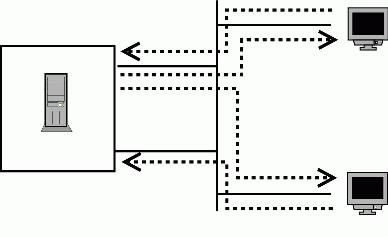
Figure 1. An Imbalanced Server
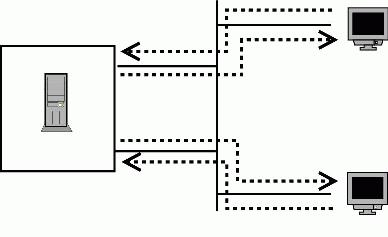
Figure 2. To use both interfaces effectively, we need to use policy-based routing.
Most of the traffic volume on a Web server is outgoing because HTTP responses tend to be much larger than are requests. Therefore, the effective bandwidth of this server still is limited to 100Mb/sec, even though it has two load-balanced interfaces. Load balancing the requests alone does not help, because the bottleneck is on the response side. Packets either use the default rule through eth0 or, if they are destined for the local subnet they have to choose between two equally weighted routes. In that case the first route (again to eth0) is selected. The end result is the Web requests are balanced evenly across eth0 and eth1, but the larger and more important responses all are funneled through a bottleneck on eth0.
A good way to address this imbalance is with the iproute2 package. iproute2 allows the administrator to throw away traditional network configuration tools, such as ifconfig, and tackle more complicated situations using a program named ip. ip is part of the iproute2 package written by kernel developer Alexey Kuznetsov. iproute2 comes installed with most distributions. If the ip command is not available on your system, the package may be downloaded at ftp.inr.ac.ru/ip-routing. Like many packages that tightly integrate with Linux internals, iproute2 needs a copy of the kernel sources to be available during its own compilation.
General iproute2 functionality also requires netlink socket support to be compiled into the running kernel. Additionally, the particular strategy outlined in this article requires the IP: advanced router and IP: policy routing options to be configured in the running kernel. These features have been available for the entire 2.4 kernel series and are included in 2.6 as well. The kernel configuration scripts still label policy routing as NEW, but that is more a factor of the kernel help screens being updated slowly than a reflection on the maturity level of advanced and policy routing.
The complete story of iproute2 is too involved for this article. In addition to controlling routing behavior, iproute2 can be used to set up interfaces, control arp behavior, do NAT and establish tunnels.
The main idea of iproute2's routing control is to separate routing decisions into two steps. The second step is a traditional destination-based routing table. The key difference in an iproute2 world is the system may contain many different destination-based routing tables instead of a single global system table. The first iproute2 step is used to identify which of those many tables should be used during the second step. This table identification step is known as rule selection or policy selection. Rule selection is considered more flexible than traditional routing, because it uses factors broader than only the destination address of the packet when making a policy selection.
This two-phase infrastructure lays the groundwork for solving the bottleneck problem on the multi-homed Web server described above. First, we need to create two routing tables; each table routes out through a different interface. Second, we need to create the decision step in such a manner that it selects the routing table that sends the server's response traffic out the same interface on which the request arrived. The source address of the outgoing packets can be used to correlate the packets with the interface on which the session originated. In networking parlance, this technique is known as source-based routing.
Begin by creating the two routing tables. The tables need only default routes to our main gateway, but each one uses a different interface to reach that gateway. Different tables are represented in iproute2 configurations by unique integers. Table numbers can be given string aliases through the /etc/iproute2/rt_tables file, but simple numbers are sufficient for this example. The numbers are simply identifiers, their magnitude carries no meaning. The default system routing table (the normal table seen when using the traditional route command) is number 254. Numbers 1 through 252 are available for local use. We call our example tables here table 1 and table 2:
#ip route add default via 192.168.16.1 dev eth0 tab 1
#ip route add default via 192.168.16.1 dev eth1 tab 2
Displaying the contents of any table is done using the ip route show command:
#ip route show table 1
default via 192.168.16.1 dev eth0

#ip route show table 2
default via 192.168.16.1 dev eth1
Our simple tables look fine; their only difference is the interface on which they transmit. Let's move on to creating the policies that dynamically select among the two tables at runtime. On the example server, interface eth0 is bound to address 192.168.16.20 and interface eth1 is bound to 192.168.16.21. A selection policy that matches the source address of an outgoing packet with the table that uses an interface that is in turn bound to that source address accomplishes our goal. That sounds more complicated than the process really is. What it really means is we need a policy that says packets with a source address of 192.168.16.20 should use table 1 because table 1 uses eth0 and eth0 is bound to 192.168.16.20. Similar logic applies to a policy that ties eth1 and 192.168.16.21 together.
Each routing policy has an associated priority. Policies with a lower priority number take precedence over policies that also may match the candidate packet but have a higher priority value. The priority is an unsigned 32-bit number, so there is never a problem finding enough priority levels to express any algorithm in great detail. Our example algorithm requires only two policies.
At start-up time, the kernel creates several default rules to control the normal routing for the server. These rules have priorities 0, 32766 and 32767. The rule at priority 0 is a special rule for controlling intra-box traffic and does not affect us. However, we do want our new rules to take precedence over the other default rules, so they should use priority numbers less than 32766. These two default rules also may be deleted if you are sure your replacement routes never need to fall back on the default behavior of the server.
The new policy rules are added using the ip rule add command. The from attribute is used to generate source address-based routing policies.
#ip rule add from 192.168.16.20/32 tab 1 priority 500
#ip rule add from 192.168.16.21/32 tab 2 priority 600
Under this setup, outgoing packets first are checked for source address 192.168.16.20. If that matches they use routing table 1, which sends all traffic out eth0. Otherwise the packets are checked for source addresses that match 192.168.16.21. Matches to that rule would use table 2, which sends all traffic out eth1. Any other packets would use the default system rules detailed by rules 32766 and 32767.
#ip rule show
0:      from all lookup local
500:  from 192.168.16.20 lookup 1
600:  from 192.168.16.21 lookup 2
32766:  from all lookup main
32767:  from all lookup 253
Changes made to the policy database do not take effect dynamically. To tell the kernel that it needs to re-parse the policy database, issue the ip route flush cache command:
#ip route flush cache
iproute2 allows you to use factors other than the source address when performing policy selection. The candidate packet's type of service bits, the destination address and any diffserv markings also are available, along with some other attributes. See www.compendium.com.ar/policy-routing.txt and www.linuxgrill.com/iproute2.doc.html for a good description of all the iproute2 parameters and capabilities.
Let's now see the results of this technique play out during a real Web serving test. The test consists of transferring a 90KB file 20,000 times. The HTTP transactions are load-balanced across the server's two IP addresses, with an average of 40 connections being performed in parallel.
The ifconfig command reports on an interface's packet counters. Listing 2 shows the output of the ifconfig command after running the test on a vanilla Web server that does not employ the source-based routing approach.
Listing 2. Interface Counters with Destination-Based Routing
eth0 Link encap:Ethernet  HWaddr 00:E1:AA:7C:51:2C
     inet addr:192.168.16.20  Bcast:192.168.16.255  Mask:255.255.255.0
     UP BROADCAST RUNNING MULTICAST  MTU:1500  Metric:1
     RX packets:328008 errors:0 dropped:0 overruns:0 frame:0
     TX packets:1341151 errors:0 dropped:0 overruns:0 carrier:0
     collisions:0 txqueuelen:100
     RX bytes:23963417 (22.8 Mb)  TX bytes:1908125938 (1819.7 Mb)
     Interrupt:19 Base address:0xe400 Memory:dff80000-dffa0000

eth1 Link encap:Ethernet  HWaddr 00:E1:AA:7C:51:2D
     inet addr:192.168.16.21  Bcast:192.168.16.255  Mask:255.255.255.0
     UP BROADCAST RUNNING MULTICAST  MTU:1500  Metric:1
     RX packets:346430 errors:0 dropped:0 overruns:0 frame:0
     TX packets:0 errors:0 dropped:0 overruns:0 carrier:0
     collisions:0 txqueuelen:100
     RX bytes:25250075 (24.0 Mb)  TX bytes:0 (0.0 b)
     Interrupt:16 Base address:0xec00 Memory:dffa0000-dffc0000
The server's received traffic, which consists of HTTP requests and TCP acknowledgments for the HTTP responses, is well balanced at roughly 330,000 packets received by each interface. However, the transmission traffic has fallen prey to the asynchronous route problem: interface eth0 has transmitted 1.3 million packets where eth1 has not transmitted any.
Listing 3 contains the output of ifconfig after rebooting the server to clear the interface counters and employing the iproute2 strategy discussed in this article. The test then was run again in the same manner as above.
Listing 3. Interface Counters with Policy Based Routing
eth0 Link encap:Ethernet  HWaddr 00:E1:AA:7C:51:2C
     inet addr:192.168.16.20  Bcast:192.168.16.255  Mask:255.255.255.0
     UP BROADCAST RUNNING MULTICAST  MTU:1500  Metric:1
     RX packets:332371 errors:0 dropped:0 overruns:0 frame:0
     TX packets:670341 errors:0 dropped:0 overruns:0 carrier:0
     collisions:0 txqueuelen:100
     RX bytes:24270910 (23.1 Mb)  TX bytes:954045844 (909.8 Mb)
     Interrupt:19 Base address:0xe400 Memory:dff80000-dffa0000

eth1 Link encap:Ethernet  HWaddr 00:E1:AA:7C:51:2D
     inet addr:192.168.16.21  Bcast:192.168.16.255  Mask:255.255.255.0
     UP BROADCAST RUNNING MULTICAST  MTU:1500  Metric:1
     RX packets:334110 errors:0 dropped:0 overruns:0 frame:0
     TX packets:670152 errors:0 dropped:0 overruns:0 carrier:0
     collisions:0 txqueuelen:100
     RX bytes:24387875 (23.2 Mb)  TX bytes:954032082 (909.8 Mb)
     Interrupt:16 Base address:0xec00 Memory:dffa0000-dffc0000
The server's received traffic remains well balanced, but the transmission traffic now is equalized at 670,000 packets for each interface.
Source-based routing capabilities are common on high end networking gear, but they rarely are seen or utilized in server environments. Linux has excellent but poorly understood source-based routing support. The whole universe of advanced Linux routing and traffic shaping is well described at lartc.org.
Resources
Effects of Network Asymmetry on TCP Performance: www.eecs.berkeley.edu/IPRO/Summary/97abstracts/padmanab.1.html
Linux Advanced Routing and Traffic Control: www.lartc.org
Patrick McManus (mcmanus@ducksong.com) works as a software engineer for Datapower Technology, near his home in Boston, Massachusetts. He currently is obsessed with reading a biography of each American president.
