
Using SQL-Ledger for Your Business
Back in the late 1990s, I started looking for a good accounting software package for Linux. I was disappointed by all the offerings I found; none was up to snuff or even looked like it might ever be. Then, about three and a half years ago, I stumbled on SQL-Ledger (SL) written by Dieter Simader (see the “Making Open Source Work” sidebar).
Making Open Source Work
Dieter Simader is the author of SQL-Ledger. He started the project four years ago. His software has taken off since then, and he now works on SL full-time. He's made his open-source project, released under the GPL with no cost to others to use, his primary source of income.
So how does one make a living off free software? If you visit the SL site, you can see that Dieter offers support contracts, which are all reasonably priced. His software is of high quality, and his offerings include data conversion, pay-as-you-play support and support for the development version if you need the more advanced features. He also sells the software manual that tells you not only how to use his program but how to customize screens for all users or for certain users, using SL's API.
These value-added features are well worth the price and should be considered essential for any business. Although businesses can hire someone else to do what Dieter does, including supporting the software, customizing templates and importing data, few could do the work as well as Dieter.
As a consultant, my clients usually want to deal with me, not someone on another continent whom they don't know. For that convenience, they are willing to pay a premium. So I tack a small percentage on to Dieter's price, pay Dieter and we're both happy. He gets work and is paid for supporting his program. I get an annoyance fee, because my clients will annoy me if the software doesn't work to their satisfaction. This model also serves as a good way to expand into markets where the author doesn't speak the language, so additional revenue also serves as a translation fee. SQL-Ledger is proof that open-source business models can work.
To be honest, at first glance I thought SQL-Ledger wasn't yet an offering for a serious business. It lacked point of sale (POS), payroll and a number of other features. But, based on its ease of installation, its flexibility and a number of other factors, not the least of which was the author's rather ambitious to-do list, I tried it out.
I used SQL-Ledger for my IT consulting business, Pananix, SA, and it proved to be more than adequate. I could input customers and vendors, create invoices and orders, and print basic reports, including trial balance, income statement and balance sheet. SL even had rudimentary support for goods and services reports covering product inventory and services.
Because I currently live in a Spanish-speaking country, I anticipated problems. I'm not familiar with Spanish accounting terms, but the laws of this country require that the program interface and all statements and reports be in Spanish for the natives and tax auditors. Fortunately, SL is written in such a way that users can choose the language they require. That means I can see everything in English, while my accountant and the local tax authorities see Spanish—perfectly legal. If a language doesn't exist, it can be added easily. This feature was not well supported in any other accounting package I looked at and was a major factor for me in choosing SL.
Installation was a breeze back when I first looked at SL, but it's even easier now. The biggest stumbling block for most people involves the few requisite Perl modules for database support. A second stumbling block comes with the configuration of PostgreSQL itself, but all these are covered in the instructions and FAQ. As long as they are followed to the letter, even newbies shouldn't have any difficulty. The problems seem to arise when folks wander off on their own and deliberately or accidentally make changes affecting permissions, occasionally permissions on the database itself.
Once Perl and whatever supported database you want to use are set up, the rest is easy. MySQL is not supported and will be only when it provides certain parts of the SQL-92 standard it is now missing. PostgreSQL is the database used for design and testing, but Oracle and DB2 also work.
You also need to configure your Web server of choice to access SL, but that involves only copying a few lines to httpd.conf and restarting it. If you install SL under your DocumentRoot, even this step can be omitted, as long as you can run CGI scripts from below your DocumentRoot. If you want to print reports to disk as PDF files, you need to make sure you have LaTeX installed.
The currently recommended installation practice for SL itself is to use the author's supplied setup.pl file to handle everything for you. This makes it difficult to go wrong, and the script also is used to upgrade SL. The author recently included code to test the database itself during upgrades to ensure you don't have version mismatches between the database and the code. If you do, it automatically upgrades it (nice touch, that).
Those of you who follow my writings know that I consider security to be job number one. Accountants out there should be pleased to know that security in SL can be implemented on a user-by-user basis. Therefore, one user can see only Accounts Payable while another can see only Accounts Receivable.
SL also can be configured to comply with generally accepted accounting principles (GAAP). Most countries have their own version of GAAP, but these practices are similar. You therefore can configure SL so users can't go back and delete transactions but must post reversing entries instead. You also can close periods so nothing can be edited in prior periods.
All this is accomplished in the administration section where you add users and basically tell the system how you want it to act. After that, it's up to you. The FAQ contains information to assist you in tightening security on your system. Basically, you decide how secure or open your system will be.
SL is easy to use and fairly simple to customize in any way you need. Everything in SL revolves around its Chart of Accounts. When you set up SL, you choose one to load. But making changes to that one or even creating a new one is not difficult. In fact, many businesses probably will want to sit down and make some modifications.
The way SL's tax system is set up, almost any tax system can be configured easily, simply by linking from one table to another using the tax percentage. The ease with which this can be done makes it ideal for locations where the tax structure might require two or three separate taxes be applied to a sale. The Default Chart of Accounts is set up with three tax accounts just to show how it is done. Tax tables contain multiple links to customers, vendors, parts and services, and a match determines whether tax is applied or not. AR and AP are independent from one another, and in combination with tax settings for customers, vendors' parts and service, you have a very flexible model to calculate tax. You even can set up negative taxes to calculate tax withholdings at source or tax on tax. The tax system here requires that I charge taxes on services tied to the sale of a taxable item; otherwise, I don't charge tax on purely a service offering. So I had to create a service call that was nontaxable and one that was taxable.
So that customers don't notice that I sometimes charge tax on a service but other times I don't, and because the taxable service always was tied to a hardware sale, I simply created an installation package that included the hardware and taxable service with the entire bundle being taxed. I haven't seen a single other accounting package for Linux that offers me this kind of flexibility.
SL can be accessed from any system with a Web browser, text or graphical, from anywhere you can reach the SL server by HTTP or HTTPS. If, like most people, you're using a graphical browser, after login you see two frames. The one on the left contains a menu broken down into several sections with items below them, and the one on the right contains a main screen where you can enter data.
One of the first things I do after each upgrade is cd into the bin/mozilla directory and edit menu.pl to widen the menubar. For me, it's a little too narrow, and making it about 35 pixels wider makes it more pleasing to my eyes. For those of you who use a text browser, like Lynx, that doesn't render frames, the menu headings are at the bottom of the page.
The major headings that show up depend on the user's configuration from the admin page. Entire menu headings can be removed or only specific items. So any given user's menubar may look a bit sparser than that shown in the screen captures, depending on setup and version in use. The screenshot in Figure 1 clearly shows this is Version 2.3.1, a development version. It is slightly more feature-rich than the stable version, but its designation as unstable warns you it hasn't been as thoroughly tested as the stable version. Major menu headings include AR, POS, AP, Cash, HR, Order Entry, Shipping, Quotations, General Ledger, Goods & Services, Projects and Reports.
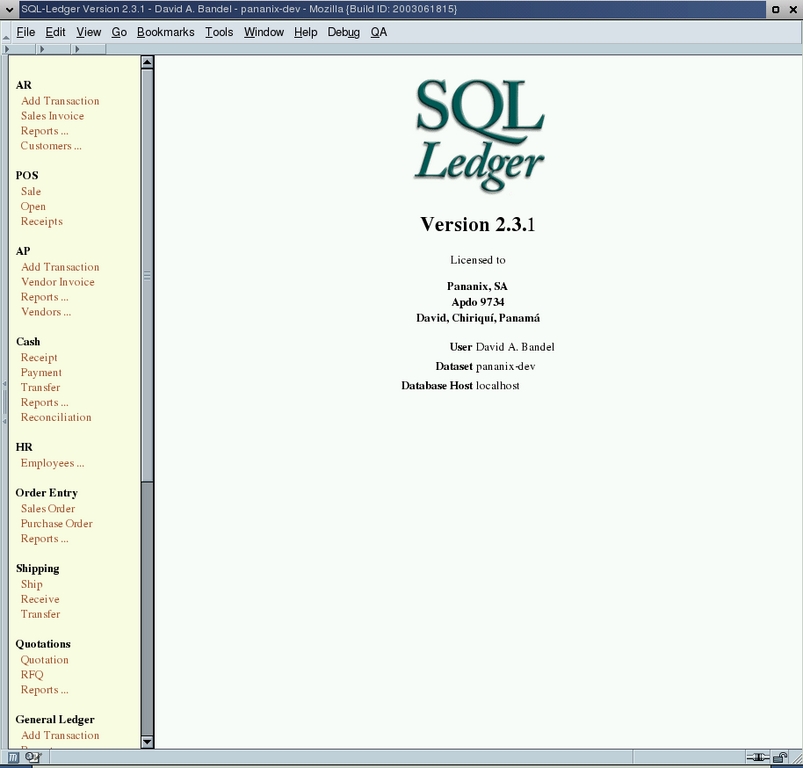
Figure 1. SQL-Ledger Start Page
You also can see some menu items followed by ellipses. Those bring up even more detailed submenu items. In the case of System..., a long list is brought up in later versions.
Taking a quick look at AR Reports, selecting Reports expands the menu list. Then selecting Transactions provides a screen to define the transactions we want to see and the information we want presented; see Figure 2.
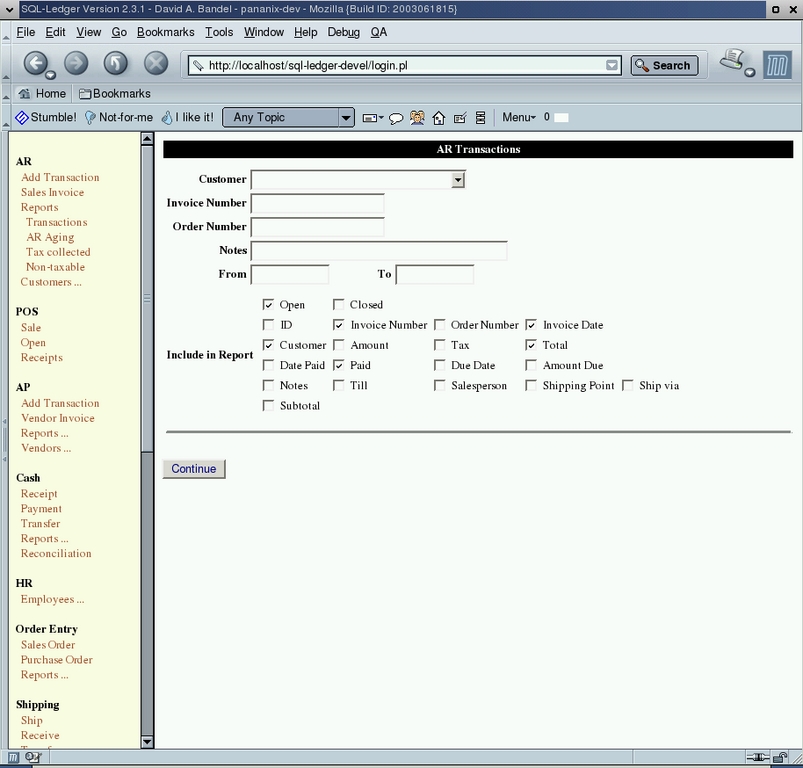
Figure 2. AR Transactions Query Screen
Notice the Customer window at the top of the browser window in Figure 2. In a number of screens, this can be either a drop-down list or a pick list in a separate window. Better yet, this presentation is configurable by each user. So users who like drop-down lists and don't mind that the list scrolls 16 pages off the bottom of the screen can put a large number in their pick-list preference. Those that want a smaller, more sane list, can get a drop-down list unless the number of available items for the drop-down list exceeds the limit. Then, they simply can put in a few letters of the name for which they're searching, refresh the screen and get a small pick list, as shown in Figure 3. This particular pick list came up from an invoice screen after entering maint in the part number window and selecting Update.
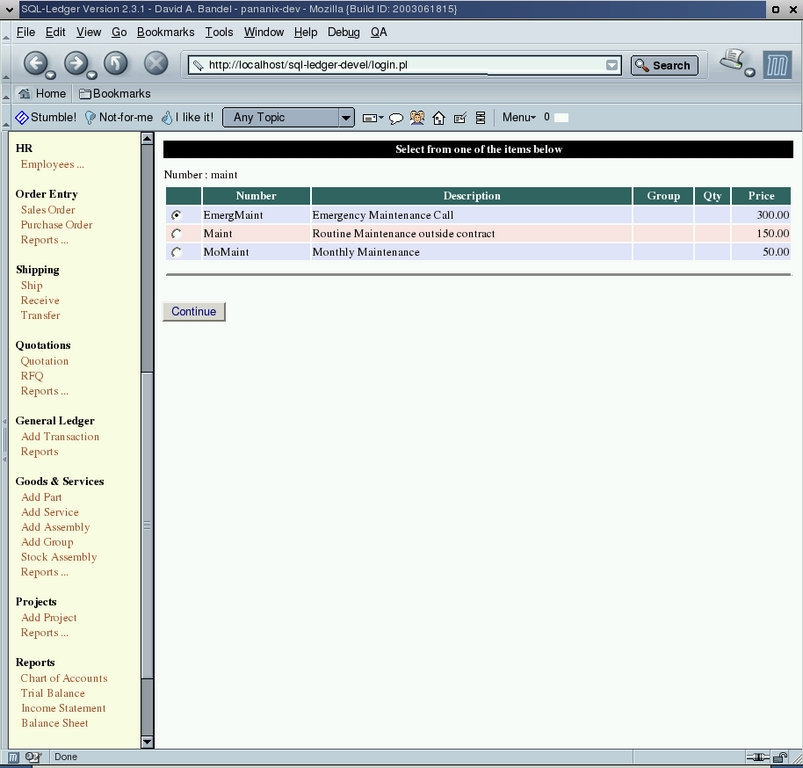
Figure 3. Sample Pick-List Screen
For those of you interested in playing with SL without going to the trouble of setting it up, I suggest you head over to www.sql-ledger.com. A few demo systems are available, so folks can try before they install the software.
I'm not an accountant, and I barely get by with my accounting duties as it is. As with most powerful accounting software, you should know something about it before using it. But if it's an accounting question, I probably don't have the answer.
Fortunately, except for the few times I may have to wade into general ledger, the system takes care of itself. I've found the customer list to be quite friendly. It serves as both a customer list and a way to keep e-mail addresses straight. I e-mail monthly bills, and this program has made that particularly easy. In fact, after posting, you can call up a bill and e-mail it with a single click. The program handles it all for you, including sending a cover letter.
Purchase orders are as easy to do, and they also can be e-mailed directly from the interface. When orders come in it's a few more clicks to enter inventory and create the payable. A quick trip to Cash→Payments and we're done.
If you have several businesses, you can run as many ledgers as you want using different database names. You also have to use different user names, one for each, but I've found the easy way to do this is to make the user name a combined user/company name. You may think of something more convenient.
Now that the latest SL includes POS, you can connect a bar-code reader and use that to enter items on the screen. SL was designed deliberately with the UPDATE button first, so scanning a bar code fills in a product number then updates that to fill in the rest of the line.
SL is now fairly feature-rich these days, especially compared to several years ago, but the author maintains an ambitious to-do list. By the time you read this, in fact, SL even may contain payroll. Most of the tables and links are in place; it appears to be a matter of coding and testing. I fully expect a payroll system to rival any available, based on what's come before in SL.
The SL to-do list includes such items as:
Budgets: comparisons to actual ones and also to enforce budget (expense) constraints.
Manufacturing: finished goods and goods-in-process inventory; material and human resources planning.
Lot allocation: repackaging bulk goods into smaller portions; memorized transactions and custom reports.
Batch form generation: invoices, orders and other forms for batch printing.
Financial reports: more comparison options, such as month-to-month.
SL offers a range of support for the software. From the SL home page you can find several users lists in a variety of languages. Currently six user lists exist. The author lurks on the English list. He occasionally posts to clear up misunderstandings.
Paid support also is available at extremely reasonable rates. A wide variety of support options are available, and most come with a copy of the SQL-Ledger users manual. If you want to use this software without support, that's fine. But as with all GPL software, if you break it, you get to keep both pieces. Paid support is your assurance it doesn't break. A support option is available to import old data from accounting packages that can export tab-delimited text files.
David A. Bandel (david@pananix.com) is a Linux/UNIX/Network (both wired and wireless) consultant in Panama who dabbles in almost all aspects of telecommunications. He's authored or coauthored three Linux books, runs two HF radio Sailmail stations and does volunteer work for the Linux Professional Institute. When not working, he can be found relaxing on his farm near the Costa Rican border.
