
Paranoid Penguin - Seven Top Security Tools
Linux supports a wealth of outstanding free and open-source security tools—enough, obviously, to write a monthly column on the topic. But whereas I usually focus on one or two particular tools or techniques in-depth, this month I'd like to discuss, at a high level, a variety of my favorite security tools for Linux.
If you're new to Linux or to network security, this may be your first exposure to these particular software packages, and I hope this column nudges you in the direction to learn more. If you're familiar with a couple of them but not the others, I hope this article helps you to augment your toolkit. But even if all of this is old hat for you, I hope you find it amusing to see which of the t00lz on my laptop have been getting the most CPU time lately. So without further ado, I bring you the Paranoid Penguin's Choice.
We begin with the most ubiquitous of our featured tools, Netfilter, the Linux kernel's built-in firewall code. To be precise, the collection of modules in question officially is called Netfilter—iptables is merely the user-space command we use to configure the Netfilter kernel modules. The two names can be used interchangeably most of the time except, of course, when you're issuing iptables commands or talking to kernel developers.
Netfilter was the winner in the Best Security Tool category of our 2003 Editors' Choice Awards. As I explained then, Netfilter is responsible for moving Linux firewalls out of the primordial soup of dumb, stateless packet filtering and into the modern era of stateful packet filters. What this means for non-security geeks is Netfilter allows Linux firewalls to inspect network packets statefully in relation to one another, that is, by associating them with established connections, identifying them as beginning new transactions and so on. In contrast, in pre-2.4 kernels Linux treated each packet as a standalone entity, filtering it based strictly on where it came from and where it was headed. For example, all the packets in an HTTP transaction were filtered separately rather than being treated as a group, but no more.
This new packet power and intelligence has ramifications that extend beyond Linux's usefulness as a network firewall. Netfilter is as useful for local security on servers and even on workstations as it is on proper network firewalls—I explain precisely how and include code examples in my article “Using iptables for Local Security”, LJ, August 2002, and also in Chapter 3 of my book Building Secure Servers With Linux.
The command iptables is, for many people, simple to use after spending some time with the iptables(8) man page. Besides my own material on that topic, I also recommend Robert Ziegler's book Linux Firewalls, 2nd Ed. (New Riders, 2002). iptables is eminently scriptable, and the aforementioned sources and the Internet abound with example scripts you can adapt for your own use.
But what if you prefer to insulate yourself from the inner workings of packet filtering and instead want a GUI front end that speaks plain English to you? You're in luck: many quality third-party front ends for Netfilter exist. One of the best is Firewall Builder (www.fwbuilder.org), which allows you to create firewall rules with reusable objects and with wizards. I covered Firewall Builder in-depth in my two-part series “Using Firewall Builder” (LJ, May and June 2003).
Another popular iptables helper is Mason, which automatically builds iptables scripts by passively observing normal system use. This is useful especially for personal firewall setups on workstations. Mason is available at users.dhp.com/~whisper/mason. Yet another increasingly popular tool is Shorewall, which generates iptables scripts based on how you configure a few simple text files in the directory /etc/shorewall. Shorewall's home page is shorewall.net.
Finally, I'd be remiss if I didn't mention that many Linux distributions have their own (distribution-specific) packages for using iptables. SuSE 8.2, for example, has SuSEfirewall2, which automatically generates and runs iptables commands based on simple parameters you set in the file /etc/sysconfig/SuSEfirewall2. If your preferred distribution has such a tool, it's worth checking out—it already may be installed on your system.
By the way, in case you're wondering what I myself prefer, I usually write my own iptables scripts by hand. For me that's the simplest and most direct way; then again I'm a professional firewall engineer—your needs and skills may vary.
Bastille, the brainchild of Jay Beale and Jon Lasser, is in a class by itself. It's a script that performs a comprehensive lockdown of your Linux system, based entirely on questions it asks you. What really sets it apart from other hardening scripts is all the questions it asks are annotated copiously. Of all the security tools I've seen, none does more to educate its users than Bastille. For this reason, I especially recommend Bastille to newbies.
When I wrote a Linux Journal article on Bastille a couple of years ago (“Battening Down the Hatches with Bastille” LJ, April 2001), I asked Jay Beale a few questions over e-mail that, after meeting face-to-face soon after, led to an enduring friendship. Bastille benefits greatly from Jay's outgoing personality, and he uses direct and even entertaining language to enable you to help Bastille tweak your system into a more secure state.
Bastille is supported officially on Red Hat, Mandrake and Debian GNU/Linux. It's even been ported to HP-UX and Mac OS X. You can get Bastille at www.bastille-linux.org.
Netfilter and Bastille are strictly defensive tools, but what if you want to test your Linux box's current state of security? One way is to run a port scanner and enumerate the listening ports on it, for the purpose of deducing which network applications are running.
In a site-wide security audit, automated port scanners are invaluable in determining how carefully and consistently hosts have been secured. If you run a port scanner against hosts protected by a firewall, it can validate the firewall's configuration. And at the most tactical level, a good port scanner tells you the precise points of entry attackers can see on each host it runs against.
Nmap (Listing 1) is the undisputed king of port scanners: it's fast, low-profile, free and feature-rich. Nmap offers a variety of scanning methodologies, from the fast but noisy TCP Connect method to arcane but stealthful approaches, such as Xmas Tree scanning. Nmap even comes with a GUI, NmapFE, though it's quite easy to use from the command prompt as well. You can get the latest version of Nmap from www.insecure.org, but your Linux distribution of choice probably has its own reasonably current package. You most likely needn't look any further than your Linux CDs to get Nmap.
Listing 1. Nmap reveals which network services are available on a host.
tamarin:/usr/src # nmap -sS -F -P0 -O 10.1.2.123

Starting nmap V. 3.00 ( www.insecure.org/nmap/ )
caught SIGINT signal, cleaning up
tamarin:/usr/src # nmap -sS -F -P0 10.1.2.123

Starting nmap V. 3.00 ( www.insecure.org/nmap/ )
Interesting ports on wuxia.wiremonkeys.org
(10.1.2.123):
(The 1134 ports scanned but not shown below are in
state: filtered)
Port       State       Service
21/tcp     closed      ftp
22/tcp     open        ssh
25/tcp     open        smtp
53/tcp     open        domain
80/tcp     open        http
119/tcp    closed      nntp
389/tcp    open        ldap
418/tcp    closed      hyper-g
443/tcp    open        https
636/tcp    open        ldapssl
873/tcp    closed      rsync
993/tcp    open        imaps
3389/tcp   closed      ms-term-serv
6666/tcp   closed      irc-serv
8080/tcp   closed      http-proxy
11371/tcp  closed      pksd
Whereas port scanners simply enumerate listening ports, security scanners attempt to connect to open ports and find out as much as possible about the applications doing the listening. At its simplest, this can amount to banner grabbing, which is logging the text message the application prints upon successful connection. Many applications identify themselves by name and some even by version.
But professional-grade security scanners go much further than banner grabbing. Once they identify which application is running on a given port, they try to determine whether various known vulnerabilities can be exploited against that application, sometimes by actually beginning but not following through with penetration methods. Nessus (Figure 1) is a professional-grade security scanner, but it's a free and 100% customizable one.
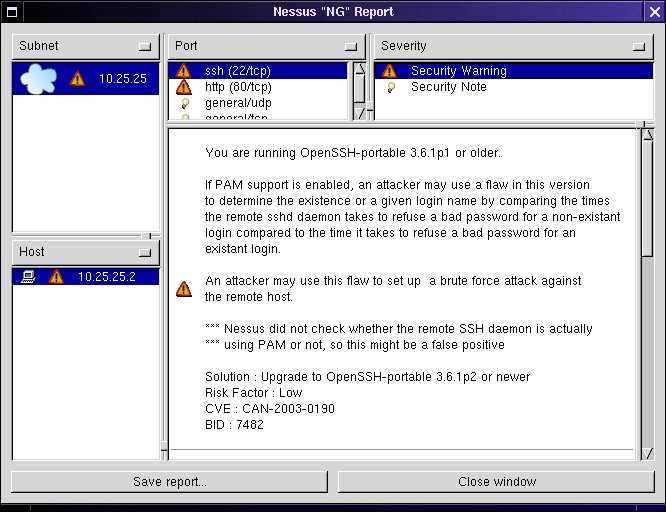
Figure 1. This sample Nessus report reveals a vulnerable SSH dæmon.
As with Nmap, the value of Nessus to professional security engineers is immeasurable; I use both in my work all the time. But even civilians can benefit from, for example, testing their hobby Web servers with Nessus. As with Bastille, Nessus includes user education in its design goals. If you read a report carefully, you can learn a thing or two not only about the vulnerabilities it identifies but what to do to fix them.
Scanning, Probing and Fuzzing: Caution
I enjoy using and writing about port scanners, security scanners and other offense-oriented security tools. In the hands of a careful and responsible user, they serve an important role in validating system and network security.
They also carry significant potential for abuse, however, so much so that if someone unexpectedly discovers you using such tools against their system, they probably won't assume you're trying to help them. Never scan any host you haven't been authorized explicitly to scan.
Also, never install a security scanner on a bastion host (a hardened, publicly accessible server). Such hosts are at higher-than-average risk of being compromised by outsiders, so they're the last place to keep security-probing tools. If you need to do your scans on the same LANs as your target systems, get a laptop computer. A used laptop capable of running Nmap, Nessus and other tools shouldn't cost you more than $350 US, and I do much of my own scanning and penetration-testing with such a system.
Before we leave the realm of security validation checking, let's consider Web application security. Web applications constitute the single largest area of growth both in Internet-accessible services and in externally exploitable system vulnerabilities. So how do we test the security of our Web applications?
You might think that Nessus is a good start, and it is, but mainly for generic Web dæmon security. Most of what Nessus tells us about Web services applies to the server dæmon itself, such as Apache, not to the actual Web content it serves up. It doesn't tell us whether our custom Web applications do proper input validation, whether they're vulnerable to cross-site scripting vulnerabilities, whether they're vulnerable to fuzzing attacks (in which expected parameters are altered or fuzzed) and so forth. That's where tools like Paros come in.
Paros (Figure 2) is a free tool released under the Clarified Artistic License, and it's written in Java. You need the Java Runtime Environment installed in order to use Paros. You can download both Paros' executable JAR file and its complete source code from www.proofsecure.com.
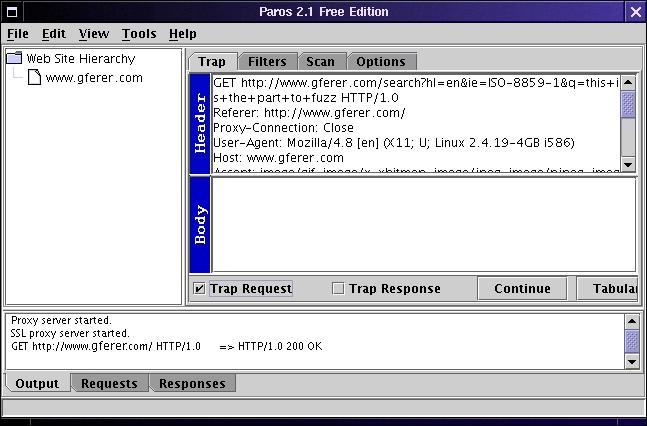
Figure 2. Paros is a free tool for testing Web applications.
Paros works on a principle common to the new generation of Web security tools. You run it as a local proxy on your scanning workstation, and all the interaction between your local browser and the target Web server is brokered by the security tool. In this way, you can capture an outbound query, alter or fuzz it and then send it along to the server. For example, suppose your Web application uses a form with pull-down menus, and you want to make sure that the application is validating input properly. With Paros, you could replace pull-down menu options arbitrarily with random strings—blozzle instead of monday—and see that query's effect on the application.
Paros also supports several scanning-type features, such as directory traversal. Although the JRE can be taxing on older systems, overall Paros is a flexible and user-friendly tool. Furthermore, being Java-based, it's cross-platform. I've also used it on several different flavors of Windows.
Paros isn't the only free fuzzing proxy. I also should mention Dave Aitel's SPIKE Proxy. It too acts as a local proxy but has the ability to run automated fuzzing attacks based on things it learns about the target site by watching you interact with it. SPIKE has the added advantage of being written in Python, which means much less CPU and memory overhead than Paros requires.
I'm closing my little survey with a forensics tool: William Salusky's F.I.R.E., the Forensics and Incident Response Environment. It's unpleasant to contemplate, but no matter how careful and proactive you are, you may nonetheless someday experience a system compromise. If you do and you want to understand how and why, F.I.R.E. can help.
F.I.R.E. is a single CD-ROM Linux distribution geared toward analyzing compromised systems and recovering data from them. You can use it either by rebooting the compromised system with the F.I.R.E. CD-ROM or by mounting the CD-ROM in a running but feared-compromised Linux system and running tools directly off the CD. The latter technique is useful particularly when you don't trust the system's binaries, as when you fear they've been replaced by rootkit or trojaned versions, but can't take the system off-line just yet.
Besides analysis, F.I.R.E. makes it easy to copy data from the compromised system to other hosts on your network. F.I.R.E. also includes the X Windows System and a variety of both command-line and X-based security tools (including Nmap and Nessus). You can use F.I.R.E. to transform an ordinary Windows laptop into an awesome penetration-testing juggernaut. And at no extra charge, F.I.R.E.'s major functions can be accessed from a menu system comprehendable even by those of us who aren't full-time computer forensics specialists. You can learn all about and obtain F.I.R.E. at fire.dmzs.com.
This article is by no means a comprehensive list of the many, many excellent security tools available for Linux. I would have loved to devote blurbs to Tripwire, AIDE, Nikto, GnuPG, FreeS/WAN, Snort, PSAD, Stunnel, OpenSSL and a score of other worthy tools. But I've had fun showing off some of my favorite tools, and I hope you've found it useful. Remember, many of these tools bestow awesome powers upon their bearer: use them responsibly, ethically and carefully. But so long as you do, have fun.
Mick Bauer, CISSP, is Linux Journal's security editor and an IS security consultant in Minneapolis, Minnesota. He's the author of Building Secure Servers With Linux (O'Reilly & Associates, 2002).
