
Personal Video Recorder Basics
All our favorite TV shows are recorded digitally and edited digitally. But, we receive them using some analog technology, such as cable, plain air or satellite. Now, that's just wrong. Luckily, an alternative is available that offers better picture quality, Dolby Digital sound and EPG, the electronic program guide. Ladies and gentlemen, please welcome DVB, digital video broadcasting.
DVB works with an MPEG-2 compressed stream and has a theoretical maximum bit rate of 15Mbit/s. Because DVB never is used for video alone, extra audio tracks and other information are added to create a richer user experience. All of this data is stored in small packages. Of course, if some packets don't arrive or are corrupted, they leave artifacts in the picture and possibly in the sound stream. The program, on the other hand, continues as if nothing has happened once correct packages arrive again, so there is no need to worry about bad sync. The signal also is forgiving, because the antennas usually are dimensioned with enough reserve to cope with rain, snow or small animals.
Three different models of DVB are available, DVB-S for satellite, DVB-C for cable and DVB-T for terrestrial reception. All three basically are the same; the differences lie in the tuners. DVB-T is rather new and not yet used widely; the other two, especially the satellite variant, are quite common and popular all over the world.
Modern set-top boxes available from major manufacturers have some nice features, such as hard disk recording and MP3 playback. Nevertheless, they lack more advanced options, including archival of recordings to SVCD or some MPEG-4 sibling. With the advent of affordable DVD burners and media, backing up your favorite TV shows to DVD is well within reach. In Europe, digital personal video recorders (PVRs) carry a hefty price tag of around 500 EUR, and most come without a hard disk. A full-featured DVB-S card, on the other hand, can be found at on-line retailers for as low as 165 EUR.
But, what good is cheap hardware without good software? The program VDR, video disc recorder, enables you to build a powerful set-top box on your own using your favorite flavor of Linux and a DVB card. The machine I built incorporates basic features, such as watching TV, recording and time-shifting, plus advanced features, including MP3/Ogg playback, playback of all video formats supported by MPlayer and backup of the recorded material to MPEG-4, video CD or DVD. A commercial set-top box hardly stands a chance against this feature list.
To build our box, we need some hardware. Bear in mind that the recordings need a lot of space. A 120GB hard drive typically holds some 60 hours of video, which should be plenty of space. You can get away with less if you back up your movies more often to get them off the drive, but I recommend at least a 20GB drive, which hold about three or four movies.
We also need a processor. If you want to encode the videos, you need a faster one; if not, an old 200MHz machine should do. I wasn't able to find anything slower than a Celeron 1,700MHz, which is more than enough power, even for the encoding process. Playback using MPlayer also requires a fast processor and at least 1GHz, though it's rumored to work with less. I've tested MPlayer on a slower machine, and the image quality does suffer quite a bit. The reason for this is the way MPlayer uses the MPEG-2 decoder on the DVB board. Non-MPEG-1/2 material is converted to MPEG on the fly, which eats up quite a few processor cycles.
This leads us to the most important piece of hardware; the DVB card. You need a full-featured card with a hardware MPEG decoder. These are more expensive, but they have several connections for sound and TV. Cards like the WinTV Nova work best as secondary cards to record several programs at once. If you can, go for the satellite option. It is by far the most flexible solution because you are not dependent on some cable provider. Apart from that you can link up several satellite dishes to watch even more channels. I also discuss the DVB-S variant in this article, but deploying a different solution is not really a different process. I opted for a Hauppauge Nexus-s. It's probably the most expensive card, but it doesn't suffer from the overheating problems older models experienced, plus it has a good tuner and comes with an infrared remote and receiver.
For the base software load, I used Red Hat Linux 9, but any distribution should do. A small installation with GCC and development packages for libjpeg should be enough. X isn't needed because the full-featured DVB cards have video-out capabilities. Don't forget to install all the kernel development packages; we need those to compile the DVB driver.
Once the base distribution is up and running, we need a driver for the card. You can get the CVS version at linvdr.org/download/vdr/Developer. At the time of this writing, linux-dvb.2003-09-05.tar.bz2 is the latest version. The current drivers sometimes hang when disconnecting the satellite cable or the reception drops to zero. You then have to remove and re-insert the drivers, which does not always work, leaving you with the need to reboot to get it up and running again. These hangs can be especially pesky if you're simply recording something or are in the middle of a movie, but they usually don't happen.
Now go to /usr/src, unpack the driver snapshot and mv it to DVB. Renaming the directory is important because certain patches and plugins rely on directory names. Go to the DVB directory and type make to compile the driver and some useful applications that help you scan the satellites to retrieve a list of channels. make install is not needed because the runvdr script we use later takes care of the module loading. It's important to run the makedev.napi script after compiling the drivers, as this script creates the needed entries in /dev.
If you live outside of Europe or don't use the Astra satellites, you have to use a different channel list. Scanning for channels is an automated process. A tool called scan comes with the DVB driver, and you can find it in the /apps/scan directory. Invoke it with the -o vdr option so the output file is in VDR's channel format. To capture the newly created channel file, you need to redirect the programs standard output with this command:
./scan -o vdr > channels.conf
Fetch vdr-1.2.5.tar.bz2, unpack it in /usr/src and change to that directory. Installing VDR can be a bit tricky. Because you can use some patches to spice up the features, you quickly can end up in patch hell if you're not careful. The best idea, if you want to use multiple patches, is to get your hands on an all-in-one patch. I used nothing but the Elchi patch, which gives the rather dull default VDR interface a nice face-lift. If you have the right patch for your VDR version, you shouldn't encounter any problems.
The range of additional functions added by plugins goes from simple games to e-mail alerts to full-featured DVD playback. Here, install only two, the remote plugin and the MP3/MPlayer playback plugin. The remote plugin is necessary only when using the original remote from Hauppauge. The MP3/MPlayer plugin, on the other hand, is a must-have.
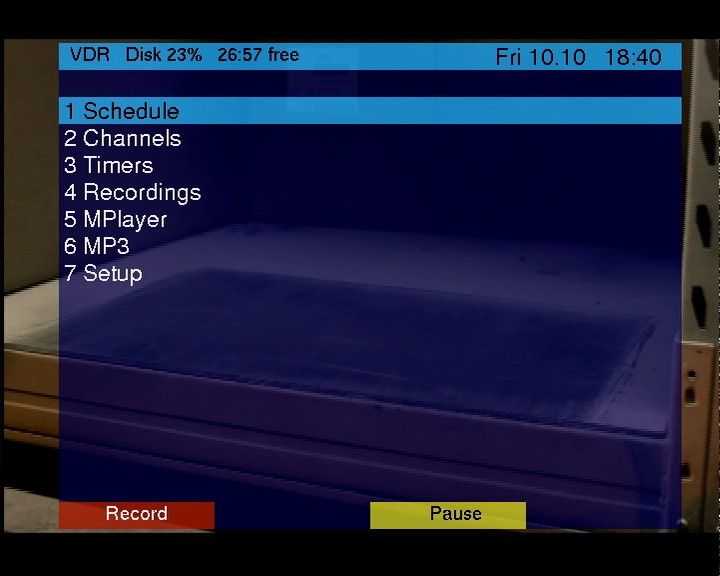
Figure 1. VDR Main Menu with the Elchi Patch Applied
Change to /usr/src/vdr-1.2.5/PLUGINS/src and unpack the two packages. VDR's Makefile won't build the plugins until you strip the version information from the directory names, so rename them to remote and MP3. The MP3 plugin has some additional requirements, namely libsndfile, libmad and libid3tag. Since Red Hat ships without MP3 support, you have to install them manually. Fetch them from www.freshrpms.org, and don't forget to install the development packages. When everything is set, type make REMOTE=plugin NEWSTRUCT=1 all plugins. The REMOTE=plugin parameter adds another input method using the remote plugin. You can use Lirc to select whatever remote you happen to find; VCR ones do rather well. Simply add REMOTE=lirc in that case. Keyboard support is enabled by default and shouldn't be disabled, as it can be very helpful for debugging. The NEWSTRUCT=1 is needed to tell the plugins to search for the new drivers in /usr/src/DVB.
Having compiled everything, we now need to edit the startup script a bit. As a basis, use the one supplied with the remote plugin. You can find it in the misc directory, named runvdr.remote. This script loads a keymap so the signals from the remote are decoded. This is used only with Hauppauge's IR receiver. If you don't have one, use the runvdr script in VDR's root as a starting point. Move the runvdr.remote script to VDR's root and fire up your favorite editor. On line 24 you should find the parameters by which vdr is started. Mine looks like this:
VDRCMD="$VDRPRG -w 60 -P scanner \
       -P\"mplayer -M /video/plugins/mplayer.sh\" \
       -P mp3 \
       -P\"remote -i /dev/input/event1\" $*"
If you're unsure what you need to add, simply run vdr -help, and you should see a list of all usable modules and their options, along with all of VDR's options. Don't worry, it's fairly easy to find out what to add. To finish up, we need a base directory; the default (as defined in Make.config) is /video. This directory holds all the recordings and configuration files. Copy the sources.conf and your channels.conf to /video.
The only thing left for us to do is write configuration files for the MPlayer/MP3 plugin. Start by creating a directory named /video/plugins. Now we need two files, one called mp3sources.conf and one called mplayersources.conf. Writing them is simple. For starters, add something like /video/music;Local files;0 for mp3sources.conf and /video/compressed;Local files;0 for mplayersources.conf and save them. To get MPlayer to work with the DVB card, you have to recompile. Grab a copy from www.mplayerhq.hu, and add --with-extraincdir=/usr/src/DVB/include to your configure options. Let the configure script run, recompile and install, and you're good to go.
As you can see from the runvdr script, the MPlayer plugin uses a special shell script to start MPlayer, mplayer.sh. You can get that from batleth.sapienti-sat.org/projects/VDR. The package consists of only two files, mplayer.sh itself and mplayer.sh.conf, which holds some configuration options. If your machine is too slow to play back files using MPlayer, you should try tweaking the settings in this file.
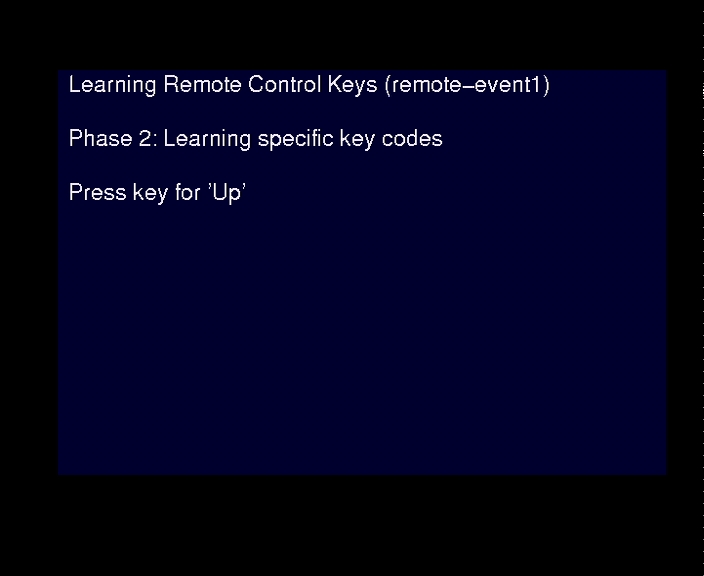
Figure 2. Defining the Keys for Your Remote
Go back to /usr/src/vdr-1.2.5 and run runvdr.remote. If you use Red Hat, set the environment variable LD_ASSUME_KERNEL=2.4.1, because VDR doesn't yet work with the native posix layer that Red Hat introduced in the latest version. The modules for the DVB card then are loaded, and the VDR is started. Hook up your TV, and you should see a black screen prompting you to define the keys on your remote. After finishing the wizard, you're ready to watch TV, record shows and remove commercials. You can listen to your MP3s and watch videos. There's a manual in VDR's root that explains how to record and edit TV events, using the time-shift feature.
In case you're disappointed that the end of the article is within reach, don't worry; there still are some optional things you can do. The automatic backup feature has some limitations. Although the (S)VCD backup works flawlessly, the DivX encoding does not crop the picture to remove black bands, should they exist. This has quite a negative impact on bit rate, size and overall picture quality. If you really want a high-quality, small-size MPEG-4, you should back it up manually. The improved picture quality is well worth the trouble.
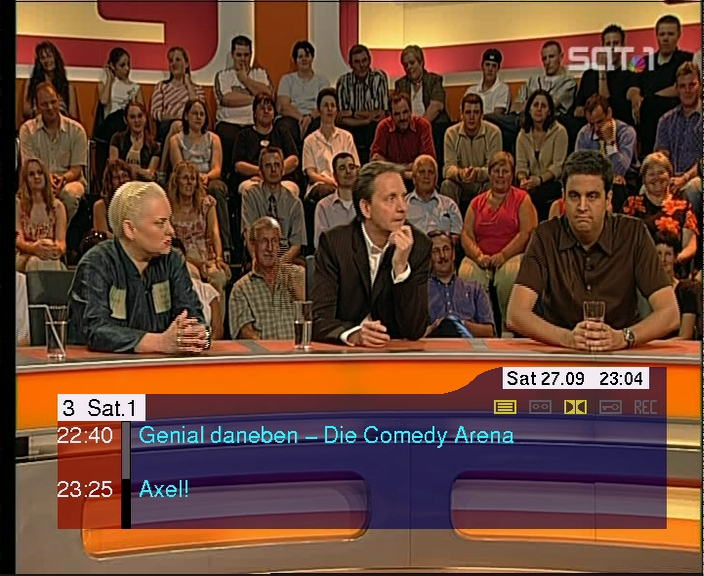
Figure 3. The information bar shows the program name, running TV show and what's on next.
VDR splits its recordings into 2GB files, which is a bit inconvenient for transcoding the videos. If you go for manual conversion, which gives you finer control over the quality/size aspect, mencoder or transcode are good options. Use the speedy mencoder, which I found to be perfect for backups to MPEG-4, or transcode, which comes with a lot of tools. If you favor the I-don't-want-to-care approach, get a hold of VDRCONVERT. The README file offers a pretty simple approach to installing it, and at least you can watch some TV while downloading and compiling. With VDRCONVERT you have to change some scripts and configuration files to adapt the DVD/(S)VCD resolutions to NTSC, in case PAL is not used where you live.
It's too bad that a Linux PVR doesn't make the TV programs themselves any better, but I guess you can't have everything, can you?
Resources
Libraries: www.freshrpms.org
LIRC: www.lirc.org
MPlayer: www.mplayer.hu
mplayer.sh: batleth.sapienti-sat.org/projects/VDR
Plugins, Scripts and Patches for VDR: www.vdrportal.de/board/portal_downloads.php?site=6
Christian A. Herzog is a programmer focused on Web development using open-source technologies. He's still on his never-ending quest to bring a Linux-based device to every home and company he comes across. Write him at noeffred@gmx.net.


