
LinuxBIOS at Four
LinuxBIOS is a GPLed program that replaces the BIOS found on many computers, including AMD64, x86, Alpha and PowerPC systems. LinuxBIOS is a vendor-independent, architecture-neutral BIOS, more than 95% of which is written in C. LinuxBIOS is four years old. Some of the largest Linux clusters in the world use LinuxBIOS, and some of the smallest embedded systems in the world do too. LinuxBIOS has been used in robots searching for survivors in the World Trade Center, as well as robots used in Afghanistan and Iraq. LinuxBIOS is supported by many vendors, including AMD and Tyan. It now is possible, for example, to order LinuxBIOS motherboards from Tyan.
In this article I describe the basic structure of LinuxBIOS, the origins of LinuxBIOS and how it evolved to its current state. I also cover the platforms it supports and the lessons we have learned about trying to marry a GPL project to some of the lowest-level, most heavily guarded secrets that vendors possess.
Before we can explain LinuxBIOS structure we need to provide a quick overview of modern PC architectures. PCs consist of a set of chips, including the CPU, graphics and keyboard controller, all connected by buses. A bus is a set of one or more wires that can be used to interconnect two or more chips. Some buses have two wires, signal and ground, and other buses have tens or hundreds of wires.
A highly simplified diagram of PC architecture is shown in Figure 1. The different types of buses cannot be wired to one another directly, so chips known as bridges are used to connect one bus to another. The first bus is the front-side bus, and on most PCs it connects CPUs to one another and to the north bridge. The north bridge connects CPUs to both the memory bus and the PCI bus. In our diagram we show only one north bridge, but there are many variations on this theme. The AMD Opteron, for example, uses a north bridge for each CPU, and the front-side bus connects only each Opteron CPU to its own north bridge. In other words, there is no shared front-side bus on the Opteron. Nevertheless, the north bridge is an identifiable device in the Opteron chipset.
The south bridge, which almost always resides on PCI bus 0, is the next bridge in line. The south bridge interfaces from the PCI bus to legacy devices, namely the set of devices found on PCs ca. 1981. The south bridge also drives the BIOS Flash part.
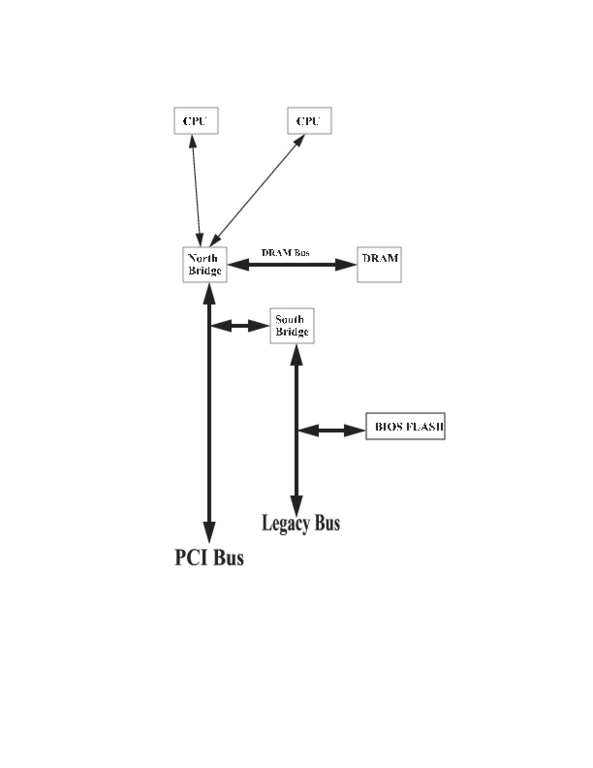
Figure 1. A simplified view of a basic PC architecture. Bridges are chips that connect one bus to another.
When the PC is turned on or reset, the CPUs start fetching from a known address, which traditionally has been from the top of memory (TOM) minus 16 bytes. In the original 8086, this was address 0xffff0; on newer PCs, it is address 0xfffffff0. This initial instruction fetch has to be supported by the hardware somehow, even before it has been configured. A lot of the hardware has to work for that first instruction fetch.
Nevertheless, when first turned on the PC hardly is ready to run C code and barely is ready to run assembly code. The motherboard has to be brought to life in stages. As a result, LinuxBIOS has a sequence of bootstraps, each bootstrap being invoked when additional CPU resources are activated. Each bootstrap assumes that certain resources have been enabled and that the machine has a well-defined set of resources available.
These LinuxBIOS pieces are:
The first 10 or 15 instructions that enable the CPU, enable a minimal virtual memory capability (at minimum, 32-bit addresses) and enable other resources needed to turn on memory (such as the I2C bus). They also set the internal CPU state to clean up things, such as instruction pipelines.
Memory startup code, which requires a sane CPU and a working I2C bus for interrogating memory parameters.
Code that loads object code originally written in C from Flash to memory. The object code optionally can be compressed.
Code that can be run once memory is working. This code scans all the hardware resources and initializes them.
One or more payloads that perform any custom final configuration work and boot an OS.
We show all the phases in Figure 2.
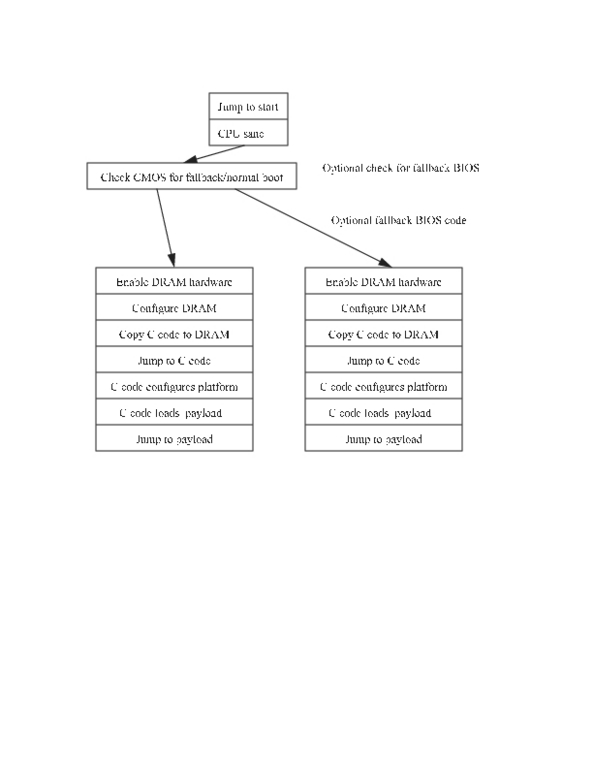
Figure 2. Phases of LinuxBIOS
LinuxBIOS supports an optional fallback BIOS in the event of BIOS problems. The fallback support is built in to the BIOS when it is compiled. Additional code checks flags in the CMOS and determines whether the CMOS is corrupted, whether the previous BIOS failed to start correctly or whether the user wishes to boot in to the fallback CMOS. The fallback BIOS is a complete LinuxBIOS image, and its capabilities are not limited in any way.
The fallback capability is useful for unattended BIOS updates. Consider the case of updating the BIOS on 1,024 or more nodes—what if it fails halfway through? For most systems, you now have a very expensive, very heavy paperweight. With LinuxBIOS, one simply resets the nodes and they come back up automatically in fallback mode.
I started the LinuxBIOS Project at Los Alamos National Lab (LANL) in September 1999. For the prior eight years, I had been building clusters of all kinds and had built my first PC cluster in 1994. In all this time, the BIOS had been a stumbling block in constructing larger clusters.
In 1997, I built the 144-node Cyclone cluster at the Sarnoff Corporation. As an experiment, we had only 16 nodes with video. The experiment was not successful; PCs using the standard BIOS simply are too unreliable to have the video removed, because PC failure recovery always requires interaction with the BIOS. It was clear that if we were to move to ever-larger PC clusters, we needed to resolve the problems of the BIOS.
We decided the ideal PC cluster node would have the following capabilities: boots directly into an OS from some onboard, nonvolatile RAM; configures all the network interfaces but configures no other hardware; connects to a control node using any working network interface; and takes action only at the direction of the control node.
Private industry was not the place to move on this kind of work, however, so we never were able to take these ideas past the talking stage.
Once I got to LANL, I had the ability to pursue these ideas. Several technology trends also made 1999 a far better year than 1997 to look at this problem. In 1999, motherboards with 1MB of Flash were appearing, and the self-describing PCI bus had replaced the older EISA and ISA buses completely. Also important, Linux was becoming much better at doing more configuration, as exemplified by the SGI Visual Workstation, which didn't even have a standard BIOS.
It seemed clear that if we could put Linux in the BIOS part, we could achieve our goals. Linux can do a far better job of running the hardware than any BIOS we have seen. What we needed was a simple hardware bootstrap that loaded Linux from Flash into memory; Linux would do the rest. Hence, our early motto, “Let Linux do it!”
Before we got the LinuxBIOS Project going full steam, we needed to ensure that Linux could be used as an OS bootstrap, which meant that Linux had to be able to boot Linux. By December 1999, we had demonstrated Linux booting Linux with the LOBOS work.
The easiest way to get work done in an Open Source world is to let somebody else do it for you, so the next step in LinuxBIOS was to look for somebody else's software. James Hendricks and Dale Webster found such a system in the OpenBIOS Project. In the space of five days, starting with the OpenBIOS source, they wrote and built a test system on our Intel L440GX+ motherboards that could boot the system from reset—not power on, but reset. Starting from power on would take another five months to figure out, but it wasn't bad work for five vacation days.
We realized early on that assembly code could not be the future of LinuxBIOS. OpenBIOS was a lot of assembly code, with a difficult-to-master build structure. Our small community began a search for a better foundation for LinuxBIOS. Jeff Garzik found a new BIOS and learned that STPC, which had written it, was willing to open source it. The STPC BIOS became the code base for the new LinuxBIOS. The STPC code required substantial reorganization so it could support multiple motherboards and chipsets, but it did provide a good starting point.
The next six months were spent getting a few platforms to run LinuxBIOS. Our first non-graphical platform was an Intel L440GX+ motherboard, followed by an SiS 630 motherboard. With the SiS, we got our first corporate involvement. SiS supplied data books, schematics, assembly code and technical support, all aimed at getting LinuxBIOS running on its platform.
We learned what Linux could and could not do. At the time, we were working with kernel version 2.2. We learned that Linux could not configure a PCI bus from scratch—LinuxBIOS had to do that. We were able to take the PCI code from Linux and, with modifications, use it directly in LinuxBIOS, while adding the extensions we needed for true PCI configuration. We learned that LinuxBIOS came up so fast, the IDE drives were not spun up. We continue to support a patch for Linux to work around this problem. These and a host of other lessons required some unexpected changes in our “Let Linux do it!” philosophy.
By the nine-month mark, we had LinuxBIOS working well on two platforms, written mostly in C, and we had the beginnings of corporate interest. VIA and Acer contributed data books that allowed us to port to their new chipsets. That summer James Hendricks began work on SMP support, and in “Let Linux do it!” mode, that support was written as patches to the Linux kernel, not as extensions to LinuxBIOS. At one point, with our patches, a Linux kernel could come up as a uniprocessor and enable the additional processors from scratch—something that heretofore only the BIOSes knew how to do.
That summer, Linux NetworX joined the effort, and to our good fortune, Eric Biederman got involved. Eric's most important early work was the Alpha port. Eric also cleaned up the memory startup code significantly. Our collaboration continues to this day; Linux NetworX is the largest reseller of LinuxBIOS-based systems, and Eric has spearheaded the creation and architecture of version 2 of LinuxBIOS.
That fall, we presented talks at Atlanta Linux Showcase 2000, and while there met Steve James from Linux Labs. This partnership allowed us, in the space of less than a month, to realize our dream: we built a 13-node LinuxBIOS-based cluster for Supercomputing 2000. The cluster booted to full operational status in about 13 seconds.
By 2001, Linux NetworX had completed the Alpha port for the DS10. We then built a cluster with 104 DS10s, all running LinuxBIOS. The DS10 booted more slowly than the Pentium systems, so it took this cluster 50 or so seconds to come to full operational status, a speed that still was quite acceptable. We were used to BIOSes that took 50 seconds simply to test memory.
The Alpha port demonstrated that LinuxBIOS was portable. Little if any of the code changed, and yet LinuxBIOS worked fine as a 64-bit BIOS or as a 32-bit BIOS.
Since 2001, we have added developers (there are now 11) and continued to port to more platforms, the most recent being the AMD Opteron. We envisioned LinuxBIOS as purely for clusters, but now non-cluster use far outstrips LinuxBIOS use in clusters. We thought Linux could do everything hard; LinuxBIOS does a lot now, including SMP startup. We would have preferred to “Let Linux do it”, but the design of the AMD K7 SMP hardware requires that SMP startup be done in the BIOS.
We thought vendors would jump in. It has taken four years, but in this fifth year of LinuxBIOS development, we now are finding some of the largest computer vendors in the world expressing interest. We simply were a little optimistic on the time frame. Once vendors see the business case, however, they get involved. Vendors sold at least $30 million US worth of LinuxBIOS-based systems in 2003, up from $0 million in 2000.
LinuxBIOS runs on a wide range of platforms. Fifty supported motherboards are in the source tree, but we have found that many motherboards are so similar that a LinuxBIOS for one motherboard can work on another. Companies build code for one motherboard, run it on another motherboard and do not always get around to telling us.
LinuxBIOS works on 64-bit and 32-bit CPUs. CPUs supported include the Alpha, K8, K7, PowerPC, P4, PIII, PII, Cyrix (VIA), Geode (now AMD) and SC520 (AMD). Chipsets are too numerous to list. Form factors of mainboards range from the smallest PC/104 systems to the largest K8 systems. An IBM PPC 970 port is in progress.
One of the most common phrases we heard from chip vendors in the first few years was “we'll never tell you that.” “That” being CPU information, chipset information, motherboard information or any combination of the three. The designs for these three systems constitute highly guarded secrets. It seems amazing, even now, that vendors are able to let us build a GPLed BIOS that by its nature exposes some of these secrets.
How was it possible for us to get this type of information? Simple, businesses are not charities. If there is no business case for releasing this information to us, they do not do it. If, however, there is a business case, then it happens—sometimes with astonishing speed.
From what we can see, the two factors in our success were competition and the creation of a market. Competition gave us a wide variety of choices as to motherboard, chipset and CPU. Once there was a reasonable market, vendors were concerned about being left out.
The experience at LANL is revealing. LANL's last two large cluster RFPs have specified LinuxBIOS as a mandatory requirement. Spending on these RFPs has come in at over $19 million US. Companies that had decided not to become involved in LinuxBIOS could not respond to these RFPs. Companies that had the foresight to get involved in LinuxBIOS early in the game were equipped to respond. Foresight, in this case, conferred a competitive advantage.
LinuxBIOS has come a long way in four years—as one person put it, from “I'm Possible” to “In Production”. LinuxBIOS is used on everything from the largest Linux clusters yet built to the small—test instruments, MP3 players and portable clusters.
LinuxBIOS makes it possible to build systems without PC hardware baggage. The systems can be optimized for Linux and thus can be more compact and simpler. There is increasingly a business case for such systems.
LinuxBIOS is now in its second version, with four years, at least six CPUs and over 50 motherboards' worth of experience behind it. It now takes only days in some cases to do a port to a new system; originally, it took months. LinuxBIOS' impact on the world of computing is only beginning.
So many people have contributed to LinuxBIOS that it is easy to slight them by listing some and not all. Nevertheless, a few contributors stand out as having made LinuxBIOS possible. First, of course, is Stefan Reinauer and the OpenBIOS effort; Jeff Garzik, who got the STPC BIOS Project set up on SourceForge as FreeBIOS; Ollie Lho, who did so much to get our first workstation platforms going in 2000; Steve James and Linux Labs, who worked with us and expedited the shipment in 2000 of our first LinuxBIOS cluster; Greg Watson, who did the PowerPC port; and Eric Biederman, who has done so much to get our really hard platforms up and stable and who has done so much to create version 2.
This paper is released under LAUR 03-8165. This research was funded by the Mathematical Information and Computer Sciences (MICS) Program of the DOE Office of Science and the Los Alamos Computer Science Institute (ASCI). Los Alamos National Laboratory is operated by the University of California for the National Nuclear Security Administration of the United States Department of Energy under contract W-7404-ENG-36.
Ronald G. Minnich has been working in high-performance computing and clustering for 15 years. He recently realized that one of his first clusters, a 16-node SPARC cluster, has a total power equivalent to one-fourth of one of the 2,048 processors in his newest cluster; his new cluster has 10,000 times the power of his first one. Ron started working with UNIX in 1976, with Linux in 1993 and built his first PC cluster in 1994.

